
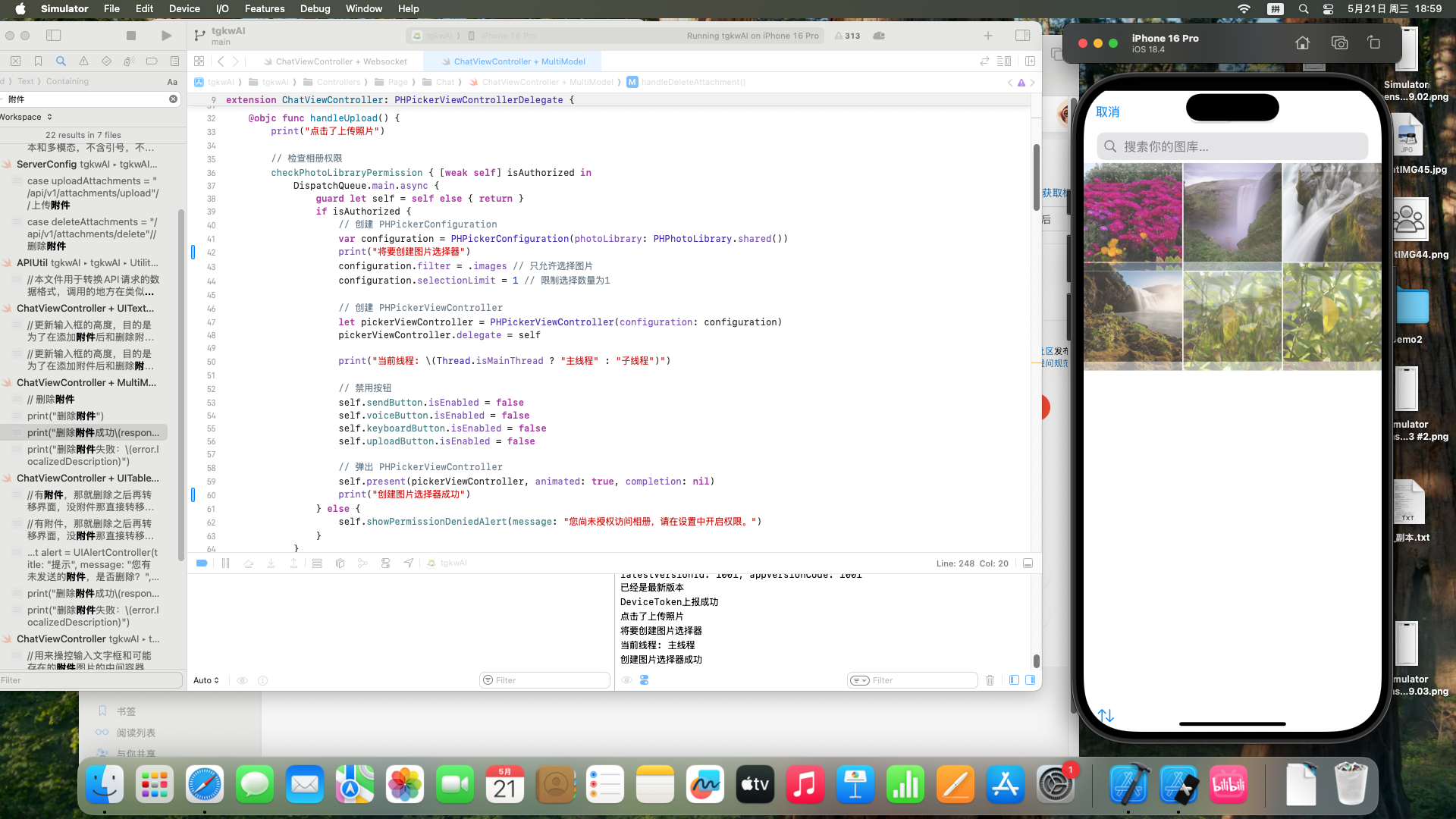
在Xcode更新后的16型号的所有模拟器打开图片选择器的时候都会加载进入后卡死,但是在15及15以下的还是可以正常使用,这应该是什么问题,使用的都是原生控件,不是第三方
import UIKit
import PhotosUI

extension ChatViewController: PHPickerViewControllerDelegate {
    func checkPhotoLibraryPermission(completion: @escaping (Bool) -> Void) {
        let status = PHPhotoLibrary.authorizationStatus(for: .readWrite)

        switch status {
        case .notDetermined:
            // 请求权限
            PHPhotoLibrary.requestAuthorization(for: .readWrite) { newStatus in
                DispatchQueue.main.async {
                    completion(newStatus == .authorized)
                }
            }
        case .authorized:
            // 已授权
            completion(true)
        case .denied, .restricted:
            // 权限被拒绝或受限
            completion(false)
        @unknown default:
            completion(false)
        }
    }

    @objc func handleUpload() {
        print("点击了上传照片")

        // 检查相册权限
        checkPhotoLibraryPermission { [weak self] isAuthorized in
            DispatchQueue.main.async {
                guard let self = self else { return }
                if isAuthorized {
                    // 创建 PHPickerConfiguration
                    var configuration = PHPickerConfiguration(photoLibrary: PHPhotoLibrary.shared())
                    print("将要创建图片选择器")
                    configuration.filter = .images // 只允许选择图片
                    configuration.selectionLimit = 1 // 限制选择数量为1

                    // 创建 PHPickerViewController
                    let pickerViewController = PHPickerViewController(configuration: configuration)
                    pickerViewController.delegate = self

                    print("当前线程: \(Thread.isMainThread ? "主线程" : "子线程")")

                    // 禁用按钮
                    self.sendButton.isEnabled = false
                    self.voiceButton.isEnabled = false
                    self.keyboardButton.isEnabled = false
                    self.uploadButton.isEnabled = false

                    // 弹出 PHPickerViewController
                    self.present(pickerViewController, animated: true, completion: nil)
                    print("创建图片选择器成功")
                } else {
                    self.showPermissionDeniedAlert(message: "您尚未授权访问相册,请在设置中开启权限。")
                }
            }
        }
    }

    func showPermissionDeniedAlert(message: String) {
        let alert = UIAlertController(title: "错误", message: message, preferredStyle: .alert)
        alert.addAction(UIAlertAction(title: "去设置", style: .default, handler: { _ in
            if let url = URL(string: UIApplication.openSettingsURLString) {
                UIApplication.shared.open(url)
            }
        }))
        alert.addAction(UIAlertAction(title: "取消", style: .cancel, handler: nil))
        present(alert, animated: true, completion: nil)
    }

    // MARK: - PHPickerViewControllerDelegate
    func picker(_ picker: PHPickerViewController, didFinishPicking results: [PHPickerResult]) {
        print("图片选择完成")

        // 恢复按钮状态
        DispatchQueue.main.async {
            self.sendButton.isEnabled = true
            self.voiceButton.isEnabled = true
            self.keyboardButton.isEnabled = true
            self.uploadButton.isEnabled = true
        }

        picker.dismiss(animated: true) {
            print("图片选择器已关闭")
        }

        // 处理选择的图片
        guard let provider = results.first?.itemProvider,
              provider.canLoadObject(ofClass: UIImage.self) else {
            print("未选择图片")
            return
        }

        provider.loadObject(ofClass: UIImage.self) { image, error in
            if let image = image as? UIImage {
                DispatchQueue.main.async {
                    self.showLoadingIndicator()

                    self.onImageSizeExceeded = { message in
                        DispatchQueue.main.async {
                            // 在主线程中执行UI更新
                            self.view.makeToast(message, duration: 1.5, position: .center)
                        }
                    }

                    DispatchQueue.global().async {
                        // 获取图片的文件名和 MIME 类型
                        let fileName: String
                        var mimeType: String
                        var imageData: Data?

                        let maxFileSize: UInt64 = 10 * 1024 * 1024 // 10MB

                        // 判断图片格式
                        if let jpegData = image.jpegData(compressionQuality: 0.5) { // 压缩质量
                            fileName = "image_\(UUID().uuidString).jpg"
                            mimeType = "image/jpeg"
                            imageData = jpegData
                            print("选择了jpeg格式的图片")
                        } else if let pngData = image.pngData() {
                            fileName = "image_\(UUID().uuidString).png"
                            mimeType = "image/png"
                            imageData = pngData
                            print("选择了png格式的图片")
                        } else {
                            DispatchQueue.main.async {
                                self.hideLoadingIndicator()
                                self.showErrorAlert(message: "不支持的图片格式")
                            }
                            return
                        }

                        // 打印出上传文件的大小
                        print("上传文件大小:\(imageData?.count ?? 0) 字节")

                        // 调用上传函数
                        if let imageData = imageData, imageData.count < maxFileSize {
                            APICaller.shared.uploadAttachments(fileName: fileName, mimeType: mimeType, fileData: imageData) { result in
                                DispatchQueue.main.async {
                                    self.hideLoadingIndicator()
                                    switch result {
                                    case .success(let response):
                                        self.attachmentFilePath = response.data
                                        print("上传成功,路径:\(self.attachmentFilePath)")
                                        // 更新 UI
                                        self.view.makeToast("上传成功", duration: 1.0, position: .center)
                                        self.updateUIWithAttachment(image: image, filePath: response.data)
                                        self.sendButton.isEnabled = true
                                        self.uploadButton.isEnabled = true
                                        self.keyboardButton.isEnabled = true
                                        self.voiceButton.isEnabled = true
                                    case .failure(let error):
                                        print("上传失败,错误:\(error.localizedDescription)")
                                        self.sendButton.isEnabled = true
                                        self.uploadButton.isEnabled = true
                                        self.keyboardButton.isEnabled = true
                                        self.voiceButton.isEnabled = true
                                        self.showErrorAlert(message: "上传失败,请稍后重试")
                                    }
                                }
                            }
                        } else {
                            DispatchQueue.main.async {
                                self.hideLoadingIndicator()
                                self.onImageSizeExceeded?("最大允许上传\(maxFileSize / (1024 * 1024))MB大小文件!")
                            }
                        }
                    }
                }
            } else if let error = error {
                print("加载图片失败: \(error.localizedDescription)")
            }
        }
    }

    func updateUIWithAttachment(image: UIImage, filePath: String) {
        print("更新 UI")
        self.attachmentImageView.image = image
        self.attachmentImageView.isHidden = false
        self.deleteAttachmentButton.isHidden = false
        self.inputContainerView.addSubview(self.attachmentImageView)
        self.inputContainerView.addSubview(self.deleteAttachmentButton)

        self.attachmentImageView.snp.makeConstraints { make in
            make.leading.equalTo(self.inputContainerView.snp.leading).offset(10)
            make.top.equalTo(self.inputContainerView.snp.top).offset(5)
            make.width.height.equalTo(40) // 可根据需要调整尺寸
        }
        self.deleteAttachmentButton.snp.makeConstraints { make in
            make.top.equalTo(self.attachmentImageView.snp.top)
            make.leading.equalTo(self.attachmentImageView.snp.leading).offset(40)
            make.width.height.equalTo(12) // 可根据需要调整尺寸
        }
        self.inputTextView.snp.remakeConstraints { make in
            make.leading.equalTo(self.inputContainerView.snp.leading).offset(10)
            make.top.equalTo(self.attachmentImageView.snp.bottom).offset(10)  // 使得文本框在图片下方
            make.trailing.equalTo(self.inputContainerView.snp.trailing).offset(-10)
            make.bottom.equalTo(self.inputContainerView.snp.bottom).offset(-5)
        }
        self.updateInputContainerViewHeight()
    }

    func showLoadingIndicator() {
        print("显示加载指示器")
        if activityIndicator == nil {
            activityIndicator = UIActivityIndicatorView(style: .large)
            activityIndicator?.color = .gray
            activityIndicator?.center = self.view.center
            activityIndicator?.hidesWhenStopped = true
            if let activityIndicator = activityIndicator {
                self.view.addSubview(activityIndicator)
            }
        }
        activityIndicator?.startAnimating()
    }

    func hideLoadingIndicator() {
        print("隐藏加载指示器")
        activityIndicator?.stopAnimating()
    }

    func showErrorAlert(message: String) {
        print("显示错误提示: \(message)")
        let alert = UIAlertController(title: "错误", message: message, preferredStyle: .alert)
        alert.addAction(UIAlertAction(title: "确定", style: .default, handler: nil))
        present(alert, animated: true, completion: nil)
    }

    // 删除附件
    @objc func handleDeleteAttachment() {
        print("删除附件")
        guard let attachmentFilePath = self.attachmentFilePath else { return }
        APICaller.shared.deleteAttachments(file_path: attachmentFilePath) { result in
            DispatchQueue.main.async{
                switch result {
                case .success(let response):
                    self.attachmentFilePath = nil
                    print("删除附件成功\(response)")
                    self.updateUIAfterAttachmentDeletion()
                    self.view.makeToast("删除成功", duration: 1.0, position: .center)
                case .failure(let error):
                    print("删除附件失败:\(error.localizedDescription)")
                    self.view.makeToast("删除失败,请稍后重试", duration: 1.5, position: .center)
                }
            }
        }
    }
}


