
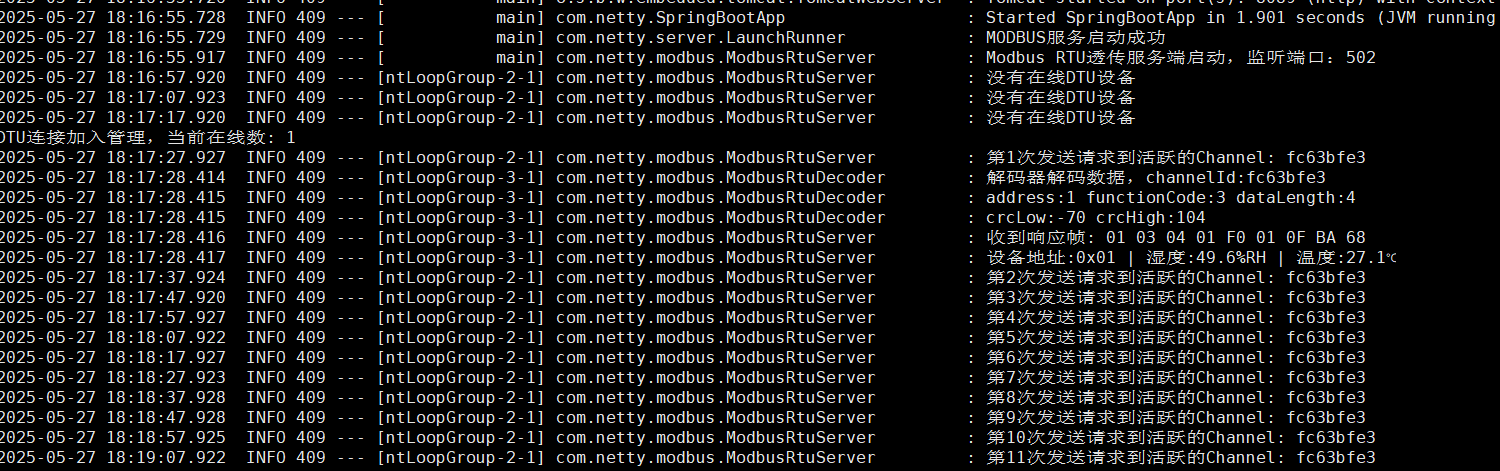
有人DTU透传只有第一次请求可以拿到数据
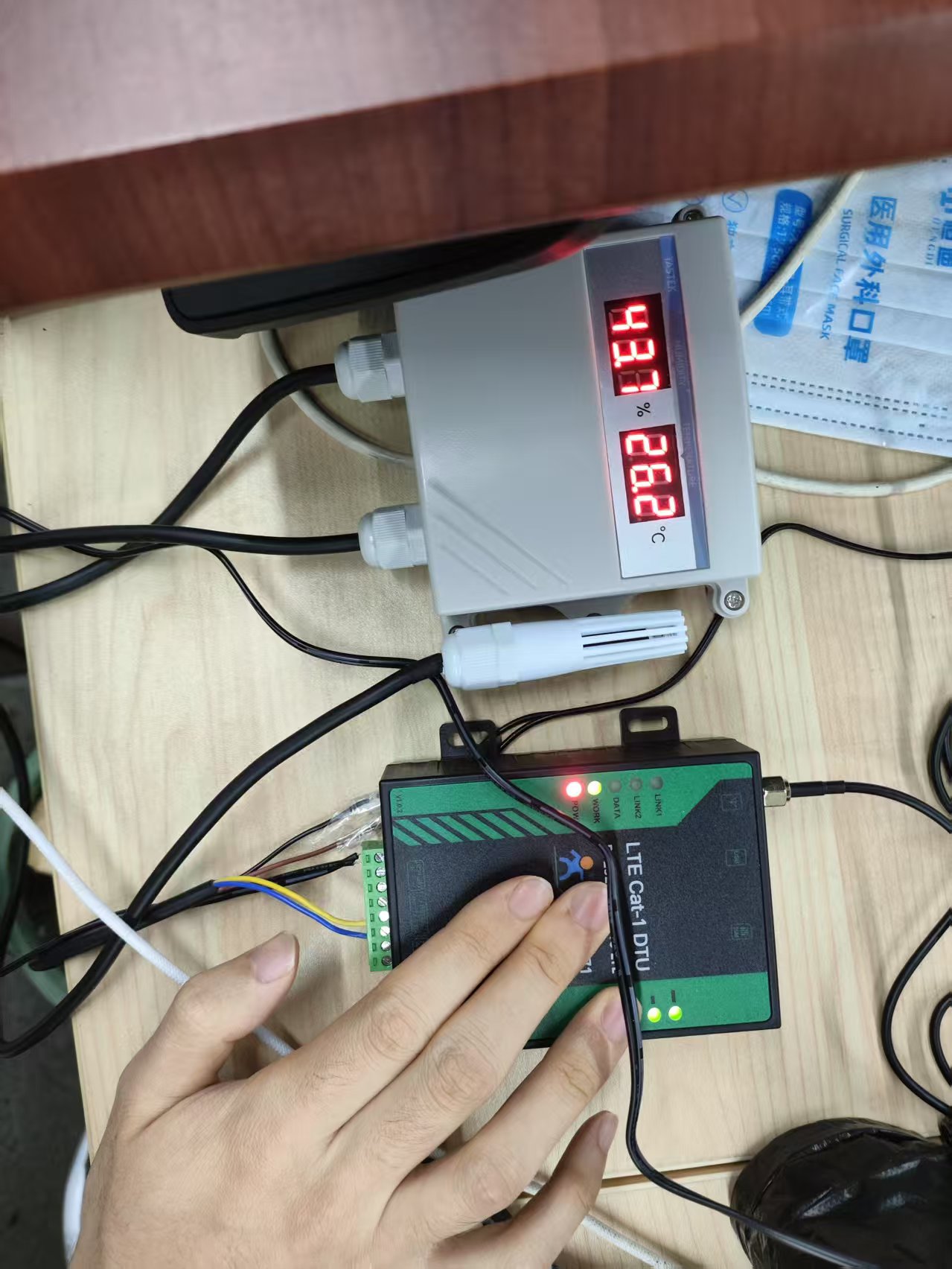
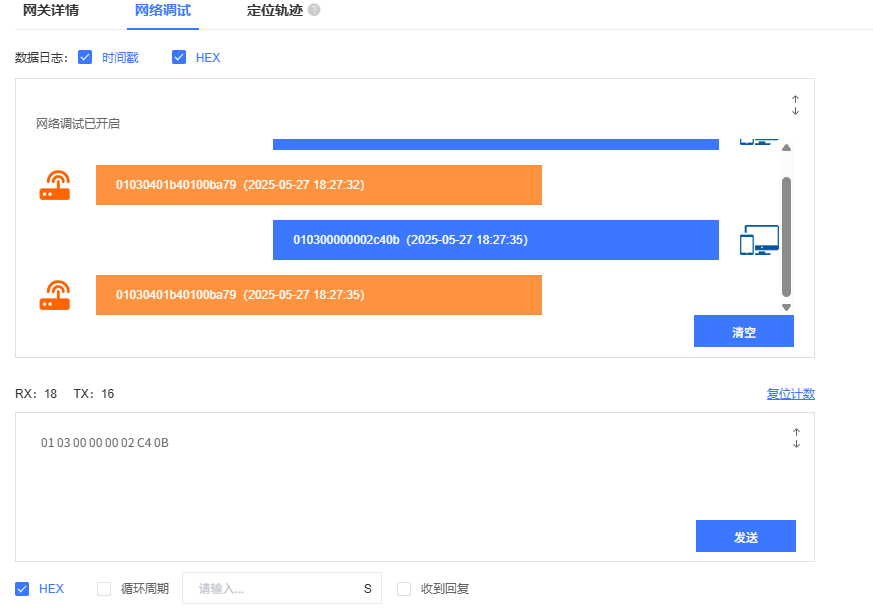
在有人云调试功能测试没有任何问题,通过java程序作为服务端,定时任务轮询发送modbus报文,只有第一次请求有响应
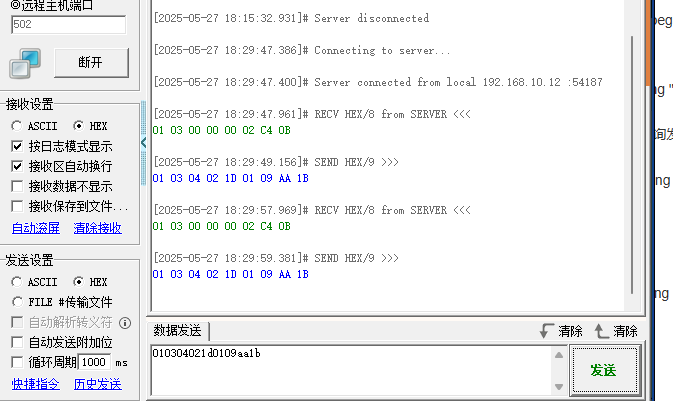
我通过网络调试助手模拟dtu,是没有任何问题的

下面是服务端代码:
package com.netty.modbus;

import io.netty.buffer.ByteBuf;
import io.netty.channel.ChannelHandlerContext;
import io.netty.handler.codec.ReplayingDecoder;
import lombok.extern.slf4j.Slf4j;

import java.util.Arrays;
import java.util.List;

import static com.netty.modbus.ModbusRtuServer.bytesToHex;

/**
 * @ClassName:ModbusRtuDecoder
 * @Author: mjg
 * @Date: 2025/5/27 10:28
 * @Description: 必须描述类做什么事情, 实现什么功能
 */
@Slf4j
public class ModbusRtuDecoder extends ReplayingDecoder<Void> {
    private static final int MAX_DATA_LENGTH = 255;

    private static final int MAX_FRAME_LENGTH = 260;

    @Override
    protected void decode(ChannelHandlerContext ctx, ByteBuf in, List<Object> out) {
        log.info("解码器解码数据,channelId:{}", ctx.channel().id());
        try {

            // ModbusRtuDecoder的decode方法末尾:
            // 1. 利用ReplayingDecoder自动处理缓冲区读取(无需手动校验长度)
            int address = in.readUnsignedByte();
            int functionCode = in.readUnsignedByte();
            int dataLength = in.readUnsignedByte();


            log.info("address:{} functionCode:{} dataLength:{}", address, functionCode, dataLength);
            // 2. 校验数据长度(保留核心校验)
            if (dataLength < 0 || dataLength > MAX_DATA_LENGTH) {
                log.warn("非法数据异常");
                throw new IllegalArgumentException("非法数据长度: " + dataLength);
            }

            // 3. 读取数据和CRC(ReplayingDecoder自动处理缓冲区不足)
            byte[] data = new byte[dataLength];
            in.readBytes(data);
            byte crcLow = in.readByte();
            byte crcHigh = in.readByte();

            log.info("crcLow:{} crcHigh:{}", crcLow, crcHigh);
            // 4. 计算CRC(使用堆缓冲区避免直接内存操作)
            byte[] crcData = new byte[3 + dataLength]; // 地址+功能码+数据长度+数据
            crcData[0] = (byte) address;
            crcData[1] = (byte) functionCode;
            crcData[2] = (byte) dataLength;
            System.arraycopy(data, 0, crcData, 3, dataLength);

            byte[] calculatedCrc = ModbusRtuServer.calculateCrc16(crcData);
            if (calculatedCrc[0] != crcLow || calculatedCrc[1] != crcHigh) {
                log.warn("CRC校验失败");
                throw new IllegalArgumentException("CRC校验失败");
            }

            // 5. 直接传递原始字节数组(避免使用ByteBuf,减少内存操作)
            byte[] fullFrame = new byte[5 + dataLength]; // 地址+功能码+数据长度+数据+CRC
            fullFrame[0] = (byte) address;
            fullFrame[1] = (byte) functionCode;
            fullFrame[2] = (byte) dataLength;
            System.arraycopy(data, 0, fullFrame, 3, dataLength);
            fullFrame[3 + dataLength] = crcLow;
            fullFrame[4 + dataLength] = crcHigh;

            out.add(fullFrame);
        } catch (Exception e) {
            e.printStackTrace();
            // 关键:仅记录日志,不手动操作缓冲区(依赖ReplayingDecoder自动回退)
            log.error("解码异常: {},等待后续数据", e.getMessage());
        }
    }
}


package com.netty.modbus;

import io.netty.buffer.ByteBuf;
import io.netty.channel.ChannelHandlerContext;
import io.netty.handler.codec.MessageToByteEncoder;
import io.netty.handler.codec.MessageToMessageEncoder;
import lombok.extern.slf4j.Slf4j;

import java.util.List;

import static com.netty.modbus.ModbusRtuServer.bytesToHex;

/**
 * @ClassName:ModbusRtuEncoder
 * @Author: mjg
 * @Date: 2025/5/27 10:28
 * @Description: 必须描述类做什么事情, 实现什么功能
 */
@Slf4j
public class ModbusRtuEncoder extends MessageToMessageEncoder<String> {


    @Override
    protected void encode(ChannelHandlerContext ctx, String s, List<Object> list) throws Exception {

        log.info("编码器执行");
        byte[] bytes = new byte[]{0x01, 0x03, 0x00, 0x00, 0x00, 0x02, (byte) 0xC4, 0x0B};

        // 创建一个 ByteBuf 来存储十六进制数据
        ByteBuf outBuffer = ctx.alloc().buffer(bytes.length * 2);

        outBuffer.writeBytes(bytes);

        // 将 ByteBuf 添加到输出列表
        list.add(outBuffer);
    }
}


package com.netty.modbus;

import com.netty.server.ChannelMap;
import io.netty.bootstrap.ServerBootstrap;
import io.netty.buffer.ByteBuf;
import io.netty.buffer.Unpooled;
import io.netty.channel.*;
import io.netty.channel.group.ChannelGroup;
import io.netty.channel.group.DefaultChannelGroup;
import io.netty.channel.nio.NioEventLoopGroup;
import io.netty.channel.socket.SocketChannel;
import io.netty.channel.socket.nio.NioServerSocketChannel;
import io.netty.handler.timeout.IdleStateHandler;
import io.netty.util.concurrent.GlobalEventExecutor;
import lombok.extern.slf4j.Slf4j;
import org.springframework.stereotype.Component;

import java.net.InetSocketAddress;
import java.util.Map;
import java.util.Set;
import java.util.concurrent.ConcurrentHashMap;
import java.util.concurrent.TimeUnit;

/**
 * @ClassName:ModbusRtuServer
 * @Author: mjg
 * @Date: 2025/5/27 10:24
 * @Description: 必须描述类做什么事情, 实现什么功能
 */
@Component
@Slf4j
public class ModbusRtuServer {

    private static Integer i = 1;

    private static final Map<String, ChannelHandlerContext> CHANNEL_MAP = new ConcurrentHashMap<>(16);

 //   private static final ChannelGroup ONLINE_DTUS = new DefaultChannelGroup(GlobalEventExecutor.INSTANCE);


    public void start() {
        EventLoopGroup bossGroup = new NioEventLoopGroup(1);
        EventLoopGroup workerGroup = new NioEventLoopGroup(8);

        try {
            ServerBootstrap b = new ServerBootstrap();
            b.group(bossGroup, workerGroup)
                    .channel(NioServerSocketChannel.class)
                    .localAddress(new InetSocketAddress(502)) // 透传端口(可自定义)
                    .childHandler(new ChannelInitializer<SocketChannel>() {
                        @Override
                        protected void initChannel(SocketChannel ch) {
                            ch.pipeline()
                                    .addLast(new IdleStateHandler(30, 0, 0, TimeUnit.SECONDS)) // 设置
                                    .addLast(new ModbusRtuEncoder())
                                    .addLast(new ModbusRtuDecoder())
                                    .addLast(new RtuBusinessHandler());
                        }
                    });

            ChannelFuture f = b.bind().sync();
            log.info("Modbus RTU透传服务端启动,监听端口:502");

            // 定时任务:主动发送读温湿度指令(每10秒)
            f.channel().eventLoop().scheduleAtFixedRate(() -> {
                if (!CHANNEL_MAP.isEmpty()) {
                    sendReadHumidityTempRequest();
                } else {
                    log.info("没有在线DTU设备");
                }
            }, 2, 10, TimeUnit.SECONDS);

            f.channel().closeFuture().sync();
        } catch (InterruptedException e) {
            e.printStackTrace();
        } finally {
            bossGroup.shutdownGracefully();
            workerGroup.shutdownGracefully();
        }
    }


    /**
     * 构造读温湿度的Modbus RTU请求帧
     * 对应协议:地址码0x01,功能码0x03,读0000H-0001H共2个寄存器
     */
    private static void sendReadHumidityTempRequest() {
        // 手动构造RTU请求数据(不含CRC)
        byte[] requestData = {
                0x01,          // 地址码
                0x03,          // 功能码
                0x00, 0x00,    // 起始地址(0000H)
                0x00, 0x02     // 寄存器数量(2个)
        };

        // 计算CRC16校验码(低位在前,高位在后)
        byte[] crc = calculateCrc16(requestData);

        // 拼接完整请求帧
        byte[] fullRequest = new byte[requestData.length + 2];
        System.arraycopy(requestData, 0, fullRequest, 0, requestData.length);
        fullRequest[requestData.length] = crc[0];   // CRC低位
        fullRequest[requestData.length + 1] = crc[1]; // CRC高位

        for (ChannelHandlerContext ctx : CHANNEL_MAP.values()) {
            if (ctx.channel().isActive()) {
                ctx.writeAndFlush(Unpooled.wrappedBuffer(fullRequest));
                log.info("第{}次发送请求到活跃的Channel: {}", i++,ctx.channel().id());
            } else {
                log.warn("Channel已关闭,无法发送请求: {}", ctx.channel().id());
            }
        }

    }

    static class RtuBusinessHandler extends SimpleChannelInboundHandler<byte[]> {


        @Override
        public void channelActive(ChannelHandlerContext ctx) {
            //ONLINE_DTUS.add(ctx.channel());
            CHANNEL_MAP.put(ctx.channel().id().toString(), ctx);
            System.out.println("DTU连接加入管理,当前在线数: " + CHANNEL_MAP.size());
        }

        @Override
        public void channelInactive(ChannelHandlerContext ctx) {
            //ONLINE_DTUS.remove(ctx.channel());
            CHANNEL_MAP.remove(ctx.channel().id().toString());
            System.out.println("DTU移除管理,当前在线数: " + CHANNEL_MAP.size());
        }


        @Override
        protected void channelRead0(ChannelHandlerContext ctx, byte[] response) {
            log.info("收到响应帧: {}", bytesToHex(response));
            // 解析RTU应答帧(已验证CRC)
            int address = response[0] & 0xFF;       // 地址码
            int functionCode = response[1] & 0xFF;  // 功能码
            int dataLength = response[2] & 0xFF;    // 有效字节数

            // 验证功能码和数据长度(读2个寄存器应返回4字节数据)
            if (functionCode != 0x03 || dataLength != 4) {
                log.warn("无效应答帧,功能码或数据长度不符");
                return;
            }

            // 提取湿度和温度原始数据(每2字节为一个寄存器)
            int humidityRaw = ((response[3] & 0xFF) << 8) | (response[4] & 0xFF); // 0x0292 → 658
            int tempRaw = ((response[5] & 0xFF) << 8) | (response[6] & 0xFF);    // 0xFF9B → -101

            // 转换为实际值
            double humidity = humidityRaw / 10.0;   // 658 → 65.8%RH
            double temperature = tempRaw / 10.0;    // -101 → -10.1℃

            log.info(String.format("设备地址:0x%02X | 湿度:%.1f%%RH | 温度:%.1f℃",
                    address, humidity, temperature));
//            System.out.printf("设备地址:0x%02X | 湿度:%.1f%%RH | 温度:%.1f℃\n",
//                    address, humidity, temperature);
        }

        @Override
        public void exceptionCaught(ChannelHandlerContext ctx, Throwable cause) {
            cause.printStackTrace();
            log.error("连接异常: {}", cause.getMessage());
            ctx.close();
        }
    }

    // 工具方法:字节数组转十六进制字符串
    static String bytesToHex(byte[] bytes) {
        StringBuilder sb = new StringBuilder();
        for (byte b : bytes) {
            sb.append(String.format("%02X ", b));
        }
        return sb.toString().trim();
    }

    // 工具方法:计算Modbus RTU CRC16校验码(低位在前)
    static byte[] calculateCrc16(byte[] data) {
        int crc = 0xFFFF;
        for (byte b : data) {
            crc ^= (b & 0xFF);
            for (int i = 0; i < 8; i++) {
                if ((crc & 0x0001) != 0) {
                    crc >>= 1;
                    crc ^= 0xA001;
                } else {
                    crc >>= 1;
                }
            }
        }
        // 转换为低位在前的字节数组(例如0x0BC4 → [0xC4, 0x0B])
        return new byte[]{(byte) (crc & 0xFF), (byte) ((crc >> 8) & 0xFF)};
    }

}
为了测试 数据写死了


