
WPF 按键仅显示一部分呢?
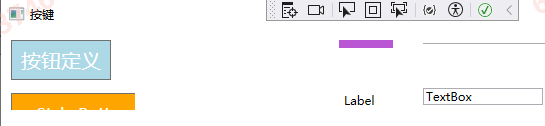
<Window x:Class="TestCom.BtnWpf"
        xmlns="http://schemas.microsoft.com/winfx/2006/xaml/presentation"
        xmlns:x="http://schemas.microsoft.com/winfx/2006/xaml"
        xmlns:d="http://schemas.microsoft.com/expression/blend/2008"
        xmlns:mc="http://schemas.openxmlformats.org/markup-compatibility/2006"
        xmlns:local="clr-namespace:TestCom"
        mc:Ignorable="d"
        Title="按键" Height="450" Width="800">
    <Window.Resources>
        <Style x:Key="MyButtonStyle" TargetType="Button">
            <Setter Property="Width" Value="140"/>
            <Setter Property="Height" Value="40"/>
            <Setter Property="Background" Value="Orange"/>
            <Setter Property="Foreground" Value="White"/>
            <Setter Property="FontSize" Value="16"/>
            <Setter Property="Padding" Value="10"/>
        </Style>

    </Window.Resources>

    <Grid >
        <Button x:Name="button" Content="按钮定义" FontSize="20" Width="100" Height="40" Background="LightBlue" Foreground="White" HorizontalAlignment="Left" Margin="10,10,0,0" VerticalAlignment="Top" Click="button_Click"/>
        <Button x:Name="btnStyle" Content=" Style Button" Style="{StaticResource MyButtonStyle }" Margin="10,63,650,332" VerticalAlignment="Top" ></Button>
        <Label Content="Name:" Target="{Binding ElementName=txtName}" FontSize="12" Foreground="White" Background="MediumOrchid" Width="70" Margin="338,10,392,394" HorizontalAlignment="Center" VerticalAlignment="Center" HorizontalContentAlignment="Center" VerticalContentAlignment="Center"/>
        <TextBox x:Name="txtName" Width="200" Height="24" Margin="422,13,178,398"></TextBox>
        <Label x:Name="label" Content="Label" HorizontalAlignment="Left" Margin="338,58,0,0" VerticalAlignment="Top"/>
        <TextBox x:Name="textBox" HorizontalAlignment="Left" Margin="422,58,0,0" TextWrapping="Wrap" Text="TextBox" VerticalAlignment="Top" Width="120"/>
    </Grid>
</Window>


