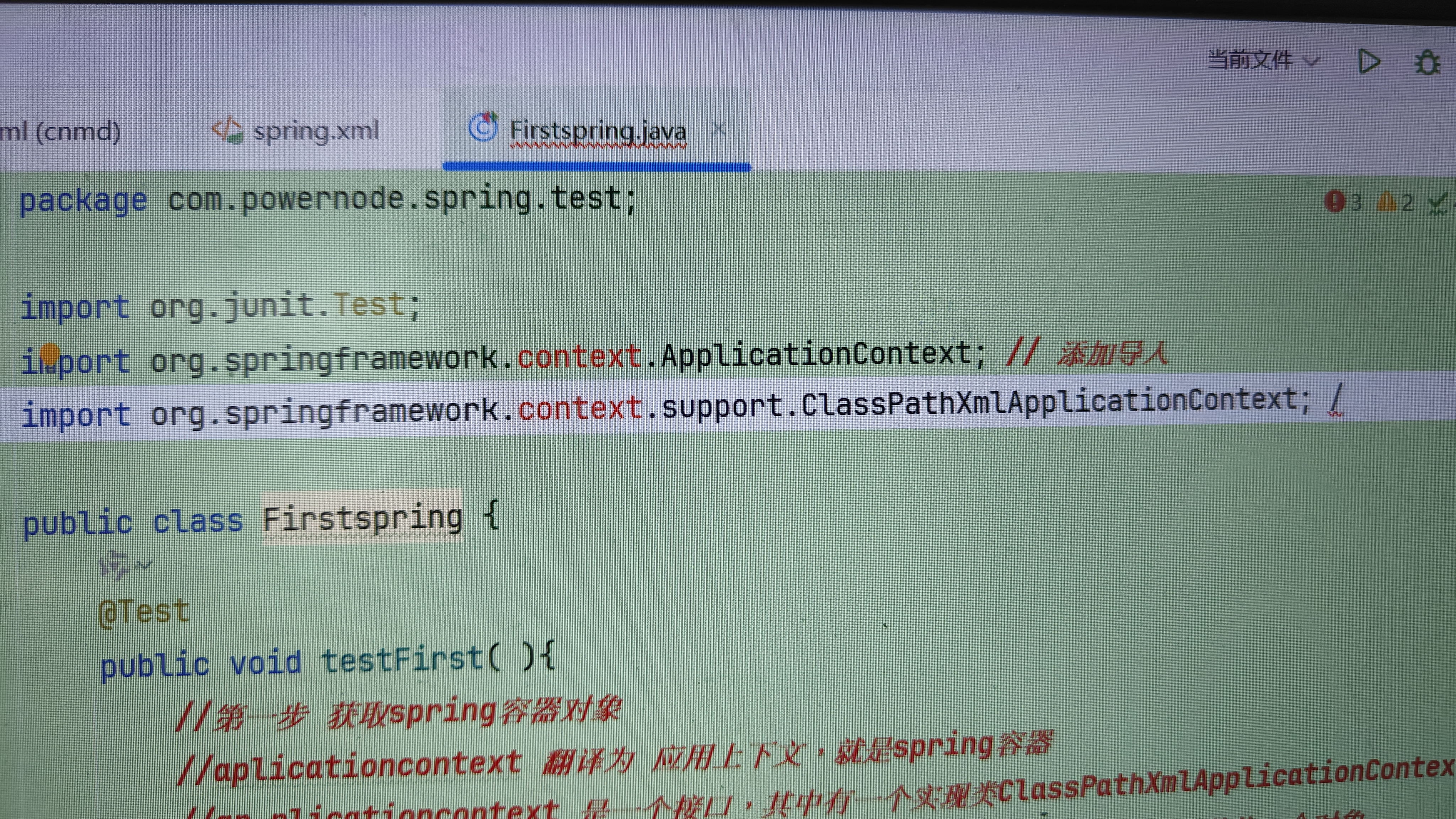
这个该死的context包导进去就爆红,maven那里没报错,pom.xml也没报错,就是导不进去context包

 分享
分享
中午好🌞🌞🌞
本答案参考通义千问
在Spring开发中,context包是核心模块之一,通常用于配置和管理Spring上下文。如果你导入context包时出现“爆红”现象(即IDE提示错误),但Maven没有报错且pom.xml也正常,可能是由于以下原因导致的:
有时候,IDE的缓存可能导致依赖无法正确加载。尝试清理和重新构建项目:
File -> Invalidate Caches / Restart,然后选择 Invalidate and Restart。Maven -> Update Project,然后勾选 Force Update of Snapshots/Releases。pom.xml配置确保你的pom.xml文件中正确引入了spring-context依赖。以下是标准的spring-context依赖配置:
<dependencies>
    <!-- Spring Context -->
    <dependency>
        <groupId>org.springframework</groupId>
        <artifactId>spring-context</artifactId>
        <version>5.3.20</version> <!-- 确保版本号与项目兼容 -->
    </dependency>
</dependencies>
重点:确保spring-context的版本与项目的其他Spring模块版本一致(例如spring-core、spring-beans等)。
如果依赖没有完全下载到本地仓库,可以强制更新Maven依赖:
mvn clean install -U
-U 参数会强制更新所有依赖。
确保IDE的Maven配置正确:
File -> Settings -> Build, Execution, Deployment -> Build Tools -> Maven。Maven home path 和 Runner 设置正确。Properties -> Java Build Path。Maven Dependencies包含spring-context。如果你使用的是较旧的Spring版本(如4.x),某些模块可能已经移除或合并到其他模块中。建议升级到最新稳定版本(如5.x或6.x)。
有时,多个版本的Spring库可能会导致冲突。你可以通过以下方式检查冲突:
mvn dependency:tree
查找是否有重复的spring-context或其他Spring模块。
如果上述方法无效,可以手动下载spring-context依赖并添加到项目中:
spring-context,找到对应版本后下载其.jar文件。.jar文件添加到项目的lib目录,并刷新IDE。假设你需要使用Spring的ApplicationContext来加载配置文件,以下是一个简单的示例代码:
import org.springframework.context.ApplicationContext;
import org.springframework.context.support.ClassPathXmlApplicationContext;

public class MainApp {
    public static void main(String[] args) {
        // 加载Spring配置文件
        ApplicationContext context = new ClassPathXmlApplicationContext("applicationContext.xml");

        // 获取Bean实例
        MyService myService = (MyService) context.getBean("myService");

        // 使用Bean
        myService.execute();
    }
}
对应的applicationContext.xml配置文件:
<?xml version="1.0" encoding="UTF-8"?>
<beans xmlns="http://www.springframework.org/schema/beans"
       xmlns:xsi="http://www.w3.org/2001/XMLSchema-instance"
       xsi:schemaLocation="http://www.springframework.org/schema/beans
           http://www.springframework.org/schema/beans/spring-beans.xsd">

    <bean id="myService" class="com.example.MyService"/>
</beans>
通过以上步骤,你应该能够解决spring-context包导入失败的问题。如果问题仍然存在,请提供更多细节(如pom.xml内容、错误日志等),以便进一步分析和解决问题。
分享 创建了问题
6月3日
创建了问题
6月3日

