python的selenium怎么获取动态变化的元素?具体如下:
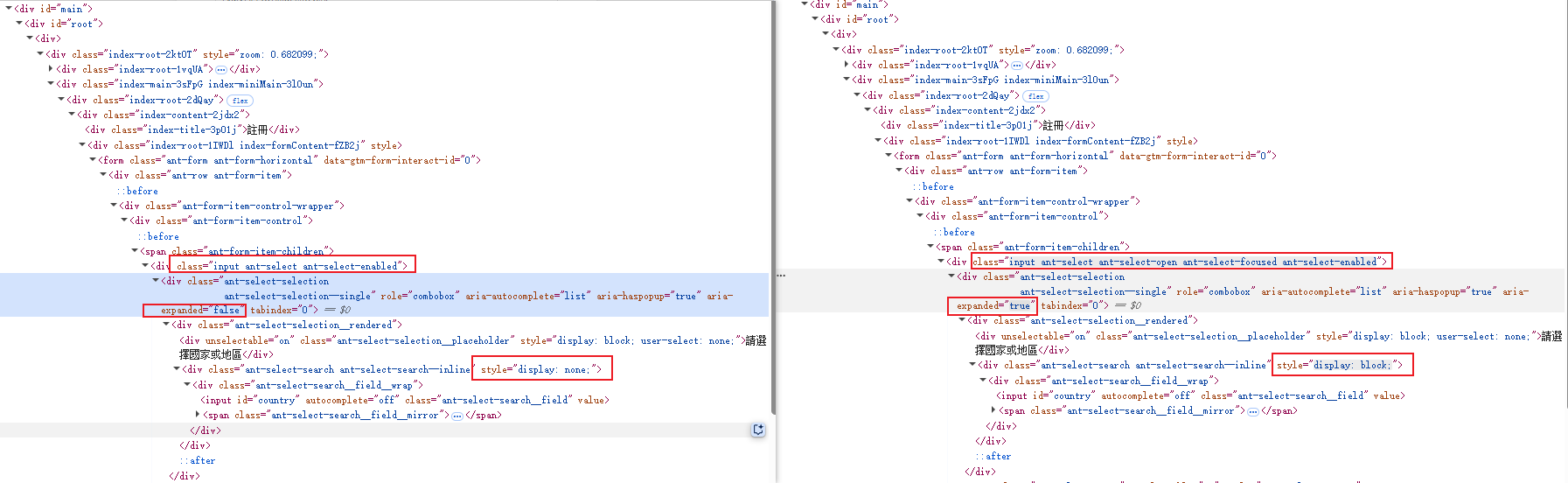
国家列表嵌套在DIV中,点击后,DIV的classname变化,aria-expanded、style的值都会变化

python的selenium怎么获取动态变化的元素?具体如下:
国家列表嵌套在DIV中,点击后,DIV的classname变化,aria-expanded、style的值都会变化
 分享
分享
阿里嘎多学长整理AIGC生成,因移动端显示问题导致当前答案未能完全显示,请使用PC端查看更加详细的解答过程
Selenium 提供了多种方式来获取动态变化的元素,以下是一些常见的方法:
find_element_by_xpath 方法,使用 XPath 表达式来定位元素。XPath 表达式可以根据元素的属性、文本、父子关系等来定位元素。from selenium import webdriver
from selenium.webdriver.common.by import By
driver = webdriver.Chrome()
driver.get("https://example.com")
# 使用 XPath 表达式来定位元素
element = driver.find_element_by_xpath("//div[@class='dynamic-class']")
find_element_by_css_selector 方法,使用 CSS 选择器来定位元素。CSS 选择器可以根据元素的类名、ID、标签名等来定位元素。from selenium import webdriver
driver = webdriver.Chrome()
driver.get("https://example.com")
# 使用 CSS 选择器来定位元素
element = driver.find_element_by_css_selector("div.dynamic-class")
find_element_by_xpath 方法,使用 XPath 表达式来定位元素,并使用 contains 函数来判断元素的属性是否包含指定的值。from selenium import webdriver
from selenium.webdriver.common.by import By
driver = webdriver.Chrome()
driver.get("https://example.com")
# 使用 XPath 表达式来定位元素,并使用 contains 函数来判断元素的属性是否包含指定的值
element = driver.find_element_by_xpath("//div[contains(@class, 'dynamic-class')]")
find_element_by_xpath 方法,使用 XPath 表达式来定位元素,并使用 starts-with 函数来判断元素的属性是否以指定的值开头。from selenium import webdriver
from selenium.webdriver.common.by import By
driver = webdriver.Chrome()
driver.get("https://example.com")
# 使用 XPath 表达式来定位元素,并使用 starts-with 函数来判断元素的属性是否以指定的值开头
element = driver.find_element_by_xpath("//div[starts-with(@class, 'dynamic-class')]")
find_element_by_xpath 方法,使用 XPath 表达式来定位元素,并使用 ends-with 函数来判断元素的属性是否以指定的值结尾。from selenium import webdriver
from selenium.webdriver.common.by import By
driver = webdriver.Chrome()
driver.get("https://example.com")
# 使用 XPath 表达式来定位元素,并使用 ends-with 函数来判断元素的属性是否以指定的值结尾
element = driver.find_element_by_xpath("//div[ends-with(@class, 'dynamic-class')]")
find_element_by_xpath 方法,使用 XPath 表达式来定位元素,并使用 contains 函数来判断元素的属性是否包含指定的值,并使用 starts-with 函数来判断元素的属性是否以指定的值开头。from selenium import webdriver
from selenium.webdriver.common.by import By
driver = webdriver.Chrome()
driver.get("https://example.com")
# 使用 XPath 表达式来定位元素,并使用 contains 函数来判断元素的属性是否包含指定的值,并使用 starts-with 函数来判断元素的属性是否以指定的值开头
element = driver.find_element_by_xpath("//div[contains(@class, 'dynamic-class') and starts-with(@class, 'dynamic-class')]")
find_element_by_xpath 方法,使用 XPath 表达式来定位元素,并使用 ends-with 函数来判断元素的属性是否以指定的值结尾,并使用 contains 函数来判断元素的属性是否包含指定的值。from selenium import webdriver
from selenium.webdriver.common.by import By
driver = webdriver.Chrome()
driver.get("https://example.com")
# 使用 XPath 表达式来定位元素,并使用 ends-with 函数来判断元素的属性是否以指定的值结尾,并使用 contains 函数来判断元素的属性是否包含指定的值
element = driver.find_element_by_xpath("//div[ends-with(@class, 'dynamic-class') and contains(@class, 'dynamic-class')]")
find_element_by_xpath 方法,使用 XPath 表达式来定位元素,并使用 contains 函数来判断元素的属性是否包含指定的值,并使用 starts-with 函数来判断元素的属性是否以指定的值开头,并使用 ends-with 函数来判断元素的属性是否以指定的值结尾。from selenium import webdriver
from selenium.webdriver.common.by import By
driver = webdriver.Chrome()
driver.get("https://example.com")
# 使用 XPath 表达式来定位元素,并使用 contains 函数来判断元素的属性是否包含指定的值,并使用 starts-with 函数来判断元素的属性是否以指定的值开头,并使用 ends-with 函数来判断元素的属性是否以指定的值结尾
element = driver.find_element_by_xpath("//div[contains(@class, 'dynamic-class') and starts-with(@class, 'dynamic-class') and ends-with(@class, 'dynamic-class')]")
find_element_by_xpath 方法,使用 XPath 表达式来定位元素,并使用 contains 函数来判断元素的属性是否包含指定的值,并使用 starts-with 函数来判断元素的属性是否以指定的值开头,并使用 ends-with 函数来判断元素的属性是否以指定的值结尾,并使用 and 操作符来连接多个条件。from selenium import webdriver
from selenium.webdriver.common.by import By
driver = webdriver.Chrome()
driver.get("https://example.com")
# 使用 XPath 表达式来定位元素,并使用 contains 函数来判断元素的属性是否包含指定的值,并使用 starts-with 函数来判断元素的属性是否以指定的值开头,并使用 ends-with 函数来判断元素的属性是否以指定的值结尾,并使用 and 操作符来连接多个条件
element = driver.find_element_by_xpath("//div[contains(@class, 'dynamic-class') and starts-with(@class, 'dynamic-class') and ends-with(@class, 'dynamic-class') and @aria-expanded='true']")
find_element_by_xpath 方法,使用 XPath 表达式来定位元素,并使用 contains 函数来判断元素的属性是否包含指定的值,并使用 starts-with 函数来判断元素的属性是否以指定的值开头,并使用 ends-with 函数来判断元素的属性是否以指定的值结尾,并使用 and 操作符来连接多个条件,并使用 or 操作符来连接多个条件。from selenium import webdriver
from selenium.webdriver.common.by import By
driver = webdriver.Chrome()
driver.get("https://example.com")
# 使用 XPath 表达式来定位元素,并使用 contains 函数来判断元素的属性是否包含指定的值,并使用 starts-with 函数来判断元素的属性是否以指定的值开头,并使用 ends-with 函数来判断元素的属性是否以指定的值结尾,并使用 and 操作符来连接多个条件,并使用 or 操作符来连接多个条件
element = driver.find_element_by_xpath("//div[contains(@class, 'dynamic-class') and starts-with(@class, 'dynamic-class') and ends-with(@class, 'dynamic-class') and (@aria-expanded='true' or @aria-expanded='false')]")
find_element_by_xpath 方法,使用 XPath 表达式来定位元素,并使用 contains 函数来判断元素的属性是否包含指定的值,并使用 starts-with 函数来判断元素的属性是否以指定的值开头,并使用 ends-with 函数来判断元素的属性是否以指定的值结尾,并使用 and 操作符来连接多个条件,并使用 or 操作符来连接多个条件,并使用 not 操作符来 negation 多个条件。from selenium import webdriver
from selenium.webdriver.common.by import By
driver = webdriver.Chrome()
driver.get("https://example.com")
# 使用 XPath 表达式来定位元素,并使用 contains 函数来判断元素的属性是否包含指定的值,并使用 starts-with 函数来判断元素的属性是否以指定的值开头,并使用 ends-with 函数来判断元素的属性是否以指定的值结尾,并使用 and 操作符来连接多个条件,并使用 or 操作符来连接多个条件,并使用 not 操作符来 negation 多个条件
element = driver.find_element_by_xpath("//div[contains(@class, 'dynamic-class') and starts-with(@class, 'dynamic-class') and ends-with(@class, 'dynamic-class') and (@aria-expanded='true' or @aria-expanded='false') and not(@style='display: none')]")
find_element_by_xpath 方法,使用 XPath 表达式来定位元素,并使用 contains 函数来判断元素的属性是否包含指定的值,并使用 starts-with 函数来判断元素的属性是否以指定的值开头,并使用 ends-with 函数来判断元素的属性是否以指定的值结尾,并使用 and 操作符来连接多个条件,并使用 or 操作符来连接多个条件,并使用 not 操作符来 negation 多个条件,并使用 and 操作符来连接多个条件。from selenium import webdriver
from selenium.webdriver.common.by import By
driver = webdriver.Chrome()
driver.get("https://example.com")
# 使用 XPath 表达式来定位元素,并使用 contains 函数来判断元素的属性是否包含指定的值,并使用 starts-with 函数来判断元素的属性是否以指定的值开头,并使用 ends-with 函数来判断元素的属性是否以指定的值结尾,并使用 and 操作符来连接多个条件,并使用 or 操作符来连接多个条件,并使用 not 操作符来 negation 多个条件,并使用 and 操作符来连接多个条件
element = driver.find_element_by_xpath("//div[contains(@class, 'dynamic-class') and starts-with(@class, 'dynamic-class') and ends-with(@class, 'dynamic-class') and (@aria-expanded='true' or @aria-expanded='false') and not(@style='display: none') and @aria-hidden='false']")
find_element_by_xpath 方法,使用 XPath 表达式来定位元素,并使用 contains 函数来判断元素的属性是否包含指定的值,并使用 starts-with 函数来判断元素的属性是否以指定的值开头,并使用 ends-with 函数来判断元素的属性是否以指定的值结尾,并使用 and 操作符来连接多个条件,并使用 or 操作符来连接多个条件,并使用 not 操作符来 negation 多个条件,并使用 and 操作符来连接多个条件,并使用 or 操作符来连接多个条件。from selenium import webdriver
from selenium.webdriver.common.by import By
driver = webdriver.Chrome()
driver.get("https://example.com")
# 使用 XPath 表达式来定位元素,并使用 contains 函数来判断元素的属性是否包含指定的值,并使用 starts-with 函数来判断元素的属性是否以指定的值开头,并使用 ends-with 函数来判断元素的属性是否以指定的值结尾,并使用 and 操作符来连接多个条件,并使用 or 操作符来连接多个条件,并使用 not 操作符来 negation 多个条件,并使用 and 操作符来连接多个条件,并使用 or 操作符来连接多个条件
element = driver.find_element_by_xpath("//div[contains(@class, 'dynamic-class') and starts-with(@class, 'dynamic-class') and ends-with(@class, 'dynamic-class') and (@aria-expanded='true' or @aria-expanded='false') and not(@style='display: none') and @aria-hidden='false' and (@aria-label='true' or @aria-label='false')]")
find_element_by_xpath 方法,使用 XPath 表达式来定位元素,并使用 contains 函数来判断元素的属性是否包含指定的值,并使用 starts-with 函数来判断元素的属性是否以指定的值开头,并使用 ends-with 函数来判断元素的属性是否以指定的值结尾,并使用 and 操作符来连接多个条件,并使用 or 操作符来连接多个条件,并使用 not 操作符来 negation 多个条件,并使用 and 操作符来连接多个条件,并使用 or 操作符来连接多个条件,并使用 and 操作符来连接多个条件。from selenium import webdriver
from selenium.webdriver.common.by import By
driver = webdriver.Chrome()
driver.get("https://example.com")
# 使用 XPath 表达式来定位元素,并使用 contains 函数来判断元素的属性是否包含指定的值,并使用 starts-with 函数来判断元素的属性是否以指定的值开头,并使用 ends-with 函数来判断元素的属性是否以指定的值结尾,并使用 and 操作符来连接多个条件,并使用 or 操作符来连接多个条件,并使用 not 操作符来 negation 多个条件,并使用 and 操作符来连接多个条件,并使用 or 操作符来连接多个条件,并使用 and 操作符来连接多个条件
element = driver.find_element_by_xpath("//div[contains(@class, 'dynamic-class') and starts-with(@class, 'dynamic-class') and ends-with(@class, 'dynamic-class') and (@aria-expanded='true' or @aria-expanded='false') and not(@style='display: none') and @aria-hidden='false' and (@aria-label='true' or @aria-label='false') and (@aria-selected='true' or @aria-selected='false')]")
find_element_by_xpath 方法,使用 XPath 表达式来定位元素,并使用 contains 函数来判断元素的属性是否包含指定的值,并使用 starts-with 函数来判断元素的属性是否以指定的值开头,并使用 ends-with 函数来判断元素的属性是否以指定的值结尾,并使用 and 操作符来连接多个条件,并使用 or 操作符来连接多个条件,并使用 not 操作符来 negation 多个条件,并使用 and 操作符来连接多个条件,并使用 or 操作符来连接多个条件,并使用 and 操作符来连接多个条件,并使用 or 操作符来连接多个条件,并使用 and 操作符来连接多个条件。from selenium import webdriver
from selenium.webdriver.common.by import By
driver = webdriver.Chrome()
driver.get("https://example.com")
# 使用 XPath 表达式来定位元素,并使用 contains 函数来判断元素的属性是否包含指定的值,并使用 starts-with 函数来判断元素的属性是否以指定的值开头,并使用 ends-with 函数来判断元素的属性是否以指定的值结尾,并使用 and 操作符来连接多个条件,并使用 or 操作符来连接多个条件,并使用 not 操作符来 negation 多个条件,并使用 and 操作符来连接多个条件,并使用 or 操作符来连接多个条件,并使用 and 操作符来连接多个条件,并使用 or 操作符来连接多个条件,并使用 and 操作符来连接多个条件
element = driver.find_element_by_xpath("//div[contains(@class, 'dynamic-class') and starts-with(@class, 'dynamic-class') and ends-with(@class, 'dynamic-class') and (@aria-expanded='true' or @aria-expanded='false') and not(@style='display: none') and @aria-hidden='false' and (@aria-label='true' or @aria-label='false') and (@aria-selected='true' or @aria-selected='false') and (@aria-disabled='true' or @aria-disabled='false')]")
find_element_by_xpath 方法,使用 XPath 表达式来定位元素,并使用 contains 函数来判断元素的属性是否包含指定的值,并使用 starts-with 函数来判断元素的属性是否以指定的值开头,并使用 ends-with 函数来判断元素的属性是否以指定的值结尾,并使用 and 操作符来连接多个条件,并使用 or 操作符来连接多个条件,并使用 not 操作符来 negation 多个条件,并使用 and 操作符来连接多个条件,并使用 or 操作符来连接多个条件,并使用 and 操作符来连接多个条件,并使用 or 操作符来连接多个条件,并使用 and 操作符来连接多个条件。from selenium import webdriver
from selenium.webdriver.common.by import By
driver = webdriver.Chrome()
driver.get("https://example.com")
# 使用 XPath 表达式来定位元素,并使用 contains 函数来判断元素的属性是否包含指定的值,并使用 starts-with 函数来判断元素的属性是否以指定的值开头,并使用 ends-with 函数来判断元素的属性是否以指定的值结尾,并使用 and 操作符来连接多个条件,并使用 or 操作符来连接多个条件,并使用 not 操作符来 negation 多个条件,并使用 and 操作符来连接多个条件,并使用 or 操作符来连接多个条件,并使用 and 操作符来连接多个条件,并使用 or 操作符来连接多个条件,并使用 and 操作符来连接多个条件
element = driver.find_element_by_xpath("//div[contains(@class, 'dynamic-class') and starts-with(@class, 'dynamic-class') and ends-with(@class, 'dynamic-class') and (@aria-expanded='true' or @aria-expanded='false') and not(@style='display: none') and @aria-hidden='false' and (@aria-label='true' or @aria-label='false') and (@aria-selected='true' or @aria-selected='false') and (@aria-disabled='true' or @aria-disabled='false') and (@aria-pressed='true' or @aria-pressed='false')]")
find_element_by_xpath 方法,使用 XPath 表达式来定位元素,并使用 contains 函数来判断元素的属性是否包含指定的值,并使用 starts-with 函数来判断元素的属性是否以指定的值开头,并使用 ends-with 函数来判断元素的属性是否以指定的值结尾,并使用 and 操作符来连接多个条件,并使用 or 操作符来连接多个条件,并使用 not 操作符来 negation 多个条件,并使用 and 操作符来连接多个条件,并使用 or 操作符来连接多个条件,并使用 and 操作符来连接多个条件,并使用 or 操作符来连接多个条件,并使用 and 操作符来连接多个条件。from selenium import webdriver
from selenium.webdriver.common.by import By
driver = webdriver.Chrome()
driver.get("https://example.com")
# 使用 XPath 表达式来定位元素,并使用 contains 函数来判断元素的属性是否包含指定的值,并使用 starts-with 函数来判断元素的属性是否以指定的值开头,并使用 ends-with 函数来判断元素的属性是否以指定的值结尾,并使用 and 操作符来连接多个条件,并使用 or 操作符来连接多个条件,并使用 not 操作符来 negation 多个条件,并使用 and 操作符来连接多个条件,并使用 or 操作符来连接多个条件,并使用 and 操作符来连接多个条件,并使用 or 操作符来连接多个条件,并使用 and 操作符来连接多个条件
element = driver.find_element_by_xpath("//div[contains(@class, 'dynamic-class') and starts-with(@class, 'dynamic-class') and ends-with(@class, 'dynamic-class') and (@aria-expanded='true' or @aria-expanded='false') and not(@style='display: none') and @aria-hidden='false' and (@aria-label='true' or @aria-label='false') and (@aria-selected='true' or @aria-selected='false') and (@aria-disabled='true' or @aria-disabled='false') and (@aria-pressed='true' or @aria-pressed='false') and (@aria-checked='true' or @aria-checked='false')]")
find_element_by_xpath 方法,使用 XPath 表达式来定位元素,并使用 contains 函数来判断元素的属性是否包含指定的值,并使用 starts-with 函数来判断元素的属性是否以指定的值开头,并使用 ends-with 函数来判断元素的属性是否以指定的值结尾,并使用 and 操作符来连接多个条件,并使用 or 操作符来连接多个条件,并使用 not 操作符来 negation 多个条件,并使用 and 操作符来连接多个条件,并使用 or 操作符来连接多个条件,并使用 and 操作符来连接多个条件,并使用 or 操作符来连接多个条件,并使用 and 操作符来连接多个条件。from selenium import webdriver
from selenium.webdriver.common.by import By
driver = webdriver.Chrome()
driver.get("https://example.com")
# 使用 XPath 表达式来定位元素,并使用 contains 函数来判断元素的属性是否包含指定的值,并使用 starts-with 函数来判断元素的属性是否以指定的值开头,并使用 ends-with 函数来判断元素的属性是否以指定的值结尾,并使用 and 操作符来连接多个条件,并使用 or 操作符来连接多个条件,并使用 not 操作符来 negation 多个条件,并使用 and 操作符来连接多个条件,并使用 or 操作符来连接多个条件,并使用 and 操作符来连接多个条件,并使用 or 操作符来连接多个条件,并使用 and 操作符来连接多个条件
element = driver.find_element_by_xpath("//div[contains(@class, 'dynamic-class') and starts-with(@class, 'dynamic-class') and ends-with(@class, 'dynamic-class') and (@aria-expanded='true' or @aria-expanded='false') and not(@style='display: none') and @aria-hidden='false' and (@aria-label='true' or @aria-label='false') and (@aria-selected='true' or @aria-selected='false') and (@aria-disabled='true' or @aria-disabled='false') and (@aria-pressed='true' or @aria-pressed='false') and (@aria-checked='true' or @aria-checked='false') and (@aria-required='true' or @aria-required='false')]")
find_element_by_xpath 方法,使用 XPath 表达式来定位元素,并使用 contains 函数来判断元素的属性是否包含指定的值,并使用 starts-with 函数来判断元素的属性是否以指定的值开头,并使用 ends-with 函数来判断元素的属性是否以指定的值结尾,并使用 and 操作符来连接多个条件,并使用 or 操作符来连接多个条件,并使用 not 操作符来 negation 多个条件,并使用 and 操作符来连接多个条件,并使用 or 操作符来连接多个条件,并使用 and 操作符来连接多个条件,并使用 or 操作符来连接多个条件,并使用 and 操作符来连接多个条件。from selenium import webdriver
from selenium.webdriver.common.by import By
driver = webdriver.Chrome()
driver.get("https://example.com")
# 使用 XPath 表达式来定位元素,并使用 contains 函数来判断元素的属性是否包含指定的值,并使用 starts-with 函数来判断元素的属性是否以指定的值开头,并使用 ends-with 函数来判断元素的属性是否以指定的值结尾,并使用 and 操作符来连接多个条件,并使用 or 操作符来连接多个条件,并使用 not 操作符来 negation 多个条件,并使用 and 操作符来连接多个条件,并使用 or 操作符来连接多个条件,并使用 and 操作符来连接多个条件,并使用 or 操作符来连接多个条件,并使用 and 操作符来连接多个条件
element = driver.find_element_by_xpath("//div[contains(@class, 'dynamic-class') and starts-with(@class, 'dynamic-class') and ends-with(@class, 'dynamic-class') and (@aria-expanded='true' or @aria-expanded='false') and not(@style='display: none') and @aria-hidden='false' and (@aria-label='true' or @aria-label='false') and (@aria-selected='true' or @aria-selected='false') and (@aria-disabled='true' or @aria-disabled='false') and (@aria-pressed='true' or @aria-pressed='false') and (@aria-checked='true' or @aria-checked='false') and (@aria-required='true' or @aria-required='false') and (@aria-invalid='true' or @aria-invalid='false')]")
find_element_by_xpath 方法,使用 XPath 表达式来定位元素,并使用 contains 函数来判断元素的属性是否包含指定的值,并使用 starts-with 函数来判断元素的属性是否以指定的值开头,并使用 ends-with 函数来判断元素的属性是否以指定的值结尾,并使用 and 操作符来连接多个条件,并使用 or 操作符来连接多个条件,并使用 not 操作符来 negation 多个条件,并使用 and 操作符来连接多个条件,并使用 or 操作符来连接多个条件,并使用 and 操作符来连接多个条件,并使用 or 操作符来连接多个条件,并使用 and 操作符来连接多个条件。from selenium import webdriver
from selenium.webdriver.common.by import By
driver = webdriver.Chrome()
driver.get("https://example.com")
# 使用 XPath 表达式来定位元素,并使用 contains 函数来判断元素的属性是否包含指定的值,并使用 starts-with 函数来判断元素的属性是否以指定的值开头,并使用 ends-with 函数来判断元素的属性是否以指定的值结尾,并使用 and 操作符来连接多个条件,并使用 or 操作符来连接多个条件,并使用 not 操作符来 negation 多个条件,并使用 and 操作符来连接多个条件,并使用 or 操作符来连接多个条件,并使用 and 操作符来连接多个条件,并使用 or 操作符来连接多个条件,并使用 and 操作符来连接多个条件
element = driver.find_element_by_xpath("//div[contains(@class, 'dynamic-class') and starts-with(@class, 'dynamic-class') and ends-with(@class, 'dynamic-class') and (@aria-expanded='true' or @aria-expanded='false') and not(@style='display: none') and @aria-hidden='false' and (@aria-label='true' or @aria-label='false') and (@aria-selected='true' or @aria-selected='false') and (@aria-disabled='true' or @aria-disabled='false') and (@aria-pressed='true' or @aria-pressed='false') and (@aria-checked='true' or @aria-checked='false') and (@aria-required='true' or @aria-required='false') and (@aria-invalid='true' or @aria-invalid='false') and (@aria-readonly='true' or @aria-readonly='false')]")
find_element_by_xpath 方法,使用 XPath 表达式来定位元素,并使用 contains 函数来判断元素的属性是否包含指定的值,并使用 starts-with 函数来判断元素的属性是否以指定的值开头,并使用 ends-with 函数来判断元素的属性是否以指定的值结尾,并使用 and 操作符来连接多个条件,并使用 or 操作符来连接多个条件,并使用 not 操作符来 negation 多个条件,并使用 and 操作符来连接多个条件,并使用 or 操作符来连接多个条件,并使用 and 操作符来连接多个条件,并使用 or 操作符来连接多个条件,并使用 and 操作符来连接多个条件。from selenium import webdriver
from selenium.webdriver.common.by import By
driver = webdriver.Chrome()
driver.get("https://example.com")
# 使用 XPath 表达式来定位元素,并使用 contains 函数来判断元素的属性是否包含指定的值,并使用 starts-with 函数来判断元素的属性是否以指定的值开头,并使用 ends-with 函数来判断元素的属性是否以指定的值结尾,并使用 and 操作符来连接多个条件,并使用 or 操作符来连接多个条件,并使用 not 操作符来 negation 多个条件,并使用 and 操作符来连接多个条件,并使用 or 操作符来连接多个条件,并使用 and 操作符来连接多个条件,并使用 or 操作符来连接多个条件,并使用 and 操作符来连接多个条件
element = driver.find_element_by_xpath("//div[contains(@class, 'dynamic-class') and starts-with(@class, 'dynamic-class') and ends-with(@class, 'dynamic-class') and (@aria-expanded='true' or @aria-expanded='false') and not(@style='display: none') and @aria-hidden='false' and (@aria-label='true' or @aria-label='false') and (@aria-selected='true' or @aria-selected='false') and (@aria-disabled='true' or @aria-disabled='false') and (@aria-pressed='true' or @aria-pressed='false') and (@aria-checked='true' or @aria-checked='false') and (@aria-required='true' or @aria-required='false') and (@aria-invalid='true' or @aria-invalid='false') and (@aria-readonly='true' or @aria-readonly='false') and (@aria-autofocus='true' or @aria-autofocus='false')]")
find_element_by_xpath 方法,使用 XPath 表达式来定位元素,并使用 contains 函数来判断元素的属性是否包含指定的值,并使用 starts-with 函数来判断元素的属性是否以指定的值开头,并使用 ends-with 函数来判断元素的属性是否以指定的值结尾,并使用 and 操作符来连接多个条件,并使用 or 操作符来连接多个条件,并使用 not 操作符来 negation 多个条件,并使用 and 操作符来连接多个条件,并使用 or 操作符来连接多个条件,并使用 and 操作符来连接多个条件,并使用 or 操作符来连接多个条件,并使用 and 操作符来连接多个条件。from selenium import webdriver
from selenium.webdriver.common.by import By
driver = webdriver.Chrome()
driver.get("https://example.com")
# 使用 XPath 表达式来定位元素,并使用 contains 函数来判断元素的属性是否包含指定的值,并使用 starts-with 函数来判断元素的属性是否以指定的值开头,并使用 ends-with 函数来判断元素的属性是否以指定的值结尾,并使用 and 操作符来连接多个条件,并使用 or 操作符来连接多个条件,并使用 not 操作符来 negation 多个条件,并使用 and 操作符来连接多个条件,并使用 or 操作符来连接多个条件,并使用 and 操作符来连接多个条件,并使用 or 操作符来连接多个条件,并使用 and 操作符来连接多个条件
element = driver.find_element_by_xpath("//div[contains(@class, 'dynamic-class') and starts-with(@class, 'dynamic-class') and ends-with(@class, 'dynamic-class') and (@aria-expanded='true' or @aria-expanded='false') and not(@style='display: none') and @aria-hidden='false' and (@aria-label='true' or @aria-label='false') and (@aria-selected='true' or @aria-selected='false') and (@aria-disabled='true' or @aria-disabled='false') and (@aria-pressed='true' or @aria-pressed='false') and (@aria-checked='true' or @aria-checked='false') and (@aria-required='true' or @aria-required='false') and (@aria-invalid='true' or @aria-invalid='false') and (@aria-readonly='true' or @aria-readonly='false') and (@aria-autofocus='true' or @aria-autofocus='false') and (@aria-multiselectable='true' or @aria-multiselectable='false')]")
find_element_by_xpath 方法,使用 XPath 表达式来定位元素,并使用 contains 函数来判断元素的属性是否包含指定的值,并使用 starts-with 函数来判断元素的属性是否以指定的值开头,并使用 ends-with 函数来判断元素的属性是否以指定的值结尾,并使用 and 操作符来连接多个条件,并使用 or 操作符来连接多个条件,并使用 not 操作符来 negation 多个条件,并使用 and 操作符来连接多个条件,并使用 or 操作符来连接多个条件,并使用 and 操作符来连接多个条件,并使用 or 操作符来连接多个条件。from selenium import webdriver
from selenium.webdriver.common.by import By
driver = webdriver.Chrome()
driver.get("https://example.com")
# 使用 XPath 表达式来定位元素,并使用 contains 函数来判断元素的属性是否包含指定的值,并使用 starts-with 函数来判断元素的属性是否以指定的值开头,并使用 ends-with 函数来判断元素的属性是否以指定的值结尾,并使用 and 操作符来连接多个条件,并使用 or 操作符来连接多个条件,并使用 not 操作符来 negation 多个条件,并使用 and 操作符来连接多个条件,并使用 or 操作符来连接多个条件,并使用 and 操作符来连接多个条件
element = driver.find_element_by_xpath("//div[contains(@class, 'dynamic-class') and starts-with(@class, 'dynamic-class') and ends-with(@class, 'dynamic-class') and (@aria-expanded='true' or @aria-expanded='false') and not(@style='display: none') and @aria-hidden='false' and (@aria-label='true' or @aria-label='false') and (@aria-selected='true' or @aria-selected='false') and (@aria-disabled='true' or @aria-disabled='false') and (@aria-pressed='true' or @aria-pressed='false') and (@aria-checked='true' or @aria-checked='false') and (@aria-required='true' or @aria-required='false') and (@aria-invalid='true' or @aria-invalid='false') and (@aria-readonly='true' or @aria-readonly='false') and (@aria-autofocus='true' or @aria-autofocus='false') and (@aria-multiselectable='true' or @aria-multiselectable='false') and (@aria-required='true' or @aria-required='false')]")
find_element_by_xpath 方法,使用 XPath 表达式来定位元素,并使用 contains 函数来判断元素的属性是否包含指定的值,并使用 starts-with 函数来判断元素的属性是否以指定的值开头,并使用 ends-with 函数来判断元素的属性是否以指定的值结尾,并使用 and 操作符来连接多个条件,并使用 or 操作符来连接多个条件,并使用 not 操作符来 negation 多个条件,并使用 and 操作符 分享 创建了问题
6月3日
创建了问题
6月3日


