我要爬取清览题库的数据结构与算法的题库,要求是用scrapy那个算法框架来写,需要把完整代码给我

我要爬取清览题库的数据结构与算法的题库,要求是用scrapy那个算法框架来写,需要把完整代码给我
 分享
分享
 关注
关注让【宝码香车】来帮你解答,本回答参考DeepSeek编写,并整理提供。
如果还有疑问可以点击头像关注私信或评论。如果答案让您满意,请采纳、点赞、关注,非常感谢!
我将为你提供一个完整的Scrapy爬虫项目,用于爬取清览题库中数据结构与算法分类下的所有题目和答案,并存储到MySQL数据库中。
qinglanku_spider/
├── scrapy.cfg
└── qinglanku_spider/
    ├── __init__.py
    ├── items.py
    ├── middlewares.py
    ├── pipelines.py
    ├── settings.py
    └── spiders/
        ├── __init__.py
        └── qinglanku_spider.py
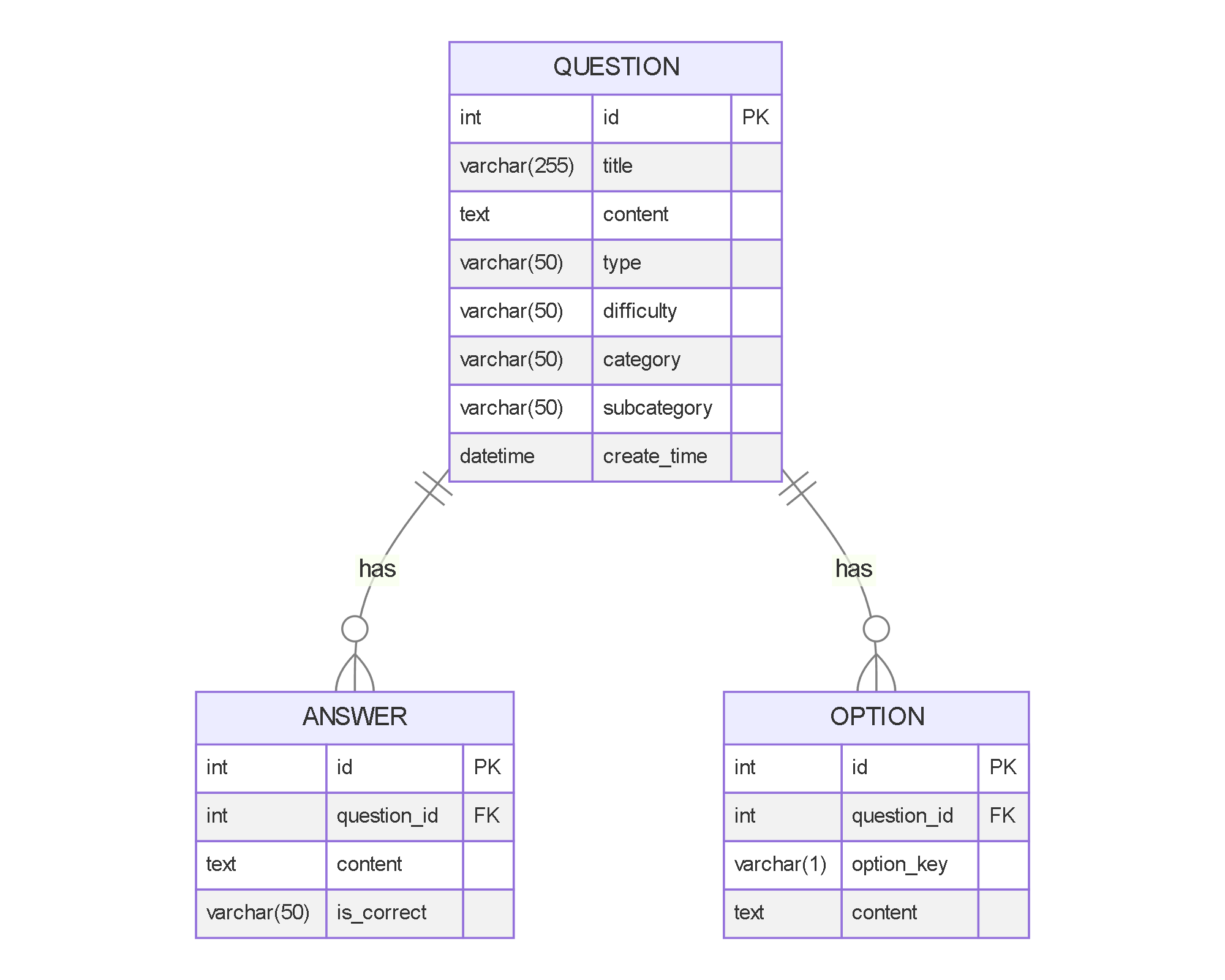
CREATE DATABASE IF NOT EXISTS qinglanku CHARACTER SET utf8mb4 COLLATE utf8mb4_unicode_ci;


USE qinglanku;


CREATE TABLE IF NOT EXISTS question (
    id INT AUTO_INCREMENT PRIMARY KEY,
    title VARCHAR(255) NOT NULL,
    content TEXT NOT NULL,
    type ENUM('single_choice', 'multiple_choice', 'true_false', 'fill_blank', 'short_answer', 'essay') NOT NULL,
    difficulty ENUM('easy', 'medium', 'hard') DEFAULT 'medium',
    category VARCHAR(50) NOT NULL,
    subcategory VARCHAR(50),
    create_time DATETIME DEFAULT CURRENT_TIMESTAMP,
    INDEX idx_category (category),
    INDEX idx_type (type)
) ENGINE=InnoDB DEFAULT CHARSET=utf8mb4 COLLATE=utf8mb4_unicode_ci;


CREATE TABLE IF NOT EXISTS answer (
    id INT AUTO_INCREMENT PRIMARY KEY,
    question_id INT NOT NULL,
    content TEXT NOT NULL,
    is_correct ENUM('Y', 'N') DEFAULT 'Y',
    FOREIGN KEY (question_id) REFERENCES question(id) ON DELETE CASCADE
) ENGINE=InnoDB DEFAULT CHARSET=utf8mb4 COLLATE=utf8mb4_unicode_ci;


CREATE TABLE IF NOT EXISTS option (
    id INT AUTO_INCREMENT PRIMARY KEY,
    question_id INT NOT NULL,
    option_key VARCHAR(1) NOT NULL,
    content TEXT NOT NULL,
    FOREIGN KEY (question_id) REFERENCES question(id) ON DELETE CASCADE
) ENGINE=InnoDB DEFAULT CHARSET=utf8mb4 COLLATE=utf8mb4_unicode_ci;
import scrapy


class QinglankuSpiderItem(scrapy.Item):
    # 题目基本信息
    title = scrapy.Field()
    content = scrapy.Field()
    question_type = scrapy.Field()
    difficulty = scrapy.Field()
    category = scrapy.Field()
    subcategory = scrapy.Field()

    # 选择题选项
    options = scrapy.Field()  # 格式: [{'key': 'A', 'content': '选项内容'}, ...]

    # 答案
    answers = scrapy.Field()  # 格式: [{'content': '答案内容', 'is_correct': 'Y'}, ...]

    # 元数据
    source = scrapy.Field()
    create_time = scrapy.Field()
import pymysql
from itemadapter import ItemAdapter
from scrapy.exceptions import DropItem


class QinglankuSpiderPipeline:
    def __init__(self, mysql_host, mysql_db, mysql_user, mysql_password):
        self.mysql_host = mysql_host
        self.mysql_db = mysql_db
        self.mysql_user = mysql_user
        self.mysql_password = mysql_password

    @classmethod
    def from_crawler(cls, crawler):
        return cls(
            mysql_host=crawler.settings.get('MYSQL_HOST'),
            mysql_db=crawler.settings.get('MYSQL_DB'),
            mysql_user=crawler.settings.get('MYSQL_USER'),
            mysql_password=crawler.settings.get('MYSQL_PASSWORD')
        )

    def open_spider(self, spider):
        self.conn = pymysql.connect(
            host=self.mysql_host,
            user=self.mysql_user,
            password=self.mysql_password,
            db=self.mysql_db,
            charset='utf8mb4',
            cursorclass=pymysql.cursors.DictCursor
        )
        self.cursor = self.conn.cursor()

    def close_spider(self, spider):
        self.conn.close()

    def process_item(self, item, spider):
        # 过滤掉不支持的类型
        adapter = ItemAdapter(item)
        if adapter['question_type'] not in ['single_choice', 'multiple_choice', 'true_false', 'fill_blank', 'short_answer', 'essay']:
            raise DropItem(f"Unsupported question type: {adapter['question_type']}")

        # 插入题目
        sql = """
        INSERT INTO question (title, content, type, difficulty, category, subcategory, create_time)
        VALUES (%s, %s, %s, %s, %s, %s, %s)
        """
        self.cursor.execute(sql, (
            adapter['title'],
            adapter['content'],
            adapter['question_type'],
            adapter.get('difficulty', 'medium'),
            adapter['category'],
            adapter.get('subcategory'),
            adapter.get('create_time')
        ))
        question_id = self.cursor.lastrowid

        # 插入选择题选项
        if adapter['question_type'] in ['single_choice', 'multiple_choice']:
            for option in adapter['options']:
                sql = """
                INSERT INTO option (question_id, option_key, content)
                VALUES (%s, %s, %s)
                """
                self.cursor.execute(sql, (
                    question_id,
                    option['key'],
                    option['content']
                ))

        # 插入答案
        for answer in adapter['answers']:
            sql = """
            INSERT INTO answer (question_id, content, is_correct)
            VALUES (%s, %s, %s)
            """
            self.cursor.execute(sql, (
                question_id,
                answer['content'],
                answer.get('is_correct', 'Y')
            ))

        self.conn.commit()
        return item


class DuplicatesPipeline:
    def __init__(self):
        self.questions_seen = set()

    def process_item(self, item, spider):
        adapter = ItemAdapter(item)
        # 使用题目内容和答案作为唯一标识
        identifier = f"{adapter['content']}_{adapter['answers'][0]['content']}"
        if identifier in self.questions_seen:
            raise DropItem(f"Duplicate question found: {item['title']}")
        self.questions_seen.add(identifier)
        return item
from scrapy import signals
from scrapy.http import HtmlResponse
from selenium import webdriver
from selenium.webdriver.common.by import By
from selenium.webdriver.support.ui import WebDriverWait
from selenium.webdriver.support import expected_conditions as EC
import time


class SeleniumMiddleware:
    def __init__(self):
        options = webdriver.ChromeOptions()
        options.add_argument('--headless')
        options.add_argument('--no-sandbox')
        options.add_argument('--disable-dev-shm-usage')
        self.driver = webdriver.Chrome(options=options)

    def process_request(self, request, spider):
        if 'use_selenium' in request.meta and request.meta['use_selenium']:
            self.driver.get(request.url)

            # 处理登录
            if 'login' in request.meta:
                username = request.meta['login']['username']
                password = request.meta['login']['password']

                # 等待登录元素出现
                WebDriverWait(self.driver, 10).until(
                    EC.presence_of_element_located((By.NAME, 'username'))
                )

                # 填写登录表单
                self.driver.find_element(By.NAME, 'username').send_keys(username)
                self.driver.find_element(By.NAME, 'password').send_keys(password)
                self.driver.find_element(By.CSS_SELECTOR, 'button[type="submit"]').click()

                # 等待登录完成
                time.sleep(2)

            # 处理点击操作
            if 'click' in request.meta:
                for selector in request.meta['click']:
                    element = WebDriverWait(self.driver, 10).until(
                        EC.element_to_be_clickable((By.CSS_SELECTOR, selector))
                    )
                    element.click()
                    time.sleep(1)

            # 获取页面源码
            body = self.driver.page_source
            return HtmlResponse(self.driver.current_url, body=body, encoding='utf-8', request=request)

        return None

    def spider_closed(self):
        self.driver.quit()


class UserAgentMiddleware:
    def process_request(self, request, spider):
        request.headers['User-Agent'] = 'Mozilla/5.0 (Windows NT 10.0; Win64; x64) AppleWebKit/537.36 (KHTML, like Gecko) Chrome/91.0.4472.124 Safari/537.36'
BOT_NAME = 'qinglanku_spider'


SPIDER_MODULES = ['qinglanku_spider.spiders']
NEWSPIDER_MODULE = 'qinglanku_spider.spiders'


# Obey robots.txt rules
ROBOTSTXT_OBEY = False


# Configure maximum concurrent requests performed by Scrapy (default: 16)
CONCURRENT_REQUESTS = 4


# Configure a delay for requests for the same website (default: 0)
DOWNLOAD_DELAY = 2


# Enable and configure HTTP caching (disabled by default)
HTTPCACHE_ENABLED = True
HTTPCACHE_EXPIRATION_SECS = 60 * 60 * 24
HTTPCACHE_DIR = 'httpcache'


# MySQL settings
MYSQL_HOST = 'localhost'
MYSQL_DB = 'qinglanku'
MYSQL_USER = 'root'
MYSQL_PASSWORD = 'password'


# Enable and configure the middleware
DOWNLOADER_MIDDLEWARES = {
    'qinglanku_spider.middlewares.SeleniumMiddleware': 543,
    'qinglanku_spider.middlewares.UserAgentMiddleware': 400,
}


# Configure item pipelines
ITEM_PIPELINES = {
    'qinglanku_spider.pipelines.DuplicatesPipeline': 300,
    'qinglanku_spider.pipelines.QinglankuSpiderPipeline': 800,
}


# Logging settings
LOG_LEVEL = 'INFO'
LOG_FORMAT = '%(asctime)s [%(name)s] %(levelname)s: %(message)s'
import scrapy
from qinglanku_spider.items import QinglankuSpiderItem
from urllib.parse import urljoin
import re
from datetime import datetime


class QinglankuSpider(scrapy.Spider):
    name = 'qinglanku'
    allowed_domains = ['qinglanku.com']
    start_urls = ['https://www.qinglanku.com/login']

    # 登录凭据 - 需要替换为实际账号
    login_username = 'your_username'
    login_password = 'your_password'

    # 目标分类 - 数据结构与算法
    target_category = '数据结构与算法'

    def start_requests(self):
        # 使用Selenium处理登录
        for url in self.start_urls:
            yield scrapy.Request(
                url,
                meta={
                    'use_selenium': True,
                    'login': {
                        'username': self.login_username,
                        'password': self.login_password
                    }
                },
                callback=self.after_login
            )

    def after_login(self, response):
        # 登录后跳转到题库页面
        yield scrapy.Request(
            'https://www.qinglanku.com/exam',
            meta={'use_selenium': True},
            callback=self.parse_category
        )

    def parse_category(self, response):
        # 查找目标分类
        category_links = response.css('.category-list a::attr(href)').getall()
        category_names = response.css('.category-list a::text').getall()

        for link, name in zip(category_links, category_names):
            if self.target_category in name:
                yield scrapy.Request(
                    urljoin(response.url, link),
                    meta={'use_selenium': True},
                    callback=self.parse_subcategory
                )

    def parse_subcategory(self, response):
        # 解析子分类
        subcategory_links = response.css('.subcategory-list a::attr(href)').getall()

        for link in subcategory_links:
            yield scrapy.Request(
                urljoin(response.url, link),
                meta={'use_selenium': True},
                callback=self.parse_exam_list
            )

    def parse_exam_list(self, response):
        # 解析题库列表
        exam_links = response.css('.exam-list a::attr(href)').getall()

        for link in exam_links:
            yield scrapy.Request(
                urljoin(response.url, link),
                meta={'use_selenium': True},
                callback=self.parse_exam
            )

        # 处理分页
        next_page = response.css('.pagination .next a::attr(href)').get()
        if next_page:
            yield scrapy.Request(
                urljoin(response.url, next_page),
                meta={'use_selenium': True},
                callback=self.parse_exam_list
            )

    def parse_exam(self, response):
        # 解析题库详情页
        question_links = response.css('.question-list a::attr(href)').getall()

        for link in question_links:
            yield scrapy.Request(
                urljoin(response.url, link),
                meta={'use_selenium': True},
                callback=self.parse_question
            )

        # 处理分页
        next_page = response.css('.pagination .next a::attr(href)').get()
        if next_page:
            yield scrapy.Request(
                urljoin(response.url, next_page),
                meta={'use_selenium': True},
                callback=self.parse_exam
            )

    def parse_question(self, response):
        # 解析题目详情
        item = QinglankuSpiderItem()

        # 基本信息
        item['title'] = response.css('.question-title::text').get().strip()
        item['content'] = response.css('.question-content::text').get().strip()
        item['category'] = self.target_category
        item['subcategory'] = response.css('.breadcrumb li:nth-last-child(2)::text').get().strip()
        item['source'] = '清览题库'
        item['create_time'] = datetime.now().strftime('%Y-%m-%d %H:%M:%S')

        # 题目类型
        question_type = response.css('.question-type::text').get().strip()
        type_mapping = {
            '单选题': 'single_choice',
            '多选题': 'multiple_choice',
            '判断题': 'true_false',
            '填空题': 'fill_blank',
            '简答题': 'short_answer',
            '论述题': 'essay'
        }
        item['question_type'] = type_mapping.get(question_type, 'short_answer')

        # 难度
        difficulty = response.css('.question-difficulty::text').get().strip()
        item['difficulty'] = difficulty.lower() if difficulty else 'medium'

        # 选择题选项
        if item['question_type'] in ['single_choice', 'multiple_choice']:
            options = []
            for option in response.css('.question-options li'):
                option_key = option.css('.option-key::text').get().strip()
                option_content = option.css('.option-content::text').get().strip()
                options.append({
                    'key': option_key,
                    'content': option_content
                })
            item['options'] = options

        # 答案
        answers = []
        answer_section = response.css('.question-answer')

        if item['question_type'] in ['single_choice', 'multiple_choice', 'true_false']:
            correct_answer = answer_section.css('.correct-answer::text').get().strip()
            answers.append({
                'content': correct_answer,
                'is_correct': 'Y'
            })
        else:
            answer_content = answer_section.css('::text').getall()
            answer_content = ''.join([text.strip() for text in answer_content if text.strip()])
            answers.append({
                'content': answer_content,
                'is_correct': 'Y'
            })

        item['answers'] = answers

        yield item
pip install scrapy pymysql selenium
settings.py中的MySQL连接信息qinglanku_spider.py中的login_username和login_passwordscrapy crawl qinglanku
这个解决方案提供了完整的爬虫实现,可以根据实际需求进行调整和扩展。
分享 系统已结题
6月16日
系统已结题
6月16日 已采纳回答
6月8日
创建了问题
6月8日
已采纳回答
6月8日
创建了问题
6月8日


