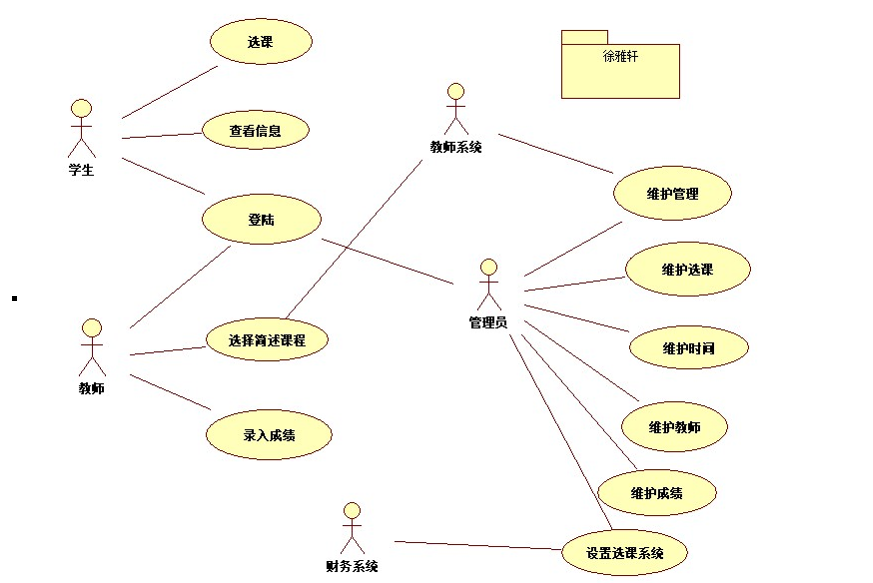
根据图片写出学生选课的修改课程表和删除课程表的子流程 这俩大块中其中包括边界类 控制类和实体类,还要用starUML画顺序图 通信图和分析类图

 分享
分享
阿里嘎多学长整理AIGC生成,因移动端显示问题导致当前答案未能完全显示,请使用PC端查看更加详细的解答过程
根据提供的图片,学生选课的修改课程表和删除课程表的子流程可以分为以下步骤:
修改课程表
修改课程表的顺序图如下:
sequenceDiagram
    participant Student as "学生"
    participant CourseController as "课程控制器"
    participant StudentCourseService as "学生选课服务"
    participant Course as "课程"

    Student->>CourseController: 修改课程表请求
    CourseController->>StudentCourseService: 修改课程表请求
    StudentCourseService->>Course: 修改课程信息
    Course->>StudentCourseService: 修改课程信息结果
    StudentCourseService->>CourseController: 修改课程表结果
    CourseController->>Student: 修改课程表结果
删除课程表
删除课程表的顺序图如下:
sequenceDiagram
    participant Student as "学生"
    participant CourseController as "课程控制器"
    participant StudentCourseService as "学生选课服务"
    participant Course as "课程"

    Student->>CourseController: 删除课程表请求
    CourseController->>StudentCourseService: 删除课程表请求
    StudentCourseService->>Course: 删除课程信息
    Course->>StudentCourseService: 删除课程信息结果
    StudentCourseService->>CourseController: 删除课程表结果
    CourseController->>Student: 删除课程表结果
通信图如下:
sequenceDiagram
    participant Student as "学生"
    participant CourseController as "课程控制器"
    participant StudentCourseService as "学生选课服务"
    participant Course as "课程"

    Student->>CourseController: 修改/删除课程表请求
    CourseController->>StudentCourseService: 修改/删除课程表请求
    StudentCourseService->>Course: 修改/删除课程信息
    Course->>StudentCourseService: 修改/删除课程信息结果
    StudentCourseService->>CourseController: 修改/删除课程表结果
    CourseController->>Student: 修改/删除课程表结果
分析类图如下:
classDiagram
    class Student {
        - id
        - name
    }
    class Course {
        - id
        - name
        - description
    }
    class StudentCourseService {
        + modifyCourse(courseId, newCourseInfo)
        + deleteCourse(courseId)
    }
    class CourseController {
        + modifyCourse(courseId, newCourseInfo)
        + deleteCourse(courseId)
    }
以上是学生选课修改课程表和删除课程表的子流程的分析和设计结果。
分享 创建了问题
6月8日
创建了问题
6月8日


