汉疆唐土34 2025-06-09 11:20 采纳率: 66.7%
浏览 9
已结题

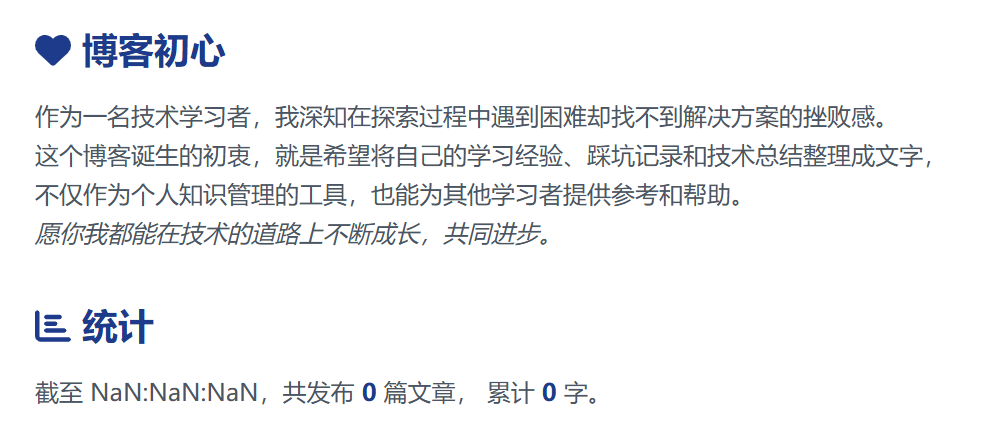
为什么我在我的Django个人博客系统无法加载时间

为什么我在我的Django个人博客系统在模板中渲染时间日期时出现了Could not parse the remainder: ' "Y-m-d H:i:s"' from 'now "Y-m-d H:i:s"'

<div class="mb-8">
                <h2 class="text-2xl font-semibold text-blue-900 mb-4">
                    <i class="fa fa-bar-chart mr-2"></i> 统计
                </h2>
                <p class="text-gray-600 leading-relaxed">
                    截至 <span id="current-time">{{ now "Y-m-d H:i:s" }}   <span id="current-seconds">:</span></span>,共发布
                    <span class="text-blue-900 font-bold">{{ total_articles }}</span> 篇文章,
                    累计 <span class="text-blue-900 font-bold">{{ total_words }}</span> 字。
                </p>
            </div>
// 1. 获取服务器时间(ISO格式,兼容不同时区)
        const serverIsoTime = "{{ now "%Y-%m-%d %H:%M:%S" }}"; // 格式:2025-06-15T14:30:45
        const serverUtcTimestamp = new Date(serverIsoTime).getTime(); // 转换为UTC时间戳

        function updateRealTime() {
            // 2. 获取客户端当前UTC时间戳
            const clientUtcTimestamp = Date.now();

            // 3. 计算时间差(毫秒)
            const timeDiff = clientUtcTimestamp - serverUtcTimestamp;

            // 4. 转换为时分秒(基于UTC偏移)
            const totalSeconds = Math.floor(timeDiff / 1000);
            const hours = Math.floor(totalSeconds / 3600) % 24; // 确保小时在0-23之间
            const minutes = Math.floor((totalSeconds % 3600) / 60);
            const seconds = totalSeconds % 60;

            // 5. 补零处理
            const pad = (n) => n.toString().padStart(2, '0');
            const formattedTime = `${pad(hours)}:${pad(minutes)}:${pad(seconds)}`;

            // 6. 更新页面显示
            document.getElementById('current-seconds').textContent = ` ${formattedTime}`;
        }

        // 初始化时立即更新
        updateRealTime();
        // 每秒更新一次
        setInterval(updateRealTime, 1000);
def about_view(request):
    # 统计文章总数
    total_articles = Article.objects.count()

    # 统计总字数(通过聚合函数计算 content 字段总长度)
    from django.db.models import Sum, CharField, Func
    class Length(Func):
        function = 'LENGTH'
        output_field = CharField()

    total_words = Article.objects.aggregate(total=Sum(Length('content')))['total'] or 0

    # # 今日文章数(按服务器时区)
    # today = timezone.now().date()
    # today_articles = Article.objects.filter(create_time__date=today).count()

    return render(request, 'about.html', {
        'total_articles': total_articles,
        'total_words': total_words,
        'latest_article_time': Article.objects.latest('create_time').create_time if total_articles else None,
    })

目前截图
img

  • 写回答

6条回答 默认 最新

  • 檀越@新空间 2025-06-09 11:24
    关注

    上午好☀️☀️☀️️
    本答案参考通义千问

    从你的描述和代码来看,问题出在模板中对时间的格式化上。Django 模板语言本身并不支持直接在模板中使用 Python 的字符串格式化语法(如 "Y-m-d H:i:s")。你需要使用 Django 提供的时间格式化过滤器 date 来正确渲染时间。

    以下是详细的分析和解决方案:


    问题分析

    1. 模板语法错误: 在模板中,{{ now "Y-m-d H:i:s" }} 这种写法是无效的。Django 模板语言需要使用过滤器来格式化时间,例如 {{ now|date:"Y-m-d H:i:s" }}

    2. 上下文变量传递问题: 在视图中,你已经定义了 now 变量,但没有将其传递到模板中。你需要确保在 render 函数中包含 now 变量。

    3. 前端时间同步逻辑: 前端代码试图通过 setInterval 实现实时更新时间,但由于后端时间未正确传递,可能导致时间显示异常。


    解决方案

    1. 修改视图代码

    确保将 now 变量传递到模板中,并使用 Django 的 timezone 模块获取当前时间。

    from django.utils.timezone import now as timezone_now
    
    def about_view(request):
        # 统计文章总数
        total_articles = Article.objects.count()
    
        # 统计总字数(通过聚合函数计算 content 字段总长度)
        from django.db.models import Sum, CharField, Func
        class Length(Func):
            function = 'LENGTH'
            output_field = CharField()
    
        total_words = Article.objects.aggregate(total=Sum(Length('content')))['total'] or 0
    
        # 获取当前时间(确保是 UTC 时间)
        now = timezone_now()
    
        return render(request, 'about.html', {
            'total_articles': total_articles,
            'total_words': total_words,
            'latest_article_time': Article.objects.latest('create_time').create_time if total_articles else None,
            'now': now,  # 将当前时间传递到模板
        })
    

    2. 修改模板代码

    在模板中,使用 Django 提供的 date 过滤器来格式化时间。

    <div class="mb-8">
        <h2 class="text-2xl font-semibold text-blue-900 mb-4">
            <i class="fa fa-bar-chart mr-2"></i> 统计
        </h2>
        <p class="text-gray-600 leading-relaxed">
            截至 <span id="current-time">{{ now|date:"Y-m-d H:i:s" }}</span>,共发布
            <span class="text-blue-900 font-bold">{{ total_articles }}</span> 篇文章,
            累计 <span class="text-blue-900 font-bold">{{ total_words }}</span> 字。
        </p>
    </div>
    

    3. 前端时间同步逻辑优化

    如果需要实时更新时间,可以简化前端逻辑。以下是一个改进版的前端代码:

    function updateRealTime() {
        // 获取服务器时间并转换为本地时间
        const serverTimeElement = document.getElementById('current-time');
        const serverTime = new Date(serverTimeElement.textContent);
    
        // 更新显示的时间
        const localTimeElement = document.getElementById('current-seconds');
        localTimeElement.textContent = serverTime.toLocaleTimeString();
    }
    
    // 初始化时立即更新
    updateRealTime();
    // 每秒更新一次
    setInterval(updateRealTime, 1000);
    

    完整修改后的代码总结

    视图代码

    from django.utils.timezone import now as timezone_now
    
    def about_view(request):
        total_articles = Article.objects.count()
        from django.db.models import Sum, CharField, Func
        class Length(Func):
            function = 'LENGTH'
            output_field = CharField()
    
        total_words = Article.objects.aggregate(total=Sum(Length('content')))['total'] or 0
        now = timezone_now()
    
        return render(request, 'about.html', {
            'total_articles': total_articles,
            'total_words': total_words,
            'latest_article_time': Article.objects.latest('create_time').create_time if total_articles else None,
            'now': now,
        })
    

    模板代码

    <div class="mb-8">
        <h2 class="text-2xl font-semibold text-blue-900 mb-4">
            <i class="fa fa-bar-chart mr-2"></i> 统计
        </h2>
        <p class="text-gray-600 leading-relaxed">
            截至 <span id="current-time">{{ now|date:"Y-m-d H:i:s" }}</span>,共发布
            <span class="text-blue-900 font-bold">{{ total_articles }}</span> 篇文章,
            累计 <span class="text-blue-900 font-bold">{{ total_words }}</span> 字。
        </p>
    </div>
    

    前端代码

    function updateRealTime() {
        const serverTimeElement = document.getElementById('current-time');
        const serverTime = new Date(serverTimeElement.textContent);
        const localTimeElement = document.getElementById('current-seconds');
        localTimeElement.textContent = serverTime.toLocaleTimeString();
    }
    
    updateRealTime();
    setInterval(updateRealTime, 1000);
    

    总结

    1. 使用 Django 的 date 过滤器正确格式化时间。
    2. 确保将 now 变量传递到模板中。
    3. 前端代码可以通过 toLocaleTimeString() 简化时间同步逻辑。

    按照上述修改后,你的博客系统应该能够正确渲染时间和实现时间同步功能。

    本回答被题主选为最佳回答 , 对您是否有帮助呢?
    评论
查看更多回答(5条)

报告相同问题?

问题事件

  • 已结题 (查看结题原因) 6月9日
  • 已采纳回答 6月9日
  • 修改了问题 6月9日
  • 创建了问题 6月9日