#include "Arduino.h"
#include "TFT_eSPI.h"
#include "cmath"
#include "WiFi.h"
#include <ArduinoJson.h>
#include <HTTPClient.h>
#include <01_1.h>

#define size 512
#define h 160
#define w 128

/*———————————————————————————————————————————————————————————————————————————————————————————————————————————————————
**
全局变量
**
————————————————————————————————————————————————————————————————————————————————————————————————————————————————————*/
// http数据
HTTPClient http;
String wangzhi;

IPAddress IP_static;

// wifi账号和密码
const char *ID = "LU";
const char *moss = "15036308976";

// NTP配置参数, 使用阿里云的NTP服务器
const char *ntpServer = "ntp1.aliyun.com";
const long gmtOffset_sec = 8 * 3600; // 时区偏移量,北京是GMT+8
const int daylightOffset_sec = 0;    // 夏令时偏移量,中国无夏令时

// 定时器对象
hw_timer_t *timer1 /*数据上传定时器*/;

// 存储植物数据
struct flower
{
    String name;
    int a1;
    int a1_old;
    int min = 40;
    int max = 50;
} a1;

// 存储状态数据
struct data
{
    bool frequency = false, /*控制是否上传数据 */
        pump = false,       /*水泵状态*/
        tft_statuse = true, /*控制tft屏幕的开关状态*/
        tft_sleep = true /*记录tft屏幕状态*/;
        unsigned long lastTouchTime = 0;// 最后触摸时间
} data;

// 屏幕对象
TFT_eSPI tft = TFT_eSPI(w, h);

/*———————————————————————————————————————————————————————————————————————————————————————————————————————————————————
**
用函数声明让程序主干更简洁
**
————————————————————————————————————————————————————————————————————————————————————————————————————————————————————*/
void progress(int X, int Y, int H, int W, int Percentage, uint32_t color); // 画一个进度条(上下都为半圆形),边框宽度为1
void do_1(int a, int pin_do);                                              // 水泵控制
String JSON_felower_Packaging();                                           // 数据打包
void tft_begin();                                                          // 配置tft
void wifi_begin();                                                         // 初始化wifi
void time_begin();                                                         // 配置定时器
void time_carry();                                                         // 控制数据上传网络的中断执行函数
void tft_control();                                                        // 控制屏幕开关

/*———————————————————————————————————————————————————————————————————————————————————————————————————————————————————
**
设置初始化程序
**
————————————————————————————————————————————————————————————————————————————————————————————————————————————————————*/

void setup()
{
    Serial.begin(9600);
    // 配置外部引脚
    pinMode(39, INPUT);
    //pinMode(15, INPUT);
    ledcSetup(0, 20000, 8);
    ledcAttachPin(27, 0);

    // 配置TFT
    tft_begin();
    a1.a1_old = map(analogRead(39), 1200, 4095, 100, 0);
    // 初始化WIFi
    wifi_begin();

    // 从主机处获取植株数据
    http.begin(wangzhi + "/flower/download");
    if (http.GET() == 200)
    {
        String JOSN = http.getString();
        http.end();
        DynamicJsonDocument doc(size);
        deserializeJson(doc, JOSN);
        a1.name = doc["name"].as<String>();
        a1.max = doc["max"].as<int>();
        a1.min = doc["min"].as<int>();
    }
    else
    {
        tft.setCursor(0, 0);
        tft.print("请求失败");
        delay(1000);
        tft.fillScreen(TFT_BLACK);
    }
    tft.setCursor(128 - tft.textWidth("WIFI"), 0);
    tft.println("wifi");
}

/*———————————————————————————————————————————————————————————————————————————————————————————————————————————————————
**
主干程序
**
————————————————————————————————————————————————————————————————————————————————————————————————————————————————————*/

void loop()
{
    a1.a1 = map(analogRead(39), 1200, 4095, 100, 0);
    // 判断UI是否刷新
    tft_control();
    if (a1.a1 != a1.a1_old&data.tft_sleep)
    {
        progress(0, h * 1 / 9, h * 2 / 3, w / 12, a1.a1, TFT_BLUE);
        a1.a1_old = a1.a1;
    }
    do_1(a1.a1, 27);
    tft.fillRect(w/2,0,40,h,TFT_BLACK);
    tft.setCursor(w/2,20);
    tft.println("millis");
    tft.println(millis()-data.lastTouchTime);
    tft.println(touchRead(15));
    delay(1000);
    if (data.frequency)
    {
        data.frequency = false;
        // 发送数据
        http.begin(wangzhi + "/shujushangchuan");
        http.POST(JSON_felower_Packaging());
        http.end();
    }
}

/*———————————————————————————————————————————————————————————————————————————————————————————————————————————————————
**
声明函数详细
**
————————————————————————————————————————————————————————————————————————————————————————————————————————————————————*/

// UI
void progress(int X, int Y, int H, int W, int Percentage, uint32_t color)
{

    tft.fillRoundRect(X, Y, W, H, W / 2, TFT_BLACK);
    tft.drawRoundRect(X, Y, W, H, W / 2, color);
    if (Percentage > 0 & Percentage <= 100)
    {
        if (H * Percentage / 100 > W)
        {
            tft.fillRoundRect(X, Y + H - H * Percentage / 100, W, H * Percentage / 100, W / 2, color);
        }
        else if (H * Percentage / 100 < W / 2)
        {
            double b = acos((W / 2 - H * Percentage / 100) * 2 / W) * 180 / M_PI;
            tft.drawArc(X + W / 2 - 1, Y + H - W / 2, W / 2 - 1, 0, 360 - b, b, color, false);
        }
        else
        {
            tft.drawArc(X + W / 2 - 1, Y + H - W / 2, W / 2 - 1, 0, 270, 90, color, false);
            tft.fillRect(X, Y + H - H * Percentage / 100, W, H * Percentage / 100 - W / 2, color);
        }
    }
    tft.setCursor(0, h - tft.fontHeight());                                                                                        // 设定文字显示区域
    tft.fillRect(0, h - tft.fontHeight(), tft.textWidth("%") + tft.textWidth(String(a1.a1_old)) + 2, tft.fontHeight(), TFT_BLACK); // 刷新文字显示区域
    tft.print(String(a1.a1) + "%");                                                                                                // 显示文字数据
}

// 执行
void do_1(int a, int pin_do)
{
    if (a < a1.min & !data.pump)
    {
        data.pump = true;
        for (int a = 0; a < 101; a++)
        {
            ledcWrite(0, map(a, 0, 100, 0, 256));
            delay(2);
        }
    }
    else if (a > a1.max & data.pump)
    {
        data.pump = false;
        for (int a = 0; a < 51; a++)
        {
            ledcWrite(0, map(a, 50, 0, 0, 256));
            delay(1);
        }
    }
}

// 打包JSON数据
String JSON_felower_Packaging()
{
    DynamicJsonDocument JSON(size);
    JSON["name"] = a1.name;
    JSON["humidity"] = a1.a1;
    String josn;
    serializeJson(JSON, josn);
    return josn;
}

// 配置tft
void tft_begin()
{
    tft.begin();
    tft.setTextColor(TFT_WHITE, TFT_BLACK);
    tft.setTextSize(1);
    tft.fillScreen(TFT_BLACK);
    tft.setRotation(4);
    tft.loadFont(esp32); // 引用中文字库
}

// 初始化wifi
void wifi_begin()
{
    WiFi.begin(ID, moss);
    if (WiFi.status() != WL_CONNECTION_LOST)
    {
        tft.setCursor(0, 0);
        tft.print("等待WIFI连接\n");
        delay(500);
    }
    tft.fillScreen(TFT_BLACK);

    configTime(gmtOffset_sec, daylightOffset_sec, ntpServer);
    IP_static = WiFi.gatewayIP();
    IP_static[3] = 100;
    wangzhi = "http://" + IP_static.toString();
}

// 配置定时器
void time_begin()
{
    timer1 = timerBegin(0, 80, true);
    timerAlarmWrite(timer1, 60000000, true);
    timerAttachInterrupt(timer1, time_carry, true);
    timerAlarmEnable(timer1);
}

// 中断处理函数
void time_carry()
{
    data.frequency = true;
}


// 控制屏幕开关
void tft_control()
{
    if (touchRead(T3) <= 10)
    {
        data.lastTouchTime = millis(); // 更新最后触摸时间
        data.tft_statuse = false;
    }
    //if(millis()-data.lastTouchTime>=3000){
     //   data.tft_statuse=false;
    //}
    if (!data.tft_sleep &data.tft_statuse )
    {

        tft.writecommand(0x11);
        delay(120);
        data.tft_sleep = true;
        //timerAlarmEnable(timer2);
    }
    else if ( data.tft_sleep &!data.tft_statuse)
    {
        tft.writecommand(0x10);
        data.tft_sleep = false;
        //timerAlarmDisable(timer2);
    }
}
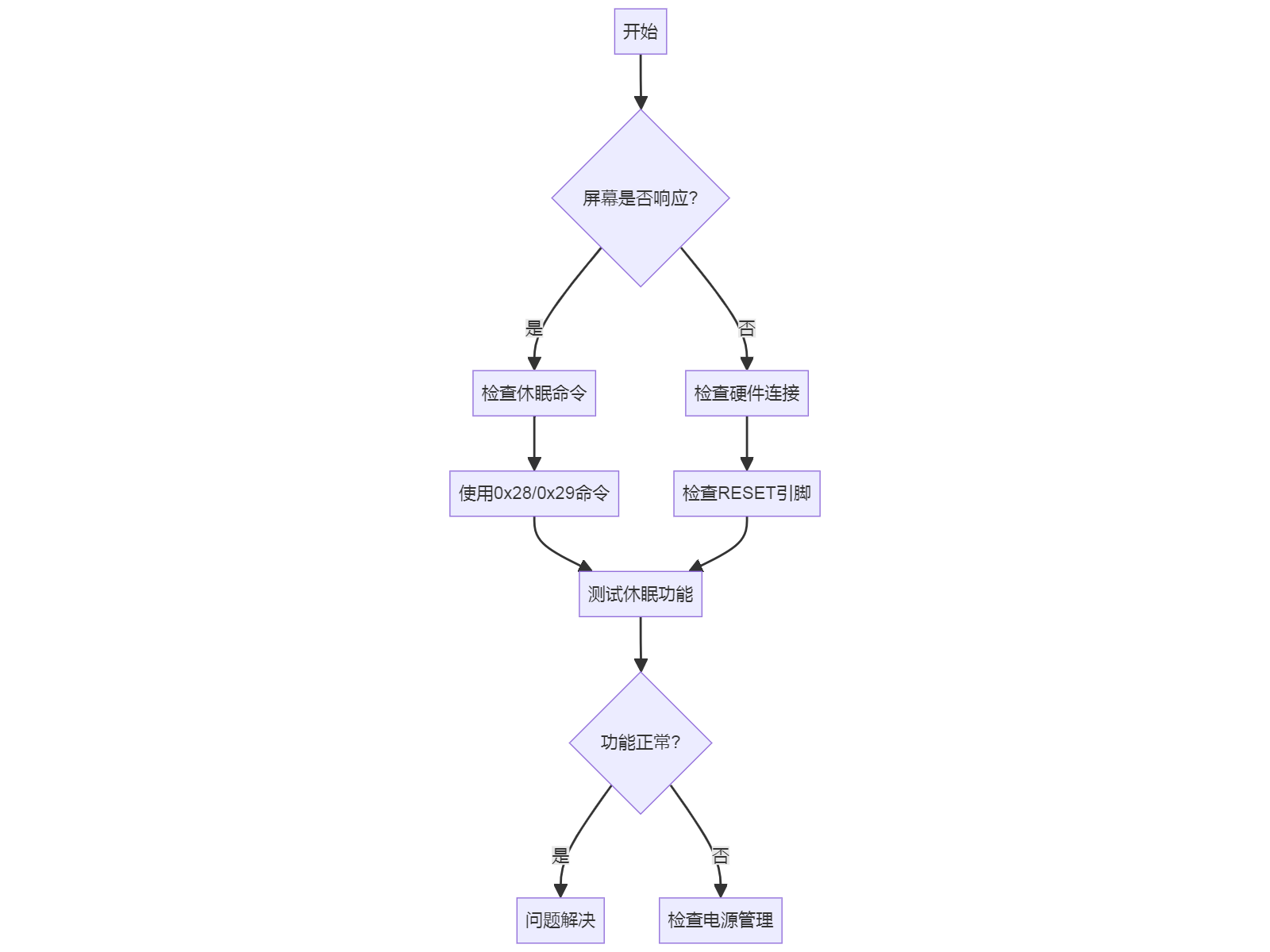
我的这个程序在ESP32运行过程中tft.writecommad();函数并没有起到让ST7735Stft屏幕进入和推出休眠模式的作用。程序全部可以达到预期的结果,仅仅是无法使屏幕休眠。
有没有解决方法?