
xdm,我想实现从LoginView窗口跳转到MainView窗口中,但是为什么一直显示跳转的界面为空?
两部分代码都放在下面了
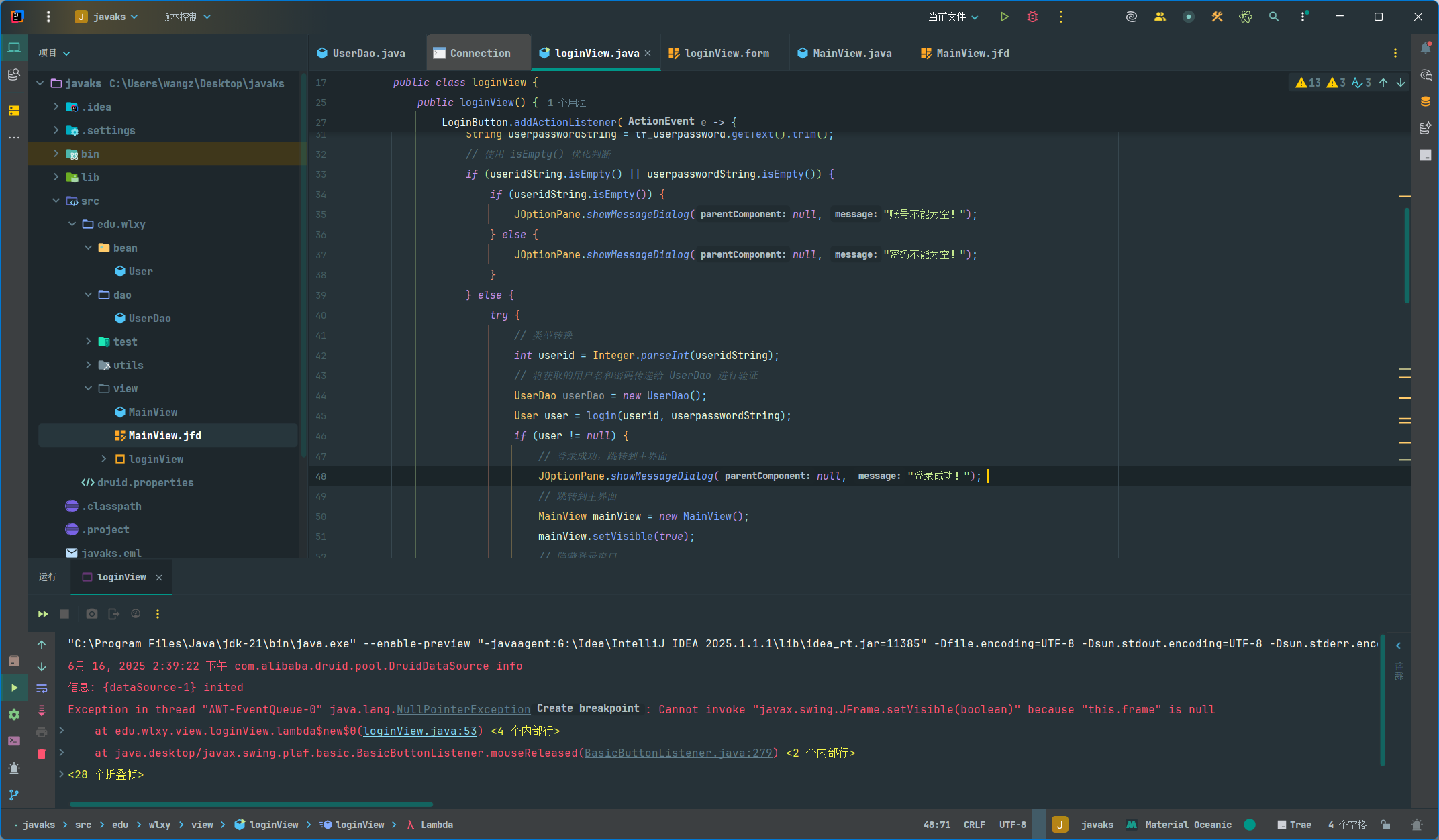
package edu.wlxy.view;

import javax.swing.*;

import com.formdev.flatlaf.FlatDarkLaf;
import com.formdev.flatlaf.FlatLightLaf; //或者FlatDarkLaf, 根据需要选择
import edu.wlxy.bean.User;
import edu.wlxy.dao.UserDao;
import edu.wlxy.utils.DruidUtils;
import org.apache.commons.dbutils.QueryRunner;
import org.apache.commons.dbutils.handlers.BeanHandler;
import javax.swing.JFrame;
import java.sql.SQLException;
import javax.swing.UIManager;
import javax.swing.UnsupportedLookAndFeelException;

public class loginView {
    private JPanel rootpannel;
    private JPanel login;
    private JTextField tf_userid;
    private JTextField tf_userpassword;
    private JButton LoginButton;
    private JFrame frame; // 新增 JFrame 引用

    public loginView() {
        this.frame = frame; // 初始化 JFrame 引用
        LoginButton.addActionListener(e -> {
            // 在这里处理登录按钮的点击事件
            // 你可以获取用户输入的用户名和密码,然后进行验证
            String useridString = tf_userid.getText().trim();
            String userpasswordString = tf_userpassword.getText().trim();
            // 使用 isEmpty() 优化判断
            if (useridString.isEmpty() || userpasswordString.isEmpty()) {
                if (useridString.isEmpty()) {
                    JOptionPane.showMessageDialog(null, "账号不能为空!");
                } else {
                    JOptionPane.showMessageDialog(null, "密码不能为空!");
                }
            } else {
                try {
                    // 类型转换
                    int userid = Integer.parseInt(useridString);
                    // 将获取的用户名和密码传递给 UserDao 进行验证
                    UserDao userDao = new UserDao();
                    User user = login(userid, userpasswordString);
                    if (user != null) {
                        // 登录成功,跳转到主界面
                        JOptionPane.showMessageDialog(null, "登录成功!");
                        // 跳转到主界面
                        MainView mainView = new MainView();
                        mainView.setVisible(true);
                        // 隐藏登录窗口
                        frame.setVisible(false);
                        // 释放登录窗口资源
                        frame.dispose();
                    } else {
                        JOptionPane.showMessageDialog(null, "账号或密码错误!");
                    }
                } catch (NumberFormatException ex) {
                    JOptionPane.showMessageDialog(null, "账号必须为数字!");
                }
            }
        });
    }


    public User login(int userid,String userpassword) {
        User user = null;
        QueryRunner runner = new QueryRunner(DruidUtils.getDataSource());
        String sql = "select * from tb_user where userid=? and userpassword=?";
        Object[] params = { userid,userpassword };
        try {
            user = runner.query(sql, new BeanHandler<User>(User.class), params);
        } catch (SQLException e) {
            e.printStackTrace();
        }
        return user;
    }

    public class YourApplication {
        public static void main(String[] args) {
            try {
                // 设置FlatLaf为当前的L&F
                UIManager.setLookAndFeel(new FlatLightLaf()); // 或者 new FlatDarkLaf()
            } catch (UnsupportedLookAndFeelException e) {
                e.printStackTrace();
            }

            // 在这里创建和显示你的Swing组件
            // 例如:
            // JFrame frame = new JFrame("My Swing Application");
            // frame.setDefaultCloseOperation(JFrame.EXIT_ON_CLOSE);
            // frame.setSize(400, 300);
            // frame.setVisible(true);
        }
    }

    public static void main(String[] args) {
        FlatDarkLaf.setup();
        JFrame frame = new JFrame("loginView");
        frame.setContentPane(new loginView().rootpannel);
        frame.setDefaultCloseOperation(JFrame.EXIT_ON_CLOSE);
        frame.pack();
        frame.setVisible(true);
    }
}
```java
/*
 * Created by JFormDesigner on Mon Jun 16 13:37:20 CST 2025
 */

package edu.wlxy.view;

import javax.swing.*;
import info.clearthought.layout.*;

/**
 * @author wangz
 */
public class MainView {
    public MainView() {
        initComponents();
    }
    private void initComponents() {
        // JFormDesigner - Component initialization - DO NOT MODIFY  //GEN-BEGIN:initComponents  @formatter:off
        JFrame mainFrame = new JFrame(); // 将“主界面”替换为“mainFrame”
        JMenuBar menuBar1 = new JMenuBar();
        JMenu menu2 = new JMenu();
        JMenuItem menuItem4 = new JMenuItem();
        JMenu menu1 = new JMenu();
        JMenuItem menuItem2 = new JMenuItem();
        JMenuItem menuItem3 = new JMenuItem();
        JMenu menu3 = new JMenu();
        JMenuItem menuItem5 = new JMenuItem();
        JDesktopPane desktopPane1 = new JDesktopPane();

        //======== mainFrame ========
        {
            var mainFrameContentPane = mainFrame.getContentPane(); // 将“主界面ContentPane”替换为“mainFrameContentPane”
            mainFrameContentPane.setLayout(new TableLayout(new double[][] {
                {TableLayout.PREFERRED, TableLayout.PREFERRED, TableLayout.PREFERRED, TableLayout.PREFERRED, TableLayout.PREFERRED, TableLayout.PREFERRED, TableLayout.PREFERRED, TableLayout.PREFERRED, TableLayout.PREFERRED, TableLayout.PREFERRED, TableLayout.PREFERRED, TableLayout.PREFERRED, TableLayout.PREFERRED, TableLayout.PREFERRED, TableLayout.PREFERRED, TableLayout.PREFERRED, TableLayout.PREFERRED, TableLayout.PREFERRED, TableLayout.PREFERRED, TableLayout.PREFERRED, TableLayout.PREFERRED, TableLayout.PREFERRED, TableLayout.PREFERRED, TableLayout.PREFERRED, TableLayout.PREFERRED, TableLayout.PREFERRED, TableLayout.PREFERRED, TableLayout.PREFERRED, TableLayout.PREFERRED, TableLayout.PREFERRED},
                {TableLayout.PREFERRED, TableLayout.PREFERRED, TableLayout.PREFERRED, TableLayout.PREFERRED, TableLayout.PREFERRED, TableLayout.PREFERRED, TableLayout.PREFERRED, TableLayout.PREFERRED, TableLayout.PREFERRED, TableLayout.PREFERRED, TableLayout.PREFERRED, TableLayout.PREFERRED, TableLayout.PREFERRED, TableLayout.PREFERRED, TableLayout.PREFERRED, TableLayout.PREFERRED, TableLayout.PREFERRED, TableLayout.PREFERRED, TableLayout.PREFERRED, TableLayout.PREFERRED, TableLayout.PREFERRED, TableLayout.PREFERRED, TableLayout.PREFERRED}}));
            ((TableLayout)mainFrameContentPane.getLayout()).setHGap(5);
            ((TableLayout)mainFrameContentPane.getLayout()).setVGap(5);

            //======== menuBar1 ========
            {

                //======== menu2 ========
                {
                    menu2.setText("\u7cfb\u7edf");

                    //---- menuItem4 ----
                    menuItem4.setText("\u9000\u51fa");
                    menu2.add(menuItem4);
                }
                menuBar1.add(menu2);

                //======== menu1 ========
                {
                    menu1.setText("\u56fe\u4e66\u7ba1\u7406");

                    //---- menuItem2 ----
                    menuItem2.setText("\u6dfb\u52a0\u56fe\u4e66");
                    menu1.add(menuItem2);

                    //---- menuItem3 ----
                    menuItem3.setText("\u67e5\u8be2\u56fe\u4e66");
                    menu1.add(menuItem3);
                }
                menuBar1.add(menu1);

                //======== menu3 ========
                {
                    menu3.setText("\u5173\u4e8e");

                    //---- menuItem5 ----
                    menuItem5.setText("\u7248\u6743");
                    menu3.add(menuItem5);
                }
                menuBar1.add(menu3);
            }
            mainFrame.setJMenuBar(menuBar1);
            mainFrameContentPane.add(desktopPane1, new TableLayoutConstraints(0, 0, 29, 22, TableLayoutConstraints.FULL, TableLayoutConstraints.FULL));
            mainFrame.pack();
            mainFrame.setLocationRelativeTo(mainFrame.getOwner());
        }
        // JFormDesigner - End of component initialization  //GEN-END:initComponents  @formatter:on
    }

    // JFormDesigner - Variables declaration - DO NOT MODIFY  //GEN-BEGIN:variables  @formatter:off
    private JFrame 主界面;
    private JMenuBar menuBar1;
    private JMenu menu2;
    private JMenuItem menuItem4;
    private JMenu menu1;
    private JMenuItem menuItem2;
    private JMenuItem menuItem3;
    private JMenu menu3;
    private JMenuItem menuItem5;
    private JDesktopPane desktopPane1;public void setVisible(boolean b) {}
    // JFormDesigner - End of variables declaration  //GEN-END:variables  @formatter:on

}
```


