
你好,这段代码,我设置的标题--“生产领料单”的字体大小明明是14,但运行后升成的模板,标题字体大小还是9,现在我们只需要将标题字体设置为14大小就可,其他已经满足需要了,请问要如何修改完善代码,才能实现我的要求,谢谢
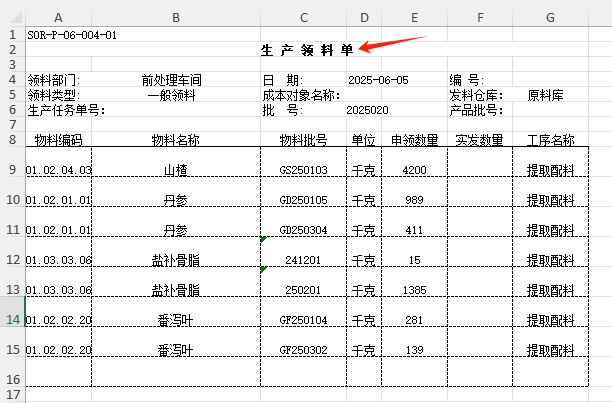
  // 生产领料单生成器
  public class PickingListGenerator
  {
      // 生成领料单的核心方法
      public void GeneratePickingList(List<MaterialStockForm.MaterialIssue> issues)
      {
          // 配置 EPPlus 许可证上下文
          ExcelPackage.LicenseContext = OfficeOpenXml.LicenseContext.NonCommercial;

          // 创建保存文件对话框
          using (SaveFileDialog saveFileDialog = new SaveFileDialog())
          {
              saveFileDialog.Filter = "Excel文件|*.xlsx";
              saveFileDialog.Title = "保存生产领料单";
              saveFileDialog.FileName = $"生产领料单_{DateTime.Now:yyyyMMddHHmmss}.xlsx";

              if (saveFileDialog.ShowDialog() == DialogResult.OK)
              {
                  using (ExcelPackage package = new ExcelPackage(new FileInfo(saveFileDialog.FileName)))
                  {
                      // 按药品批号分组
                      var groupedData = issues.GroupBy(i => i.ProductBatch);

                      // 创建工作表
                      ExcelWorksheet sheet = package.Workbook.Worksheets.Add("生产领料单");
                      int rowIndex = 0;

                      foreach (var group in groupedData)
                      {
                          // 生成表头
                          rowIndex = CreateHeader(sheet, rowIndex, group.Key, group.First().IssueDate);

                          // 生成物料行
                          rowIndex = CreateMaterialRows(sheet, rowIndex, group);

                          // 生成表尾
                          rowIndex = CreateFooter(sheet, rowIndex);

                          // 分组间空行,不带边框
                          for (int i = 0; i < 2; i++)
                          {
                              rowIndex++;
                          }
                      }

                      //// 调整列宽以适应内容,0615为了列宽,能采用自设定的宽度而设置;
                      //for (int i = 1; i <= 7; i++)
                      //{
                      //    sheet.Column(i).AutoFit();
                      //}

                      // 保存文件
                      package.Save();
                  }
              }
          }
      }

  }

  private static int CreateHeader(ExcelWorksheet sheet, int rowIndex, string batchNo, DateTime date)
  {
      // 表单编号行
      sheet.Cells[rowIndex + 1, 1].Value = "S0R-P-06-004-01";
      rowIndex++;

      // 标题行
      sheet.Cells[rowIndex + 1, 1].Value = "生 产 领 料 单";
      sheet.Cells[rowIndex + 1, 1, rowIndex + 1, 7].Merge = true;
      sheet.Cells[rowIndex + 1, 1].Style.Font.Bold = true;
      sheet.Cells[rowIndex + 1, 1].Style.Font.Size = 14;
      sheet.Cells[rowIndex + 1, 1].Style.HorizontalAlignment = ExcelHorizontalAlignment.Center;
      rowIndex++;

      // 空行
      rowIndex++;

      // 部门信息行
      sheet.Cells[rowIndex + 1, 1].Value = "领料部门:          前处理车间";
      sheet.Cells[rowIndex + 1, 3].Value = "日  期:";
      sheet.Cells[rowIndex + 1, 4].Value = date.ToString("yyyy-MM-dd");
      sheet.Cells[rowIndex + 1, 6].Value = "编 号:";
      rowIndex++;

      // 领料类型行
      sheet.Cells[rowIndex + 1, 1].Value = "领料类型:           一般领料";
      sheet.Cells[rowIndex + 1, 3].Value = "成本对象名称:";

      // 添加针对成本名称的下拉列表
      var dataValidation = sheet.DataValidations.AddListValidation($"D{rowIndex + 1}");
      dataValidation.Formula.Values.Add("荷丹胶囊干膏粉");
      dataValidation.Formula.Values.Add("荷丹片干膏粉");

      sheet.Cells[rowIndex + 1, 6].Value = "发料仓库:   原料库";
      rowIndex++;

      // 批号信息行
      sheet.Cells[rowIndex + 1, 1].Value = "生产任务单号:";
      sheet.Cells[rowIndex + 1, 3].Value = $"批  号:       {batchNo}";
      sheet.Cells[rowIndex + 1, 6].Value = "产品批号:";
      rowIndex++;

      // 空行
      rowIndex++;

      // 列标题行
      string[] headers = { "物料编码", "物料名称", "物料批号", "单位", "申领数量", "实发数量", "工序名称" };
      for (int i = 0; i < headers.Length; i++)
      {
          sheet.Cells[rowIndex + 1, i + 1].Value = headers[i];
          //sheet.Cells[rowIndex + 1, i + 1].Style.Font.Bold = true;//使上述字体加黑,加粗;
          sheet.Cells[rowIndex + 1, i + 1].Style.Border.Bottom.Style = ExcelBorderStyle.Thin;
          sheet.Cells[rowIndex + 1, i + 1].Style.HorizontalAlignment = ExcelHorizontalAlignment.Center; // 设置列标题居中
      }
      rowIndex++;

      return rowIndex;
  }

  private static int CreateMaterialRows(ExcelWorksheet sheet, int rowIndex, IGrouping<string, MaterialStockForm.MaterialIssue> group)
  {
      int startRow = rowIndex + 1;
      int actualRowCount = 0; // 记录实际数据行数

      // 设置默认字体和缩放比例
      sheet.Cells.Style.Font.Name = "宋体"; // 使用标准字体
      sheet.Cells.Style.Font.Size = 9;
      sheet.View.ZoomScale = 100;

      foreach (var item in group)
      {
          var row = sheet.Cells[rowIndex + 1, 1, rowIndex + 1, 7];

          if (MaterialStockForm.MaterialMappings.TryGetValue(item.MaterialName, out var master))
          {
              row[rowIndex + 1, 1].Value = master.MaterialCode;
              row[rowIndex + 1, 2].Value = master.MaterialName;
          }
          else
          {
              row[rowIndex + 1, 1].Value = "未知编码";
              row[rowIndex + 1, 2].Value = item.MaterialName;
          }

          row[rowIndex + 1, 3].Value = item.MaterialBatch;
          row[rowIndex + 1, 4].Value = "千克";
          row[rowIndex + 1, 5].Value = item.IssueQty;
          row[rowIndex + 1, 6].Value = ""; // 实发数量留空
          row[rowIndex + 1, 7].Value = "提取配料";

          // 设置虚线边框
          row.Style.Border.Top.Style = ExcelBorderStyle.Dashed;
          row.Style.Border.Bottom.Style = ExcelBorderStyle.Dashed;
          row.Style.Border.Left.Style = ExcelBorderStyle.Dashed;
          row.Style.Border.Right.Style = ExcelBorderStyle.Dashed;
          row.Style.HorizontalAlignment = ExcelHorizontalAlignment.Center; // 表格内容居中

          // 设置固定行高为22.5
          sheet.Row(rowIndex + 1).Height = 22.5;
          sheet.Row(rowIndex + 1).CustomHeight = true; // 确保使用自定义行高

          rowIndex++;
          actualRowCount++;
      }

      // 计算需要补充的空行数
      int emptyRowsNeeded = 8 - actualRowCount;
      if (emptyRowsNeeded > 0)
      {
          // 添加空行,带虚线边框
          for (int i = 0; i < emptyRowsNeeded; i++)
          {
              var emptyRow = sheet.Cells[rowIndex + 1, 1, rowIndex + 1, 7];

              // 所有单元格留空,但设置边框
              for (int col = 1; col <= 7; col++)
              {
                  emptyRow[rowIndex + 1, col].Value = "";
              }

              // 设置虚线边框
              emptyRow.Style.Border.Top.Style = ExcelBorderStyle.Dashed;
              emptyRow.Style.Border.Bottom.Style = ExcelBorderStyle.Dashed;
              emptyRow.Style.Border.Left.Style = ExcelBorderStyle.Dashed;
              emptyRow.Style.Border.Right.Style = ExcelBorderStyle.Dashed;
              emptyRow.Style.HorizontalAlignment = ExcelHorizontalAlignment.Center; // 空行内容也居中

              // 设置固定行高
              sheet.Row(rowIndex + 1).Height = 22.5;
              sheet.Row(rowIndex + 1).CustomHeight = true;

              rowIndex++;
          }
      }


      // 为表单体添加边框
      var tableBody = sheet.Cells[startRow, 1, rowIndex, 7];
      tableBody.Style.Border.Top.Style = ExcelBorderStyle.Dashed;
      tableBody.Style.Border.Bottom.Style = ExcelBorderStyle.Dashed;
      tableBody.Style.Border.Left.Style = ExcelBorderStyle.Dashed;
      tableBody.Style.Border.Right.Style = ExcelBorderStyle.Dashed;
      tableBody.Style.HorizontalAlignment = ExcelHorizontalAlignment.Center; // 确保整个表格内容居中

      // 补充空行(空一行)
      for (int i = 0; i < 1; i++)
      {
          rowIndex++;
      }

      // 设置列宽,第1列的宽为9.38(仅需设置一次,列宽是列级属性,而非行级)
      sheet.Column(1).Width = 9.45;  // 物料编码
      sheet.Column(2).Width = 24.13; // 物料名称
      sheet.Column(3).Width = 12.25; // 物料批号
      sheet.Column(4).Width = 5;     // 单位
      sheet.Column(5).Width = 9.5;   // 申领数量
      sheet.Column(6).Width = 9.25;  // 实发数量
      sheet.Column(7).Width = 10.88; // 工序名称

      return rowIndex;
  }

  private static int CreateFooter(ExcelWorksheet sheet, int rowIndex)
  {
      sheet.Cells[rowIndex + 1, 1].Value = "审核:         记账 :          领料:         发料:         工序签字:        制单:代玉杰";
      sheet.Cells[rowIndex + 1, 1, rowIndex + 1, 7].Merge = true;
      rowIndex++;

      return rowIndex;
  }


