打工很辛苦吧 2025-07-02 14:43 采纳率: 22.7%
浏览 179
已结题

cursor安装了最新版得Vue(Official)插件后,编辑器全是错误提示

cursor安装了最新版得Vue(Official)插件后,编辑器全是错误提示

这个插件没更新前都是正常得
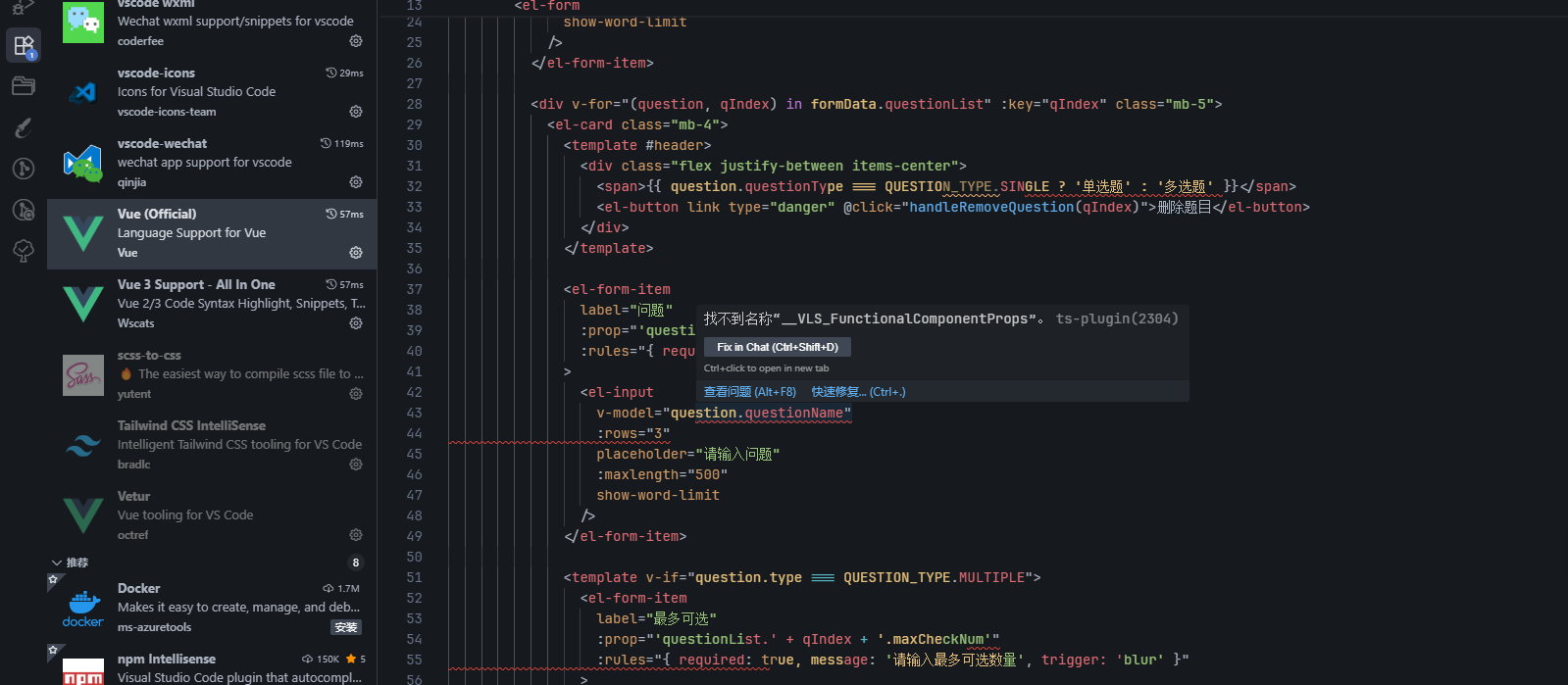
img

tsconfig.json

{
  "compilerOptions": {
    "target": "esnext",
    "useDefineForClassFields": true,
    "module": "esnext",
    "moduleResolution": "node",
    "strict": true,
    "jsx": "preserve",
    "sourceMap": true,
    "resolveJsonModule": true,
    "esModuleInterop": true,
    "lib": ["esnext", "dom"],
    "baseUrl": "./",
    "allowJs": true,
    "forceConsistentCasingInFileNames": true,
    "allowSyntheticDefaultImports": true,
    "strictFunctionTypes": false,
    "noUnusedLocals": true,
    "noUnusedParameters": true,
    "experimentalDecorators": true,
    "noImplicitAny": false,
    "skipLibCheck": true,
    "paths": {
      "@/*": ["src/*"]
    },
    "types": [
      // "@intlify/unplugin-vue-i18n/types",
      "vite/client"
      // "element-plus/global",
      // "@types/qrcode",
      // "vite-plugin-svg-icons/client"
    ],
    "outDir": "target", // 请保留这个属性,防止tsconfig.json文件报错
    "typeRoots": ["./node_modules/@types/", "./types"]
  },
  "include": [
    "src",
    "types/**/*.d.ts",
    "src/types/auto-imports.d.ts",
    "src/types/auto-components.d.ts"
  ],
  "exclude": ["dist", "target", "node_modules"]
}
  • 写回答

6条回答 默认 最新

  • 宝码香车 优质创作者: JavaScript技术领域 2025-07-02 15:19
    关注

    让【宝码香车】来帮你解答,本回答参考DeepSeek编写,并整理提供。

    如果还有疑问可以点击头像关注私信或评论。如果答案让您满意,请采纳、点赞、关注,非常感谢!

    若您愿意支持,欢迎直接打赏,将不胜感激!
    .

    根据问题描述和提供的代码片段,您遇到的是Vue(Official)插件更新后导致的类型检查错误问题。以下是解决方案:

    问题分析

    1. 插件更新后可能引入了更严格的类型检查
    2. 错误主要集中在el-form-item组件的prop属性类型不匹配
    3. 部分Vue模板语法可能被新插件误判

    解决方案

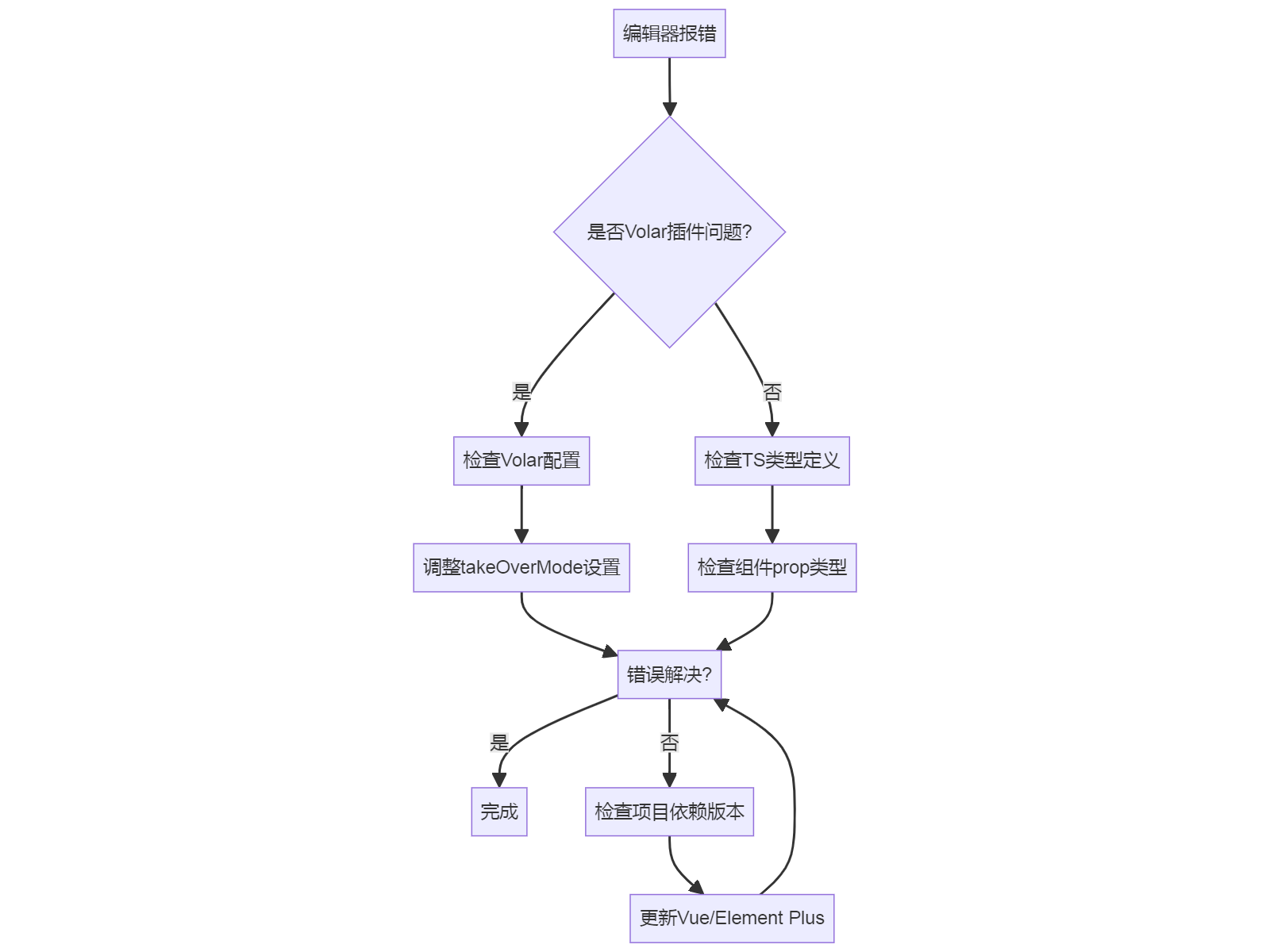
    1. 检查Volar插件配置

    确保Volar(Vue官方插件)配置正确:

    // settings.json
    {
      "volar.takeOverMode.enabled": true,
      "volar.experimental.templateInterpolationService": true
    }
    

    2. 修正模板中的类型错误

    修改模板中的prop属性写法:

    <!-- 修改前 -->
    <el-form-item
      :prop="'questionList.' + qIndex + '.maxCheckNum'"
      :rules="{required: true, message: '请输入最多可选数量', trigger: 'blur'}"
    >
    
    
    <!-- 修改后 -->
    <el-form-item
      :prop="`questionList.${qIndex}.maxCheckNum`"
      :rules="{required: true, message: '请输入最多可选数量', trigger: 'blur'}"
    >
    

    3. 更新tsconfig.json配置

    添加Vue相关类型支持:

    {
      "compilerOptions": {
        "types": [
          "vite/client",
          "vue",
          "element-plus/global"
        ]
      }
    }
    

    4. 类型检查流程

    "编辑器报错"

    5. 其他建议

    1. 确保项目依赖版本兼容:
    npm install vue@latest @volar/vue-language-server@latest
    
    1. 如果使用Element Plus,确保类型正确安装:
    npm install --save-dev @types/element-plus
    
    1. 临时解决方案(不推荐):
    // settings.json
    {
      "volar.takeOverMode.enabled": false
    }
    

    常见错误处理

    对于VLS_FunctionalComponentProps这类错误,通常是因为:

    1. 组件未正确注册
    2. 类型定义缺失
    3. 模板语法不规范

    建议检查:

    1. 组件是否通过components选项或unplugin-vue-components自动导入
    2. 确保所有自定义组件都有正确的类型定义

    如果问题仍未解决,可以提供更详细的错误日志或考虑回退插件版本。

    评论

报告相同问题?

问题事件

  • 已结题 (查看结题原因) 7月8日
  • 创建了问题 7月2日