

VUE,遇见了页面跳转传递参数后,子页面搜索框接收参数出现页面缓存的情况,该如何解决?
问题详述
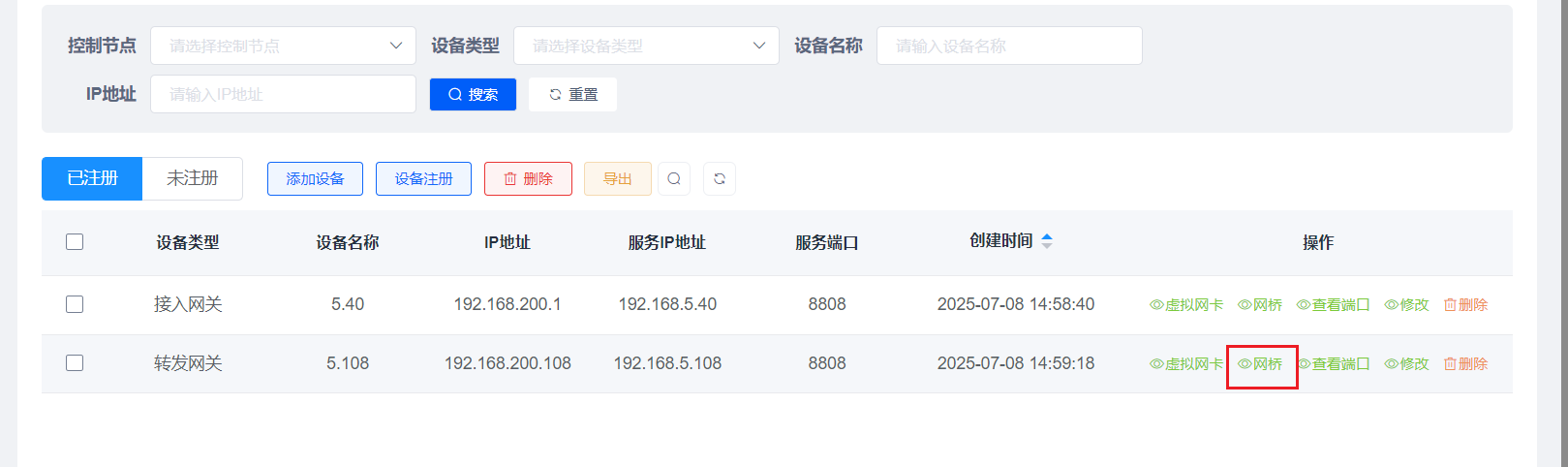
下面是父页面,点击网桥按钮跳转到网桥页面,并传递这一行的id
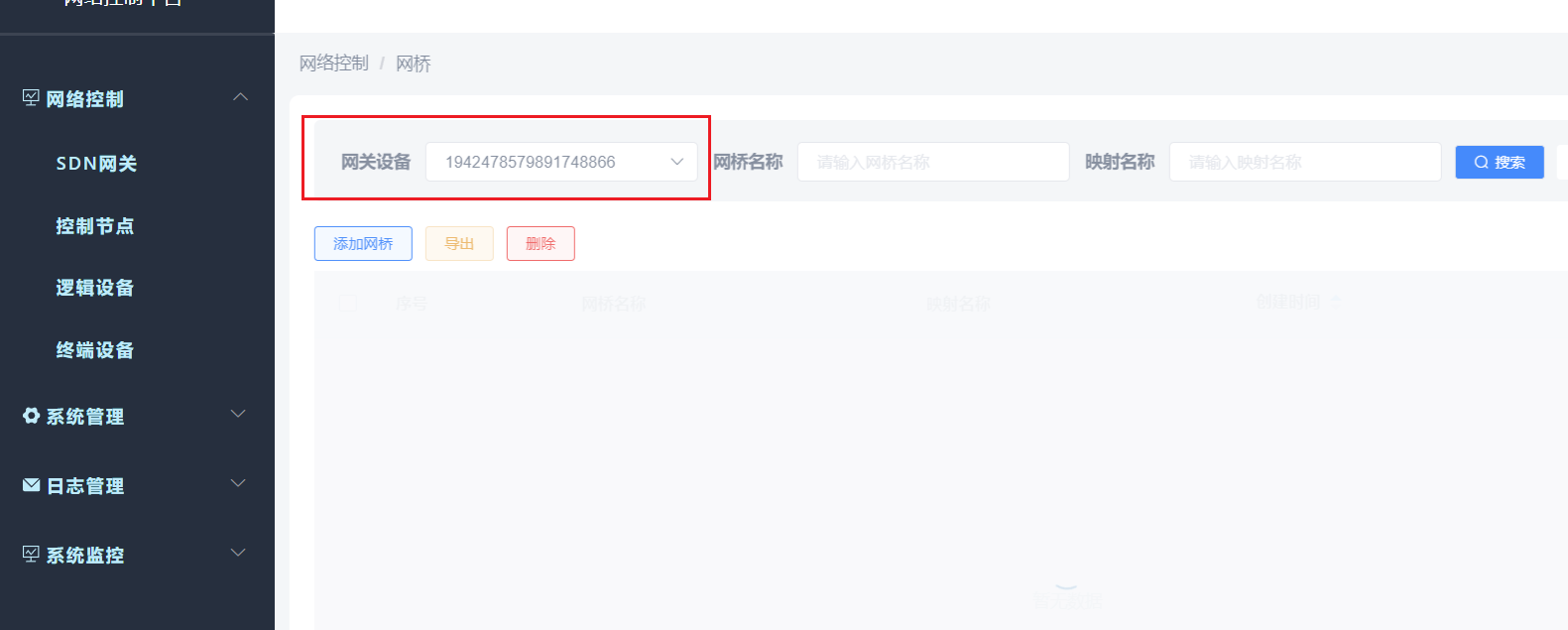
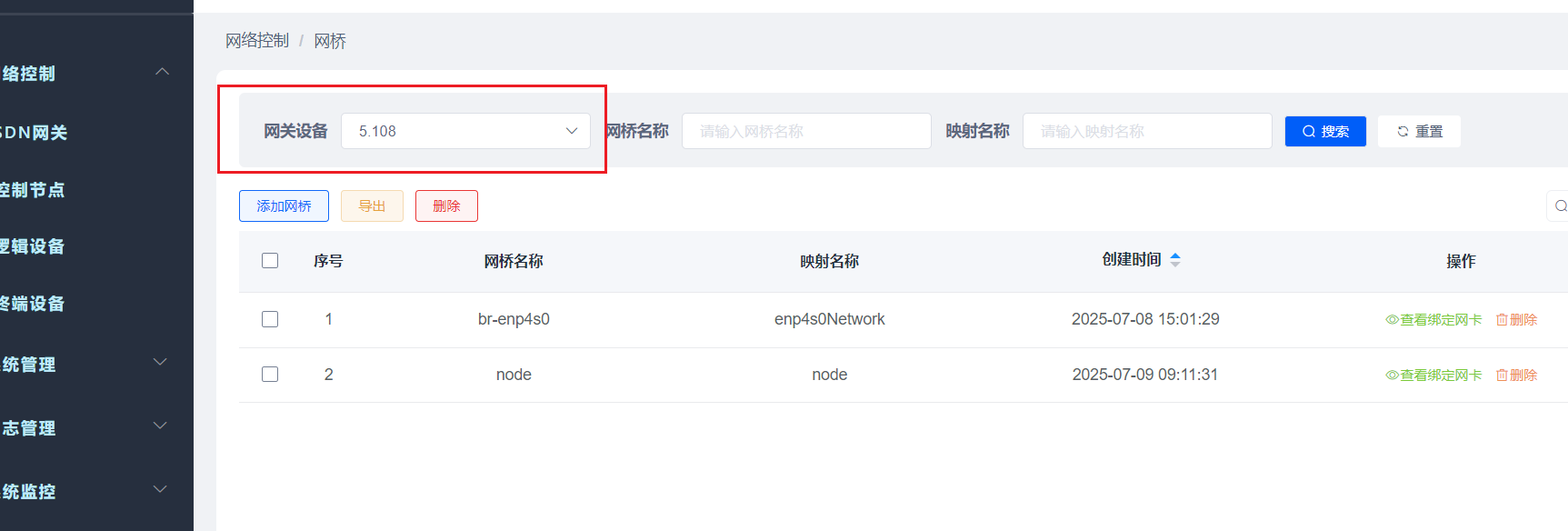
下面是子页面(网桥页面),接收id到搜索框时,会先出现一秒id,再显示对应的名字,该怎么办
下面是父页面跳转部分代码
...
<el-button
              size="mini"
              type="text"
              icon="el-icon-view"
              @click="handleBrClick(scope.row)"
              v-hasPermi="['monitor:job:query']"
            >网桥</el-button>
...
 handleBrClick(row) {
      const id = row.id;
      this.$router.push({ path: '/network/networkEquipment/networkBridge', query: { id : id} });
    },
下面是子页面全部代码
<template>
<div class="app-container">
<bread-crumb />
<div class="container-bottom">
<el-form :model="queryParams" ref="queryForm" size="small" :inline="true" v-show="showSearch" label-width="70px" class="container-top">
<el-form-item label="网关设备" prop="gwEqpId">
<el-select v-model="queryParams.gwEqpId" filterable placeholder="请选择网关设备" clearable>
<el-option
v-for="item in deployEqpList"
:key="item.id"
:label="item.eqpName"
:value="item.id"
></el-option>
</el-select>
</el-form-item>
.....
<el-form-item>
<el-button class="button-search" icon="el-icon-search" size="mini" @click="handleQuery">搜索</el-button>
<el-button class="button-refresh" icon="el-icon-refresh" size="mini" @click="resetQuery">重置</el-button>
</el-form-item>
</el-form>
<el-row :gutter="10" class="mb8">
<el-col :span="1.5">
<el-button
type="primary"
plain
size="mini"
@click="handleAdd"
v-hasPermi="['system:post:add']"
>添加网桥</el-button>
</el-col>
<right-toolbar :showSearch.sync="showSearch" @queryTable="getList"></right-toolbar>
</el-row>
<el-table v-loading="loading" :data="postList" @selection-change="handleSelectionChange" :height="tableHeight" style="background-color: transparent;" header-row-class-name="header-row-style" :default-sort = "{prop: 'createTime', order: 'ascending'}">
<el-table-column type="selection" width="55" align="center" />
<el-table-column label="序号" type="index" align="center">
<template slot-scope="scope">
<span>{{(pageNum - 1) * pageSize + scope.$index + 1}}</span>
</template>
</el-table-column>
<el-table-column label="网桥名称" align="center" prop="brName" />
<el-table-column label="映射名称" align="center" prop="mappingName" />
<el-table-column label="创建时间" align="center" prop="createTime" sortable>
<template slot-scope="scope">
<span>{{ parseTime(scope.row.createTime) }}</span>
</template>
</el-table-column>
<el-table-column label="操作" align="center" class-name="small-padding fixed-width">
<template slot-scope="scope">
<el-button
size="mini"
type="text"
icon="el-icon-view"
@click="handleViewPorts(scope.row)"
v-hasPermi="['monitor:job:query']"
>查看绑定网卡</el-button>
</template>
</el-table-column>
</el-table>
<pagination
v-show="total>0"
:total="total"
:page.sync="queryParams.pageNum"
:limit.sync="queryParams.pageSize"
@pagination="getList"
/>
</div>
<script>
/* import {listMac,listBridge,addBridge,delLogicalRouter,delAllLogicalRouter} from "@/api/logicalDevice/router"; */
import {listBridge,addBridge,delBridge,delAllBridge,listBridgePorts,addPorts,delPorts} from "@/api/logicalDevice/bridge";
/* import {listPorts,addPorts,delPorts} from "@/api/logicalDevice/routerPorts"; */
import {listAcl,addAcl,delAcl} from "@/api/logicalDevice/routerRules";
import {listNat,addNat,delNat} from "@/api/logicalDevice/natRules";
import { listGwEqp,getRegisterList } from "@/api/networkEquipment/networkEquipment";
import { portList } from "@/api/networkEquipment/networkPorts";
import breadCrumb from "@/components/Breadcrumb/index.vue"
import autoComputedH from '@/utils/mixins/autoComputedH'
export default {
name: "Post",
mixins: [autoComputedH],
dicts: ['nat_type','logical_equipment_type','logical_switch_port_type','acl_rule_direction','acl_rule_action'],
components: {
breadCrumb
},
data() {
return {
// 遮罩层
loading: true,
portLoading:true,
// 选中数组
ids: [],
// 非单个禁用
single: true,
// 非多个禁用
multiple: true,
// 显示搜索条件
showSearch: true,
// 总条数
total: 0,
portsTotal:0,
// 控制节点表格数据
postList: [],
//端口列表
portsList:[],
//ACL
aclList:[],
natList:[],
// 弹出层标题
title: "",
//所在设备下拉框
deployEqpList: [],
//uuid下拉框
uuidList:[],
// 网关端口下拉框
networkPortList:[],
//端口名称下拉框
portNameList:[],
// 是否显示弹出层
open: false,
//是否显示规则弹框
openRule:false,
openAclRule:false,
openNatRule:false,
openAddNatRule:false,
//是否显示端口弹框
openPorts:false,
openAddPorts:false,
pageNum: 1,
pageSize: 10,
// 存储查看端口→添加端口信息的数组
port: {
//mappingName: '',
bindGwPortId: '',
//bingGwId:''
},
//存储端口信息的数组
//ports:[],
// 控制端口区域的显示
showPort: false,
// 查询参数
queryParams: {
gwEqpId: undefined,
brName: undefined,
mappingName:undefined,
pageNum: 1,
pageSize: 10,
},
//查看端口 查询端口参数
queryPortsParams: {
//mappingName:undefined,
pageNum: 1,
pageSize: 10,
},
// 表单参数
form: {
gwEqpId: undefined,
uuid: undefined,
eqpName: undefined,
brName: undefined,
mappingName: undefined,
ports:[]
},
//表单添加端口参数
formAddPorts:{
gwEqpId:undefined,
portName:undefined,
nicName:undefined,
ipAddress:undefined,
mac:undefined,
},
ruleForm:{
ruleName:undefined,
ipPrefix:undefined,
nextHop:undefined
},
aclForm:{
portName:undefined,
externalIp:undefined,
logicalIp:undefined,
natType:undefined
},
// 表单校验
rules: {
brName: [
{ required: true, message: "网桥名称不能为空", trigger: "blur" }
],
mappingName:[
{ required: true, message: "映射名称不能为空", trigger: "blur" }
]
},
portRules: {
/* mappingName: [
{ required: true, message: "映射名称不能为空", trigger: "blur" }
], */
bindGwPortId: [
{ required: true, message: "网关端口不能为空", trigger: "blur" }
]
},
gwEqpId:null,
lgcId:null,
containerTop: null,
};
},
created() {
this.gwEqpId = this.$route.query.id;
this.queryParams.gwEqpId = this.gwEqpId;
//this.getDeployEqpSelect();
this.getDeployEqpSelect().then(() => {
this.getList();
});
this.getPortSelect();
// this.uuidList = [];
// getRegisterList({ eqpType: 2}).then((response) => {
// this.uuidList = response.rows.map((registerItem) => ({
// value: registerItem.id,
// label: registerItem.eqpName,
// children: []
// }));
// }).catch(() => {});
/* this.portList = [];
portList({ gwEqpId: this.gwEqpId }).then(response => {
this.portList = response.rows;
console.log(this.portList)
}).catch(() => {}); */
},
methods: {
//添加端口
addPort() {
this.form.ports.push({ /* uuid: '', *//* mappingName: '', */ bindGwPortId: '',/* bingGwId:'' */});
this.showPort = true;
},
//删除端口
removePort(index) {
this.form.ports.splice(index, 1);
if (this.form.ports.length === 0) {
this.showPort = false;
}
},
/** 查询岗位列表 */
getList() {
this.loading = true;
listBridge({ gwEqpId: this.gwEqpId, ...this.queryParams }).then(response => {
this.postList = response.rows;
this.total = response.total;
this.loading = false;
});
},
// 取消按钮
cancel() {
this.open = false;
this.reset();
},
//关闭查看端口弹出框
cancelPortsForm(){
this.openPorts = false;
},
cancelAddPortsForm(){
this.openAddPorts = false;
},
submitPortsForm(){
this.openPorts = false;
},
// 表单重置
reset() {
this.form = {
gwEqpId: undefined,
uuid: undefined,
//eqpName: undefined,
brName: undefined,
ports:[]
};
//this.ports = [];
this.resetForm("form");
},
resetPorts() {
this.port = {
bindGwPortId: undefined
}
},
resetRuleForm(){
this.ruleForm = {
ruleName:undefined,
ipPrefix:undefined,
nextHop:undefined
};
},
resetNatForm() {
this.aclForm = {
portName:undefined,
externalIp:undefined,
logicalIp:undefined,
natType:undefined
};
},
/** 搜索按钮操作 */
handleQuery() {
/* this.gwEqpId = this.form.gwEqpId;
this.queryParams.gwEqpId = this.form.gwEqpId; */
this.queryParams.pageNum = 1;
this.getList();
},
handleQueryPorts() {
this.portLoading = true;
const params = {
lgcId: this.lgcId,
//mappingName: this.queryPortsParams.mappingName
};
listBridgePorts(params).then(response => {
this.portsList = response.rows;
this.portsTotal = response.total;
this.portLoading = false;
}).catch(() => {});
},
/** 重置按钮操作 */
resetQuery() {
this.resetForm("queryForm");
this.handleQuery();
},
resetQueryPorts() {
this.resetForm("queryFormPorts");
this.handleQueryPorts();
},
// 多选框选中数据
handleSelectionChange(selection) {
this.ids = selection.map(item => item.id)
this.single = selection.length!=1
this.multiple = !selection.length
},
/** 新增按钮操作 */
handleAdd() {
this.reset();
this.open = true;
this.title = "添加网桥";
},
/* 新增添加端口操作 */
handleAddPort(row){
this.resetPorts();
this.openAddPorts = true;
this.title= "添加网卡";
//this.formAddPorts.gwEqpId = this.currentGwEqpId;
},
/* 查看绑定网卡 */
handleViewPorts(row){
this.portLoading = true;
this.openPorts = true;
this.lgcId = row.id;
const id = {lgcId:row.id}
listBridgePorts(id).then(response => {
this.portsList = response.rows.map(item => ({
...item,
bindGwPortId: `${item.bindGwName} - ${item.bindGwPortName}`
}));
this.portsTotal = response.total;
this.portLoading = false;
})
},
/* handleClick(row) {
const id = row.id;
this.$router.push({ path: '/controlNode/registerDevice', query: { id : id} });
}, */
/** 修改按钮操作 */
/* handleUpdate(row) {
this.reset();
const postId = row.postId || this.ids
getPost(postId).then(response => {
this.form = response.data;
this.open = true;
this.title = "修改岗位";
});
}, */
/** 提交按钮 */
submitForm: function() {
this.$refs["form"].validate(valid => {
if (valid) {
const formData = {
...this.form,
//ports: this.ports,
gwEqpId:this.gwEqpId
}
if (this.form.id != undefined) {
delControlNode(this.form).then(response => {
this.$modal.msgSuccess("修改成功");
this.open = false;
this.getList();
});
} else {
addBridge(formData).then(response => {
console.log(response,'1234567890')
this.postList = response.rows;
this.$modal.msgSuccess("新增成功");
this.open = false;
this.getList();
});
}
}
});
},
/* 查看端口→添加端口操作 */
submitAddPortsForm:function(){
this.$refs["port"].validate(valid => {
if(valid) {
const params = {
lgcId: this.lgcId,
//mappingName: this.port.mappingName,
bindGwPortId: this.port.bindGwPortId,
bindGwId: this.port.bindGwId,
};
addPorts(params).then(response => {
this.$modal.msgSuccess("新增成功");
this.openAddPorts = false;
const id = { lgcId: this.lgcId };
listBridgePorts(id).then(response => {
console.log(response,'response')
this.portsList = response.rows.map(item => ({
...item,
bindGwPortId: `${item.bindGwName} - ${item.bindGwPortName}`
}));
this.portsTotal = response.total;
});
})
}
})
},
/** 删除按钮操作 */
handleDelete(row) {
//const controlNode = row.id || this.ids;
const controlNodeId = {id:row.id || this.ids[0]};
const controlNodeIds = {ids:this.ids}
if (this.ids.length<2) {
this.$modal.confirm('是否确认删除所选数据项?').then(()=> {
return delBridge(controlNodeId).then((response) => {
if(response.success){
this.postList = this.postList.filter(item => item.id !== row.id);
this.$modal.msgSuccess("删除成功");
this.getList();
}else {
this.$modal.msgError( "删除失败");
}
});
}).catch(() => {});
} else {
this.$modal.confirm('是否确认删除所选数据项?').then(()=> {
return delAllBridge(controlNodeIds).then((response) => {
if(response.success){
this.postList = this.postList.filter(item => item.id !== row.id);
this.$modal.msgSuccess("删除成功");
this.getList();
}else {
this.$modal.msgError( "删除失败");
}
});
}).catch(() => {
});
}
},
//获取网关设备下拉框
getDeployEqpSelect() {
return listGwEqp(this.queryParams).then((response) => {
this.deployEqpList = response.rows;
if (!this.gwEqpId) {
this.queryParams.gwEqpId = this.deployEqpList[0].id;
//this.gwEqpId = this.deployEqpList[0].id;
}
// this.uuidList = [];
// this.deployEqpList.forEach((item) => {
// if (item.eqpType === 2) {
// getRegisterList({ eqpType: item.eqpType }).then((response) => {
// this.uuidList = response.rows.map((registerItem) => ({
// value: registerItem.id,
// label: registerItem.eqpName,
// children: []
// }));
// }).catch(() => {});
// }
// });
/* this.uuidList = this.deployEqpList.filter(item => item.eqpType === 2).map(item => ({
id: item.uuid,
bindGwPortId: item.uuid
})); */
});
},
//获取网关端口下拉框s
getPortSelect() {
portList({gwEqpId: this.gwEqpId}).then((response) => {
this.networkPortList = response.rows;
})
},
/* 删除端口操作 */
handleDeletePort(row) {
const Id = {id:row.id };
if (this.ids.length<2) {
this.$modal.confirm('是否确认删除所选数据项?').then(()=> {
return delPorts(Id).then((response) => {
if (response.success) {
this.portsList = this.portsList.filter(item => item.id !== row.id);
this.$modal.msgSuccess("删除成功");
this.handleQueryPorts();
} else {
this.$modal.msgError( "删除失败");
}
});
}).catch(() => {
});
}
},
/** 导出按钮操作 */
handleExport() {
this.download('/logicalBridge/export', {
gwEqpId:this.gwEqpId,
...this.queryParams
}, `逻辑设备-网桥_${new Date().getTime()}.xlsx`)
},
/* 添加端口中获取对应设备类型的下拉框数据 */
/* handleBindLgcTypeChange(port) {
console.log(port,'port')
getRegisterList({ eqpType: 2 }).then(response => {
port.bindLgcIdOptions = response.rows.map(item => ({
value: item.id,
label: item.brName
}));
}).catch(() => {});
}, */
//路由
/* loadLgcChildrenData(port, node) {
console.log(node,'node')
const lgcId = node[0];
const targetNode = this.findLgcNode(port.bindLgcIdOptions, lgcId);
if(targetNode){
listRouterPort({ lgcId: lgcId }).then(response => {
console.log(response,'response')
targetNode.children = response.rows.map(item => ({
value: item.id,
label: item.portName
}));
}).catch(() => {});
}
}, */
/* findLgcNode(nodes, nodeId) {
for (const node of nodes) {
if (node.value === nodeId) {
return node;
}
if (node.children) {
const result = this.findNode(node.children, nodeId);
if (result) {
return result;
}
}
}
return null;
}, */
//网桥
loadChildrenData(port, node) {
const gwEqpId = node[0];
const targetNode = this.findNode(this.uuidList, gwEqpId);
if (targetNode) {
listPorts({ gwEqpId: gwEqpId }).then(response => {
console.log(response,'response896321455')
targetNode.children = response.rows.map(item => ({
value: item.id,
label: item.portName
}));
}).catch(() => {});
}
},
findNode(nodes, nodeId) {
for (const node of nodes) {
if (node.value === nodeId) {
return node;
}
if (node.children) {
const result = this.findNode(node.children, nodeId);
if (result) {
return result;
}
}
}
return null;
},
/* handleCascaderChange(value) {
console.log(value,'value456789')
if (value.length >= 1) {
this.port.bingGwId = value[0];
this.port.bindGwPortId = '';
this.ports.map(item => {
item.bingGwId = value[0];
item.bindGwPortId='';
})
}
if (value.length >= 2) {
this.port.bingGwId = value[0];
this.port.bindGwPortId = value[1];
this.ports.map(item => {
item.bingGwId = value[0];
item.bindGwPortId=value[1];
})
}
}, */
//查询ACL规则列表
handleViewAcl(row) {
this.openRule = true;
this.title = "规则信息";
listAcl({ lgcId: row.id }).then(response => {
this.aclList = response.rows;
this.lgcId = row.id;
this.loading = false;
}).catch(() => {});
},
//添加ACL规则
handleAddRule() {
this.openAclRule = true;
this.title = "规则信息"
},
//ACL规则弹框提交
submitRuleForm(){
addAcl({lgcId:this.lgcId,...this.ruleForm}).then(response => {
if (response.success) {
this.$modal.msgSuccess("新增成功")
this.openAclRule = false;
const id = { lgcId: this.lgcId };
listAcl(id).then(response => {
this.aclList = response.rows;
this.total = response.total;
});
}
})
},
//关闭添加Acl规则信息弹框
cancelRuleForm() {
this.openAclRule = false;
this.resetRuleForm()
},
//删除ACL规则
handleDeleteRule(row) {
const Id = {id:row.id };
if(this.ids.length<2){
this.$modal.confirm('是否确认删除所选数据项?').then(()=> {
return delAcl(Id).then((response) => {
if(response.success){
this.aclList = this.aclList.filter(item => item.id !== row.id);
this.$modal.msgSuccess("删除成功");
this.getList();
}else {
this.$modal.msgError( "删除失败");
}
});
}).catch(() => {
});
}
},
//查询NAT规则列表
handleViewNat(row){
this.openNatRule = true;
this.title = "地址转化规则信息";
this.lgcId = row.id;
listNat({ lgcId: row.id }).then(response => {
this.natList = response.rows;
}).catch(() => {});
listPorts({ lgcId: this.lgcId} ).then((response) => {
this.portNameList = response.rows.map(item => ({
id: item.id,
portName: item.portName
}));
});
},
//添加NAT规则
handleAddNatRule() {
this.openAddNatRule = true;
this.title = "规则信息"
this.resetNatForm()
},
//NAT规则弹框提交
submitNatForm(){
addNat({lgcId:this.lgcId,...this.aclForm}).then(response => {
if(response.success){
this.$modal.msgSuccess("新增成功")
this.openAddNatRule = false;
const id = { lgcId: this.lgcId };
listNat(id).then(response => {
this.natList = response.rows;
this.total = response.total;
});
}
})
},
//关闭添加NAT规则信息弹框
cancelNatForm(){
this.openAddNatRule = false;
this.resetNatForm()
},
//删除NAT规则
handleDeleteNatRule(row) {
const Id = {id:row.id };
if (this.ids.length < 2) {
this.$modal.confirm('是否确认删除所选数据项?').then(()=> {
return delNat(Id).then((response) => {
if(response.success){
this.natList = this.natList.filter(item => item.id !== row.id);
this.$modal.msgSuccess("删除成功");
this.getList();
}else {
this.$modal.msgError( "删除失败");
}
});
}).catch(() => {});
}
},
/* handleMac(index){
listMac().then(response => {
console.log(response,'mAC')
console.log(this.ports,'ports')
this.ports[index].mac = response.data
})
} */
}
};
</script>
<style scoped>
</style>


