dhtmlx gantt的左侧文件结构和右侧图之间这条竖线怎么设置可以拖动的效果啊,我在文档翻了半天也没解决
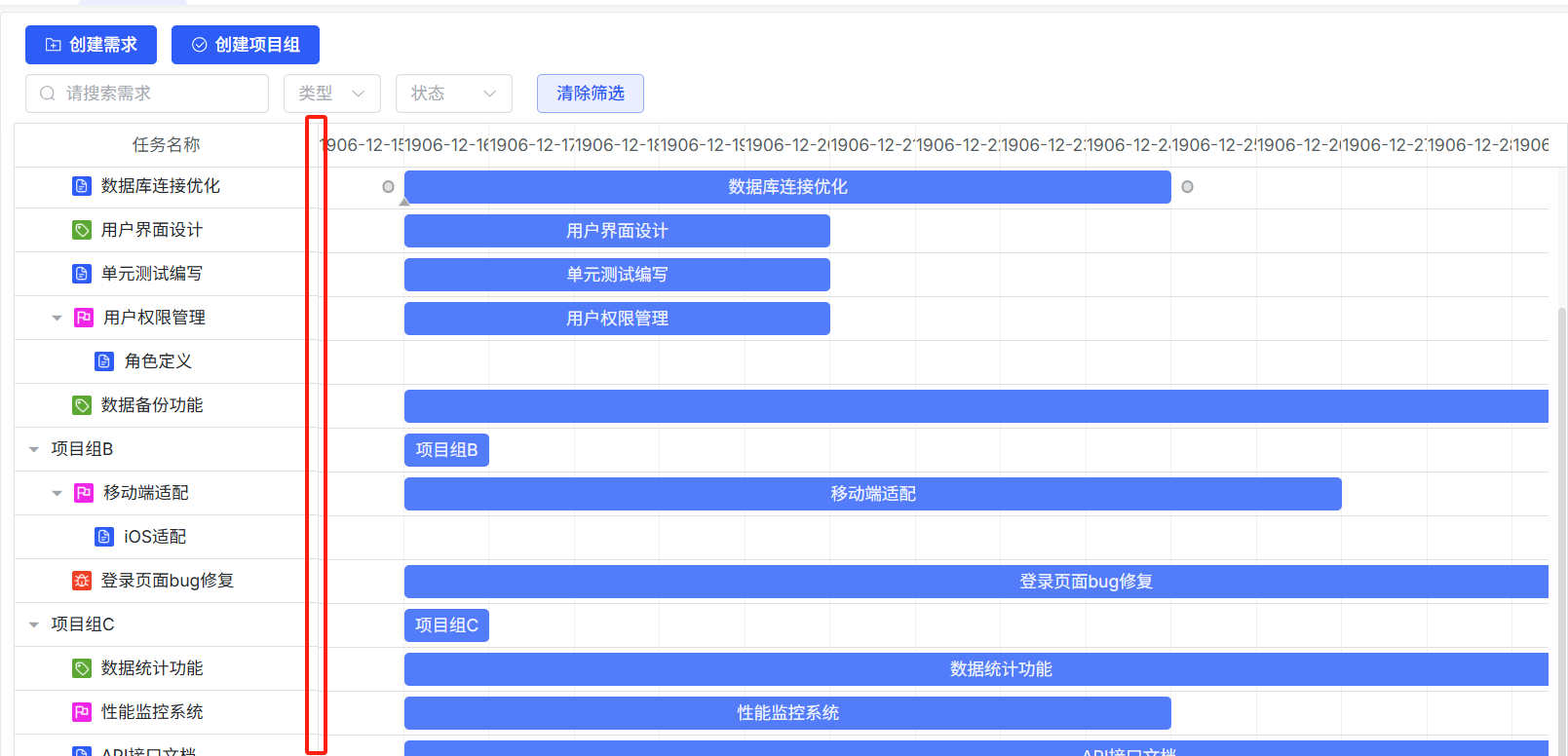

dhtmlx gantt的左侧文件结构和右侧图之间这条竖线怎么设置可以拖动的效果啊,我在文档翻了半天也没解决
 分享
分享
下午好🌅🌅🌅
本答案参考通义千问
在 dhtmlx Gantt 中,左侧的文件结构(通常是 gantt_tree)和右侧的甘特图之间有一条竖线,这条线通常用于分隔两个区域。你提到的“拖动这条竖线以调整左右区域宽度”的功能,在默认情况下是不开启的,但可以通过配置实现。
gantt_drag_resize 功能dhtmlx Gantt 提供了一个内置的拖拽调整功能,可以用来拖动左右区域的边界。
gantt.config.drag_resize = true;
gantt.init("gantt_container");
注意: 此功能默认只适用于甘特图本身的左右边缘。如果你想要拖动左侧树与甘特图之间的竖线,可能需要自定义实现。
由于 dhtmlx Gantt 默认没有提供直接拖动左侧树和甘特图之间竖线的功能,你需要通过以下步骤手动实现:
确保你的 HTML 结构类似如下:
<div id="gantt_container" style="width: 100%; height: 100%;">
    <div id="gantt_left" style="width: 300px; float: left;"></div>
    <div id="gantt_right" style="margin-left: 300px;"></div>
</div>
使用 JavaScript 添加鼠标事件来实现拖拽效果:
let isDragging = false;
let startX = 0;
let startWidth = 0;

const resizeHandle = document.createElement('div');
resizeHandle.style.position = 'absolute';
resizeHandle.style.left = '300px';
resizeHandle.style.top = '0';
resizeHandle.style.width = '5px';
resizeHandle.style.height = '100%';
resizeHandle.style.backgroundColor = '#ccc';
resizeHandle.style.cursor = 'col-resize';
resizeHandle.style.zIndex = '10';

document.getElementById('gantt_container').appendChild(resizeHandle);

resizeHandle.addEventListener('mousedown', (e) => {
    isDragging = true;
    startX = e.clientX;
    startWidth = parseInt(document.getElementById('gantt_left').style.width);
});

document.addEventListener('mousemove', (e) => {
    if (!isDragging) return;
    const newWidth = startWidth + (e.clientX - startX);
    document.getElementById('gantt_left').style.width = `${newWidth}px`;
    document.getElementById('gantt_right').style.marginLeft = `${newWidth}px`;
});

document.addEventListener('mouseup', () => {
    isDragging = false;
});
重点说明:
- 这个方法通过创建一个拖拽手柄,并监听鼠标的
mousedown,mousemove, 和mouseup事件来实现拖拽。- 关键代码部分是
mousemove中对左右区域宽度的动态调整。
为了保证拖拽时布局稳定,建议使用 CSS Flexbox 或 Grid 布局:
#gantt_container {
    display: flex;
    width: 100%;
    height: 100%;
}

#gantt_left {
    width: 300px;
    background-color: #f0f0f0;
    overflow: auto;
}

#gantt_right {
    flex-grow: 1;
}
重点说明:
- 使用
flex布局可以更灵活地控制左右区域的比例变化。- 如果你想保留拖拽手柄,可以在
#gantt_left和#gantt_right之间插入一个resizer元素。
gantt.config.drag_resize = true;div 作为拖拽手柄。mousedown, mousemove, mouseup 事件。flex 或 grid)提高兼容性和稳定性。<!DOCTYPE html>
<html>
<head>
<meta charset="utf-8">
<link rel="stylesheet" href="https://cdn.dhtmlx.com/gantt/6.0.1/codebase/dhtmlxgantt.css">
<script src="https://cdn.dhtmlx.com/gantt/6.0.1/codebase/dhtmlxgantt.js"></script>
<style>
#gantt_container {
display: flex;
width: 100%;
height: 100vh;
}
#gantt_left {
width: 300px;
background-color: #f0f0f0;
overflow: auto;
}
#gantt_right {
flex-grow: 1;
}
.resizer {
width: 5px;
background: #ccc;
cursor: col-resize;
position: relative;
}
</style>
</head>
<body>
<div id="gantt_container">
<div id="gantt_left">
<!-- 左侧树结构 -->
</div>
<div class="resizer"></div>
<div id="gantt_right">
<div id="gantt_here" style="width: 100%; height: 100vh;"></div>
</div>
</div>
<script>
gantt.init("gantt_here");
let isDragging = false;
let startX = 0;
let startWidth = 0;
const resizer = document.querySelector('.resizer');
resizer.addEventListener('mousedown', (e) => {
isDragging = true;
startX = e.clientX;
startWidth = parseInt(window.getComputedStyle(document.getElementById('gantt_left')).width);
});
document.addEventListener('mousemove', (e) => {
if (!isDragging) return;
const newWidth = startWidth + (e.clientX - startX);
document.getElementById('gantt_left').style.width = `${newWidth}px`;
document.getElementById('gantt_right').style.marginLeft = `${newWidth}px`;
});
document.addEventListener('mouseup', () => {
isDragging = false;
});
</script>
</body>
</html>
如有更多关于 dhtmlx Gantt 的问题,欢迎继续提问!
分享 创建了问题
7月21日
创建了问题
7月21日


