

Vue+Element-ui 如何在项目中加上tabs页,比如下面页面中有很多跳转页面,如何在表头那里(红框框住的部分)保留跳转页面的内容,可以直接根据这个tabs页或者面包屑进行切换
问题详述
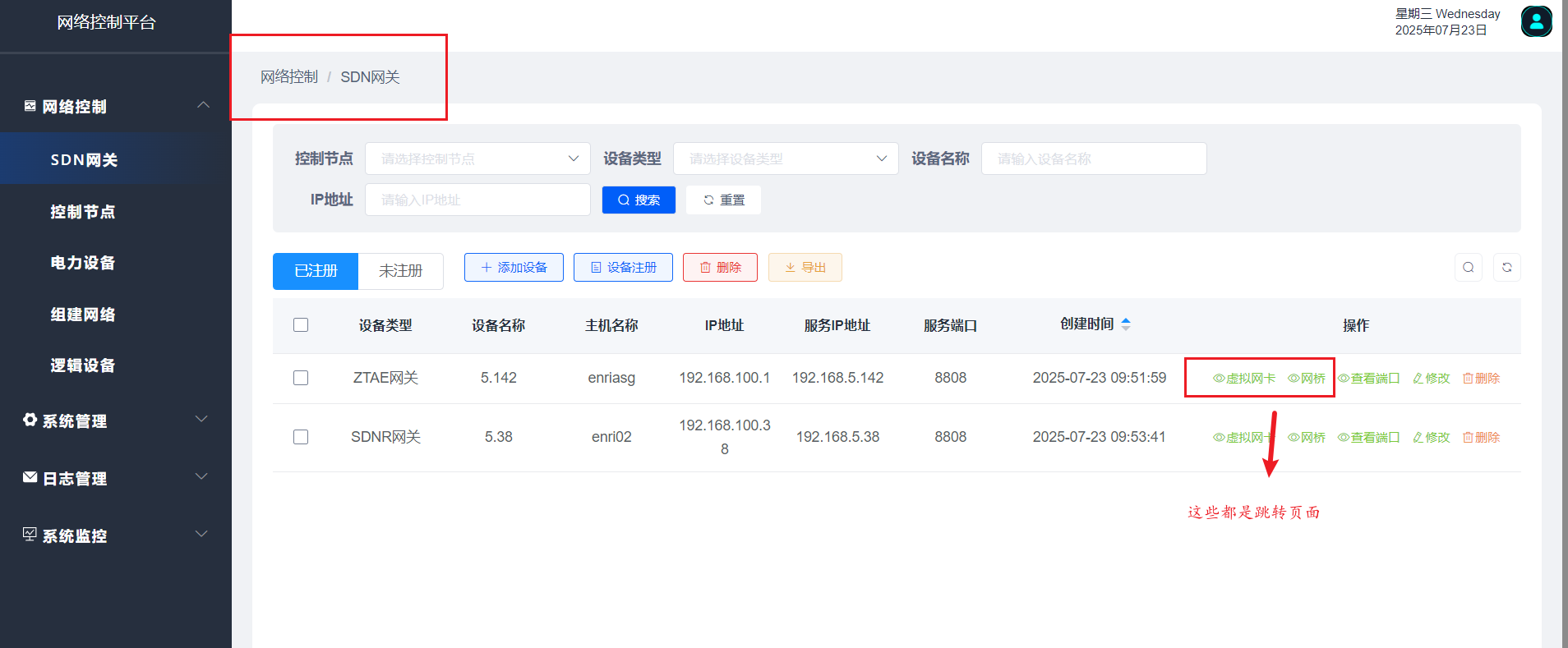
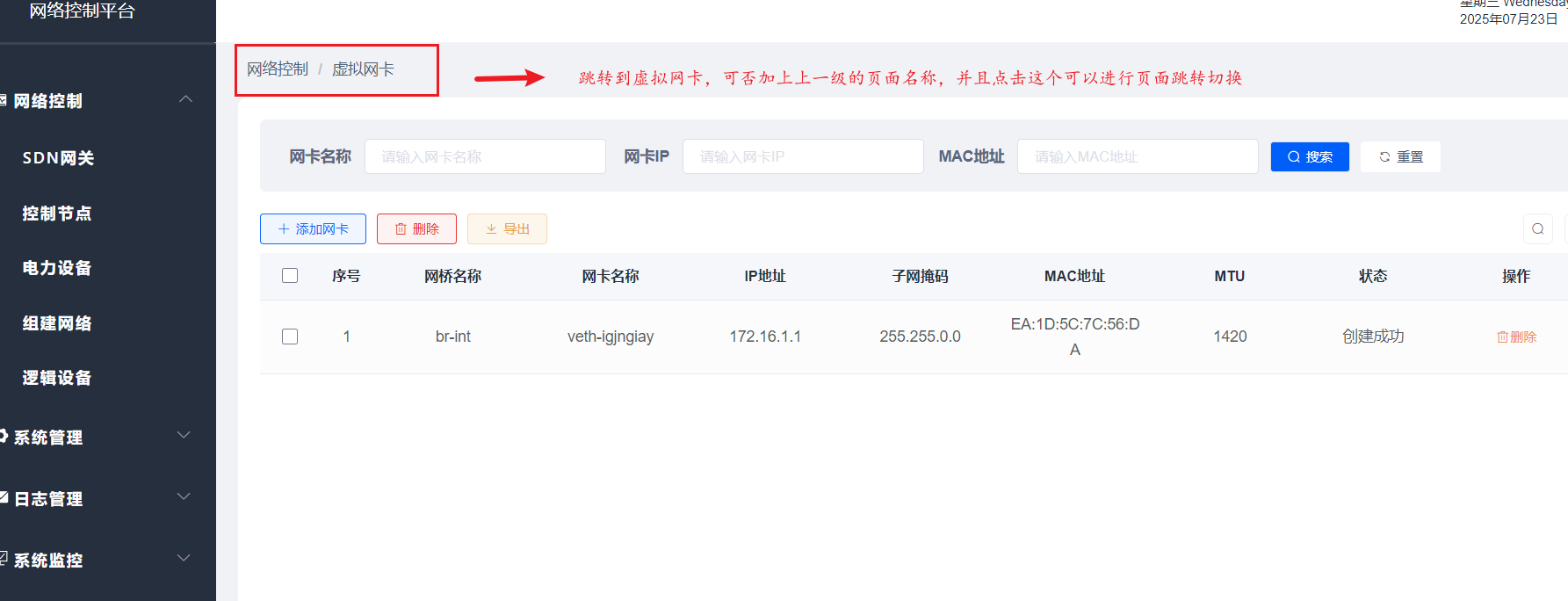
下面是面包屑导航栏封装的组件代码
<template>
  <div class="container">
    <!-- <i class="el-icon-map-location"></i> -->
    <el-breadcrumb class="app-breadcrumb" separator="/">
      <transition-group name="breadcrumb">
        <!-- <el-breadcrumb-item v-for="(item,index) in levelList" :key="item.path">
          <span v-if="item.redirect === 'noRedirect' || index == levelList.length - 1" class="no-redirect">{{ item.meta.title }}</span>
          <a v-else>{{ item.meta.title }}</a>
        </el-breadcrumb-item> -->
        <el-breadcrumb-item v-for="(item,index) in levelList" :key="item.path">
          <span v-if="item.redirect === 'noRedirect' || index == levelList.length - 1" class="no-redirect">{{ item.meta.title }}</span>
          <a v-else @click.prevent="handleLink(item)">{{ item.meta.title }}</a>
        </el-breadcrumb-item>
      </transition-group>
    </el-breadcrumb>
  </div>

</template>

<script>
export default {
  data() {
    return {
      levelList: null
    }
  },
  watch: {
    $route(route) {
      // if you go to the redirect page, do not update the breadcrumbs
      if (route.path.startsWith('/redirect/')) {
        return
      }
      this.getBreadcrumb()
    }
  },
  created() {
    this.getBreadcrumb()
  },
  methods: {
    getBreadcrumb() {
      // only show routes with meta.title
      let matched = this.$route.matched.filter(item => item.meta && item.meta.title)
      const first = matched[0]

      // if (!this.isDashboard(first)) {
      //   matched = [{ path: '/index', meta: { title: '首页' }}].concat(matched)
      // }

      this.levelList = matched.filter(item => item.meta && item.meta.title && item.meta.breadcrumb !== false)
    },
    isDashboard(route) {
      const name = route && route.name
      if (!name) {
        return false
      }
      return name.trim() === 'Index'
    },
    handleLink(item) {
      const { redirect, path } = item
      if (redirect) {
        this.$router.push(redirect)
        return
      }
      this.$router.push(path)
    }
  }
}
</script>

<style lang="scss" scoped>
.container{
  display:flex;
  align-items: center;
  /* color: #bfebfa; */
  .app-breadcrumb.el-breadcrumb {
    display: inline-block;
    font-size: 14px;
    line-height: 50px;
    margin-left: 8px;

    .no-redirect {
      color: #515f77;
      cursor: text;
    }
  }
}
</style>
下面是一个页面代码(其他页面也有跳转)
 <!-- 虚拟网卡 -->
<template>
  <div class="app-container">
    <bread-crumb />

    <div class="container-bottom">
      <el-form :model="queryParams" ref="queryForm" size="small" :inline="true" v-show="showSearch" label-width="60px" class="container-top">
        <el-form-item label="网卡名称" prop="vnicName" label-width="75px">
          <el-input
            v-model="queryParams.vnicName"
            placeholder="请输入网卡名称"
            clearable
            @keyup.enter.native="handleQuery"
          />
        </el-form-item>
        <el-form-item label="网卡IP" prop="ipAddress">
          <el-input
            v-model="queryParams.ipAddress"
            placeholder="请输入网卡IP"
            clearable
            @keyup.enter.native="handleQuery"
          />
        </el-form-item>
        <el-form-item label="MAC地址" prop="mac" label-width="75px">
          <el-input
            v-model="queryParams.mac"
            placeholder="请输入MAC地址"
            clearable
            @keyup.enter.native="handleQuery"
          />
        </el-form-item>
        <el-form-item>
          <el-button class="button-search" icon="el-icon-search" size="mini" @click="handleQuery">搜索</el-button>
          <el-button class="button-refresh" icon="el-icon-refresh" size="mini" @click="resetQuery">重置</el-button>
        </el-form-item>
      </el-form>
      <el-row :gutter="10" class="mb8">
        <el-col :span="1.5">
          <el-button
            type="primary"
            plain
            icon="el-icon-plus"
            size="mini"
            @click="handleAdd"
            v-hasPermi="['system:post:add']"
          >添加网卡</el-button>
        </el-col>
        <el-col :span="1.5">
          <el-button
            type="danger"
            plain
            icon="el-icon-delete"
            size="mini"
            :disabled="multiple"
            @click="handleDelete"
            v-hasPermi="['system:post:remove']"
          >删除</el-button>
        </el-col>
        <el-col :span="1.5">
          <el-button
            type="warning"
            plain
            icon="el-icon-download"
            size="mini"
            @click="handleExport"
            v-hasPermi="['system:post:export']"
          >导出</el-button>
        </el-col>
        <right-toolbar :showSearch.sync="showSearch" @queryTable="getList"></right-toolbar>
      </el-row>

      <el-table v-loading="loading" :data="postList" @selection-change="handleSelectionChange" :height="tableHeight"  style="background-color: transparent;" header-row-class-name="header-row-style">
        <el-table-column type="selection" width="55" align="center" />
        <el-table-column label="序号" type="index" align="center">
          <template slot-scope="scope">
            <span>{{(pageNum - 1) * pageSize + scope.$index + 1}}</span>
          </template>
        </el-table-column>
        <el-table-column label="网桥名称" align="center" prop="brName" />
        <el-table-column label="网卡名称" align="center" prop="vnicName" />
        <el-table-column label="IP地址" align="center" prop="ipAddress" />
        <el-table-column label="子网掩码" align="center" prop="mask" />
        <el-table-column label="MAC地址" align="center" prop="mac" />
        <el-table-column label="MTU" align="center" prop="mtu" />
        <el-table-column label="状态" align="center" prop="status" width="120" >
          <template slot-scope="scope">
            <span v-if="scope.row.status == '1'">创建成功</span>
            <el-button
              v-if="scope.row.status != '1'"
              size="mini"
              type="text"
              @click="handleReAdd(scope.row)"
              v-hasPermi="['monitor:job:query']"
            >{{ scope.row.status == '0' ? '未创建,点此创建' : scope.row.status == '2' ? '创建失败,点此重建' : '' }}</el-button>
          </template>
        </el-table-column>
        <el-table-column label="操作" align="center" class-name="small-padding fixed-width">
          <template slot-scope="scope">
            <el-button
              class="del-btn"
              size="mini"
              type="text"
              icon="el-icon-delete"
              @click="handleDelete(scope.row)"
              v-hasPermi="['system:post:remove']"
            >删除</el-button>
          </template>
        </el-table-column>
      </el-table>

      <pagination
        v-show="total>0"
        :total="total"
        :page.sync="queryParams.pageNum"
        :limit.sync="queryParams.pageSize"
        @pagination="getList"
      />
    </div>

    <!-- 添加或修改控制节点对话框 -->
    <el-dialog :title="title" :visible.sync="open" width="800px" :close-on-click-modal="false" append-to-body>
      <el-form ref="form" :model="form" :rules="rules" label-width="110px">
        <el-row>
          <el-col :span="12">
            <el-form-item label="网桥名称" prop="brName">
              <el-input v-model="form.brName" placeholder="请输入网桥名称" :disabled="editEnable"/>
            </el-form-item>
          </el-col>
          <el-col :span="12">
            <el-form-item label="网卡名称" prop="vnicName">
              <el-input v-model="form.vnicName" placeholder="请输入网卡名称" />
            </el-form-item>
          </el-col>
        </el-row>
        <el-row>
          <el-col :span="12">
            <el-form-item label="IP地址" prop="ipAddress">
              <el-input v-model="form.ipAddress" placeholder="请输入IP地址" />
            </el-form-item>
          </el-col>
          <el-col :span="12">
            <el-form-item label="子网掩码" prop="mask">
              <el-input v-model="form.mask" placeholder="请输入子网掩码" />
            </el-form-item>
          </el-col>
        </el-row>
        <el-row>
          <el-col :span="12">
            <el-form-item label="MAC地址" prop="mac">
              <el-input v-model="form.mac" placeholder="请输入MAC地址" style="width: calc(100% - 100px)" />
              <el-button type="text" size="mini" @click="handleMac()" style="margin-left: 10px">点击生成MAC</el-button>
            </el-form-item>
          </el-col>
          <el-col :span="12">
            <el-form-item label="MTU" prop="mtu">
              <el-input-number :min="1" :max="1420" v-model="form.mtu" placeholder="MTU"  />
            </el-form-item>
          </el-col>
        </el-row>
      </el-form>
      <div slot="footer" class="dialog-footer">
        <el-button type="primary" @click="submitForm">确 定</el-button>
        <el-button @click="cancel">取 消</el-button>
      </div>
    </el-dialog>
  </div>
</template>

<script>
import { listInterface, addInterface,reAddInterface,delInterface,delAllInterface } from "@/api/networkEquipment/networkInterface";
import breadCrumb from "@/components/Breadcrumb/index.vue"
import {listMac} from "@/api/logicalDevice/router";
import autoComputedH from '@/utils/mixins/autoComputedH'
export default {
  name: "Post",
  mixins: [autoComputedH],
  /* dicts: ['sys_normal_disable'], */
  components: {
    breadCrumb,
  },
  data() {
    return {
      // 遮罩层
      loading: true,
      // 选中数组
      ids: [],
      // 非单个禁用
      single: true,
      // 非多个禁用
      multiple: true,
      // 显示搜索条件
      showSearch: true,
      // 总条数
      total: 0,
      // 控制节点表格数据
      postList: [],
      // 弹出层标题
      title: "",
      //所在设备下拉框
      deployEqpList: [],
      // 是否显示弹出层
      open: false,
      pageNum: 1,
      pageSize: 10,
      //编辑文本框是否禁用
      editEnable: true,
      // 查询参数
      queryParams: {
        vnicName: undefined,
        ipAddress: undefined,
        mac: undefined,
        pageNum: 1,
        pageSize: 10,
      },
      // 表单参数
      form: {
        brName: undefined,
        vnicName: undefined,
        ipAddress: undefined,
        mask: undefined,
        mac: undefined,
        mtu: undefined
      },
      // 表单校验
      rules: {
        brName: [
          { required: true, message: "网桥名称不能为空", trigger: "blur" }
        ],
        vnicName: [
          { required: true, message: "网卡名称不能为空", trigger: "blur" }
        ],
        ipAddress: [
          { required: true, message: "IP地址不能为空", trigger: "blur" }
        ],
        mask: [
          { required: true, message: "子网掩码不能为空", trigger: "blur" }
        ],
        mac: [
          { required: true, message: "MAC地址不能为空", trigger: "blur" }
        ],
        mtu: [
          { required: true, message: "MTU不能为空", trigger: "blur" }
        ]
      },
      gwEqpId:null,
      containerTop: null,
    };
  },
  created() {
    this.gwEqpId = localStorage.getItem('id');;
    this.getList();
  },
  methods: {
    /** 查询岗位列表 */
    getList() {
      this.loading = true;
      listInterface({ gwEqpId: this.gwEqpId, ...this.queryParams }).then(response => {
        this.postList = response.rows;
        console.log(response, '从接口获取的数据');
        this.total = response.total;
        this.loading = false;
      });
    },
    // 取消按钮
    cancel() {
      this.open = false;
      this.reset();
    },
    // 表单重置
    reset() {
      this.form = {
        gwEqpId: undefined,
        brName: "br-int",
        ipAddress: undefined,
        vnicName: undefined,
        mac: undefined,
        mtu: 1420
      };
      this.resetForm("form");
    },
    /** 搜索按钮操作 */
    handleQuery() {
      this.queryParams.pageNum = 1;
      this.getList();
    },
    /** 重置按钮操作 */
    resetQuery() {
      this.resetForm("queryForm");
      this.handleQuery();
    },
    // 多选框选中数据
    handleSelectionChange(selection) {
      this.ids = selection.map(item => item.id)
      this.single = selection.length!=1
      this.multiple = !selection.length
    },
    /** 新增按钮操作 */
    handleAdd() {
      this.reset();
      this.open = true;
      this.title = "添加网卡";
    },
    handleReAdd(row) {
      const params = {id:row.id};
      this.$modal.confirm('是否确认重新创建?').then(()=> {
        return reAddInterface(params).then((response) => {
          if (response.success) {
            this.$modal.msgSuccess("调用成功");
            this.getList();
          } else {
            this.$modal.msgError( "调用失败");
          }
        });
      }).catch(() => {});
    },
    /** 修改按钮操作 */
    /* handleUpdate(row) {
      this.reset();
      const postId = row.postId || this.ids
      getPost(postId).then(response => {
        this.form = response.data;
        this.open = true;
        this.title = "修改岗位";
      });
    }, */
    /** 提交按钮 */
  submitForm: function() {
      this.$refs["form"].validate(valid => {
        if (valid) {
          this.form.mtu = Number(this.form.mtu);
          const formData = {
            gwEqpId: this.gwEqpId,
            brName: this.form.brName,
            vnicName: this.form.vnicName,
            ipAddress: this.form.ipAddress,
            mask: this.form.mask,
            mac: this.form.mac,
            mtu: this.form.mtu
          };
          if (this.form.gwEqpId != undefined) {
            delControlNode(this.form).then(response => {
              this.$modal.msgSuccess("修改成功");
              this.open = false;
              this.getList();
            });
          } else {
            addInterface(formData).then(response => {
              this.$modal.msgSuccess("新增成功");
              this.open = false;
              this.getList();
            });
          }
        }
      });
    },
    /** 删除按钮操作 */
    handleDelete(row) {
      const InterfaceId = {id:row.id || this.ids[0]};
      const InterfaceIds = {ids:this.ids}
      if(this.ids.length<2){
        this.$modal.confirm('是否确认删除所选虚拟网卡数据项?').then(()=> {
        return delInterface(InterfaceId).then((response) => {
          if(response.success){
            this.postList = this.postList.filter(item => item.id !== row.id);
            this.$modal.msgSuccess("删除成功");
            this.getList();
          }else {
            this.$modal.msgError( "删除失败");
          }
      });
      }).catch(() => {

      });

      }else{
        this.$modal.confirm('是否确认删除所选虚拟网卡数据项?').then(()=> {
        return delAllInterface(InterfaceIds).then((response) => {
          if(response.success){
            this.postList = this.postList.filter(item => item.id !== row.id);
            this.$modal.msgSuccess("删除成功");
            this.getList();
          }else {
            this.$modal.msgError( "删除失败");
          }
      });
      }).catch(() => {

      });
      }

    },
    handleMac(){
      listMac().then(response => {
        this.form.mac = response.data
      })
    },
    /** 导出按钮操作 */
    handleExport() {
      this.download('/vnic/export', {gwEqpId:this.gwEqpId,
        ...this.queryParams
      }, `虚拟网卡_${new Date().getTime()}.xlsx`)
    }
  }
};
</script>
<style scoped>
</style>


