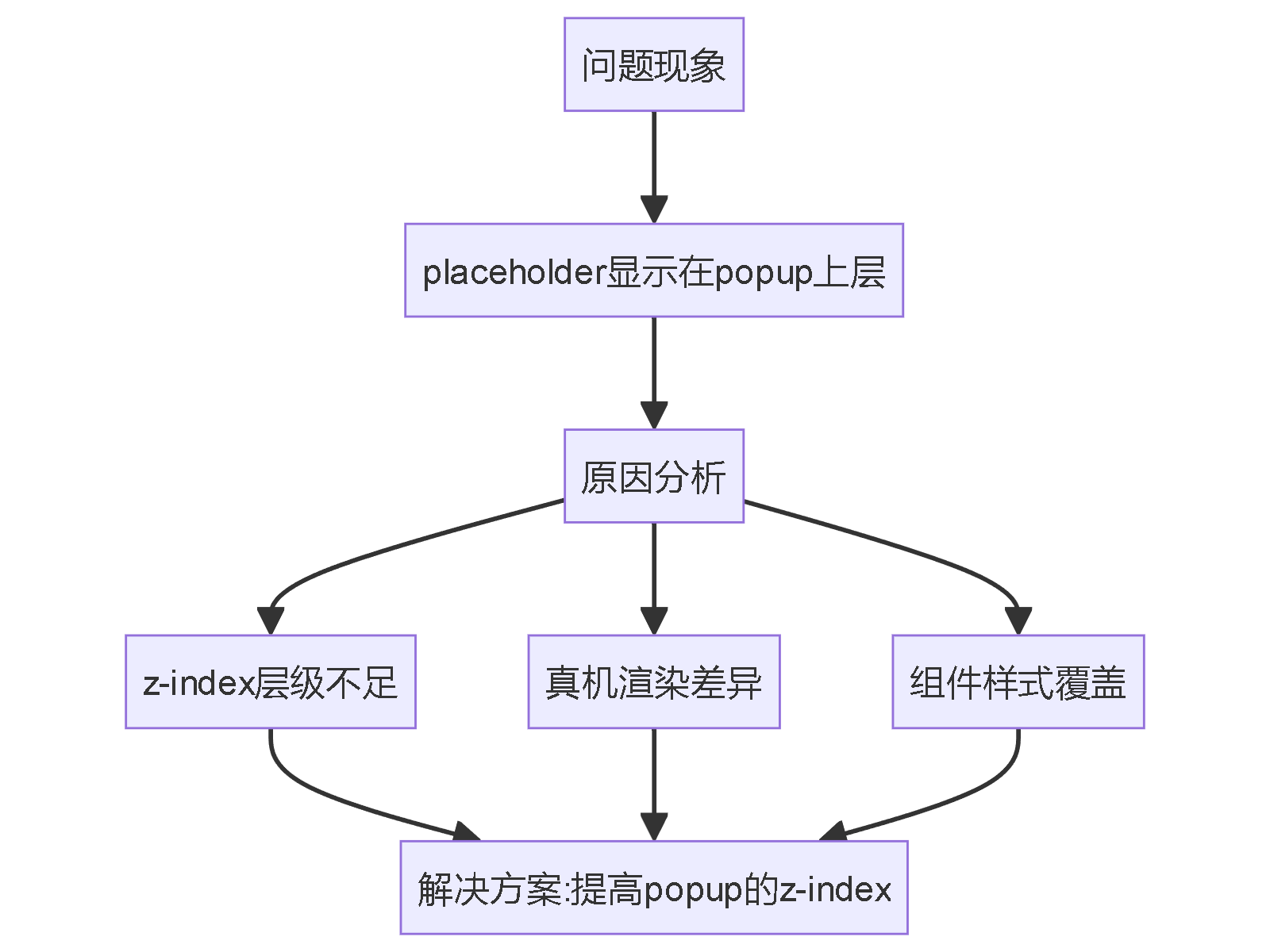
现象:
微信小程序使用van-calendar+van-popup 和 van-field 配合点击出现弹窗时,真机上显示 van-filed的 placeholder 在 popup上层;如何修改?
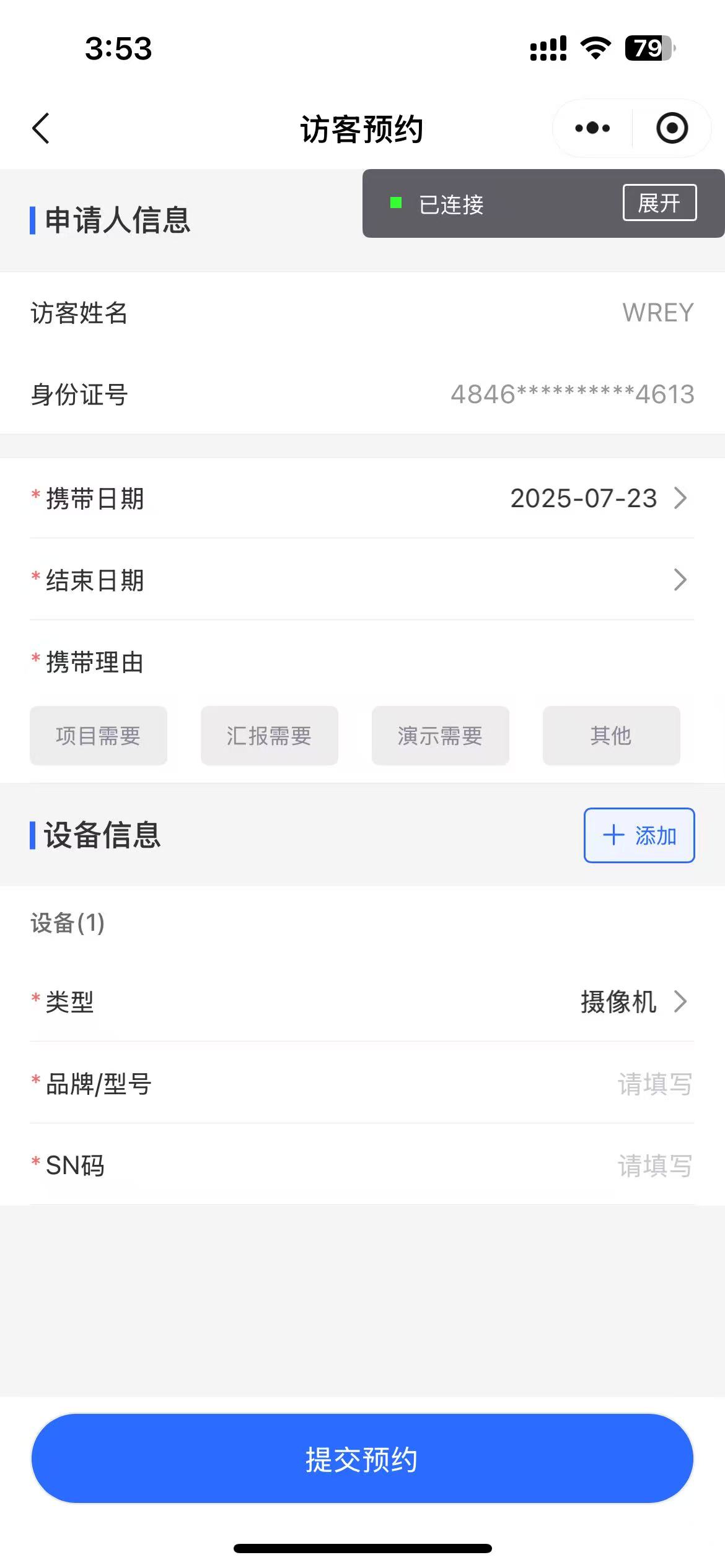
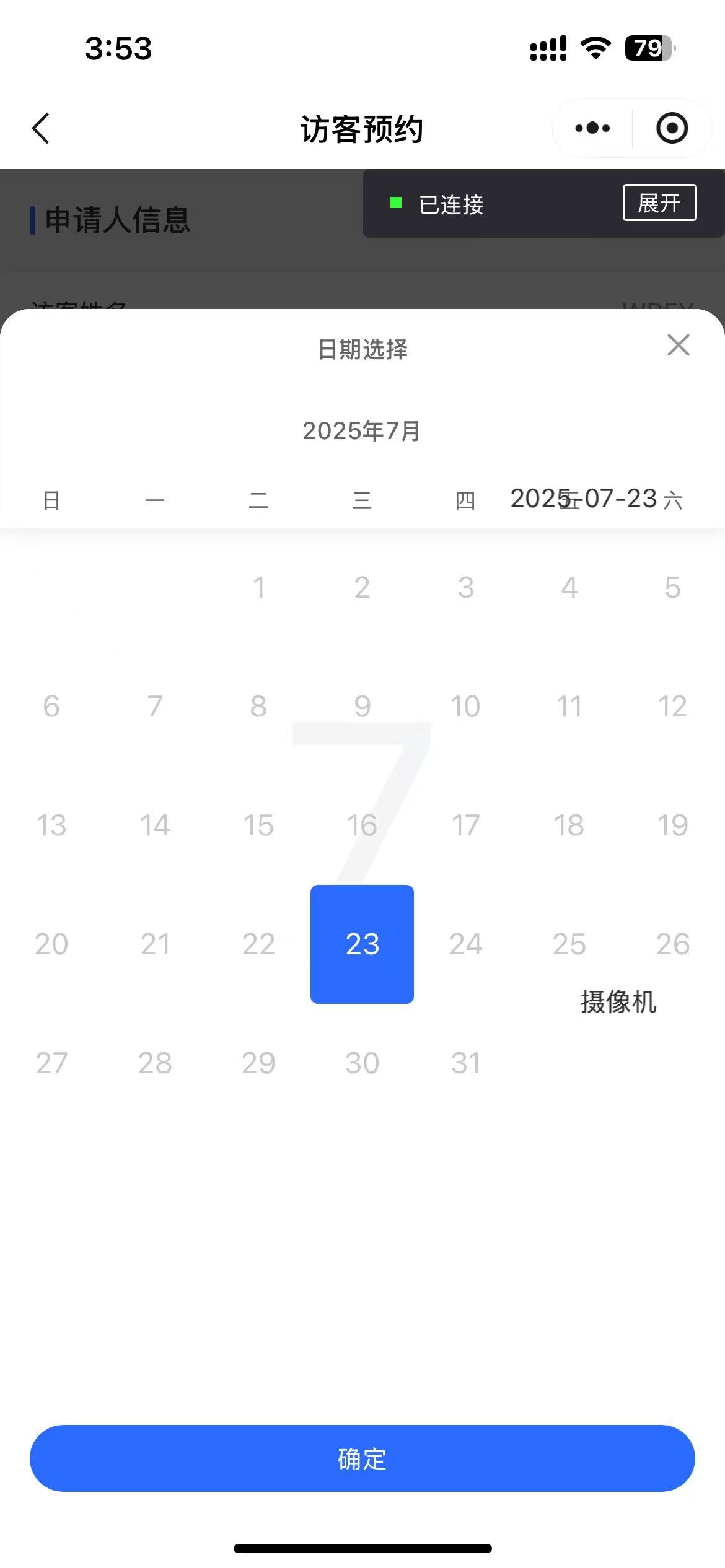
代码:
<view class="es-container">
  <view class="es-main">
    <view class="es-section-title">申请人信息</view>
    <view class="mb24">
      <van-cell-group>
        <van-cell title="访客姓名" value="{{baseInfo.name }}" border="{{ false }}"></van-cell>
        <van-cell title="身份证号" value="{{ baseInfo.idCard }}" border="{{ false }}" />
      </van-cell-group>
    </view>

    <van-cell-group class="mt24">
      <van-field data-field="startTime" input-align="right" name="startTime" value="{{ form.startTime }}" is-link readonly placeholder="只能选择最近两天日期" bind:tap="onDateDisplay">
        <view slot="label">
          <view class="required">携带日期</view>
        </view>
      </van-field>
      <van-field data-field="endTime" input-align="right" name="endTime" value="{{ form.endTime }}" is-link readonly bind:tap="onDateDisplay">
        <view slot="label">
          <view class="required">结束日期</view>
        </view>
      </van-field>

      <van-cell use-label-slot="{{true}}">
        <view slot="title">
          <view class="required">携带理由</view>
        </view>

        <view slot="label" class="label-class">
          <block wx:for="{{reasonOptions}}" wx:key="code">
            <view class="checkbox-cell {{item.checked ? 'checked' : ''}}" bindtap="toggleReason" data-value="{{item.code}}">
              <text class="">{{item.name}}</text>
            </view>
          </block>
        </view>
      </van-cell>
    </van-cell-group>

    <view class="section-devices">
      <view class="es-section-title">设备信息</view>
      <van-button bind:click="addDevice" custom-class="plus-btn" icon="plus" size="small">添加</van-button>
    </view>
    <view class="mb24">
      <view wx:for="{{devices}}" class="mb24" wx:key="index">
        <view class="equipt-title">
          <text>设备({{index+1}})</text>
          <van-icon wx:if="{{index+1 > 1}}" name="cross" data-key="{{index}}" color="red" size="36rpx" custom-class="custom-icon-style" bind:click="delDevice" />
        </view>
        <!-- <van-field  error-message="{{formErrors.list[index].type}}" error-message-align="right"  data-key="date" input-align="right" name="date" value="{{ item.types }}" is-link readonly placeholder="请选择" bind:tap="onDisplay">
          <view slot="label">
            <view class="required">类型</view>
          </view>
        </van-field> -->
        <van-field  input-align="right" name="type" value="{{ item.type }}" data-index="{{index}}" data-field="type" is-link readonly placeholder="请选择" bind:tap="onTypeDisplay">
          <view slot="label">
            <view class="required">类型</view>
          </view>
        </van-field>

        <van-field   name="model" input-align="right" value="{{ item.model }}" data-index="{{index}}" data-field="model" placeholder="请填写" bind:change="onFieldChange">
          <view slot="label">
            <view class="required">品牌/型号</view>
          </view>
        </van-field>
        <van-field   name="snCode" input-align="right" value="{{ item.snCode }}" data-index="{{index}}" data-field="snCode" placeholder="请填写" bind:change="onFieldChange">
          <view slot="label">
            <view class="required">SN码</view>
          </view>
        </van-field>
      </view>
    </view>
  </view>
  <view class="es-bottom">
    <!-- 申请按钮 -->
    <van-button disabled="{{submitLoading}}" loading="{{submitLoading}}" round custom-class="es-submit-btn" size="large" bind:click="submitInfo">提交预约</van-button>
  </view>
</view>
<van-popup show="{{ showCascader }}" round position="bottom" z-index="10020">
  <van-cascader
    wx:if="{{ showCascader }}"
    value="{{ cascaderValue }}"
    title="请选择"
    field-names="{{ fieldNames }}"
    options="{{ typeOptions }}"
    bind:close="onClose"
    bind:finish="onFinish"
  />
</van-popup>
<van-popup show="{{ dateShow }}" round position="bottom" z-index="10020">
  <van-calendar default-date="{{calendarvalue}}" show="true" max-date="{{maxDate}}" min-date="{{ minDate }}" bind:close="onDateClose" bind:confirm="onDateConfirm" color="#2C6BFF" />
</van-popup>
wxss
@import '/style/container.wxss';

/* apply */
.required::before {
  content: "*";
  color: #f56c6c;
  margin-right: 5rpx;
}

.mb24 {
  margin-bottom: 24rpx;
}

.ml20 {
  margin-left: 10px;
  color: #2C6BFF;
}

.mt24 {
  margin-top: 24rpx;
}


/* devices */
.section-devices {
  display: flex;
  justify-content: space-between;
  align-items: center;
  padding-right: 32rpx;
}

.plus-btn {
  border-radius: 8rpx !important;
  background-color: #EFF4FF !important;
  color: #2C6BFF !important;
  border: 2rpx solid #2C6BFF !important;
}

.label-class {
  margin-top: 24rpx;
  display: grid;
  grid-template-columns: repeat(4, 1fr);
  gap: 20rpx;
}

.checkbox-cell {
  width: 144rpx;
  height: 62rpx;
  display: flex;
  justify-content: center;
  align-items: center;
  border-radius: 8rpx;
  font-size: 24rpx;
  background: #EDEDED;
  box-sizing: border-box;
  border: 0.5px solid #EDEDED;
  color: #898B97;
}

.checkbox-cell.checked {
  background: #2C6BFF;
  color: #FFFFFF;
  font-weight: normal;
}

.equipt-title {
  display: flex;
  align-items: center;
  padding: var(--cell-vertical-padding, 10px) var(--cell-horizontal-padding, 16px);
  background-color: #fff;
  font-size: 24rrpx;
  font-weight: 500;
  color: #6B6B6B;
}

.custom-icon-style {
  margin-left: 20rpx !important;
}
.custom-icon-style:hover{
  background-color: var(--es-bg-color);
}
container.wxss
page {
  --es-bg-color: #f5f5f5;
  /* 按钮 */
  --es-primary-btn: #2C6BFF;
}
/* 申请布局:上滚动+按钮 */
page,
.es-container {
  display: flex;
  flex-direction: column;
  background-color: var(--es-bg-color);
  width: 100%;
  height: 100%;
  box-sizing: border-box;
  overflow: hidden;
}

.es-main {
  flex: 1;
  overflow: auto;
}

.es-bottom {
  background-color: #fff;
  width: 100%;
  opacity: 1;
  box-sizing: border-box;
  padding: 16rpx 32rpx;
  border-top: 2rpx solid var(--es-bg-color);
  display: flex;
  flex-direction: column;
}

/* 兼容旧版 iOS */
@supports (bottom: constant(safe-area-inset-bottom)) {
  .es-bottom {
    padding-bottom: constant(safe-area-inset-bottom);
  }
}

/* 兼容新版 iOS */
@supports (bottom: env(safe-area-inset-bottom)) {
  .es-bottom {
    padding-bottom: env(safe-area-inset-bottom);
  }
}

.es-submit-btn {
  background-color: var(--es-primary-btn) !important;
  color: #fff !important;
  font-size: 32rpx!important;
}

/* 蓝色块级区域 */
.es-section-title {
  color: #333;
  font-size: 32rpx;
  font-weight: 500;
  position: relative;
  margin: 30rpx 0;
  padding-left: 14rpx;
  margin-left: 32rpx;
  font-family: Source Han Sans;
}

.es-section-title::before {
  content: "";
  position: absolute;
  left: 0rpx;
  top: 50%;
  transform: translateY(-50%);
  width: 6rpx;
  height: 30rpx;
  background-color: #2C6BFF;
}

.es-section-info {
  background-color: #fff;
  padding: 15px;
}