SprintBoot版本是3.4。JDK版本是1.8。idea也设置的是1.8
SpringApplication运行报错:类文件具有错误的版本 61.0, 应为 52.0。
在不降低SpringBoot版本的提前下如何解决该问题?求解决

jdk版本

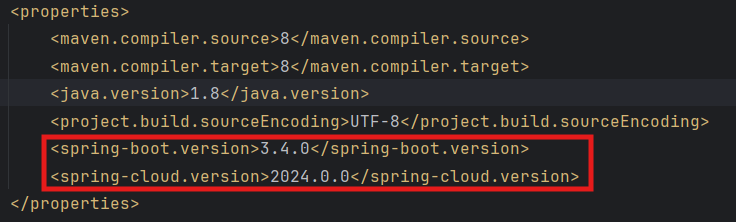
maven配置

SprintBoot版本是3.4。JDK版本是1.8。idea也设置的是1.8
SpringApplication运行报错:类文件具有错误的版本 61.0, 应为 52.0。
在不降低SpringBoot版本的提前下如何解决该问题?求解决
jdk版本
maven配置
 分享
分享
下午好🌅🌅🌅
本答案参考通义千问
你遇到的错误信息是:
类文件具有错误的版本 61.0, 应为 52.0
这个错误表示你的项目中某些类文件是用更高版本的 JDK 编译的(例如 JDK 17 或更高),而运行时使用的 JDK 是 JDK 8(版本 52.0)。Spring Boot 3.4 要求至少使用 JDK 17,但你目前使用的是 JDK 8。
这是最直接、最推荐的解决方案。Spring Boot 3.4 需要 JDK 17+ 才能正常运行。
JAVA_HOME 指向 JDK 17 的安装路径⚠️ 如果你不能升级 JDK,那么 Spring Boot 3.4 将无法正常运行,因为其底层依赖已不再兼容 JDK 8。
确保所有依赖项都使用 JDK 17 编译,而不是 JDK 8。
pom.xml 文件:<properties>
<maven.compiler.source>17</maven.compiler.source>
<maven.compiler.target>17</maven.compiler.target>
<java.version>17</java.version>
</properties>
如果你使用的是 Spring Boot 3.4,它默认会使用 JDK 17,但如果你的本地环境仍然使用 JDK 8,Maven 可能会误用它。
有时候旧的依赖可能被缓存在 .m2/repository 中,导致冲突。
mvn clean install -U
-U参数强制更新快照依赖,避免使用旧版本。
在 IntelliJ IDEA 中:
File -> Project Structure -> SDKs有些第三方库可能仍然使用 JDK 8 编译,可以尝试以下方式排查:
mvn dependency:tree 查看依赖树spring-boot-starter-web 或其他组件是否与 JDK 17 兼容如果由于某些原因你必须使用 JDK 8,那么只能:
Spring Boot 2.x 支持 JDK 8。
pom.xml<parent>
<groupId>org.springframework.boot</groupId>
<artifactId>spring-boot-starter-parent</artifactId>
<version>2.7.15</version>
<relativePath/>
</parent>
然后执行:
mvn clean install
| 问题 | 解决方案 |
|------|----------|
| 类文件版本错误 | 升级 JDK 到 17 或以上 |
| Maven 编译版本错误 | 在 pom.xml 中设置 <maven.compiler.source>17</maven.compiler.source> |
| IDEA/JDK 设置错误 | 确保 Project SDK 和 Language Level 为 JDK 17 |
| 依赖冲突 | 清理 Maven 缓存并检查依赖兼容性 |
| 无法升级 JDK | 降级 Spring Boot 到 2.x(如 2.7.x) |
如有需要,我可以提供完整的 pom.xml 示例或 JDK 安装指南。
分享 创建了问题
7月26日
创建了问题
7月26日

