墨水屏无法复原,同时显示乱码
各位佬帮帮忙吧qwq
以下是我的esp32插线,驱动板,墨水屏
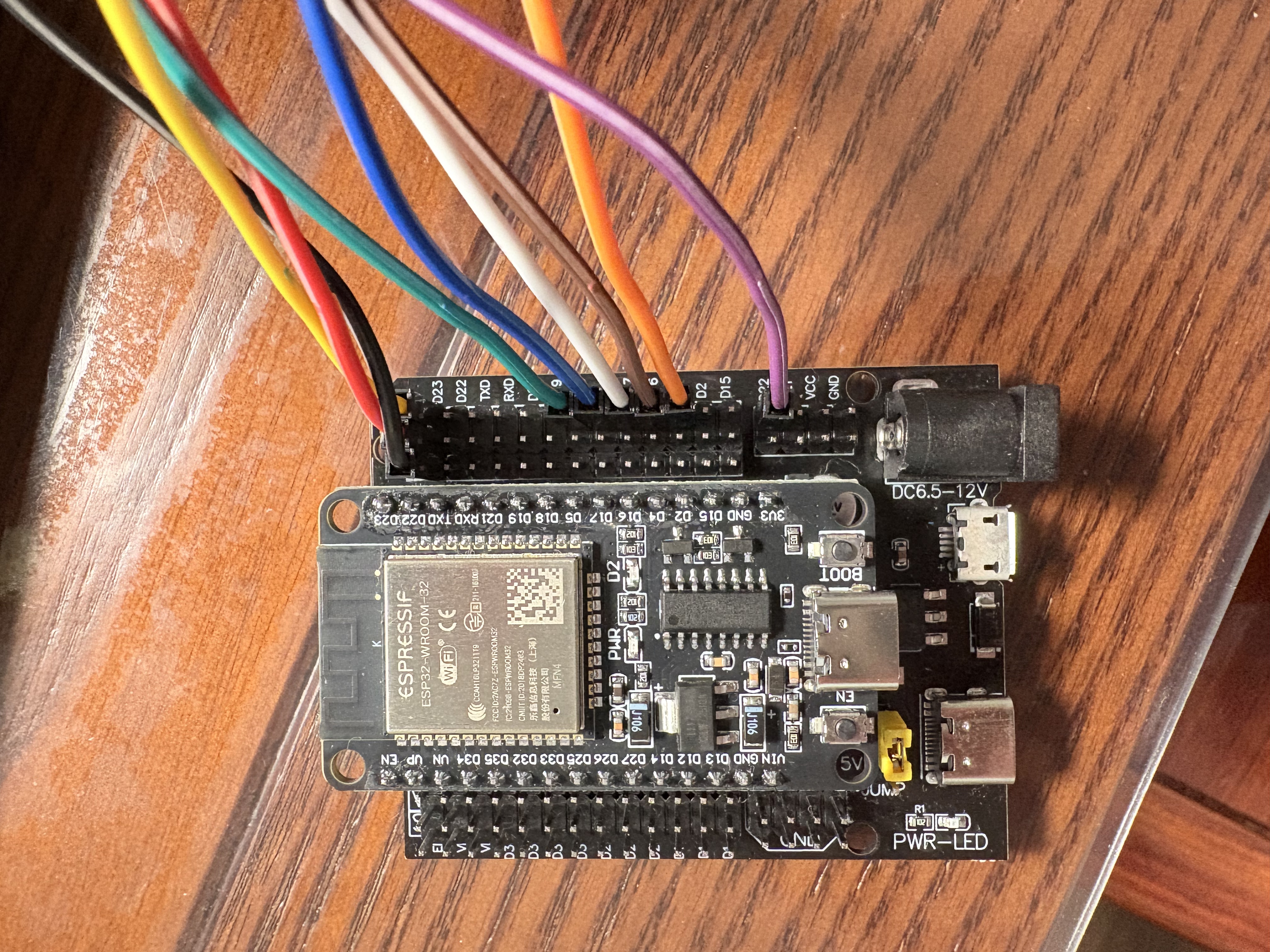
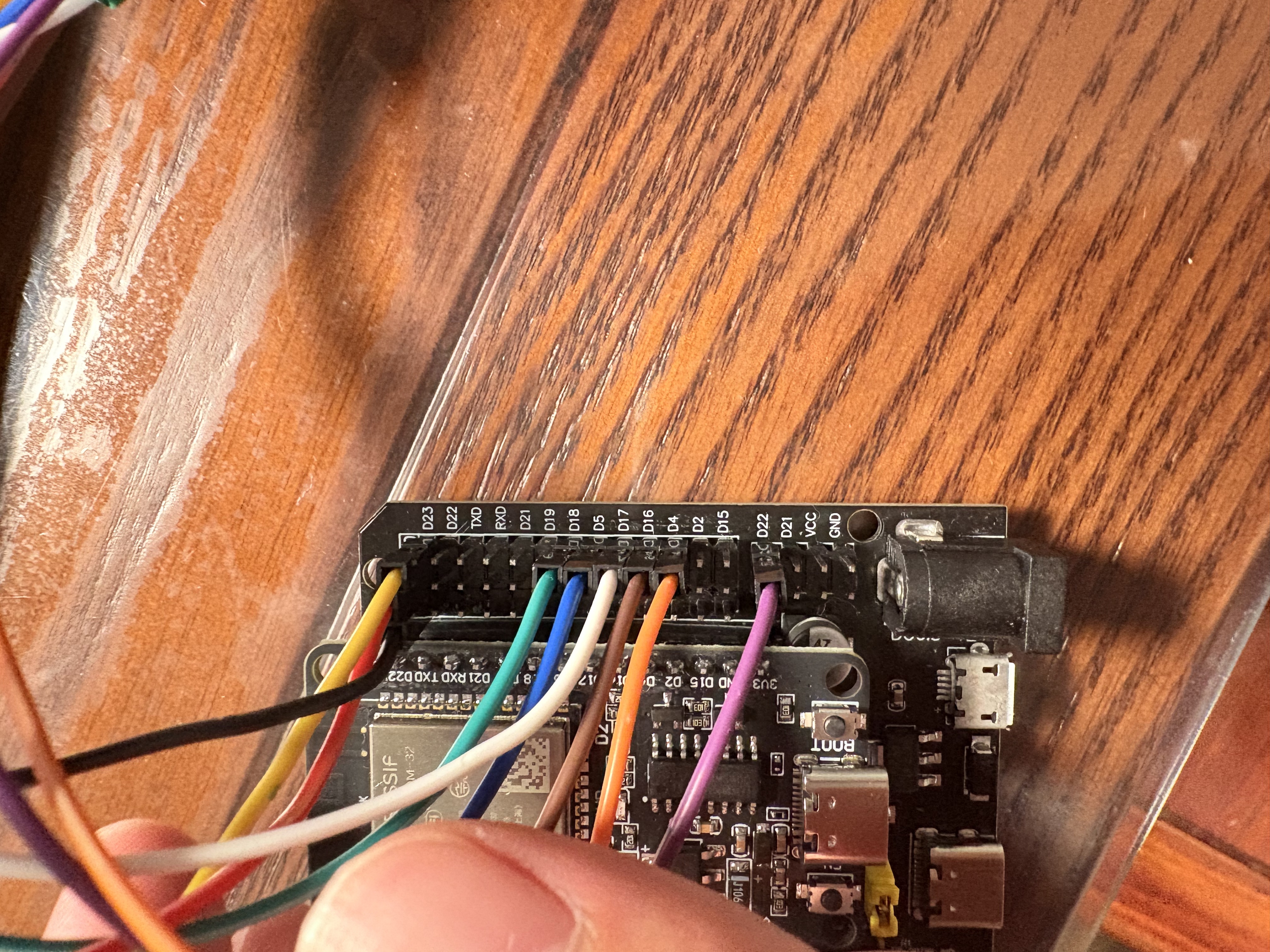
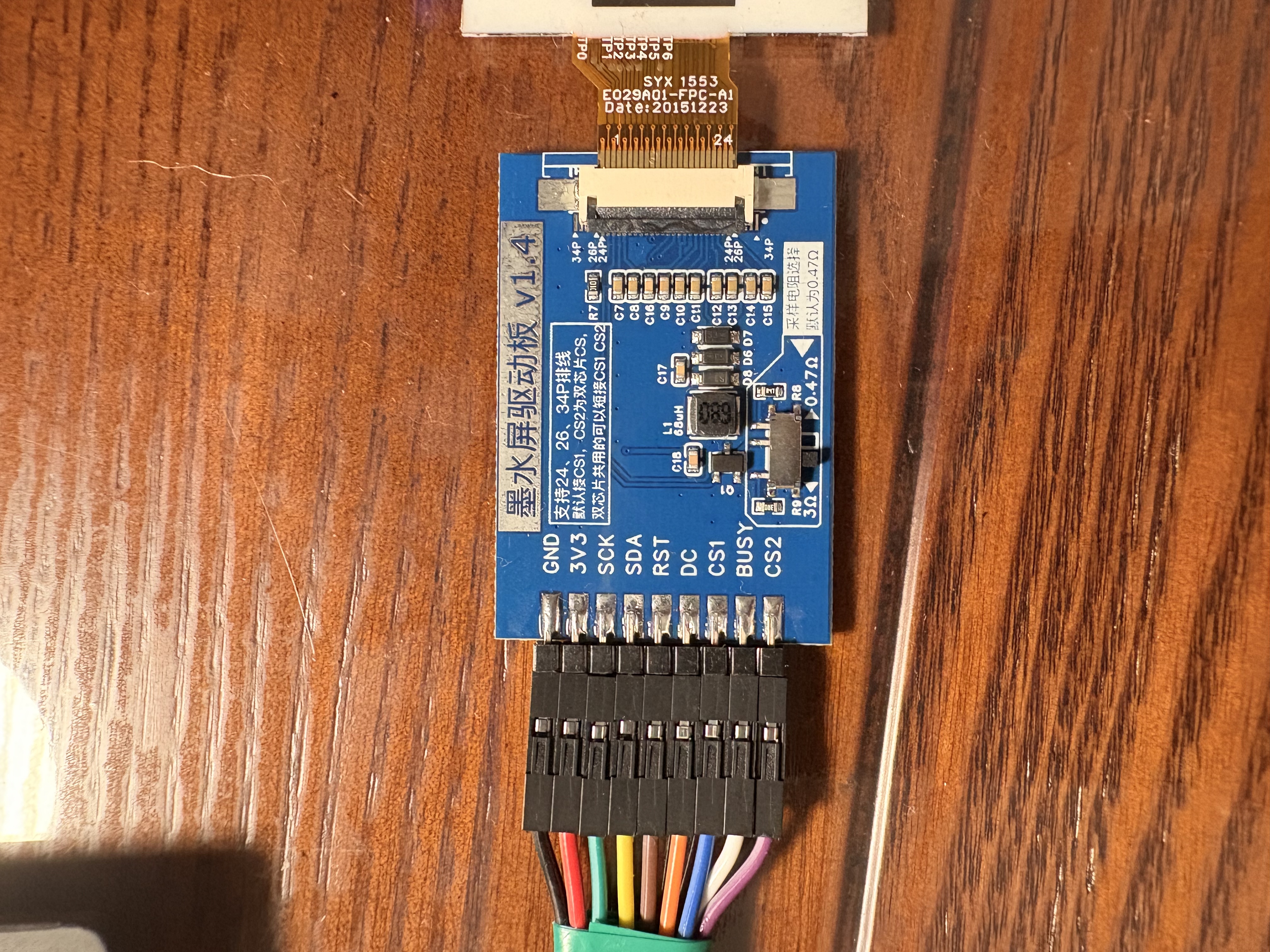
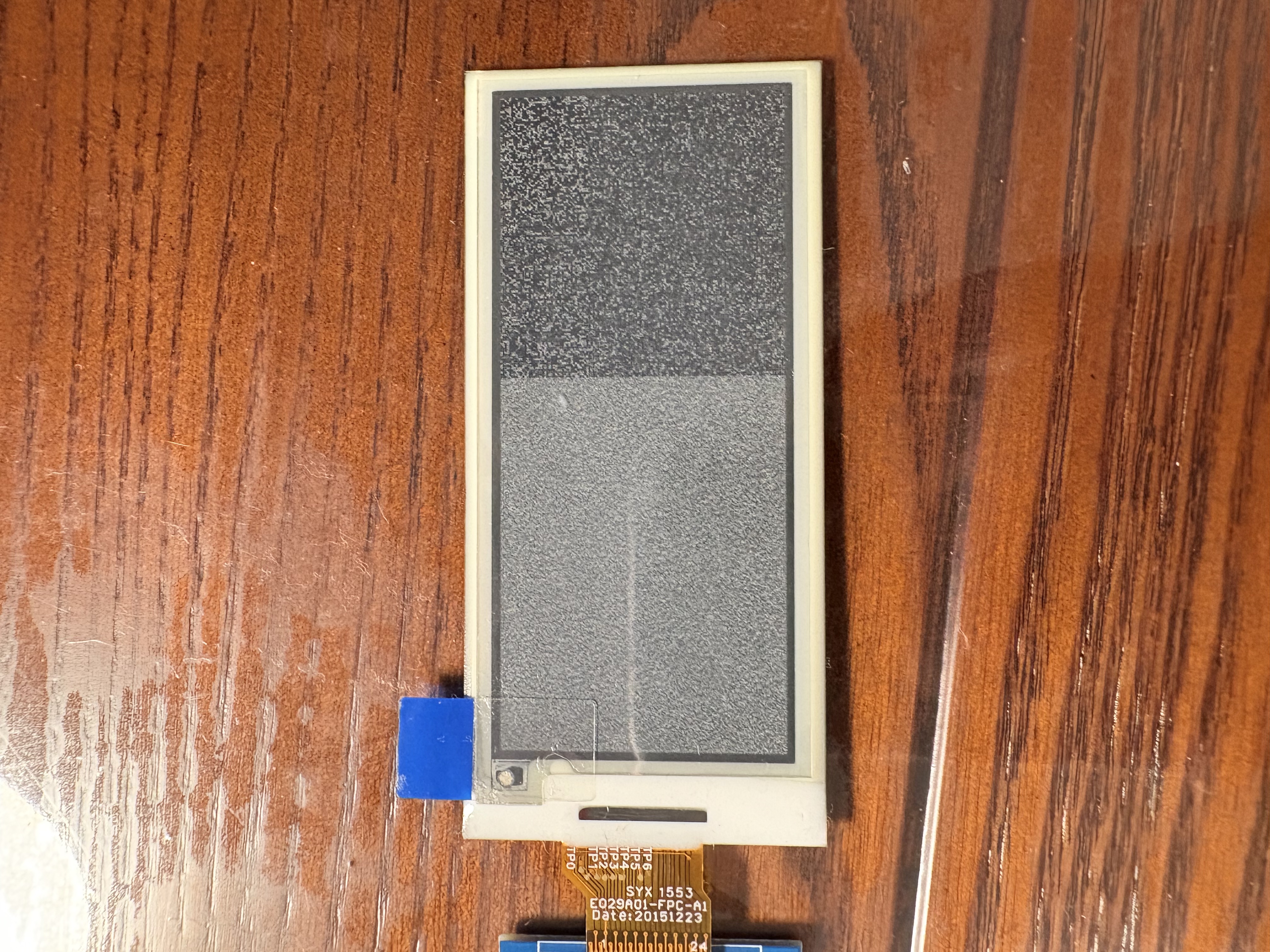
下面是全白的代码,但是没什么作用
from machine import Pin, SPI
import time

class EPD:
    def __init__(self, spi, cs, dc, rst, busy, cs2):
        self.spi = spi
        self.cs = cs
        self.dc = dc
        self.rst = rst
        self.busy = busy
        self.cs2 = cs2

        self.width = 296
        self.height = 128

        self.cs.init(self.cs.OUT, value=1)
        self.dc.init(self.dc.OUT, value=0)
        self.rst.init(self.rst.OUT, value=0)
        self.busy.init(self.busy.IN)
        self.cs2.init(self.cs2.OUT, value=1)

        self.init()

    def write_cmd(self, cmd):
        self.dc(0)
        self.cs(0)
        self.spi.write(bytearray([cmd]))
        self.cs(1)

    def write_data(self, data):
        self.dc(1)
        self.cs(0)
        self.spi.write(data)
        self.cs(1)

    def wait_until_idle(self):
        while self.busy() == 1:
            time.sleep_ms(10)

    def init(self):
        self.reset()

        self.write_cmd(0x12)  # SWRESET
        self.wait_until_idle()

        # 设置面板配置
        self.write_cmd(0x01)  # DRIVER_OUTPUT_CONTROL
        self.write_data(bytearray([(self.height - 1) & 0xFF]))
        self.write_data(bytearray([((self.height - 1) >> 8) & 0xFF]))
        self.write_data(bytearray([0x00]))  # GD = 0; SM = 0; TB = 0

        self.write_cmd(0x11)  # DATA_ENTRY_MODE
        self.write_data(bytearray([0x03]))  # X increment; Y increment

        # 设置RAM地址
        self.write_cmd(0x44)  # SET_RAM_X_ADDRESS_START_END_POSITION
        self.write_data(bytearray([0x00]))
        self.write_data(bytearray([(self.width // 8) - 1]))

        self.write_cmd(0x45)  # SET_RAM_Y_ADDRESS_START_END_POSITION
        self.write_data(bytearray([0x00, 0x00]))
        self.write_data(bytearray([(self.height - 1) & 0xFF]))
        self.write_data(bytearray([((self.height - 1) >> 8) & 0xFF]))

        # 设置RAM指针
        self.write_cmd(0x4E)  # SET_RAM_X_ADDRESS_COUNTER
        self.write_data(bytearray([0x00]))

        self.write_cmd(0x4F)  # SET_RAM_Y_ADDRESS_COUNTER
        self.write_data(bytearray([0x00, 0x00]))

        # 设置波形
        self.write_cmd(0x32)
        self.write_data(bytearray([
            0x80, 0x60, 0x40, 0x00, 0x00, 0x00, 0x00,
            0x10, 0x60, 0x20, 0x00, 0x00, 0x00, 0x00,
            0x80, 0x60, 0x40, 0x00, 0x00, 0x00, 0x00,
            0x10, 0x60, 0x20, 0x00, 0x00, 0x00, 0x00,
            0x00, 0x00, 0x00, 0x00, 0x00, 0x00, 0x00
        ]))

        # 设置边框波形控制
        self.write_cmd(0x3C)  # BORDER_WAVEFORM_CONTROL
        self.write_data(bytearray([0x05]))

        # 设置显示更新控制
        self.write_cmd(0x22)  # DISPLAY_UPDATE_CONTROL_2
        self.write_data(bytearray([0xC7]))
        self.write_cmd(0x20)  # MASTER_ACTIVATION

        self.wait_until_idle()

    def reset(self):
        self.rst(1)
        time.sleep_ms(20)
        self.rst(0)
        time.sleep_ms(2)
        self.rst(1)
        time.sleep_ms(20)

    def display_white(self):
        # 创建全白缓冲区 (所有位设置为1)
        white_buffer = bytearray([0xFF] * (self.width * self.height // 8))

        self.write_cmd(0x24)  # WRITE_RAM
        self.write_data(white_buffer)

        # 触发显示更新
        self.write_cmd(0x22)  # DISPLAY_UPDATE_CONTROL_2
        self.write_data(bytearray([0xC7]))
        self.write_cmd(0x20)  # MASTER_ACTIVATION

        self.wait_until_idle()

    def sleep(self):
        self.write_cmd(0x10)  # DEEP_SLEEP_MODE
        self.write_data(bytearray([0x01]))
        time.sleep_ms(100)

# 主程序
def main():
    # 初始化SPI
    spi = SPI(2, baudrate=20000000, polarity=0, phase=0, sck=Pin(18), mosi=Pin(23))

    # 初始化墨水屏
    epd = EPD(spi, cs=Pin(5), dc=Pin(4), rst=Pin(16), busy=Pin(17), cs2=Pin(22))

    # 显示全白
    epd.display_white()

    # 进入睡眠模式
    epd.sleep()
    print("Screen is now white and in sleep mode")

if __name__ == "__main__":
    main()
后面是我主要程序的代码
主要想做一个显示天气的墨水屏
对了,其实代码都是ai写的
完全不会啊qwq
有一个背景,但显示错误
wifi_ssid和wifi_password打的*,各位记得改一改
用的weather_api
weather_api_key就放在上面了
先是驱动epaper29l.py
from machine import Pin, SPI
import time

class EPD:
    def __init__(self, spi, cs, dc, rst, busy, cs2):
        self.spi = spi
        self.cs = cs
        self.dc = dc
        self.rst = rst
        self.busy = busy
        self.cs2 = cs2

        self.width = 296
        self.height = 128

        self.cs.init(self.cs.OUT, value=1)
        self.dc.init(self.dc.OUT, value=0)
        self.rst.init(self.rst.OUT, value=0)
        self.busy.init(self.busy.IN)
        self.cs2.init(self.cs2.OUT, value=1)

        self.init()

    def write_cmd(self, cmd):
        self.dc(0)
        self.cs(0)
        self.spi.write(bytearray([cmd]))
        self.cs(1)

    def write_data(self, data):
        self.dc(1)
        self.cs(0)
        self.spi.write(data)
        self.cs(1)

    def wait_until_idle(self):
        while self.busy() == 1:
            time.sleep_ms(10)

    def init(self):
        self.reset()

        self.write_cmd(0x12)  # SWRESET
        self.wait_until_idle()

        # 设置面板配置
        self.write_cmd(0x01)  # DRIVER_OUTPUT_CONTROL
        self.write_data(bytearray([(self.height - 1) & 0xFF]))
        self.write_data(bytearray([((self.height - 1) >> 8) & 0xFF]))
        self.write_data(bytearray([0x00]))  # GD = 0; SM = 0; TB = 0

        self.write_cmd(0x11)  # DATA_ENTRY_MODE
        self.write_data(bytearray([0x03]))  # X increment; Y increment

        # 设置RAM地址
        self.write_cmd(0x44)  # SET_RAM_X_ADDRESS_START_END_POSITION
        self.write_data(bytearray([0x00]))
        self.write_data(bytearray([(self.width // 8) - 1]))

        self.write_cmd(0x45)  # SET_RAM_Y_ADDRESS_START_END_POSITION
        self.write_data(bytearray([0x00, 0x00]))
        self.write_data(bytearray([(self.height - 1) & 0xFF]))
        self.write_data(bytearray([((self.height - 1) >> 8) & 0xFF]))

        # 设置RAM指针
        self.write_cmd(0x4E)  # SET_RAM_X_ADDRESS_COUNTER
        self.write_data(bytearray([0x00]))

        self.write_cmd(0x4F)  # SET_RAM_Y_ADDRESS_COUNTER
        self.write_data(bytearray([0x00, 0x00]))

        # 设置波形
        self.write_cmd(0x32)
        self.write_data(bytearray([
            0x80, 0x60, 0x40, 0x00, 0x00, 0x00, 0x00,
            0x10, 0x60, 0x20, 0x00, 0x00, 0x00, 0x00,
            0x80, 0x60, 0x40, 0x00, 0x00, 0x00, 0x00,
            0x10, 0x60, 0x20, 0x00, 0x00, 0x00, 0x00,
            0x00, 0x00, 0x00, 0x00, 0x00, 0x00, 0x00
        ]))

        # 设置边框波形控制
        self.write_cmd(0x3C)  # BORDER_WAVEFORM_CONTROL
        self.write_data(bytearray([0x05]))

        # 设置显示更新控制
        self.write_cmd(0x22)  # DISPLAY_UPDATE_CONTROL_2
        self.write_data(bytearray([0xC7]))
        self.write_cmd(0x20)  # MASTER_ACTIVATION

        self.wait_until_idle()

    def reset(self):
        self.rst(1)
        time.sleep_ms(20)
        self.rst(0)
        time.sleep_ms(2)
        self.rst(1)
        time.sleep_ms(20)

    def display(self, image_buffer):
        self.write_cmd(0x24)  # WRITE_RAM
        self.write_data(image_buffer)

        # 触发显示更新
        self.write_cmd(0x22)  # DISPLAY_UPDATE_CONTROL_2
        self.write_data(bytearray([0xC7]))
        self.write_cmd(0x20)  # MASTER_ACTIVATION

        self.wait_until_idle()

    def sleep(self):
        self.write_cmd(0x10)  # DEEP_SLEEP_MODE
        self.write_data(bytearray([0x01]))

        time.sleep_ms(100)
这是程序main.py
import machine
import network
import time
import urequests
import ujson
import ntptime
from machine import Pin, SPI
import epaper29l
import framebuf
from background import background
# 配置信息
CONFIG = {
    'wifi_ssid': '*',
    'wifi_password': '*',
    'weather_api_key': 'b939d90d48cc471d83590958251607',
    'city': 'Shanghai',
    'timezone': 8  # 上海时区 UTC+8
}

# 初始化墨水屏
spi = SPI(2, baudrate=9600, polarity=0, phase=0, sck=Pin(18), mosi=Pin(23))
epd = epaper29l.EPD(spi, cs=Pin(5), dc=Pin(4), rst=Pin(16), busy=Pin(17), cs2=Pin(22))

def connect_wifi():
    sta_if = network.WLAN(network.STA_IF)
    if not sta_if.isconnected():
        print('Connecting to WiFi...')
        sta_if.active(True)
        sta_if.connect(CONFIG['wifi_ssid'], CONFIG['wifi_password'])
        while not sta_if.isconnected():
            time.sleep(0.5)
    print('Network config:', sta_if.ifconfig())

def sync_time():
    try:
        ntptime.settime()
        print("Time synchronized successfully")
    except Exception as e:
        print("Error syncing time:", e)

def get_weather():
    url = f"http://api.weatherapi.com/v1/current.json?key={CONFIG['weather_api_key']}&q={CONFIG['city']}"
    try:
        response = urequests.get(url)
        data = ujson.loads(response.text)
        response.close()

        weather_data = {
            'temp': data['current']['temp_c'],
            'condition': data['current']['condition']['text'],
            'humidity': data['current']['humidity'],
            'wind_kph': data['current']['wind_kph'],
            'icon': data['current']['condition']['code']
        }
        return weather_data
    except Exception as e:
        print("Error getting weather:", e)
        return None

def get_time_string():
    # 获取当前时间并调整为本地时区
    year, month, day, hour, minute, second, weekday, _ = time.localtime(time.time() + CONFIG['timezone'] * 3600)

    # 星期转换
    weekdays = ["周一", "周二", "周三", "周四", "周五", "周六", "周日"]
    weekday_str = weekdays[weekday]

    # 日期字符串
    date_str = f"{year}年{month:02d}月{day:02d}日 {weekday_str}"

    # 时间字符串
    time_str = f"{hour:02d}:{minute:02d}:{second:02d}"

    return date_str, time_str

def draw_weather_info(weather_data):
    # 创建帧缓冲区
    buf = bytearray(4736)  # 296*128/8 = 4736
    fb = framebuf.FrameBuffer(buf, 296, 128, framebuf.MONO_HLSB)

    # 绘制背景
    fb.blit(framebuf.FrameBuffer(background, 296, 128, framebuf.MONO_HLSB), 0, 0)

    # 获取时间和日期
    date_str, time_str = get_time_string()

    # 在右侧绘制信息 (从x=150开始)
    fb.text(date_str, 150, 10, 0)
    fb.text(time_str, 150, 30, 0)

    if weather_data:
        # 天气信息
        weather_str = f"天气: {weather_data['condition']}"
        temp_str = f"温度: {weather_data['temp']}°C"
        humidity_str = f"湿度: {weather_data['humidity']}%"
        wind_str = f"风速: {weather_data['wind_kph']} km/h"

        fb.text(weather_str, 150, 50, 0)
        fb.text(temp_str, 150, 70, 0)
        fb.text(humidity_str, 150, 90, 0)
        fb.text(wind_str, 150, 110, 0)

    # 显示到墨水屏
    epd.init()
    epd.display(buf)
    epd.sleep()
    print(humidity_str)

def main():
    # 连接WiFi
    connect_wifi()

    # 同步时间
    sync_time()

    # 获取天气数据
    weather_data = get_weather()

    # 绘制并显示信息
    draw_weather_info(weather_data)

    # 进入深度睡眠 (1小时)
#    print("Going to sleep for 1 hour...")
#    machine.deepsleep(3600 * 1000)

if __name__ == "__main__":
    main()
然后是背景
应该长这样(296x128)由于长度限制,程序无法打出来
我画的卡比还可以吧