Dify创建工作流,抓取网页文章存入知识库,在http请求环节时报错401。查询原因后以为是知识库API密钥过期,重新申请之后依然报错401,http请求环节截图如下,请大拿们帮忙解答:
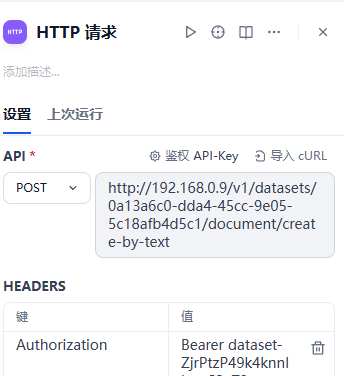
报错:
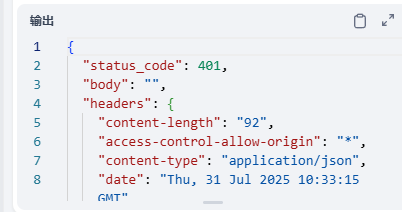

Dify创建工作流,抓取网页文章存入知识库,在http请求环节时报错401。查询原因后以为是知识库API密钥过期,重新申请之后依然报错401,http请求环节截图如下,请大拿们帮忙解答:
 分享
分享
晚上好🌙🌙🌙
本答案参考通义千问
根据你描述的情况,Dify 工作流在 HTTP 请求环节报错 401,这意味着 身份验证失败。虽然你提到重新申请了知识库 API 密钥,但问题可能出在以下几个方面:
Authorization 字段。Authorization: Bearer <your_api_key>
以下是逐步排查和解决 401 错误的方法:
注意: 如果你是通过变量传递密钥,请确保变量值是最新的。
Authorization: Bearer <your_new_api_key>
Content-Type: application/json
重点: 如果 API 使用的是 Basic Auth,则格式应为:
Authorization: Basic base64encode("username:password")但大多数现代 API 使用 Bearer Token。
curl -X POST "https://api.example.com/knowledge" \
  -H "Authorization: Bearer your_api_key" \
  -H "Content-Type: application/json" \
  -d '{"title": "Test", "content": "This is a test."}'
如果 curl 也返回 401,说明密钥或认证方式有问题。
workspace_id 或 project_id。const apiKey = env.KNOWLEDGE_API_KEY; // 确保该变量已正确设置
const response = await fetch('https://api.example.com/knowledge', {
method: 'POST',
headers: {
'Authorization': `Bearer ${apiKey}`,
'Content-Type': 'application/json'
},
body: JSON.stringify({ title: 'Test', content: 'Test content' })
});
// 确保 API 密钥已正确设置
const apiKey = process.env.KNOWLEDGE_API_KEY;

// 构建请求
const response = await fetch('https://api.example.com/knowledge', {
  method: 'POST',
  headers: {
    'Authorization': `Bearer ${apiKey}`,
    'Content-Type': 'application/json'
  },
  body: JSON.stringify({
    title: 'Test Article',
    content: 'This is the content of the article.'
  })
});

if (response.status === 200) {
  console.log('Article added to knowledge base');
} else {
  console.error(`Failed to add article: ${response.status}`);
}
| 步骤 | 操作 |
|------|------|
| 1 | 检查 API 密钥是否有效且已更新 |
| 2 | 确保请求头中包含正确的 Authorization 字段 |
| 3 | 使用工具(如 Postman)手动测试 API 接口 |
| 4 | 核对 API 文档,确认认证方式和请求格式 |
| 5 | 检查 Dify 工作流中的变量是否正确赋值 |
如果你能提供 HTTP 请求截图 或 Dify 工作流配置片段,我可以进一步帮助你定位问题。
分享 创建了问题
7月31日
创建了问题
7月31日


