
热爱学习:: 2025-08-03 10:55 采纳率: 60%
浏览 9
已结题

在vscode使用c语言链接matlab库文件出错

在vscode使用c语言链接matlab的一些库文件出错

            "includePath": [
                "${workspaceFolder}/**",
                "D:\\Users\\name\\Downloads\\x86_64-8.1.0-release-posix-seh-rt_v6-rev0\\mingw64\\include",
                "D:\\Users\\name\\Downloads\\x86_64-8.1.0-release-posix-seh-rt_v6-rev0\\mingw64\\x86_64-w64-mingw32\\include",
                "D:\\R2024b_Update_1_Windows\\extern\\include"
            ],

这是c_cpp_properties.json的部分设置

"args": [
            "-std=c99",
            "-fdiagnostics-color=always",
            "-g",
            "${file}",
            
            "-I","D:\\R2024b_Update_1_Windows\\extern\\include",
            "-L\\D:\\R2024b_Update_1_Windows\\extern\\lib\\win64\\microsoft",
            "-l mat",
            "-l mx",
            "-l mex",
            "-l eng",
            "-o","${fileDirname}\\${fileBasenameNoExtension}.exe"
        ],

这是在tasks.json的部分设置

Starting build...
cmd /c chcp 65001>nul && D:\Users\name\Downloads\x86_64-8.1.0-release-posix-seh-rt_v6-rev0\mingw64\bin\gcc.exe -std=c99 -fdiagnostics-color=always -g E:\c_code\mat_code\ex1307.c -I D:\R2024b_Update_1_Windows\extern\include -L\D:\R2024b_Update_1_Windows\extern\lib\win64\microsoft "-l mat" "-l mx" "-l mex" "-l eng" -o E:\c_code\mat_code\ex1307.exe
D:/Users/name/Downloads/x86_64-8.1.0-release-posix-seh-rt_v6-rev0/mingw64/bin/../lib/gcc/x86_64-w64-mingw32/8.1.0/../../../../x86_64-w64-mingw32/bin/ld.exe: cannot find -l mat
D:/Users/name/Downloads/x86_64-8.1.0-release-posix-seh-rt_v6-rev0/mingw64/bin/../lib/gcc/x86_64-w64-mingw32/8.1.0/../../../../x86_64-w64-mingw32/bin/ld.exe: cannot find -l mx
D:/Users/name/Downloads/x86_64-8.1.0-release-posix-seh-rt_v6-rev0/mingw64/bin/../lib/gcc/x86_64-w64-mingw32/8.1.0/../../../../x86_64-w64-mingw32/bin/ld.exe: cannot find -l mex
D:/Users/name/Downloads/x86_64-8.1.0-release-posix-seh-rt_v6-rev0/mingw64/bin/../lib/gcc/x86_64-w64-mingw32/8.1.0/../../../../x86_64-w64-mingw32/bin/ld.exe: cannot find -l eng
collect2.exe: error: ld returned 1 exit status

Build finished with error(s).

这是运行后terminal的显示信息
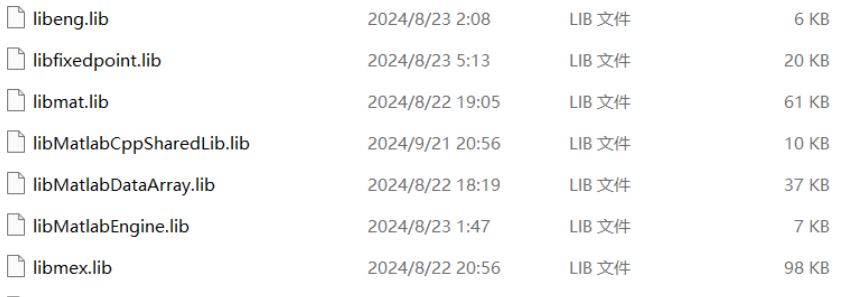
我将matlab库文件路径添加到了系统环境变量
确认了路径正确,文件夹下有相应的lib文件
img

  • 写回答

4条回答 默认 最新

  • 檀越@新空间 2025-08-03 10:56
    关注

    上午好☀️☀️☀️️
    本答案参考通义千问

    根据你提供的信息,你在 VSCode 中使用 C语言 编写代码,并尝试链接 MATLAB 的库文件(如 mat.lib, mx.lib 等),但编译时出现了错误:

    cannot find -l mat
    cannot find -l mx
    ...
    

    这表明 链接器无法找到这些库文件。下面我将逐步分析问题并提供解决方案。


    ✅ 问题原因分析

    1. 库文件路径未正确指定给链接器
      虽然你将 MATLAB 的 include 目录加入了 c_cpp_properties.jsontasks.json,但 链接器(ld) 只会查找 -L 参数指定的目录,而你的 tasks.json-L 参数写法有误。

    2. 路径中存在空格或符号问题
      -L 后面直接跟路径,如果路径中包含空格或特殊字符(如 \),需要特别注意转义或使用引号。

    3. MATLAB 库文件格式不兼容
      MATLAB 提供的库通常是 .lib 文件,但在 Windows 下,MinGW 需要的是 .a 格式的静态库,或者使用动态链接库(.dll)。如果你使用的是 .lib 文件,可能不兼容 MinGW。

    4. 环境变量设置不准确
      尽管你提到已将 MATLAB 路径添加到系统环境变量,但 VSCode 的构建任务可能并未使用该环境变量,而是依赖于命令行中的路径。


    🔧 解决方案

    1. 修正 -L 参数的路径格式

    tasks.json 中,-L 参数应使用双引号包裹路径,尤其是当路径中有空格或反斜杠时。

    ✅ 修改前:

    "-L\\D:\\R2024b_Update_1_Windows\\extern\\lib\\win64\\microsoft",
    

    ✅ 修改后:

    "-L", "D:\\R2024b_Update_1_Windows\\extern\\lib\\win64\\microsoft",
    

    注意: 不要在 -L 后面加 \,这是错误的语法。


    2. 确保库文件存在于指定路径

    确认以下路径是否存在:

    D:\R2024b_Update_1_Windows\extern\lib\win64\microsoft
    

    并且该目录下是否有如下文件:

    • mat.lib
    • mx.lib
    • mex.lib
    • eng.lib

    如果没有这些文件,可能是 MATLAB 安装不完整,或者你选择了错误的库版本(如 win64 vs win32)。


    3. 检查库文件是否适用于 MinGW

    MATLAB 提供的 .lib 文件通常为 Microsoft Visual C++ 链接器设计,MinGW 不支持这种格式。你可以尝试以下方法:

    ✅ 方法一:使用动态链接库(DLL)

    • 使用 MATLAB 提供的 .dll 文件,并通过 __declspec(dllimport) 引入函数。
    • 或者使用 LoadLibraryGetProcAddress 动态加载 DLL。

    ✅ 方法二:转换 .lib.a 格式

    使用工具如 dlltool.lib 转换为 .a 格式,以便 MinGW 使用:

    dlltool -d mat.def -l libmat.a
    

    你需要一个 .def 文件来定义导出符号。


    4. 更新 tasks.json 示例配置

    以下是修改后的 tasks.json 示例:

    {
        "label": "C/C++: gcc 生成可执行文件",
        "type": "shell",
        "command": "gcc",
        "args": [
            "-std=c99",
            "-fdiagnostics-color=always",
            "-g",
            "${file}",
            "-I", "D:\\R2024b_Update_1_Windows\\extern\\include",
            "-L", "D:\\R2024b_Update_1_Windows\\extern\\lib\\win64\\microsoft",
            "-lmat",
            "-lmx",
            "-lmex",
            "-leng",
            "-o", "${fileDirname}\\${fileBasenameNoExtension}.exe"
        ],
        "group": {
            "kind": "build",
            "isDefault": true
        },
        "problemMatcher": ["$gcc"],
        "options": {
            "cwd": "${workspaceFolder}"
        }
    }
    

    注意: 没有使用引号包裹 -l 参数,因为它们是单独的参数。


    5. 检查 c_cpp_properties.json 设置

    确保 includePath 正确指向 MATLAB 的头文件目录:

    {
        "configurations": [
            {
                "name": "Win32",
                "includePath": [
                    "${workspaceFolder}/**",
                    "D:\\Users\\name\\Downloads\\x86_64-8.1.0-release-posix-seh-rt_v6-rev0\\mingw64\\include",
                    "D:\\Users\\name\\Downloads\\x86_64-8.1.0-release-posix-seh-rt_v6-rev0\\mingw64\\x86_64-w64-mingw32\\include",
                    "D:\\R2024b_Update_1_Windows\\extern\\include"
                ],
                "defines": [],
                "compilerPath": "D:\\Users\\name\\Downloads\\x86_64-8.1.0-release-posix-seh-rt_v6-rev0\\mingw64\\bin\\gcc.exe",
                "cStandard": "c99",
                "cppStandard": "c++17"
            }
        ],
        "version": 4
    }
    

    🛠️ 最终建议步骤

    1. 检查路径是否正确且库文件存在
    2. 确保 -L 参数使用正确的语法
    3. 确认库文件格式是否兼容 MinGW
    4. 考虑使用 DLL 或转换 .lib.a
    5. 更新 tasks.jsonc_cpp_properties.json 配置

    🧾 总结

    | 问题 | 解决方案 | |------|----------| | 无法找到 -l mat | 修正 -L 路径并确保库文件存在 | | MinGW 不支持 .lib | 转换为 .a 或使用 DLL | | 环境变量未生效 | 显式在 tasks.json 中指定路径 |


    如果你能提供具体的 MATLAB 版本和库文件类型(如 .lib.dll),我可以进一步帮你定制解决方案。

    本回答被题主选为最佳回答 , 对您是否有帮助呢?
    评论
查看更多回答(3条)

报告相同问题?

问题事件

  • 系统已结题 8月11日
  • 已采纳回答 8月3日
  • 创建了问题 8月3日