

想写一个网页版的请休假,在百度AI里搜了一下,用nodejs+mssql 写网页版的请休假。
出来的代码包含以下几个文件,我在数据库中用init.sql的代码创建了表,并添加了记录,在.env文件中填写了正确的数据库地址名称,帐号密码,在控制台用node app.js运行,网页中打开localhost:3000
能显示网页,但是没有记录,提示“查询请假记录失败", 我在app.js中加了三个log, 刷 新页页时,只能显示第一个log的字符a,后面两个未显示。
是哪里有问题 ,请各位帮忙看看。
另外AI生成的网页中没有查询按钮,如果我想按条件查询,要怎样添加?
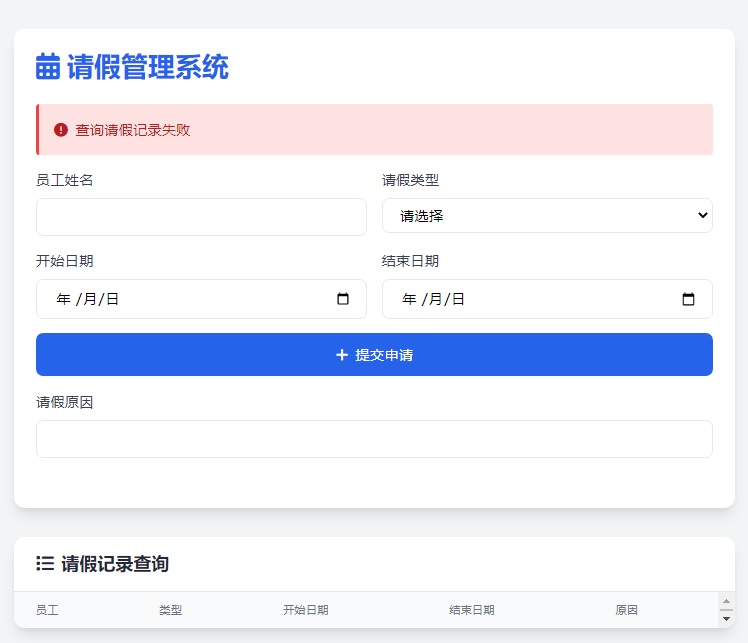
package.json 内容如下
{
  "name": "leave-management",
  "version": "1.0.0",
  "main": "app.js",
  "scripts": {
    "start": "node app.js",
    "dev": "nodemon app.js"
  },
  "dependencies": {
    "express": "^4.18.2",
    "mssql": "^9.1.1",
    "body-parser": "^1.20.2",
    "ejs": "^3.1.9",
    "express-session": "^1.17.3",
    "connect-flash": "^0.1.1",
    "dotenv": "^16.3.1"
  },
  "devDependencies": {
    "nodemon": "^3.0.2"
  }
}
app.js 内容如下
```javascript

const express = require('express');
const bodyParser = require('body-parser');
const session = require('express-session');
const flash = require('connect-flash');
const sql = require('mssql');
const path = require('path');
require('dotenv').config();

const app = express();
const PORT = process.env.PORT || 3000;

// 数据库配置
const dbConfig = {
  user: process.env.DB_USER,
  password: process.env.DB_PASSWORD,
  server: process.env.DB_SERVER,
  database: process.env.DB_NAME,
  options: {
    encrypt: false, //为true时会报错
    trustServerCertificate: true,
    port: 1433
  }
};

// 中间件
app.use(bodyParser.urlencoded({ extended: true }));
app.use(session({
  secret: 'leave-system-secret',
  resave: false,
  saveUninitialized: true
}));
app.use(flash());
app.set('view engine', 'ejs');
app.set('views', path.join(__dirname, 'views'));
app.use(express.static(path.join(__dirname, 'public')));

// 路由 - 查询请假记录
app.get('/', async (req, res) => {
  try {
console.log('a');
    const pool = await sql.connect(dbConfig);
console.log('b');
    const result = await pool.request()
      .query('SELECT * FROM LeaveApplications ORDER BY StartDate DESC');
console.log('c');
    res.render('index', {
      leaves: result.recordset,
      messages: req.flash()
    });
  } catch (err) {
    req.flash('error', '查询请假记录失败');
    res.render('index', { leaves: [], messages: req.flash() });
  }
});

// 路由 - 新增请假记录
app.post('/leave', async (req, res) => {
  const { employeeName, leaveType, startDate, endDate, reason } = req.body;

  try {
    const pool = await sql.connect(dbConfig);
    await pool.request()
      .input('employeeName', sql.NVarChar, employeeName)
      .input('leaveType', sql.NVarChar, leaveType)
      .input('startDate', sql.Date, startDate)
      .input('endDate', sql.Date, endDate)
      .input('reason', sql.NVarChar, reason)
      .query(`INSERT INTO LeaveApplications
              (EmployeeName, LeaveType, StartDate, EndDate, Reason)
              VALUES (@employeeName, @leaveType, @startDate, @endDate, @reason)`);

    req.flash('success', '请假申请提交成功');
  } catch (err) {
    req.flash('error', '提交请假申请失败');
  } finally {
    res.redirect('/');
  }
});

app.listen(PORT, () => {
  console.log(`Server running on http://localhost:${PORT}`);
});
views\index.ejs 内容如下
<!DOCTYPE html>
<html lang="zh-CN">
<head>
  <meta charset="UTF-8">
  <meta name="viewport" content="width=device-width, initial-scale=1.0">
  <title>请假管理系统</title>
  <link href="https://cdn.jsdelivr.net/npm/tailwindcss@2.2.19/dist/tailwind.min.css" rel="stylesheet">
  <link href="https://cdnjs.cloudflare.com/ajax/libs/font-awesome/6.0.0/css/all.min.css" rel="stylesheet">
</head>
<body class="bg-gray-100">
  <div class="container mx-auto px-4 py-8 max-w-6xl">
    <div class="bg-white rounded-xl shadow-lg overflow-hidden p-6 mb-8">
      <h1 class="text-3xl font-bold text-blue-600 mb-6">
        <i class="fas fa-calendar-alt mr-2"></i>请假管理系统
      </h1>

      <% if (messages.error) { %>
        <div class="bg-red-100 border-l-4 border-red-500 text-red-700 p-4 mb-4 rounded">
          <i class="fas fa-exclamation-circle mr-2"></i><%= messages.error %>
        </div>
      <% } %>
      <% if (messages.success) { %>
        <div class="bg-green-100 border-l-4 border-green-500 text-green-700 p-4 mb-4 rounded">
          <i class="fas fa-check-circle mr-2"></i><%= messages.success %>
        </div>
      <% } %>

      <form action="/leave" method="POST" class="grid grid-cols-1 md:grid-cols-2 lg:grid-cols-5 gap-4 mb-8">
        <div>
          <label class="block text-gray-700 mb-2 font-medium">员工姓名</label>
          <input type="text" name="employeeName" required
            class="w-full px-4 py-2 border rounded-lg focus:ring-2 focus:ring-blue-500 focus:border-blue-500 transition">
        </div>
        <div>
          <label class="block text-gray-700 mb-2 font-medium">请假类型</label>
          <select name="leaveType" required
            class="w-full px-4 py-2 border rounded-lg focus:ring-2 focus:ring-blue-500 focus:border-blue-500 transition">
            <option value="">请选择</option>
            <option value="年假">年假</option>
            <option value="病假">病假</option>
            <option value="事假">事假</option>
            <option value="婚假">婚假</option>
          </select>
        </div>
        <div>
          <label class="block text-gray-700 mb-2 font-medium">开始日期</label>
          <input type="date" name="startDate" required
            class="w-full px-4 py-2 border rounded-lg focus:ring-2 focus:ring-blue-500 focus:border-blue-500 transition">
        </div>
        <div>
          <label class="block text-gray-700 mb-2 font-medium">结束日期</label>
          <input type="date" name="endDate" required
            class="w-full px-4 py-2 border rounded-lg focus:ring-2 focus:ring-blue-500 focus:border-blue-500 transition">
        </div>
        <div class="md:col-span-2 lg:col-span-1 flex items-end">
          <button type="submit"
            class="w-full bg-blue-600 hover:bg-blue-700 text-white px-6 py-3 rounded-lg transition duration-300 font-medium">
            <i class="fas fa-plus mr-2"></i>提交申请
          </button>
        </div>
        <div class="md:col-span-2">
          <label class="block text-gray-700 mb-2 font-medium">请假原因</label>
          <input type="text" name="reason" required
            class="w-full px-4 py-2 border rounded-lg focus:ring-2 focus:ring-blue-500 focus:border-blue-500 transition">
        </div>
      </form>
    </div>

    <div class="bg-white rounded-xl shadow-lg overflow-hidden">
      <div class="px-6 py-4 border-b">
        <h2 class="text-xl font-semibold text-gray-800">
          <i class="fas fa-list mr-2"></i>请假记录查询
        </h2>
      </div>
      <div class="overflow-x-auto">
        <table class="min-w-full divide-y divide-gray-200">
          <thead class="bg-gray-50">
            <tr>
              <th class="px-6 py-3 text-left text-xs font-medium text-gray-500 uppercase tracking-wider">员工</th>
              <th class="px-6 py-3 text-left text-xs font-medium text-gray-500 uppercase tracking-wider">类型</th>
              <th class="px-6 py-3 text-left text-xs font-medium text-gray-500 uppercase tracking-wider">开始日期</th>
              <th class="px-6 py-3 text-left text-xs font-medium text-gray-500 uppercase tracking-wider">结束日期</th>
              <th class="px-6 py-3 text-left text-xs font-medium text-gray-500 uppercase tracking-wider">原因</th>
            </tr>
          </thead>
          <tbody class="bg-white divide-y divide-gray-200">
            <% leaves.forEach(leave => { %>
              <tr class="hover:bg-gray-50 transition duration-150">
                <td class="px-6 py-4 whitespace-nowrap text-sm font-medium text-gray-900">
                  <%= leave.EmployeeName %>
                </td>
                <td class="px-6 py-4 whitespace-nowrap text-sm text-gray-500">
                  <%= leave.LeaveType %>
                </td>
                <td class="px-6 py-4 whitespace-nowrap text-sm text-gray-500">
                  <%= new Date(leave.StartDate).toLocaleDateString() %>
                </td>
                <td class="px-6 py-4 whitespace-nowrap text-sm text-gray-500">
                  <%= new Date(leave.EndDate).toLocaleDateString() %>
                </td>
                <td class="px-6 py-4 text-sm text-gray-500">
                  <%= leave.Reason %>
                </td>
              </tr>
            <% }); %>
          </tbody>
        </table>
      </div>
    </div>
  </div>
</body>
</html>
.env 内容 如下
_USER=your_db_username
DB_PASSWORD=your_db_password
DB_SERVER=your_server_name
DB_NAME=LeaveManagement
init.sql
```javascript
CREATE TABLE LeaveApplications (
    ID INT IDENTITY(1,1) PRIMARY KEY,
    EmployeeName NVARCHAR(100) NOT NULL,
    LeaveType NVARCHAR(50) NOT NULL,
    StartDate DATE NOT NULL,
    EndDate DATE NOT NULL,
    Reason NVARCHAR(500) NOT NULL,
    CreatedAt DATETIME DEFAULT GETDATE()
);

-- 示例数据
INSERT INTO LeaveApplications (EmployeeName, LeaveType, StartDate, EndDate, Reason)
VALUES
('张三', '年假', '2025-08-10', '2025-08-15', '家庭旅行'),
('李四', '病假', '2025-08-12', '2025-08-13', '感冒发烧');


