

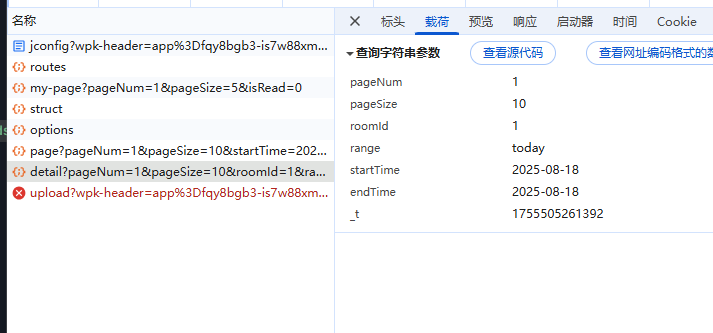
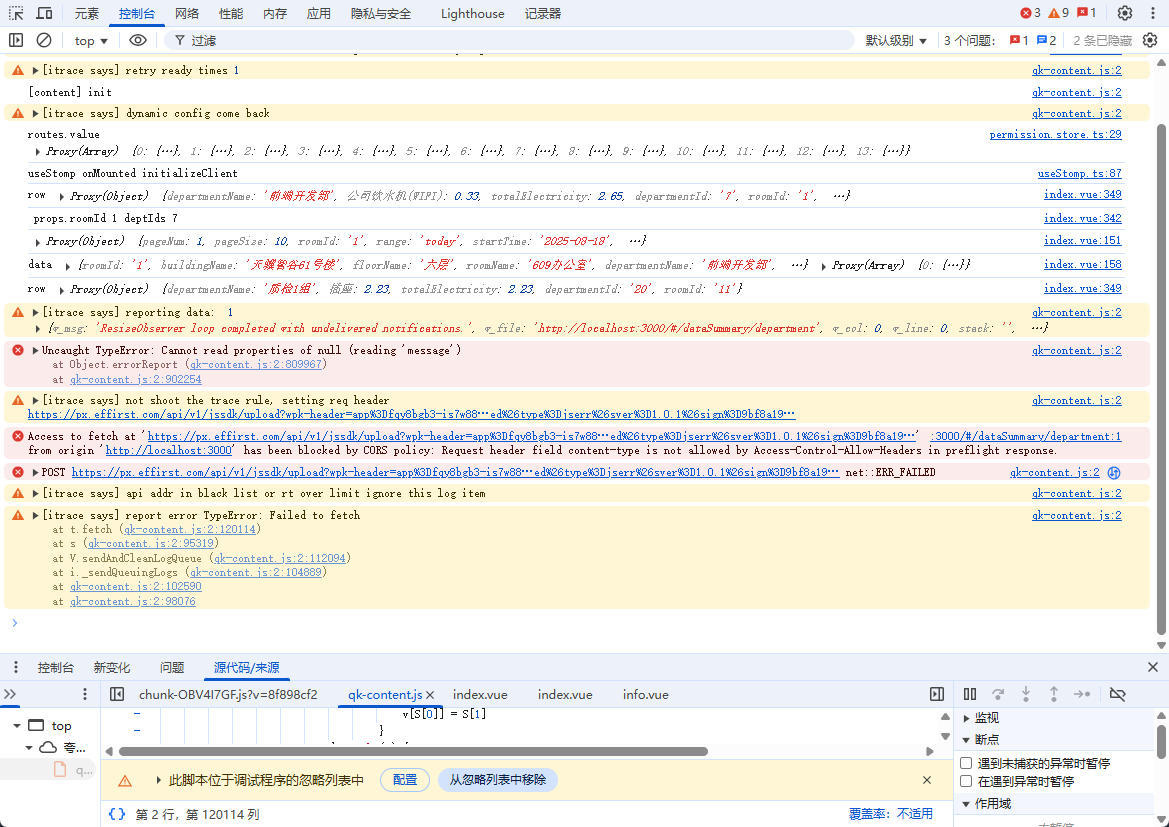
父组件点击房间明细表弹窗出子组件表格,传值时间范围和时间和页面类型(组件复用)和房间id,第二次点开弹窗报错并且没有走子组件的接口请求,弹窗内容还是第一次请求的数据
  <el-form ref="queryFormRef" :model="queryParams" :inline="true">
        <el-form-item label="时间范围" prop="">
          <el-date-picker v-model="queryParams.dateRangeValue" type="daterange" range-separator="To"
            start-placeholder="开始时间" end-placeholder="结束时间" @change="handleDateRangeChange" />
          <div class="date-shortcut-buttons" style="margin-left: 10px;">
            <el-button size="small" :class="{ 'is-active': selectedDateShortcut === 'today' }"
              @click="handleDateShortcut('today')">
              今日
            </el-button>
  <el-table-column fixed="right" label="操作" width="220">
              <template #default="scope">
                <el-button type="primary" size="small" link @click="handleOpenDialog(scope.row)">
                  房间明细表</el-button>
              </template>
            </el-table-column>
<el-dialog v-model="dialog.visible" :title="dialog.title" width="70%" @close="handleCloseDialog">
      <RoomDetails :roomId="RoomDetailsId" :range="selectedDateShortcut" :startTime="queryParams.startTime"
        :endTime="queryParams.endTime" :type="'building'" />
const selectedDateShortcut = ref<string | null>('today');//时间范围
const queryParams = reactive<DeviceJobLogPageQuery>({
  pageNum: 1,
  pageSize: 10,
  startTime: formatDate(new Date()), // 默认设置为今天的日期
  endTime: formatDate(new Date()),   // 默认设置为今天的日期
  dateRangeValue: [new Date(), new Date()]
});
// 当日期选择器值变化时更新queryParams
const handleDateRangeChange = (dates) => {
  selectedDateShortcut.value = null
  isSelect.value = false
  if (dates && dates.length === 2) {
    queryParams.startTime = formatDate(dates[0]) // 开始日期,可能是 Date 对象
    queryParams.endTime = formatDate(dates[1])   // 结束日期
  } else {
    queryParams.startTime = ''
    queryParams.endTime = ''
  }
}
const handleDateShortcut = (type: string) => {
  // 设置选中的快捷按钮状态
  selectedDateShortcut.value = type

  const now = new Date()
  let start: Date, end: Date

  switch (type) {
    case 'today':
      // 今日
      start = new Date(now.getFullYear(), now.getMonth(), now.getDate())
      end = new Date(now.getFullYear(), now.getMonth(), now.getDate())
      break
  // 设置日期选择器的值,确保结束日期包含当天
  queryParams.dateRangeValue = [
    start,
    end
  ]
  queryParams.startTime = formatDate(start) // 开始日期,可能是 Date 对象
  queryParams.endTime = formatDate(end) // 结束日期
  handleQuery()
}
/** 打开楼宇汇总弹窗 */
function handleOpenDialog(row?: any) {
  dialog.title = "房间明细表";
  RoomDetailsId.value = row.roomId; // 设置要传递的 id
  console.log("房间明细表", row.roomId, typeof RoomDetailsId.value)
  // 关键:重置 queryParams(避免旧参数残留)
  queryParams.value = {
    startTime: queryParams.startTime,
    endTime: queryParams.endTime,
    roomId: row.roomId // 显式传递新 roomId
  };
  dialog.visible = true;
}
子组件
   <el-table ref="dataTableRef" v-loading="loading" :data="pageData" highlight-current-row border default-expand-all>
        <el-table-column label="所属楼宇" prop="buildingName" align="center" width="200" />
const props = defineProps({
  roomId: {
    type: String,
    required: false
  },
  range: {
    type: String,
    required: false
  },
  startTime: {
    type: String,
    required: false
  },
  endTime: {
    type: String,
    required: false
  },
  deptId: {
    type: String,
    required: false
  },
  type: {
    type: String,
    required: false
  }

})
// 添加一个变量来存储请求取消令牌
const abortController = ref<AbortController | null>(null);
function handleQuery() {
  // 取消之前的请求(如果有)
  if (abortController.value) {
    abortController.value.abort();
  }

  // 创建新的取消令牌
  abortController.value = new AbortController();
  const signal = abortController.value.signal;

  loading.value = true;
  console.log(queryParams)
  DepartmentAPI.getRoomDetail({
    ...queryParams,
    _t: Date.now() // 每次请求添加随机参数,避免缓存
  }, { signal }) // 传递信号到请求
    .then((data) => {
      pageData.value = [data]; // 替换而不是追加数据
      console.log("data", data, pageData.value)
    })
    .catch((error) => {
      if (error.name !== 'AbortError') {
        console.error('请求出错:', error);
        ElMessage.error('获取数据失败');
      }
    })
    .finally(() => {
      loading.value = false;
    });
}
onMounted(() => {
  console.log(" props.roomId", props.roomId, "deptIds", props.deptId)
  handleQuery();
});
// 在组件卸载时取消请求
onUnmounted(() => {
  if (abortController.value) {
    abortController.value.abort();
  }
});


