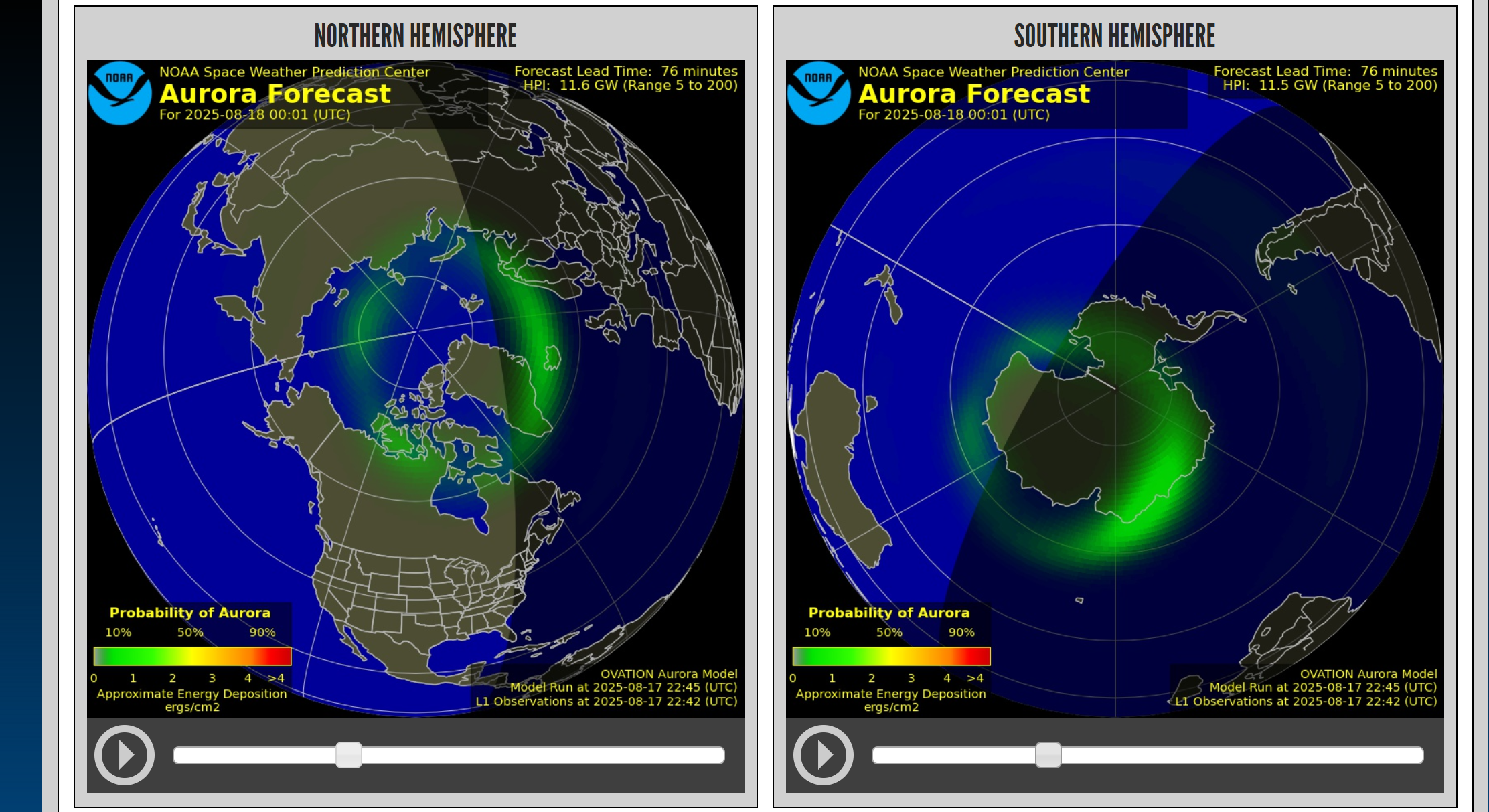
求指教,想要复刻这个极光图,matplotlib该怎么设计投影和参数才能实现美国的这个效果啊,他再75-90的那个圆特别小,但是 60-75的范围特别大,能不能使用matplotlib复现一下,有偿

 分享
分享
上午好☀️☀️☀️️
本答案参考通义千问
你提到的“极光图”可能是指一种极坐标投影下的地理分布图,特别是用于展示极光现象(如在北极或南极地区)的一种可视化方式。根据你的描述,“75-90度”的范围特别小,而“60-75度”的范围特别大,这说明你希望的是一个非等面积投影,可能是类似于极地投影(Polar Projection),但具有特定的缩放比例。
你想要复刻的“极光图”应该满足以下特征:
matplotlib)为了实现这种效果,我们可以使用 matplotlib 的 projection='polar' 投影,并通过自定义纬度到角度的映射来实现所需的视觉效果。
import matplotlib.pyplot as plt
import numpy as np

fig = plt.figure(figsize=(8, 8))
ax = fig.add_subplot(111, projection='polar')
由于标准的极坐标投影中,纬度(θ)是线性映射的,我们需要重新定义纬度与角度的关系,使得:
我们可以设计一个非线性映射函数,例如:
def custom_latitude_mapping(lat_deg):
    # 将纬度从 -90 到 90 映射到 0 到 π
    lat_rad = np.deg2rad(lat_deg)
    # 自定义映射:60~75 度之间拉伸,75~90 度压缩
    scaled_lat = (lat_rad + np.pi/2) / (np.pi/2)  # 归一化到 [0, 1]
    # 使用指数函数拉伸低纬度,压缩高纬度
    mapped_angle = np.arcsin(1 - 2 * np.exp(-scaled_lat * 10))  # 调整参数以获得所需效果
    return mapped_angle
重点: 这个函数通过非线性变换实现了你所说的“60-75度区域大,75-90度区域小”的效果。
你可以使用 ax.plot() 或 ax.scatter() 来绘制数据点,并应用上述映射函数:
# 示例数据:假设我们有多个点,它们的纬度和经度
lats = [65, 70, 72, 80, 85]  # 纬度
lons = [0, 45, 90, 180, 270]  # 经度

# 将纬度转换为极角
angles = []
for lat in lats:
    angle = custom_latitude_mapping(lat)
    angles.append(angle)

# 绘制极光图
ax.scatter(np.deg2rad(lons), angles, c='blue', s=100, alpha=0.7)

# 设置标签和标题
ax.set_theta_zero_location('N')  # 0°在北
ax.set_rlabel_position(30)      # 调整半径标签位置
plt.title("Custom Polar Projection for Aurora Visualization")
plt.show()
| 参数 | 说明 | 建议 |
|------|------|------|
| custom_latitude_mapping | 控制纬度到角度的映射 | 调整指数系数(如 *10)可以改变拉伸程度 |
| ax.set_theta_zero_location('N') | 定义0°方向 | 通常设为北 |
| ax.set_rlabel_position(30) | 控制半径标签的位置 | 便于阅读 |
| c='blue', s=100 | 颜色和大小 | 根据需要调整 |
如果你希望实现更复杂的极光效果(如颜色渐变、动态变化等),可以考虑以下方法:
cartopy 库:提供更真实的地理投影功能。要复刻你描述的“极光图”,核心在于:
projection='polar');import matplotlib.pyplot as plt
import numpy as np
def custom_latitude_mapping(lat_deg):
lat_rad = np.deg2rad(lat_deg)
scaled_lat = (lat_rad + np.pi/2) / (np.pi/2)
mapped_angle = np.arcsin(1 - 2 * np.exp(-scaled_lat * 10))
return mapped_angle
fig = plt.figure(figsize=(8, 8))
ax = fig.add_subplot(111, projection='polar')
# 示例数据
lats = [65, 70, 72, 80, 85]
lons = [0, 45, 90, 180, 270]
angles = []
for lat in lats:
angle = custom_latitude_mapping(lat)
angles.append(angle)
ax.scatter(np.deg2rad(lons), angles, c='blue', s=100, alpha=0.7)
ax.set_theta_zero_location('N')
ax.set_rlabel_position(30)
plt.title("Custom Polar Projection for Aurora Visualization")
plt.show()
如需进一步定制(如添加颜色渐变、动态极光效果等),欢迎继续提问!我可以为你提供更高级的实现方案。
分享 创建了问题
8月20日
创建了问题
8月20日
