求前端vue + js + vue这种类似3D饼图效果 图表用echats 配置写法
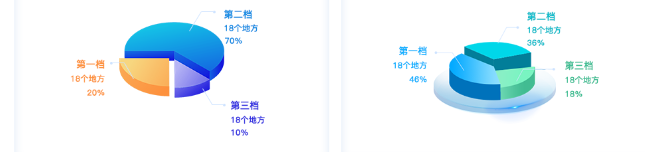

求前端vue + js + vue这种类似3D饼图效果 图表用echats 配置写法
 分享
分享
上午好☀️☀️☀️️
本答案参考通义千问
在前端开发中,ECharts 是一个非常强大的可视化库,支持多种图表类型,包括 2D 和 3D 图表。虽然 ECharts 本身并不直接支持 3D 饼图(3D Pie Chart),但可以通过一些技巧实现类似 3D 的视觉效果。
以下是一个使用 Vue + ECharts 实现类似 3D 饼图效果 的完整示例,并提供详细的配置说明。
echarts 或 echarts-for-vue)如果你使用的是 Vue 3,推荐使用 echarts:
npm install echarts --save
或者使用封装好的 echarts-for-vue(可选):
npm install echarts-for-vue --save
PieChart.vue<template>
<div ref="chart" style="width: 600px; height: 400px;"></div>
</template>
<script>
import * as echarts from 'echarts';
export default {
name: 'PieChart',
mounted() {
this.initChart();
},
methods: {
initChart() {
const chart = echarts.init(this.$refs.chart);
const option = {
title: {
text: '类似3D饼图效果',
left: 'center'
},
tooltip: {
trigger: 'item'
},
legend: {
orient: 'vertical',
left: 'left'
},
series: [
{
type: 'pie',
radius: ['50%', '70%'],
avoidLabelOverlap: false,
label: {
show: true,
position: 'outside',
formatter: '{b}: {d}%'
},
labelLine: {
show: true,
length: 20,
length2: 30
},
data: [
{ value: 335, name: 'A' },
{ value: 310, name: 'B' },
{ value: 274, name: 'C' },
{ value: 235, name: 'D' },
{ value: 400, name: 'E' }
],
itemStyle: {
borderRadius: 0, // 设置为 0 来模拟“扁平”饼图
borderColor: '#fff',
borderWidth: 2
},
emphasis: {
itemStyle: {
shadowBlur: 10,
shadowOffsetX: 0,
shadowColor: 'rgba(0, 0, 0, 0.5)'
}
}
}
]
};
chart.setOption(option);
}
}
};
</script>
| 配置项 | 作用 |
|--------|------|
| type: 'pie' | 表示这是一个饼图 |
| radius: ['50%', '70%'] | 设置内外圆半径,形成环形效果 |
| label.position: 'outside' | 将标签放在饼图外部,增强立体感 |
| labelLine.length 和 length2 | 控制标签线长度,提升视觉层次 |
| itemStyle.borderRadius: 0 | 禁用圆角,让饼图看起来更“扁平”,模拟 3D 效果 |
| emphasis.itemStyle.shadow... | 添加阴影,营造立体感 |
注意: ECharts 本身不支持真正的 3D 饼图,但可以通过以下方式模拟 3D 效果:
使用阴影(shadow)
在 emphasis 中添加 shadowBlur、shadowColor 等属性,使部分扇区有突出效果。
调整颜色和透明度
通过 itemStyle.color 设置不同颜色,配合透明度,增强立体感。
使用渐变色
为每个扇区设置渐变色,模拟光照效果。
itemStyle: {
  borderRadius: 0,
  borderColor: '#fff',
  borderWidth: 2,
  color: {
    type: 'linear',
    x: 0,
    y: 0,
    r: 0.5,
    colorStops: [
      { offset: 0, color: '#ff758f' },
      { offset: 1, color: '#ff9a9e' }
    ]
  }
},
emphasis: {
  itemStyle: {
    shadowBlur: 10,
    shadowColor: 'rgba(255, 117, 143, 0.5)',
    borderColor: '#fff',
    borderWidth: 3
  }
}
| 项目 | 内容 |
|------|------|
| 目标 | 实现类似 3D 饼图效果 |
| 技术栈 | Vue 3 + ECharts |
| 关键配置 | label, labelLine, itemStyle, emphasis |
| 模拟 3D 方法 | 阴影、标签外放、渐变色、扁平化设计 |
如需进一步实现真正 3D 效果,可以考虑使用 Three.js 或 WebGL 渲染,但复杂度较高。对于大多数场景,ECharts 的 2D 饼图 + 阴影/标签优化 已能很好地满足需求。
如有需要,我也可以为你提供 Three.js + ECharts 结合 的 3D 饼图实现方案。
分享 创建了问题
8月22日
创建了问题
8月22日


