项目使用的技术为uniapp、vue3,现在我需要使用echarts的环形图,如何实现如图所示的效果,在圆环每个部分的内侧显示百分比,文字的颜色需要和该部分圆环的颜色相同。我试过在series的label中设置position的属性,但是,值为inner会显示在圆环上,值为outer是圆环外,值为center则是在圆环中央只显示最大的那个百分比,都不符合我的要求。
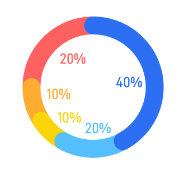

项目使用的技术为uniapp、vue3,现在我需要使用echarts的环形图,如何实现如图所示的效果,在圆环每个部分的内侧显示百分比,文字的颜色需要和该部分圆环的颜色相同。我试过在series的label中设置position的属性,但是,值为inner会显示在圆环上,值为outer是圆环外,值为center则是在圆环中央只显示最大的那个百分比,都不符合我的要求。
 分享
分享
下午好🌅🌅🌅
本答案参考通义千问
在使用 ECharts 的环形图(pie 类型)时,若想在每个扇形的内侧显示对应的百分比,并且文字颜色与该部分圆环的颜色一致,这是一个比较常见的需求。你提到尝试过 label.position: 'inner',但发现它只显示在圆环上,而不是内侧。
{d}% 来显示百分比。确保你的项目中已正确安装和引入 ECharts:
npm install echarts --save
在 uniapp 中,推荐使用 echarts-for-weixin 或 echarts 的小程序适配版本。
以下是完整的配置示例,适用于 Vue3 + uniapp 环境:
option = {
  tooltip: {
    trigger: 'item'
  },
  legend: {
    top: '5%',
    left: 'center'
  },
  series: [
    {
      name: '访问来源',
      type: 'pie',
      radius: ['40%', '70%'],
      avoidLabelOverlap: false,
      label: {
        show: true,
        position: 'inner', // 关键:设置为 inner
        color: 'inherit', // 文字颜色继承自扇形颜色
        formatter: '{d}%', // 显示百分比
        fontSize: 14, // 调整字体大小
        align: 'center',
        verticalAlign: 'middle'
      },
      data: [
        { value: 335, name: 'A', itemStyle: { color: '#5470C6' } },
        { value: 310, name: 'B', itemStyle: { color: '#91CC75' } },
        { value: 274, name: 'C', itemStyle: { color: '#FAC858' } },
        { value: 235, name: 'D', itemStyle: { color: '#EE6666' } },
        { value: 400, name: 'E', itemStyle: { color: '#73C0DE' } }
      ]
    }
  ]
};
position: 'inner' 是实现“内侧显示”的关键设置。color: 'inherit' 可以让文字颜色自动匹配扇形颜色。formatter 动态返回带颜色的字符串(例如使用 HTML 标签),但需要注意平台是否支持。color: 'inherit' 的情况如果你发现某些平台(如微信小程序)不支持 color: 'inherit',你可以通过 formatter 动态设置颜色:
formatter: function(params) {
  return `<span style="color:${params.color}">${params.percent}%</span>`;
}
注意:这种方式可能需要开启 HTML 渲染支持(如在 uniapp 中使用 rich 格式)。
<template>
  <view>
    <canvas canvas-id="myChart" style="width: 100%; height: 500px;"></canvas>
  </view>
</template>

<script>
import * as echarts from 'echarts';

export default {
  mounted() {
    const chart = echarts.init(this.$canvasContext);
    const option = {
      tooltip: {
        trigger: 'item'
      },
      legend: {
        top: '5%',
        left: 'center'
      },
      series: [
        {
          name: '访问来源',
          type: 'pie',
          radius: ['40%', '70%'],
          avoidLabelOverlap: false,
          label: {
            show: true,
            position: 'inner',
            color: 'inherit',
            formatter: '{d}%',
            fontSize: 14,
            align: 'center',
            verticalAlign: 'middle'
          },
          data: [
            { value: 335, name: 'A', itemStyle: { color: '#5470C6' } },
            { value: 310, name: 'B', itemStyle: { color: '#91CC75' } },
            { value: 274, name: 'C', itemStyle: { color: '#FAC858' } },
            { value: 235, name: 'D', itemStyle: { color: '#EE6666' } },
            { value: 400, name: 'E', itemStyle: { color: '#73C0DE' } }
          ]
        }
      ]
    };
    chart.setOption(option);
  }
};
</script>
| 步骤 | 内容 |
|------|------|
| 1 | 设置 label.position: 'inner' |
| 2 | 使用 label.color: 'inherit' 自动继承颜色 |
| 3 | 使用 formatter: '{d}%' 显示百分比 |
| 4 | 调整 align 和 verticalAlign 对齐文字 |
| 5 | 如果平台不支持 inherit,可使用 formatter 返回带颜色的字符串 |
如有更多关于 uniapp 或 ECharts 的问题,欢迎继续提问!
分享 创建了问题
8月22日
创建了问题
8月22日


