晚上好🌙🌙🌙
本答案参考通义千问
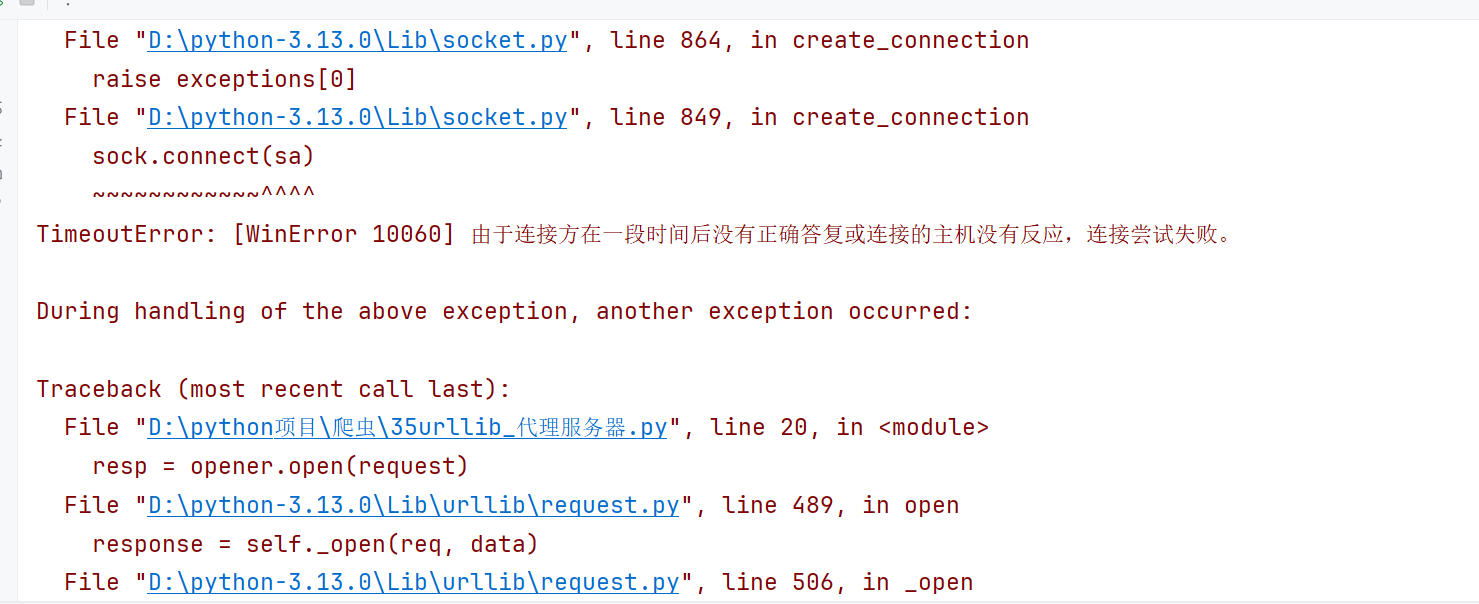
你在使用 urllib.request 进行爬虫时遇到的 WinError 通常是由于代理 IP 不可用、网络连接问题或防火墙限制导致的。下面我会详细解释原因,并提供解决方案。
✅ 问题分析
你使用的代码如下:
import urllib.request

url = 'http://www.baidu.com/s?wd=ip'
headers = {
    'user-agent': 'Mozilla/5.0 (Windows NT 10.0; Win64; x64) AppleWebKit/537.36 (KHTML, like Gecko) Chrome/139.0.0.0 Safari/537.36 Edg/139.0.0.0'
}

request = urllib.request.Request(url=url, headers=headers)

proxies = {
    'http': '114.231.172.68:80'
}
handler = urllib.request.ProxyHandler(proxies=proxies)
opener = urllib.request.build_opener(handler)
resp = opener.open(request)

content = resp.read().decode('utf-8')

with open('代理.html', 'w', encoding='utf-8') as f:
    f.write(content)
🚨 可能的问题点:
- 代理IP不可用(如:114.231.172.68:80)
- 目标网站反爬机制强(如百度对非浏览器请求的识别)
- 未设置 HTTPS 代理(有些网站使用 HTTPS,但你的代理只配置了 HTTP)
- 缺少异常处理(没有捕获错误,程序崩溃)
🔧 解决方案
1. 检查代理IP是否可用
你可以通过以下方式测试代理IP是否有效:
import urllib.request

proxy = {'http': 'http://114.231.172.68:80'}
proxy_handler = urllib.request.ProxyHandler(proxy)
opener = urllib.request.build_opener(proxy_handler)
try:
    response = opener.open('http://httpbin.org/ip')
    print(response.read().decode())
except Exception as e:
    print("代理IP不可用:", e)
如果输出类似:
{"origin": "114.231.172.68"}
说明该代理是有效的。
2. 使用 HTTPS 代理(如果目标网站使用 HTTPS)
修改代理配置为 HTTPS:
proxies = {
    'https': '114.231.172.68:80'  # 如果代理支持 HTTPS
}
注意:不是所有代理都支持 HTTPS,需要确认。
3. 添加更多请求头模拟浏览器访问
有些网站会检测 User-Agent 和其他头部信息,可以添加更多头信息来避免被识别为爬虫:
headers = {
    'User-Agent': 'Mozilla/5.0 (Windows NT 10.0; Win64; x64) AppleWebKit/537.36 (KHTML, like Gecko) Chrome/139.0.0.0 Safari/537.36 Edg/139.0.0.0',
    'Accept': 'text/html,application/xhtml+xml,application/xml;q=0.9,image/webp,*/*;q=0.8',
    'Accept-Language': 'zh-CN,zh;q=0.9,en-US;q=0.8,en;q=0.7',
    'Accept-Encoding': 'gzip, deflate, br',
    'Connection': 'keep-alive'
}
4. 添加异常处理,避免程序崩溃
在实际开发中,应该加入 try-except 块来捕捉异常:
try:
    resp = opener.open(request)
    content = resp.read().decode('utf-8')
    with open('代理.html', 'w', encoding='utf-8') as f:
        f.write(content)
except urllib.error.URLError as e:
    print("URL 错误:", e.reason)
except Exception as e:
    print("发生错误:", e)
5. 使用更稳定的代理服务(推荐)
如果你的代理不稳定,建议使用付费代理服务,例如:
- 快代理
- 芝麻代理
- ProxyScrape
- IP Proxy List
这些平台提供高质量、稳定的代理 IP,支持 HTTP/HTTPS,且有 API 接口方便调用。
✅ 最终修改后的代码示例
import urllib.request

url = 'http://www.baidu.com/s?wd=ip'
headers = {
    'User-Agent': 'Mozilla/5.0 (Windows NT 10.0; Win64; x64) AppleWebKit/537.36 (KHTML, like Gecko) Chrome/139.0.0.0 Safari/537.36 Edg/139.0.0.0',
    'Accept': 'text/html,application/xhtml+xml,application/xml;q=0.9,image/webp,*/*;q=0.8',
    'Accept-Language': 'zh-CN,zh;q=0.9,en-US;q=0.8,en;q=0.7',
    'Accept-Encoding': 'gzip, deflate, br',
    'Connection': 'keep-alive'
}

request = urllib.request.Request(url=url, headers=headers)

# 使用 HTTPS 代理(根据代理类型选择)
proxies = {
    'http': 'http://114.231.172.68:80',  # 示例,需替换为可用代理
    'https': 'http://114.231.172.68:80'
}
handler = urllib.request.ProxyHandler(proxies)
opener = urllib.request.build_opener(handler)

try:
    resp = opener.open(request)
    content = resp.read().decode('utf-8')
    with open('代理.html', 'w', encoding='utf-8') as f:
        f.write(content)
    print("成功保存网页内容到代理.html")
except urllib.error.URLError as e:
    print("URL 错误:", e.reason)
except Exception as e:
    print("发生错误:", e)
✅ 总结
| 问题 | 解决方案 |
|------|----------|
| 代理IP不可用 | 测试代理有效性,更换可用代理 |
| 网站反爬 | 添加更多请求头,模拟浏览器行为 |
| 代理不支持 HTTPS | 配置 HTTPS 代理 |
| 程序崩溃 | 添加异常处理机制 |
如果你仍然遇到问题,请提供具体的 WinError 错误信息,我可以进一步帮助你定位问题!