JERRY_LIU 2025-09-04 17:58 采纳率: 83.3%
浏览 22
已结题

网页中如何实现点击按钮转到另外面页

还是之前做的那个网页,https://ask.csdn.net/questions/8633740
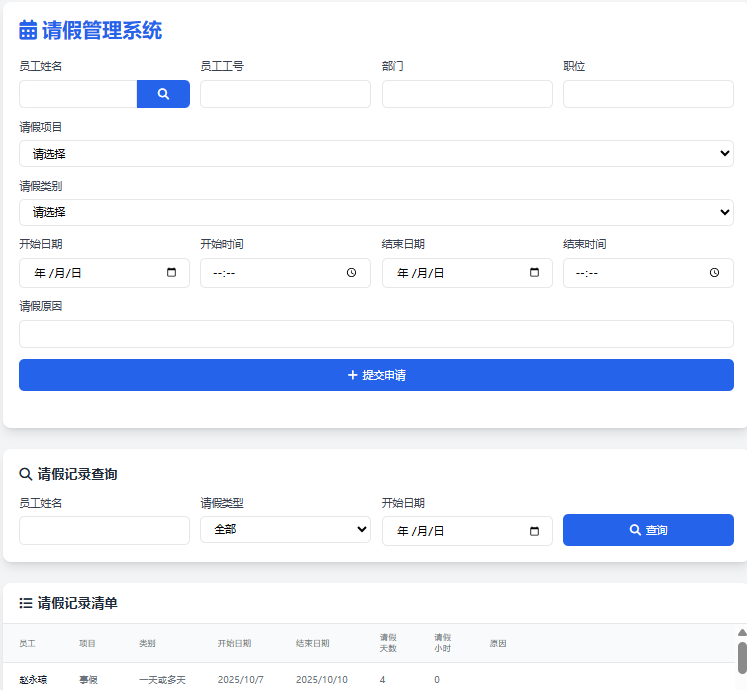
想再做一些修改,原本的网页上,添加新记录是在最顶部,而且没有修改旧记录的功能。
我想把新增和修改两个功能从主页面中独立出来,用模态窗口做合适吗?因为新增和修改时还要选择员工,也是模态窗口,两层嵌套,是不是不太好?
还是用单独的网页来实现? 是否可以同一个网页复用?因为里面控件是相同的。如果用单独网页的话,希望做到用户在网址中直接输入新增和修改网页的网址时不能直接访问,只能通过请休假页面中的新增和修改按钮点击进入。

这是现在网页打开的效果图:
img

package.json文件内容

{
  "name": "leave-test1",
  "version": "1.0.0",
  "main": "app.js",
  "scripts": {
    "start": "node app.js"
  },
  "keywords": [],
  "author": "",
  "license": "ISC",
  "description": "",
  "dependencies": {
    "body-parser": "^2.2.0",
    "connect-flash": "^0.1.1",
    "dotenv": "^17.2.1",
    "ejs": "^3.1.10",
    "express": "^5.1.0",
    "express-session": "^1.18.2",
    "mssql": "^11.0.1"
  }
}


env文件内容


DB_USER=sa
DB_PASSWORD=password
DB_SERVER=192.168.1.4
DB_NAME=Database


app.js 文件内容


const express = require('express');
const bodyParser = require('body-parser');
const session = require('express-session');
const flash = require('connect-flash');
const sql = require('mssql');
const path = require('path');
const { log } = require('console');
require('dotenv').config();

const app = express();
const PORT = process.env.PORT || 3000;

// 数据库配置
const dbConfig = {
  user: process.env.DB_USER,
  password: process.env.DB_PASSWORD,
  server: process.env.DB_SERVER,
  database: process.env.DB_NAME,
  options: {
    encrypt: false,//true时为https 加密访问,mssql不支持
    trustServerCertificate: true,
    port:1433
  }
};

// 中间件
app.use(bodyParser.urlencoded({ extended: true }));
app.use(session({
  secret: 'leave-system-secret',
  resave: false,
  saveUninitialized: true
}));
app.use(flash());
app.set('view engine', 'ejs');
app.set('views', path.join(__dirname, 'views'));
app.use(express.static(path.join(__dirname, 'public')));


// 路由 - 查询请假记录
app.get('/', async (req, res) => {
  try {
    
    const pool = await sql.connect(dbConfig);
    const result = await pool.request()
    .query('SELECT * FROM LeaveApplications ORDER BY StartDate DESC');
   res.render('leave', { 
      leaves: result.recordset,
      messages: req.flash()
      
    });
  } catch (err) {
    console.error("数据库连接或者查询错误",err);
    req.flash('error', '查询请假记录失败');
    res.render('leave', { leaves: [], messages: req.flash() });
  }
});

// 路由 - 新增请假记录
app.post('/leave', async (req, res) => {
  const { employeeName, leaveType, startDate, endDate, reason } = req.body;
  
  try {
    const pool = await sql.connect(dbConfig);
    await pool.request()
      .input('employeeName', sql.NVarChar, employeeName)
      .input('leaveType', sql.NVarChar, leaveType)
      .input('startDate', sql.Date, startDate)
      .input('endDate', sql.Date, endDate)
      .input('reason', sql.NVarChar, reason)
      .query(`INSERT INTO LeaveApplications 
              (EmployeeName, LeaveType, StartDate, EndDate, Reason) 
              VALUES (@employeeName, @leaveType, @startDate, @endDate, @reason)`);
    
    req.flash('success', '请假申请提交成功');
  } catch (err) {
    req.flash('error', '提交请假申请失败');
  } finally {
    res.redirect('/');
  }
});

// 路由 - 条件查询请假记录
app.get('/search', async (req, res) => {
  const { employeeName, leaveType, startDate } = req.query;
  
  try {
    const pool = await sql.connect(dbConfig);
    let query = 'SELECT * FROM LeaveApplications WHERE 1=1';
    const request = pool.request();


    if (employeeName) {
      query += ' AND EmployeeName LIKE @employeeName';
      request.input('employeeName', sql.NVarChar, `%${employeeName}%`);
    }
    if (leaveType) {
      query += ' AND LeaveType = @leaveType';
       request.input('leaveType', sql.NVarChar, leaveType);
    }
    if (startDate) {
     query += ' AND StartDate >= @startDate';
      request.input('startDate', sql.Date, startDate);
    }
     query += ' ORDER BY StartDate DESC';

    const result = await request.query(query);
    res.render('index', { 
      leaves: result.recordset,
      messages: req.flash()
    });
  } catch (err) {
    console.error('查询错误:', err);
    req.flash('error', '查询请假记录失败: ' + err.message);
    res.render('leave', { leaves: [], messages: req.flash() });
  }
});


// 添加员工查询API
app.get('/api/employees', async (req, res) => {
  const { q } = req.query;
  
  try {
    const pool = await sql.connect(dbConfig);
    const result = await pool.request()
      .input('keyword', sql.NVarChar, `%${q}%`)
      .query(`
        select EmployeeNumber,  EmployeeName,  EmployeeID, EmployeeDept,  EmployeePosition 
        from LeaveApplications
        where EmployeeName LIKE @keyword OR EmployeeNumber LIKE @keyword
        
      `);
    //LIMIT 50
    res.json(result.recordset);
  } catch (err) {
    console.error('员工查询错误:', err);
    res.status(500).json({ error: '查询失败' });
  }
});


 // 打开模态框
  function openSearchModal() {
    document.getElementById('searchModal').style.display = 'block';
  }


  // 关闭模态框
  function closeSearchModal() {
    document.getElementById('searchModal').style.display = 'none';
  }


  // 查询员工
  async function searchEmployees() {
    const keyword = document.getElementById('searchInput').value;
    if (!keyword) {
      alert('请输入查询关键词');
      return;
    }


    try {
      const response = await fetch(`/api/employees?q=${encodeURIComponent(keyword)}`);
      const employees = await response.json();
      
      const resultsTable = document.getElementById('searchResults');
      resultsTable.innerHTML = '';
      
      employees.forEach(emp => {
        const row = document.createElement('tr');
        row.className = 'hover:bg-gray-50';
        row.innerHTML = `
          <td class="px-6 py-4 whitespace-nowrap">${emp.EmployeeName}</td>
          <td class="px-6 py-4 whitespace-nowrap">${emp.EmployeeNumber}</td>
          <td class="px-6 py-4 whitespace-nowrap">${emp.EmployeeDept}</td>
          <td class="px-6 py-4 whitespace-nowrap">${emp.EmployeePosition}</td>
          <td class="px-6 py-4 whitespace-nowrap">
            <button onclick="selectEmployee('${emp.EmployeeName}', '${emp.EmployeeNumber}', '${emp.EmployeeID}', '${emp.EmployeeDept}', '${emp.EmployeePosition}')"
              class="text-blue-500 hover:text-blue-700">选择</button>
          </td>
        `;
        resultsTable.appendChild(row);
      });
    } catch (error) {
      console.error('查询失败:', error);
      alert('查询失败,请稍后重试');
    }
  }

  // 选择员工
  function selectEmployee(name, number, id, department, position) {
    document.getElementById('employeeName').value = name;
    document.getElementById('employeeName').dataset.id = id;
    console.log('id is :' + id);
    
    document.querySelector('input[name="employeeNumber"]').value = number;
    document.querySelector('input[name="employeeDept"]').value = department;
    document.querySelector('input[name="employeePosition"]').value = position;
    closeSearchModal();
  }


app.listen(PORT, () => {
  console.log(`Server running on http://localhost:${PORT}`);
});
  • 写回答

5条回答 默认 最新

  • 宝码香车 优质创作者: JavaScript技术领域 2025-09-04 18:11
    关注

    让【宝码香车】来帮您解答,本回答参考DeepSeek编写,并整理提供。

    如果答案让您满意,请采纳、点赞、关注,非常感谢!
    .
    每日一句正能量,让它带给您好心情:每一个不曾起舞的日子,都是对生命的辜负。
    .

    网页中实现点击按钮跳转页面的方案

    根据您的需求,我建议使用单独的页面来实现新增和修改功能,而不是嵌套模态窗口。以下是完整的解决方案:

    实现方案

    1. 修改主页面(leave.ejs) - 添加跳转按钮

    <!DOCTYPE html>
    <html lang="zh-CN">
    <head>
        <meta charset="UTF-8">
        <meta name="viewport" content="width=device-width, initial-scale=1.0">
        <title>请假管理系统</title>
        <script src="https://cdn.tailwindcss.com"></script>
    </head>
    <body class="bg-gray-100">
        <div class="container mx-auto p-4">
            <h1 class="text-2xl font-bold mb-6 text-center">请假管理系统</h1>
            
            <!-- 新增记录按钮 -->
            <div class="mb-4">
                <button onclick="location.href='/add'" 
                        class="bg-blue-500 hover:bg-blue-700 text-white font-bold py-2 px-4 rounded">
                    新增请假记录
                </button>
            </div>
            
            <!-- 查询条件和记录列表 -->
            <!-- 这里保留您原有的查询和显示逻辑 -->
            
            <!-- 在每条记录后添加修改按钮 -->
            <% leaves.forEach(function(leave) { %>
                <tr>
                    <!-- 其他字段 -->
                    <td class="px-6 py-4 whitespace-nowrap">
                        <button onclick="location.href='/edit/<%= leave.ID %>'" 
                                class="text-blue-500 hover:text-blue-700">
                            修改
                        </button>
                    </td>
                </tr>
            <% }); %>
        </div>
    </body>
    </html>
    

    2. 创建新增页面(add.ejs)

    <!DOCTYPE html>
    <html lang="zh-CN">
    <head>
        <meta charset="UTF-8">
        <meta name="viewport" content="width=device-width, initial-scale=1.0">
        <title>新增请假记录</title>
        <script src="https://cdn.tailwindcss.com"></script>
    </head>
    <body class="bg-gray-100">
        <div class="container mx-auto p-4">
            <h1 class="text-2xl font-bold mb-6">新增请假记录</h1>
            
            <form action="/leave" method="POST">
                <!-- 员工选择控件 -->
                <div class="mb-4">
                    <label class="block text-gray-700 text-sm font-bold mb-2" for="employeeName">
                        员工姓名
                    </label>
                    <input type="text" id="employeeName" name="employeeName" 
                           class="shadow appearance-none border rounded w-full py-2 px-3 text-gray-700 leading-tight focus:outline-none focus:shadow-outline"
                           required readonly>
                    <button type="button" onclick="openSearchModal()" 
                            class="mt-2 bg-blue-500 hover:bg-blue-700 text-white font-bold py-1 px-2 rounded text-sm">
                        选择员工
                    </button>
                </div>
                
                <!-- 其他表单字段 -->
                <div class="mb-4">
                    <label class="block text-gray-700 text-sm font-bold mb-2" for="leaveType">
                        请假类型
                    </label>
                    <select id="leaveType" name="leaveType" class="shadow appearance-none border rounded w-full py-2 px-3 text-gray-700 leading-tight focus:outline-none focus:shadow-outline" required>
                        <option value="">请选择</option>
                        <option value="事假">事假</option>
                        <option value="病假">病假</option>
                        <option value="年假">年假</option>
                        <option value="调休">调休</option>
                    </select>
                </div>
                
                <!-- 开始日期、结束日期、原因等字段 -->
                
                <div class="flex items-center justify-between">
                    <button type="submit" class="bg-blue-500 hover:bg-blue-700 text-white font-bold py-2 px-4 rounded focus:outline-none focus:shadow-outline">
                        提交
                    </button>
                    <button type="button" onclick="location.href='/'" 
                            class="bg-gray-500 hover:bg-gray-700 text-white font-bold py-2 px-4 rounded">
                        返回
                    </button>
                </div>
            </form>
            
            <!-- 员工搜索模态框 -->
            <div id="searchModal" class="fixed inset-0 bg-gray-600 bg-opacity-50 overflow-y-auto h-full w-full hidden">
                <div class="relative top-20 mx-auto p-5 border w-11/12 md:w-3/4 shadow-lg rounded-md bg-white">
                    <div class="mt-3">
                        <h3 class="text-lg font-medium text-gray-900">搜索员工</h3>
                        <div class="mt-2">
                            <input type="text" id="searchInput" placeholder="输入员工姓名或工号" 
                                   class="px-3 py-2 border rounded-md w-full">
                            <button onclick="searchEmployees()" 
                                    class="mt-2 bg-blue-500 hover:bg-blue-700 text-white font-bold py-1 px-2 rounded">
                                搜索
                            </button>
                        </div>
                        <div class="mt-4 overflow-auto max-h-60">
                            <table class="min-w-full divide-y divide-gray-200">
                                <thead class="bg-gray-50">
                                    <tr>
                                        <th class="px-6 py-3 text-left text-xs font-medium text-gray-500 uppercase tracking-wider">姓名</th>
                                        <th class="px-6 py-3 text-left text-xs font-medium text-gray-500 uppercase tracking-wider">工号</th>
                                        <th class="px-6 py-3 text-left text-xs font-medium text-gray-500 uppercase tracking-wider">部门</th>
                                        <th class="px-6 py-3 text-left text-xs font-medium text-gray-500 uppercase tracking-wider">职位</th>
                                        <th class="px-6 py-3 text-left text-xs font-medium text-gray-500 uppercase tracking-wider">操作</th>
                                    </tr>
                                </thead>
                                <tbody id="searchResults" class="bg-white divide-y divide-gray-200"></tbody>
                            </table>
                        </div>
                        <div class="mt-4">
                            <button onclick="closeSearchModal()" 
                                    class="bg-gray-500 hover:bg-gray-700 text-white font-bold py-1 px-2 rounded">
                                关闭
                            </button>
                        </div>
                    </div>
                </div>
            </div>
        </div>
        
        <script>
            // 员工搜索和选择功能(与主页面相同)
            function openSearchModal() {
                document.getElementById('searchModal').classList.remove('hidden');
            }
    
    
            function closeSearchModal() {
                document.getElementById('searchModal').classList.add('hidden');
            }
    
    
            async function searchEmployees() {
                const keyword = document.getElementById('searchInput').value;
                if (!keyword) {
                    alert('请输入查询关键词');
                    return;
                }
    
    
                try {
                    const response = await fetch(`/api/employees?q=${encodeURIComponent(keyword)}`);
                    const employees = await response.json();
                    
                    const resultsTable = document.getElementById('searchResults');
                    resultsTable.innerHTML = '';
                    
                    employees.forEach(emp => {
                        const row = document.createElement('tr');
                        row.className = 'hover:bg-gray-50';
                        row.innerHTML = `
                            <td class="px-6 py-4 whitespace-nowrap">${emp.EmployeeName}</td>
                            <td class="px-6 py-4 whitespace-nowrap">${emp.EmployeeNumber}</td>
                            <td class="px-6 py-4 whitespace-nowrap">${emp.EmployeeDept}</td>
                            <td class="px-6 py-4 whitespace-nowrap">${emp.EmployeePosition}</td>
                            <td class="px-6 py-4 whitespace-nowrap">
                                <button onclick="selectEmployee('${emp.EmployeeName}', '${emp.EmployeeNumber}', '${emp.EmployeeID}', '${emp.EmployeeDept}', '${emp.EmployeePosition}')"
                                    class="text-blue-500 hover:text-blue-700">选择</button>
                            </td>
                        `;
                        resultsTable.appendChild(row);
                    });
                } catch (error) {
                    console.error('查询失败:', error);
                    alert('查询失败,请稍后重试');
                }
            }
    
    
            function selectEmployee(name, number, id, department, position) {
                document.getElementById('employeeName').value = name;
                document.getElementById('employeeName').dataset.id = id;
                closeSearchModal();
            }
        </script>
    </body>
    </html>
    

    3. 创建编辑页面(edit.ejs)

    编辑页面与新增页面类似,但会预填充数据:

    <!DOCTYPE html>
    <html lang="zh-CN">
    <head>
        <meta charset="UTF-8">
        <meta name="viewport" content="width=device-width, initial-scale=1.0">
        <title>编辑请假记录</title>
        <script src="https://cdn.tailwindcss.com"></script>
    </head>
    <body class="bg-gray-100">
        <div class="container mx-auto p-4">
            <h1 class="text-2xl font-bold mb-6">编辑请假记录</h1>
            
            <form action="/update/<%= leave.ID %>" method="POST">
                <!-- 表单字段与新增页面相同,但会预填充数据 -->
                <div class="mb-4">
                    <label class="block text-gray-700 text-sm font-bold mb-2" for="employeeName">
                        员工姓名
                    </label>
                    <input type="text" id="employeeName" name="employeeName" 
                           value="<%= leave.EmployeeName %>"
                           class="shadow appearance-none border rounded w-full py-2 px-3 text-gray-700 leading-tight focus:outline-none focus:shadow-outline"
                           required readonly>
                </div>
                
                <!-- 其他预填充字段 -->
                
                <div class="flex items-center justify-between">
                    <button type="submit" class="bg-blue-500 hover:bg-blue-700 text-white font-bold py-2 px-4 rounded focus:outline-none focus:shadow-outline">
                        更新
                    </button>
                    <button type="button" onclick="location.href='/'" 
                            class="bg-gray-500 hover:bg-gray-700 text-white font-bold py-2 px-4 rounded">
                        返回
                    </button>
                </div>
            </form>
        </div>
    </body>
    </html>
    

    4. 修改app.js - 添加路由和中间件

    // 添加中间件检查引用来源
    const checkReferer = (req, res, next) => {
        // 允许直接从浏览器地址栏访问的情况(如开发环境)
        if (!req.get('Referer') && process.env.NODE_ENV !== 'production') {
            return next();
        }
        
        // 检查引用来源是否来自自己的网站
        const referer = req.get('Referer');
        if (!referer || !referer.includes(req.headers.host)) {
            return res.status(403).send('禁止直接访问');
        }
        next();
    };
    
    
    // 新增页面路由
    app.get('/add', checkReferer, (req, res) => {
        res.render('add', { messages: req.flash() });
    });
    
    
    // 编辑页面路由
    app.get('/edit/:id', checkReferer, async (req, res) => {
        try {
            const pool = await sql.connect(dbConfig);
            const result = await pool.request()
                .input('id', sql.Int, req.params.id)
                .query('SELECT * FROM LeaveApplications WHERE ID = @id');
            
            if (result.recordset.length === 0) {
                req.flash('error', '记录不存在');
                return res.redirect('/');
            }
            
            res.render('edit', { 
                leave: result.recordset[0],
                messages: req.flash() 
            });
        } catch (err) {
            console.error("数据库查询错误", err);
            req.flash('error', '获取记录失败');
            res.redirect('/');
        }
    });
    
    
    // 更新记录路由
    app.post('/update/:id', async (req, res) => {
        const { employeeName, leaveType, startDate, endDate, reason } = req.body;
        
        try {
            const pool = await sql.connect(dbConfig);
            await pool.request()
                .input('id', sql.Int, req.params.id)
                .input('employeeName', sql.NVarChar, employeeName)
                .input('leaveType', sql.NVarChar, leaveType)
                .input('startDate', sql.Date, startDate)
                .input('endDate', sql.Date, endDate)
                .input('reason', sql.NVarChar, reason)
                .query(`UPDATE LeaveApplications 
                        SET EmployeeName = @employeeName, 
                            LeaveType = @leaveType, 
                            StartDate = @startDate, 
                            EndDate = @endDate, 
                            Reason = @reason
                        WHERE ID = @id`);
            
            req.flash('success', '请假记录更新成功');
        } catch (err) {
            req.flash('error', '更新请假记录失败');
        } finally {
            res.redirect('/');
        }
    });
    

    方案优势

    1. 避免模态窗口嵌套:使用独立页面避免了多层模态窗口的复杂交互
    2. 代码复用:新增和编辑页面可以共享大部分HTML结构和JavaScript代码
    3. 直接URL访问控制:通过Referer检查防止直接访问
    4. 更好的用户体验:独立的页面提供更清晰的上下文和更专注的操作环境
    5. 浏览器导航支持:用户可以使用浏览器前进后退按钮

    注意事项

    1. 在生产环境中,您可能需要更严格的安全检查
    2. 考虑添加用户认证和授权机制
    3. 对于移动设备,可以考虑使用响应式设计优化体验

    这个方案应该能满足您的需求,同时保持代码的清晰和可维护性。

    本回答被题主选为最佳回答 , 对您是否有帮助呢?
    评论
查看更多回答(4条)

报告相同问题?

问题事件

  • 系统已结题 9月23日
  • 已采纳回答 9月15日
  • 创建了问题 9月4日