cmx_clanguage 2025-09-10 19:03 采纳率: 8.8%
浏览 3

python与数据库连接


# complete_diagnosis.py
import sqlite3
import os
import glob
import sys

def find_database_file():
    """
    查找数据库文件的完整路径
    """
    print("🔍 正在查找数据库文件...")
    
    # 可能的数据库文件扩展名
    extensions = ['', '.db', '.sqlite', '.sqlite3', '.db3']
    
    # 可能的文件路径(当前目录和常见位置)
    possible_paths = [
        '.',  # 当前目录
        '..',  # 上级目录
        os.path.expanduser('~'),  # 用户主目录
        os.path.expanduser('~/Desktop'),
        os.path.expanduser('~/Documents'),
    ]
    
    found_files = []
    
    # 检查所有可能的路径和扩展名组合
    for path in possible_paths:
        for ext in extensions:
            pattern = os.path.join(path, f"taobao_data{ext}")
            
            # 使用glob处理通配符和波浪号扩展
            expanded_pattern = os.path.expanduser(pattern)
            matches = glob.glob(expanded_pattern)
            
            for match in matches:
                if os.path.isfile(match):
                    abs_path = os.path.abspath(match)
                    found_files.append(abs_path)
                    print(f"✅ 找到数据库文件: {abs_path}")
    
    return found_files

def get_database_info(db_path):
    """
    获取数据库的详细信息
    """
    print(f"\n📊 数据库信息: {db_path}")
    print("=" * 50)
    
    try:
        # 连接到数据库
        conn = sqlite3.connect(db_path)
        cursor = conn.cursor()
        
        # 获取所有表
        cursor.execute("SELECT name FROM sqlite_master WHERE type='table'")
        tables = [table[0] for table in cursor.fetchall()]
        
        print(f"📋 数据库中的表 ({len(tables)}):")
        for table in tables:
            print(f"  - {table}")
            
        # 检查taobao_products表是否存在
        if 'taobao_products' in tables:
            print(f"\n✅ 表 'taobao_products' 存在")
            
            # 获取表结构
            cursor.execute("PRAGMA table_info(taobao_products)")
            columns = cursor.fetchall()
            
            print(f"📋 表结构 (共 {len(columns)} 列):")
            for col in columns:
                print(f"  - {col[1]} ({col[2]})")
                
            # 获取记录数量
            cursor.execute("SELECT COUNT(*) FROM taobao_products")
            count = cursor.fetchone()[0]
            print(f"📈 表中的记录数: {count}")
        else:
            print(f"\n❌ 表 'taobao_products' 不存在")
            # 查找类似的表名
            similar_tables = [t for t in tables if 'taobao' in t.lower() or 'product' in t.lower()]
            if similar_tables:
                print("🤔 找到以下可能相关的表:")
                for table in similar_tables:
                    print(f"  - {table}")
                    
        conn.close()
        
    except Exception as e:
        print(f"❌ 无法打开数据库: {e}")
        import traceback
        traceback.print_exc()

if __name__ == "__main__":
    # 查找数据库文件
    db_files = find_database_file()
    
    if not db_files:
        print("❌ 未找到数据库文件")
        # 尝试查找其他可能的名称
        other_names = ['taobao', 'products', 'data', 'spider_data']
        for name in other_names:
            print(f"\n尝试查找名称包含 '{name}' 的数据库文件...")
            db_files = find_database_file(name)
            if db_files:
                break
    
    # 显示每个找到的数据库的详细信息
    for db_file in db_files:
        get_database_info(db_file)
        print("\n" + "=" * 50 + "\n")
img

img


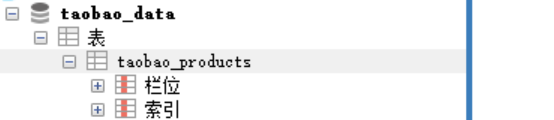
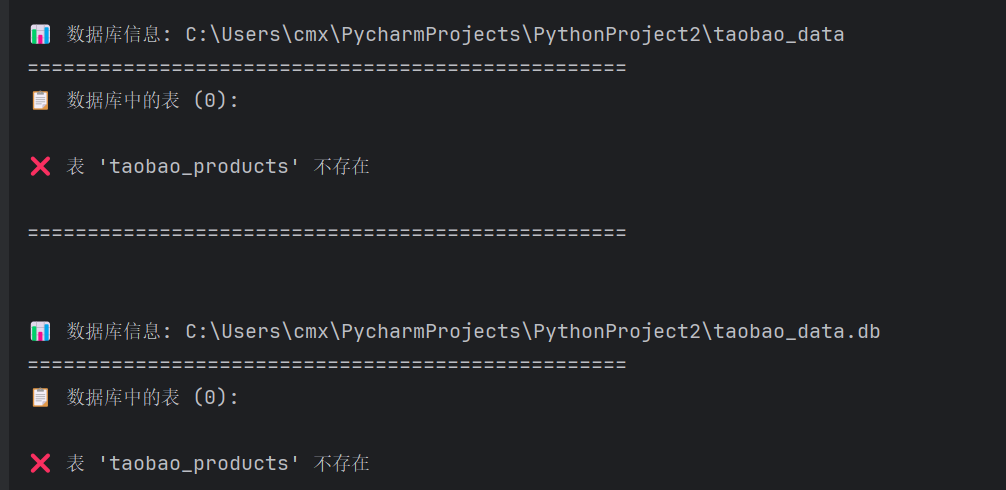
明明数据库里有表,程序检查出来却说没有

  • 写回答

5条回答 默认 最新

  • 檀越@新空间 2025-09-10 19:25
    关注

    晚上好🌙🌙🌙
    本答案参考通义千问

    你提到“明明数据库里有表,程序检查出来却说没有”,这通常意味着在代码中存在一些逻辑或路径问题,导致无法正确识别到表的存在。我们来逐步分析并提供解决方案。


    ✅ 问题分析

    1. 数据库文件路径错误
      程序可能没有找到正确的数据库文件,或者找到了一个空的、损坏的文件。

    2. 表名拼写错误
      数据库中确实存在表,但表名与代码中使用的 taobao_products 不一致(例如大小写不一致、拼写错误等)。

    3. SQL 查询错误
      使用 sqlite_master 获取表名时,可能存在语法错误或权限问题。

    4. 数据库连接失败
      连接数据库时出错,导致后续查询无法执行。

    5. PRAGMA table_info 的使用问题
      在某些情况下,PRAGMA table_info 可能返回空结果,尤其是在 SQLite 版本较低或表为空时。


    🔧 解决方案

    1. 确认数据库文件路径是否正确

    • 检查 find_database_file() 是否成功找到了实际存在的数据库文件。
    • 打印所有找到的文件路径,确保它们是有效的。

    重点:
    确保你运行脚本时所在的目录和查找路径是正确的。

    def find_database_file():
        ...
        for match in matches:
            if os.path.isfile(match):
                abs_path = os.path.abspath(match)
                found_files.append(abs_path)
                print(f"✅ 找到数据库文件: {abs_path}")
    

    建议修改:
    find_database_file() 中打印所有找到的文件路径,确认是否有有效文件。


    2. 检查表名是否匹配

    • 确保数据库中的表名为 taobao_products(包括大小写)。
    • 如果表名不同(如 TaobaoProductsproducts),请修改代码中的表名。

    重点:
    SQLite 表名是区分大小写的!

    if 'taobao_products' in tables:
        print("✅ 表 'taobao_products' 存在")
    else:
        print("❌ 表 'taobao_products' 不存在")
    

    建议修改:
    添加调试信息,打印所有找到的表名:

    print(f"📋 数据库中的表 ({len(tables)}):")
    for table in tables:
        print(f"  - {table}")
    

    3. 检查数据库连接是否成功

    • 确保 sqlite3.connect(db_path) 成功连接数据库。
    • 添加异常处理,打印更多错误信息。

    重点:
    如果连接失败,后续查询不会执行。

    try:
        conn = sqlite3.connect(db_path)
        cursor = conn.cursor()
    except Exception as e:
        print(f"❌ 无法连接数据库: {e}")
        return
    

    4. 验证 PRAGMA table_info 是否正常工作

    • 有些 SQLite 版本或环境可能对 PRAGMA 支持有限。
    • 尝试手动运行 PRAGMA table_info(taobao_products); 查看输出。

    建议修改:
    添加调试语句,查看 PRAGMA 的返回值:

    cursor.execute("PRAGMA table_info(taobao_products)")
    columns = cursor.fetchall()
    print(f"(PRAGMA) 表结构: {columns}")
    

    5. 检查数据库是否为空

    • 如果数据库存在但表为空,SELECT COUNT(*) 可能返回 0。
    • 检查 taobao_products 表是否有数据。

    建议修改:
    添加更详细的日志信息:

    cursor.execute("SELECT COUNT(*) FROM taobao_products")
    count = cursor.fetchone()[0]
    print(f"📈 表中的记录数: {count} (如果为 0,说明表为空)")
    

    ✅ 修改后的完整代码(关键部分)

    def get_database_info(db_path):
        print(f"\n📊 数据库信息: {db_path}")
        print("=" * 50)
        
        try:
            # 连接到数据库
            conn = sqlite3.connect(db_path)
            cursor = conn.cursor()
            
            # 获取所有表
            cursor.execute("SELECT name FROM sqlite_master WHERE type='table'")
            tables = [table[0] for table in cursor.fetchall()]
            
            print(f"📋 数据库中的表 ({len(tables)}):")
            for table in tables:
                print(f"  - {table}")
                
            # 检查taobao_products表是否存在
            if 'taobao_products' in tables:
                print(f"\n✅ 表 'taobao_products' 存在")
                
                # 获取表结构
                cursor.execute("PRAGMA table_info(taobao_products)")
                columns = cursor.fetchall()
                print(f"(PRAGMA) 表结构: {columns}")
                
                print(f"📋 表结构 (共 {len(columns)} 列):")
                for col in columns:
                    print(f"  - {col[1]} ({col[2]})")
                    
                # 获取记录数量
                cursor.execute("SELECT COUNT(*) FROM taobao_products")
                count = cursor.fetchone()[0]
                print(f"📈 表中的记录数: {count} (如果为 0,说明表为空)")
            else:
                print(f"\n❌ 表 'taobao_products' 不存在")
                # 查找类似的表名
                similar_tables = [t for t in tables if 'taobao' in t.lower() or 'product' in t.lower()]
                if similar_tables:
                    print("🤔 找到以下可能相关的表:")
                    for table in similar_tables:
                        print(f"  - {table}")
                        
            conn.close()
            
        except Exception as e:
            print(f"❌ 无法打开数据库: {e}")
            import traceback
            traceback.print_exc()
    

    🧪 测试建议

    1. 手动测试数据库

      • 使用 SQLite 命令行工具连接数据库:
        sqlite3 your_database.db
        .tables
        PRAGMA table_info(taobao_products);
        SELECT * FROM taobao_products LIMIT 1;
        
    2. 打印所有找到的数据库文件

      • find_database_file() 中添加调试输出:
        print("🔍 找到的数据库文件列表:")
        for file in found_files:
            print(f"  - {file}")
        

    ✅ 总结

    | 问题 | 原因 | 解决方法 | |------|------|----------| | 表未被识别 | 表名不匹配或路径错误 | 检查表名、路径、大小写 | | 数据库连接失败 | 文件不存在或权限问题 | 验证路径、权限、文件内容 | | PRAGMA table_info 返回空 | 表不存在或为空 | 检查表结构、数据 | | 表存在但无数据 | 表为空 | 检查插入操作 |

    如果你能提供数据库文件或具体错误信息,我可以进一步帮你定位问题。

    评论

报告相同问题?

问题事件

  • 创建了问题 9月10日