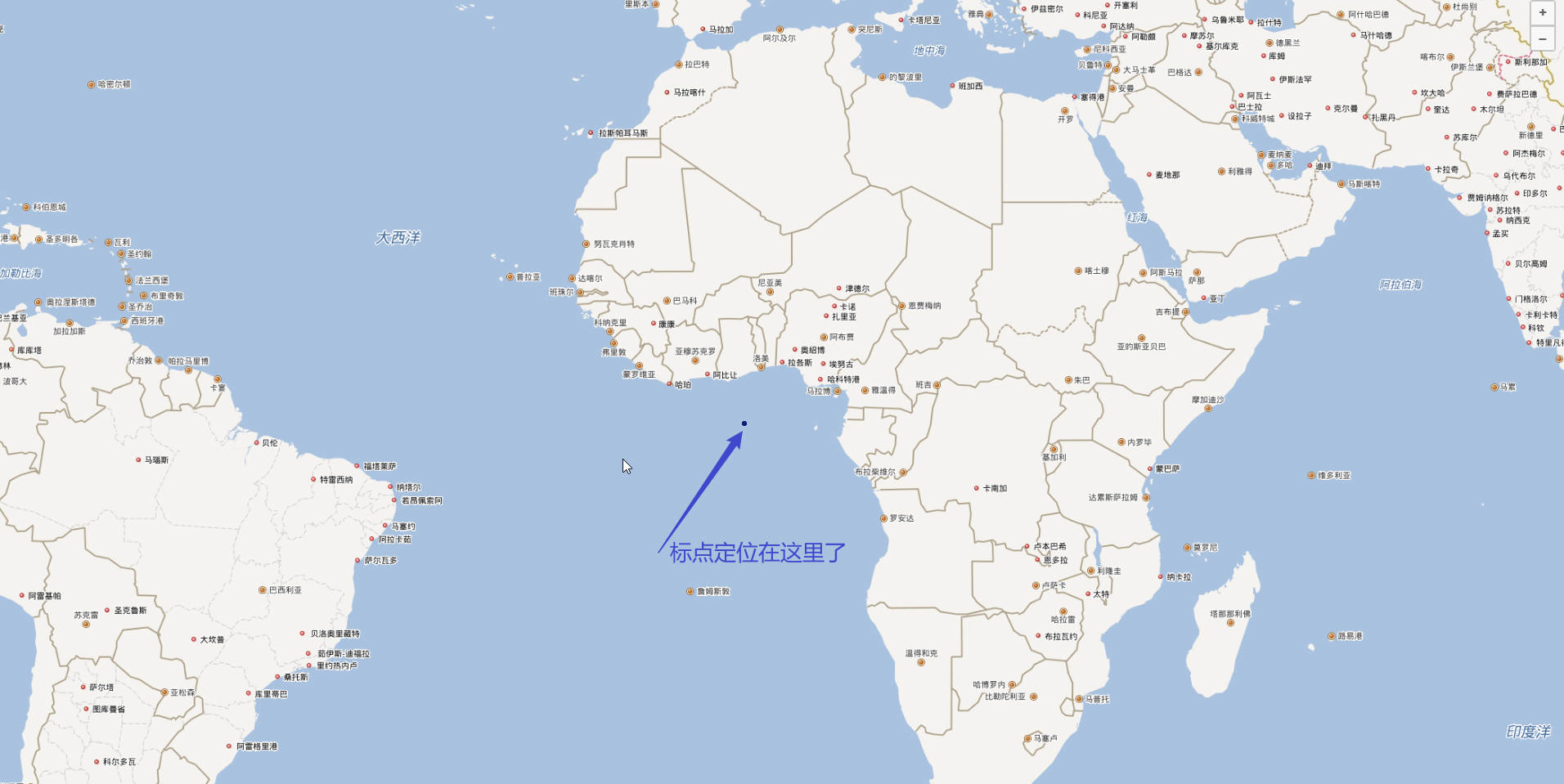
使用openlayers加载百度地图API,像地图上标点,地图成功渲染,但是标点位置不对
        // 验证BD09投影定义
        proj4.defs('BD09', '+proj=merc +a=6378245 +b=6356863.0188 +lat_ts=0.0 +lon_0=0.0 +x_0=0.0 +y_0=0 +k=1.0 +units=m +nadgrids=@null +wktext +no_defs');
        ol.proj.proj4.register(proj4);

        // 创建百度地图瓦片层
        class BaiduLayer extends ol.layer.Tile {
            constructor(options) {
                const baiduSource = new ol.source.XYZ({
                    projection: 'BD09',
                    tileUrlFunction: function (tileCoord) {
                        // 百度地图瓦片URL生成规则
                        const z = tileCoord[0];
                        const x = tileCoord[1];
                        let y = tileCoord[2];
                        // 百度地图Y坐标需要取反
                        y = -y - 1;
                        // 百度地图服务器编号
                        const serverNum = Math.ceil(Math.random() * 4);
                        return `http://online${serverNum}.map.bdimg.com/onlinelabel/?qt=tile&x=${x}&y=${y}&z=${z}&styles=pl&scaler=1&p=1`;
                    },
                    tileGrid: new ol.tilegrid.TileGrid({
                        minZoom: 3,
                        maxZoom: 18,
                        // 添加必要的原点和分辨率信息
                        origin: [0, 0],
                        resolutions: function () {
                            const resolutions = [];
                            const initialResolution = 20037508.342789244 * 2 / 256;
                            for (let z = 0; z <= 18; z++) {
                                // resolutions[z] = Math.pow(2, 18 - z);
                                resolutions[z] = initialResolution / Math.pow(2, z);
                            }
                            return resolutions;
                        }()
                    }),
                    wrapX: true
                });

                super({
                    source: baiduSource,
                    ...options
                });
            }
        }

        // 初始化地图,使用百度坐标系
        const map = new ol.Map({
            target: 'map',
            controls: ol.control.defaults.defaults().extend([
                new ol.control.Zoom(),
                new ol.control.Attribution({
                    collapsible: false,
                    html: '地图数据 © 百度地图'
                })
            ]),
            view: new ol.View({
                projection: 'BD09',
                center: wgs84ToBd09(116.4074, 39.9042),
                zoom: 4, // 初始缩放级别
                minZoom: 3, // 最小缩放级别(世界地图)
                maxZoom: 18 // 最大缩放级别(街道级)
            })
        });

        // 添加百度地图图层
        const baiduLayer = new BaiduLayer();
        map.addLayer(baiduLayer);

        // 定义不同状态对应的图标
        const statusIcons = {
            normal: './icon_dot-copy-copy-copy.svg',
            warning: './icon_dot-copy-copy-copy.svg',
            error: './icon_dot-copy-copy-copy.svg',// 动态GIF
        };

        // 创建矢量图层用于显示点位(使用百度坐标系)
        const vectorSource = new ol.source.Vector({
            features: [],
            projection: 'BD09'
        });
        // 根据缩放级别和状态创建点位样式
        const createPointStyle = (feature) => {
            const status = feature.get('status');
            const zoom = map.getView().getZoom();
            const iconSrc = statusIcons[status] || statusIcons.normal;

            // 根据缩放级别定义不同大小的图标
            let scale = 0.5; // 国家级别(小图标)
            if (zoom > 7 && zoom <= 12) {
                scale = 0.7; // 城市级别(中等图标)
            } else if (zoom > 12) {
                scale = 0.9; // 街道级别(大图标)
            }

            return new ol.style.Style({
                image: new ol.style.Icon({
                    src: iconSrc,
                    scale: scale,
                    anchor: [0.5, 1] // 图标锚点(底部中心)
                })
            });
        }
        // 创建矢量图层
        const vectorLayer = new ol.layer.Vector({
            source: vectorSource,
            style: createPointStyle // 根据缩放级别和状态创建样式
        });
        map.addLayer(vectorLayer);

        // 创建弹窗元素
        const popup = new ol.Overlay({
            element: document.createElement('div'),
            autoPan: true,
            autoPanAnimation: {
                duration: 250
            }
        });
        map.addOverlay(popup);
        // 地图点击事件处理
        map.on('click', (evt) => {
            const feature = map.forEachFeatureAtPixel(evt.pixel, (feature) => {
                return feature;
            });
            // 清除现有弹窗
            popup.getElement().innerHTML = '';
            if (feature) {
                const coordinates = evt.coordinate;
                const features = feature.get('features');
                // 如果是聚合点,点击后放大
                if (features && features.length > 1) {
                    map.getView().animate({
                        center: coordinates,
                        zoom: map.getView().getZoom() + 2,
                        duration: 500
                    });
                }
                // 如果是单个点,显示弹窗
                else if (features && features.length === 1) {
                    const point = features[0];
                    showPopup(point, coordinates);
                }
            }
        });

        // 鼠标悬停样式变化
        map.on('pointermove', (e) => {
            if (e.dragging) return;
            const pixel = map.getEventPixel(e.originalEvent);
            const hit = map.hasFeatureAtPixel(pixel);
            map.getTargetElement().style.cursor = hit ? 'pointer' : '';
        });

        // 显示弹窗信息
        function showPopup(point, coordinates) {
            const properties = point.getProperties();
            // 创建弹窗内容
            const popupContent = `
                <div class="custom-popup">
                    <div class="popup-header">${properties.name}</div>
                    <div class="popup-content">
                        <div class="popup-info">
                            <strong>位置:</strong> ${properties.location}
                        </div>
                        <div class="popup-info">
                            <strong>状态:</strong>
                            <span class="status-badge status-${properties.status}">
                                ${getStatusText(properties.status)}
                            </span>
                        </div>
                        <div class="popup-info">
                            <strong>时间:</strong> ${new Date(properties.timestamp).toLocaleString()}
                        </div>
                        <div class="popup-info">
                            <strong>描述:</strong> ${properties.description}
                        </div>
                    </div>
                </div>
            `;

            // 设置弹窗内容并显示
            const popupElement = popup.getElement();
            popupElement.innerHTML = popupContent;
            popup.setPosition(coordinates);
        }

        // 获取状态文本
        function getStatusText(status) {
            const statusTexts = {
                normal: '正常',
                warning: '警告',
                error: '错误',
            };
            return statusTexts[status] || status;
        }

        function outOfChina(lng, lat) {
            return (lng < 72.004 || lng > 137.8347 || lat < 0.8293 || lat > 55.8271);
        }

        /**
         * WGS84 转 BD09 坐标
         * @param {number} lng - WGS84 经度
         * @param {number} lat - WGS84 纬度
         * @returns {Array} [bdLng, bdLat] - BD09 坐标系的经纬度
         */
        function wgs84ToBd09(lng, lat) {
            if (outOfChina(lng, lat)) {
                return [lng, lat]; // 国外坐标直接返回
            }
            const gcj = wgs84ToGcj02(lng, lat);
            return gcj02ToBd09(gcj[0], gcj[1]);
        }
        /**
         * WGS84 转 GCJ02(高德坐标系)
         */
        function wgs84ToGcj02(lng, lat) {
            const pi = 3.1415926535897932384626;
            const a = 6378245.0; // 地球半径
            const ee = 0.00669342162296594323; // 扁率
            if (outOfChina(lng, lat)) {
                return [lng, lat];
            }
            let dLat = transformLat(lng - 105.0, lat - 35.0);
            let dLng = transformLng(lng - 105.0, lat - 35.0);
            const radLat = lat / 180.0 * pi;
            let magic = Math.sin(radLat);
            magic = 1 - ee * magic * magic;
            const sqrtMagic = Math.sqrt(magic);
            dLat = (dLat * 180.0) / ((a * (1 - ee)) / (magic * sqrtMagic) * pi);
            dLng = (dLng * 180.0) / (a / sqrtMagic * Math.cos(radLat) * pi);
            const mgLat = lat + dLat;
            const mgLng = lng + dLng;
            return [mgLng, mgLat];
        }

        /**
         * GCJ02 转 BD09(百度坐标系)
         */
        function gcj02ToBd09(lng, lat) {
            const pi = 3.1415926535897932384626;
            const x = lng;
            const y = lat;
            const z = Math.sqrt(x * x + y * y) + 0.00002 * Math.sin(y * pi);
            const theta = Math.atan2(y, x) + 0.000003 * Math.cos(x * pi);
            const bdLng = z * Math.cos(theta) + 0.0065;
            const bdLat = z * Math.sin(theta) + 0.006;
            return [bdLng, bdLat];
        }

        /**
         * 判断坐标是否在国内(国外坐标不加密)
         */
        function outOfChina(lng, lat) {
            return (lng < 73.66 || lng > 135.05 || lat < 18.16 || lat > 53.55);
        }

        /**
         * 纬度转换辅助函数
         */
        function transformLat(x, y) {
            const pi = 3.1415926535897932384626;
            let ret = -100.0 + 2.0 * x + 3.0 * y + 0.2 * y * y + 0.1 * x * y + 0.2 * Math.sqrt(Math.abs(x));
            ret += (20.0 * Math.sin(6.0 * x * pi) + 20.0 * Math.sin(2.0 * x * pi)) * 2.0 / 3.0;
            ret += (20.0 * Math.sin(y * pi) + 40.0 * Math.sin(y / 3.0 * pi)) * 2.0 / 3.0;
            ret += (160.0 * Math.sin(y / 12.0 * pi) + 320 * Math.sin(y * pi / 30.0)) * 2.0 / 3.0;
            return ret;
        }

        /**
         * 经度转换辅助函数
         */
        function transformLng(x, y) {
            const pi = 3.1415926535897932384626;
            let ret = 300.0 + x + 2.0 * y + 0.1 * x * x + 0.1 * x * y + 0.1 * Math.sqrt(Math.abs(x));
            ret += (20.0 * Math.sin(6.0 * x * pi) + 20.0 * Math.sin(2.0 * x * pi)) * 2.0 / 3.0;
            ret += (20.0 * Math.sin(x * pi) + 40.0 * Math.sin(x / 3.0 * pi)) * 2.0 / 3.0;
            ret += (150.0 * Math.sin(x / 12.0 * pi) + 300.0 * Math.sin(x / 30.0 * pi)) * 2.0 / 3.0;
            return ret;
        }

        // 模拟获取点位数据的API调用
        async function fetchPointsData() {
            // 实际项目中这里会是真实的API请求
            // return await fetch('/api/points').then(res => res.json());
            // 模拟数据 - 生成一些随机点位
            const statusTypes = ['normal', 'warning', 'error'];
            const cities = [
                { name: '北京', lng: 116.4074, lat: 39.9042 },
                { name: '上海', lng: 121.4737, lat: 31.2304 },
                { name: '广州', lng: 113.2644, lat: 23.1291 },
                { name: '深圳', lng: 114.0579, lat: 22.5431 },
                { name: '成都', lng: 104.0665, lat: 30.6592 },
                { name: '杭州', lng: 120.1551, lat: 30.2741 },
                { name: '武汉', lng: 114.3055, lat: 30.5928 },
                { name: '重庆', lng: 106.5504, lat: 29.5637 },
                { name: '南京', lng: 118.7969, lat: 32.0603 },
                { name: '西安', lng: 108.9540, lat: 34.2652 },
                { name: '东京', lng: 139.6917, lat: 35.6895 },
                { name: '纽约', lng: -74.0060, lat: 40.7128 },
                { name: '伦敦', lng: -0.1278, lat: 51.5074 }
            ];

            // 生成每个城市的多个点位
            let points = [];
            cities.forEach(city => {
                // 每个城市随机生成1-8个点位
                const pointCount = Math.floor(Math.random() * 8) + 1;
                for (let i = 0; i < pointCount; i++) {
                    const status = statusTypes[Math.floor(Math.random() * statusTypes.length)];
                    points.push({
                        id: `point-${city.name}-${i}`,
                        name: `${city.name}点位${i + 1}`,
                        location: city.name,
                        lng: city.lng,
                        lat: city.lat,
                        status: status,
                        timestamp: new Date(Date.now() - Math.random() * 86400000 * 7).getTime(),
                        description: `这是${city.name}的第${i + 1}个点位,当前状态为${getStatusText(status)}`
                    });
                }
            });
            return points;
        }

        // 初始化点位数据
        async function initPoints() {
            try {
                // 获取点位数据
                const pointsData = await fetchPointsData();
                // 隐藏加载指示器
                document.getElementById('loading').style.display = 'none';
                // 清空现有矢量数据
                vectorSource.clear();
                // 添加点位到矢量源(已转换为百度坐标)
                for (const point of pointsData) {
                    const bd09Coords = await wgs84ToBd09(point.lng, point.lat);
                    console.log('转换前:', point.lng, point.lat, '转换后:', bd09Coords);
                    if (!Array.isArray(bd09Coords) || bd09Coords.length !== 2) {
                        console.error('无效的坐标格式:', bd09Coords);
                        return;
                    }
                    const feature = new ol.Feature({
                        geometry: new ol.geom.Point(bd09Coords),
                        name: point.name,
                        location: point.location,
                        status: point.status,
                        timestamp: point.timestamp,
                        description: point.description
                    });
                    vectorLayer.getSource().addFeature(feature);
                }
            } catch (error) {
                console.error('加载数据失败:', error);
                document.getElementById('loading').innerHTML = '<span style="color: red;">数据加载失败</span>';
            }
        }

        // 地图加载完成后初始化点位
        map.on('rendercomplete', function onRenderComplete() {
            map.un('rendercomplete', onRenderComplete);
            initPoints();
        });
运行结果截图如下: