请问下各位,vscode 里的EIDE插件烧录程序后怎么自动启动程序?我是用JLINK下载器。在keil里有个 reset and run 选项。vscode里要怎么设置?
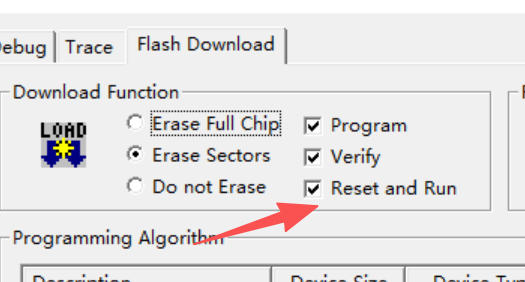

请问下各位,vscode 里的EIDE插件烧录程序后怎么自动启动程序?我是用JLINK下载器。在keil里有个 reset and run 选项。vscode里要怎么设置?
 分享
分享
阿里嘎多学长整理AIGC生成,因移动端显示问题导致当前答案未能完全显示,请使用PC端查看更加详细的解答过程
当使用 JLINK 下载器在 VSCode 中烧录程序后,自动启动程序是可能的。由于 EIDE 插件没有直接提供 reset 和 run 的功能,而是通过 task 来进行这些操作,可以利用 VSCode 的任务系统来实现。
这里提供一个解决方案:
首先,请确保你已经安装了 JLink 工具和 EIDE 插件。
然后,请检查你项目的 tasks.json 文件,如果没有这个文件,可以通过 VSCode 插件市场安装 Tasks 插件来生成。
tasks.json
{
    // See https://go.microsoft.com/fwlink/?LinkId=733558
    // for the user and workspace settings documentation.
    "version": "2.0.0",
    "tasks": [
        {
            "type": "shell",
            "label": "烧录并启动",
            "command": "jlink",
            "args": [
                "upload",
                "--device",
                "your_device_name",
                "--if",
                "swim",
                "--force",
                "--split=reset",
                "your_program.hex"
            ],
            "isBackground": true,
            "group": {
                "kind": "build",
                "isDefault": true
            },
            "isWindowsBackgroundModeEnabled": true,
            "presentation": {
                "focus": true,
                "panel": "shared",
                "showReuseMessage": true,
                "clear": false
            },
            "problemMatcher": [],
            "presentationOptions": [
                "panel",
                "silent"
            ],
            "problemMatcher": [],
            "showOutput": "always"
        }
    ]
}
请把 your_device_name 和 your_program.hex 替换成你的实际值。
在这个配置中,我们使用 jlink 命令来烧录和启动程序。--split=reset 使得程序在烧录后自动执行 reset 命令,然后执行程序。
现在,点击 控制台 > 任务 > 烧录并启动就可以执行烧录和启动程序的任务了。
如果遇到问题,可以尝试调整 tasks.json 的配置。
分享 创建了问题
9月18日
创建了问题
9月18日


