怎么把这个灰色的框框关掉,不知道这么点出来的,现在关不回去了,退出去重进也没有用,应该怎么做呢QAQ
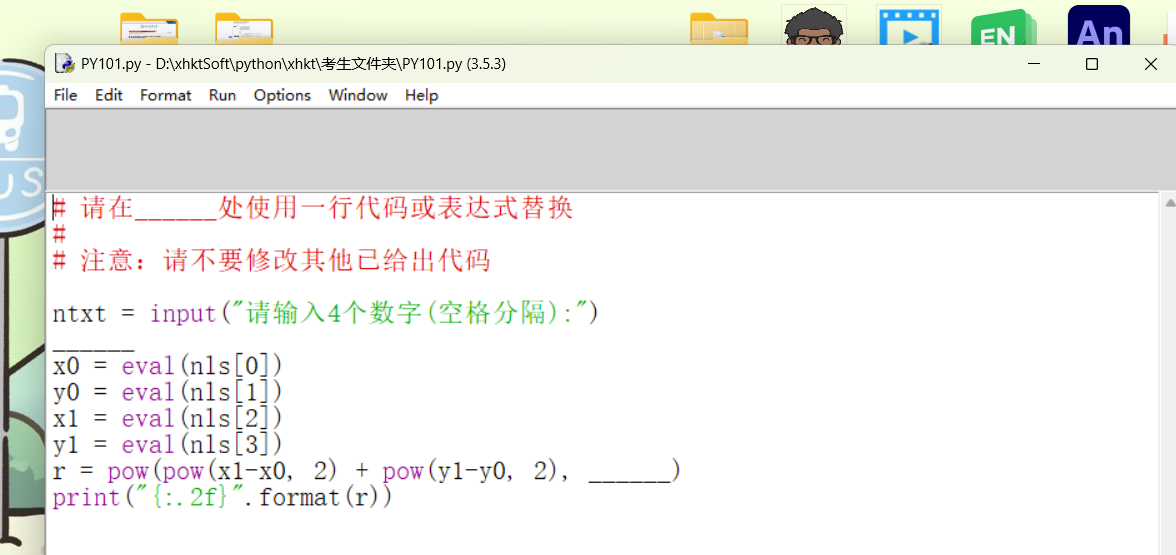

怎么把这个灰色的框框关掉,不知道这么点出来的,现在关不回去了,退出去重进也没有用,应该怎么做呢QAQ
 分享
分享
 关注
关注让阿豪来帮你解答,本回答参考chatgpt3.5编写提供,如果还有疑问可以评论或留言这个灰色的框框看起来像是一个弹窗,通常可以通过按下键盘上的某个特定键或者点击屏幕上的特定位置来关闭。如果尝试了重新进入页面仍然无效,可以尝试以下方法来关闭灰色框框:
Esc键:Esc键通常被用来关闭弹窗或者取消当前操作,尝试按下Esc键看看是否能够关闭灰色框框。Esc键,点击周围空白区域和寻找关闭按钮都无效。这时可以尝试以下方法:<!DOCTYPE html>
<html>
<head>
<title>关闭灰色框框</title>
</head>
<body>
<button onclick="openPopup()">打开灰色框框</button>
<div id="popup" style="background: gray; width: 200px; height: 100px; position: fixed; top: 50%; left: 50%; transform: translate(-50%, -50%); display: none;">
<p>这是一个灰色框框</p>
<button onclick="closePopup()">关闭</button>
</div>
<script>
function openPopup() {
document.getElementById('popup').style.display = 'block';
}
function closePopup() {
document.getElementById('popup').style.display = 'none';
}
</script>
</body>
</html>
上面的示例代码演示了一个简单的网页,点击按钮打开一个灰色的框框,并在框框内显示一个关闭按钮。点击关闭按钮即可关闭灰色框框。
分享 创建了问题
9月19日
创建了问题
9月19日

