
Power Automate Desktop 启动新 Microsoft Edge报错:无法取得 Microsoft Edge 的控制权
该错误不是每次运行都发生,发生错误的概率大约在1%左右。
我比较迷惑的是,该步骤已经设置了超时:120s,但提示的报错信息中显示:
”No Edge window was found with a tab containing the specified title within the remaining timeout period** (0 seconds).“
有人知道原因吗?可以往什么方向调试啊?
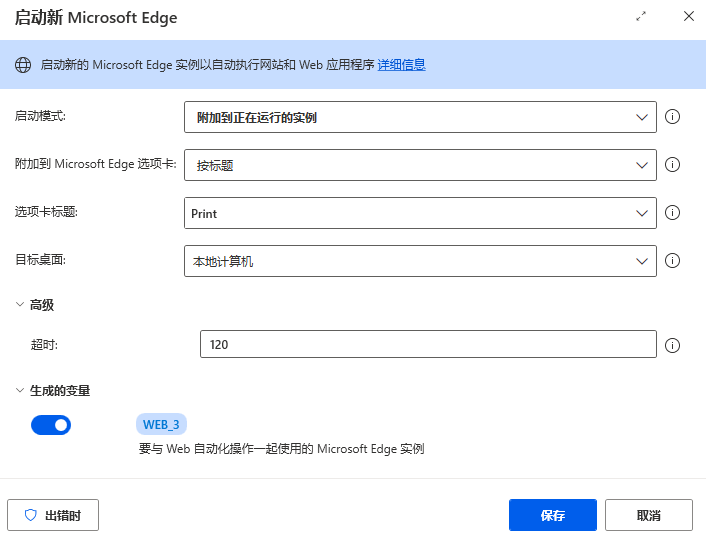
以下是完整错误信息:
错误原因:
子流程: Submit,操作: 4,操作名称: 启动新 Microsoft Edge 错误消息: 无法取得 Microsoft Edge 的控制权。No Edge window was found with a tab containing the specified title within the remaining timeout period (0 seconds). Make sure the tab in the browser is available at the execution of the action or increase the "Timeout" parameter in the action. 其他信息: {}
Microsoft.Flow.RPA.Desktop.Modules.SDK.Extended.Exceptions.InternalActionException: 无法取得 Microsoft Edge 的控制权。No Edge window was found with a tab containing the specified title within the remaining timeout period (0 seconds). Make sure the tab in the browser is available at the execution of the action or increase the "Timeout" parameter in the action. ---> Microsoft.Flow.RPA.Desktop.Modules.WebAutomation.Common.Exceptions.BrowserLaunchException: 引发类型为“Microsoft.Flow.RPA.Desktop.Modules.WebAutomation.Common.Exceptions.BrowserLaunchException”的异常。 ---> System.TimeoutException: No Edge window was found with a tab containing the specified title within the remaining timeout period (0 seconds). Make sure the tab in the browser is available at the execution of the action or increase the "Timeout" parameter in the action 在 Microsoft.Flow.RPA.Desktop.UIAutomation.WebAutomation.Core.WebExtensionsBrowser.WebExtensionsBrowserLauncher.AttachToRunningBrowser(AttachMode attachMode, String title, String uri, TimeSpan timeout) 在 Microsoft.Flow.RPA.Desktop.UIAutomation.WebAutomation.Runtime.Actions.LocalWebAutomationRuntime.LaunchNewEdge(AutomationRoute route, String initialUrl, String edgeTabTitle, String edgeTabUrl, String dialogButtonToPress, LaunchNewEdgeMode operation, LaunchWindowState windowState, AttachMode attachMode, Boolean waitForWebPageToLoad, TimeSpan waitForPageToLoadTimeout, WebPageCourseOfActionIfDialogAppears courseOfActionIfDialogAppears, Boolean clearCache, Boolean clearCookies, TimeSpan timeout, PiPUserDataFolderMode pipUserDataFolderMode, String pipUserDataFolderPath, Boolean runInPip) --- 内部异常堆栈跟踪的结尾 --- 在 Microsoft.Flow.RPA.Desktop.UIAutomation.Core.Abstractions.ServiceRouter1.Invoke(MethodInfo targetMethod, Object[] args) --- 引发异常的上一位置中堆栈跟踪的末尾 --- 在 System.Runtime.ExceptionServices.ExceptionDispatchInfo.Throw() 在 System.Reflection.DispatchProxyGenerator.Invoke(Object[] args) 在 generatedProxy_6.LaunchNewEdge(AutomationRoute , String , String , String , String , LaunchNewEdgeMode , LaunchWindowState , AttachMode , Boolean , TimeSpan , WebPageCourseOfActionIfDialogAppears , Boolean , Boolean , TimeSpan , PiPUserDataFolderMode , String , Boolean ) --- 远程异常堆栈跟踪结束 --- 在 System.Runtime.ExceptionServices.ExceptionDispatchInfo.Throw() 在 Microsoft.Flow.RPA.Desktop.UIAutomation.Shared.Rpc.RpcDispatchProxy1.GetRemoteResultOrThrow(ISerializer serializer, RPCMessage response, Type expectedResultType, Object additionalContext) 在 Microsoft.Flow.RPA.Desktop.UIAutomation.Shared.Rpc.RpcDispatchProxy1.Invoke(MethodInfo targetMethod, Object[] args) --- 引发异常的上一位置中堆栈跟踪的末尾 --- 在 System.Runtime.ExceptionServices.ExceptionDispatchInfo.Throw() 在 System.Reflection.DispatchProxyGenerator.Invoke(Object[] args) 在 generatedProxy_2.LaunchNewEdge(AutomationRoute , String , String , String , String , LaunchNewEdgeMode , LaunchWindowState , AttachMode , Boolean , TimeSpan , WebPageCourseOfActionIfDialogAppears , Boolean , Boolean , TimeSpan , PiPUserDataFolderMode , String , Boolean ) 在 Microsoft.Flow.RPA.Desktop.Modules.WebAutomation.Actions.WebAutomationRuntimeServiceProxy.<>c__DisplayClass26_0.b__0(IWebAutomationRuntime s) 在 Microsoft.Flow.RPA.Desktop.Modules.WebAutomation.Actions.WebAutomationRuntimeServiceProxy.ExecuteSafe[T](Func2 action, TimeSpan timeout) 在 Microsoft.Flow.RPA.Desktop.Modules.WebAutomation.Actions.WebAutomationRuntimeServiceProxy.LaunchNewEdge(AutomationRoute route, String initialUrl, String edgeTabTitle, String edgeTabUrl, String dialogButtonToPress, LaunchNewEdgeMode operation, LaunchWindowState windowState, AttachMode attachMode, Boolean waitForWebPageToLoad, TimeSpan waitForPageToLoadTimeout, WebPageCourseOfActionIfDialogAppears courseOfActionIfDialogAppears, Boolean clearCache, Boolean clearCookies, TimeSpan timeout, PiPUserDataFolderMode pipUserDataFolderMode, String pipUserDataFolderPath, Boolean runInPip) 在 Microsoft.Flow.RPA.Desktop.Modules.WebAutomation.Actions.LaunchEdgeBase.<>c__DisplayClass74_0.b__0(IWebAutomationRuntime s) 在 Microsoft.Flow.RPA.Desktop.Modules.WebAutomation.Actions.WebAutomationActionBase.PerformWebAutomationWithLogging[T](Func2 action, WebAutomationRuntimeLogData requestData, Func3 resultData) 在 Microsoft.Flow.RPA.Desktop.Modules.WebAutomation.Actions.LaunchEdgeBase.Execute(ActionContext context) --- 内部异常堆栈跟踪的结尾 --- 在 Microsoft.Flow.RPA.Desktop.Modules.WebAutomation.Actions.LaunchEdgeBase.Execute(ActionContext context) 在 Microsoft.Flow.RPA.Desktop.Robin.Engine.Execution.ActionRunner.Run(IActionStatement statement, Dictionary2 inputArguments, Dictionary2 outputArguments)


