
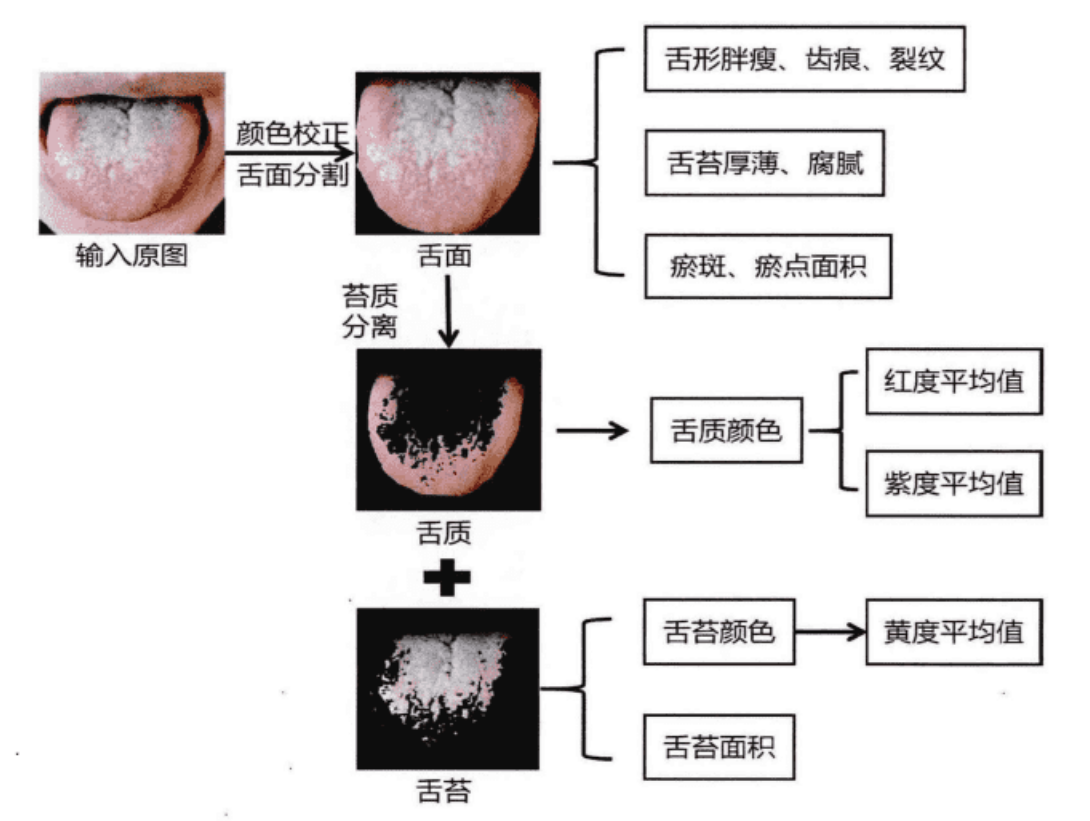
我想用Python分离舌体,舌苔和舌质,获得如图效果,该怎么办

 分享
分享
 关注
关注让【宝码香车】来帮您解答,本回答参考DeepSeek编写,并整理提供。
如果答案让您满意,请采纳、点赞、关注,非常感谢!
.
每日一句正能量,让它带给您好心情:别让过去的错误,惩罚现在的自己。
.
根据您的需求,要实现舌体、舌苔和舌质的分离,主要涉及图像处理和计算机视觉技术。以下是完整的解决方案:
import cv2
import numpy as np
from sklearn.cluster import KMeans
import matplotlib.pyplot as plt


class TongueAnalyzer:
    def __init__(self):
        self.tongue_mask = None
        self.coating_mask = None
        self.body_mask = None

    def preprocess_image(self, image_path):
        """图像预处理"""
        image = cv2.imread(image_path)
        image = cv2.cvtColor(image, cv2.COLOR_BGR2RGB)
        # 图像增强
        hsv = cv2.cvtColor(image, cv2.COLOR_RGB2HSV)
        hsv[:,:,2] = cv2.equalizeHist(hsv[:,:,2])
        enhanced = cv2.cvtColor(hsv, cv2.COLOR_HSV2RGB)
        return enhanced

    def segment_tongue(self, image):
        """舌体分割"""
        # 转换为HSV颜色空间
        hsv = cv2.cvtColor(image, cv2.COLOR_RGB2HSV)

        # 定义舌头的颜色范围(红色调)
        lower_red1 = np.array([0, 50, 50])
        upper_red1 = np.array([10, 255, 255])
        lower_red2 = np.array([170, 50, 50])
        upper_red2 = np.array([180, 255, 255])

        mask1 = cv2.inRange(hsv, lower_red1, upper_red1)
        mask2 = cv2.inRange(hsv, lower_red2, upper_red2)
        tongue_mask = mask1 + mask2

        # 形态学操作去除噪声
        kernel = np.ones((5,5), np.uint8)
        tongue_mask = cv2.morphologyEx(tongue_mask, cv2.MORPH_CLOSE, kernel)
        tongue_mask = cv2.morphologyEx(tongue_mask, cv2.MORPH_OPEN, kernel)

        # 找到最大连通区域
        contours, _ = cv2.findContours(tongue_mask, cv2.RETR_EXTERNAL, cv2.CHAIN_APPROX_SIMPLE)
        if contours:
            largest_contour = max(contours, key=cv2.contourArea)
            tongue_mask = np.zeros_like(tongue_mask)
            cv2.fillPoly(tongue_mask, [largest_contour], 255)

        self.tongue_mask = tongue_mask
        return tongue_mask

    def separate_coating_body(self, image, tongue_mask):
        """分离舌苔和舌质"""
        # 提取舌体区域
        tongue_region = cv2.bitwise_and(image, image, mask=tongue_mask)

        # 转换为LAB颜色空间,更好的颜色分离
        lab = cv2.cvtColor(tongue_region, cv2.COLOR_RGB2LAB)

        # 使用K-means聚类分离舌苔和舌质
        pixels = lab.reshape(-1, 3)
        pixels = pixels[np.where(tongue_mask.flatten() == 255)[0]]

        kmeans = KMeans(n_clusters=2, random_state=42)
        labels = kmeans.fit_predict(pixels)

        # 根据亮度区分舌苔和舌质
        cluster_centers = kmeans.cluster_centers_
        brightness = cluster_centers[:, 0]  # L通道表示亮度

        # 较亮的为舌苔,较暗的为舌质
        coating_cluster = np.argmax(brightness)
        body_cluster = np.argmin(brightness)

        # 创建掩码
        coating_mask_full = np.zeros_like(tongue_mask)
        body_mask_full = np.zeros_like(tongue_mask)

        tongue_indices = np.where(tongue_mask.flatten() == 255)[0]
        coating_mask_full.flat[tongue_indices[labels == coating_cluster]] = 255
        body_mask_full.flat[tongue_indices[labels == body_cluster]] = 255

        self.coating_mask = coating_mask_full
        self.body_mask = body_mask_full

        return coating_mask_full, body_mask_full

    def calculate_color_features(self, image, mask):
        """计算颜色特征"""
        region = cv2.bitwise_and(image, image, mask=mask)
        pixels = region.reshape(-1, 3)
        pixels = pixels[np.where(mask.flatten() == 255)[0]]

        if len(pixels) == 0:
            return {'red_mean': 0, 'red_std': 0, 'green_mean': 0, 'green_std': 0,
                   'blue_mean': 0, 'blue_std': 0, 'yellow_index': 0, 'purple_index': 0}

        # 基本颜色统计
        red_mean = np.mean(pixels[:, 0])
        green_mean = np.mean(pixels[:, 1])
        blue_mean = np.mean(pixels[:, 2])

        red_std = np.std(pixels[:, 0])
        green_std = np.std(pixels[:, 1])
        blue_std = np.std(pixels[:, 2])

        # 黄度指数 (基于RGB)
        yellow_index = (red_mean + green_mean) / 2 - blue_mean

        # 紫度指数
        purple_index = (red_mean + blue_mean) / 2 - green_mean

        return {
            'red_mean': red_mean,
            'red_std': red_std,
            'green_mean': green_mean,
            'green_std': green_std,
            'blue_mean': blue_mean,
            'blue_std': blue_std,
            'yellow_index': yellow_index,
            'purple_index': purple_index
        }

    def analyze_tongue(self, image_path):
        """完整的舌象分析流程"""
        # 1. 预处理
        image = self.preprocess_image(image_path)

        # 2. 舌体分割
        tongue_mask = self.segment_tongue(image)

        # 3. 舌苔舌质分离
        coating_mask, body_mask = self.separate_coating_body(image, tongue_mask)

        # 4. 特征计算
        coating_features = self.calculate_color_features(image, coating_mask)
        body_features = self.calculate_color_features(image, body_mask)

        # 5. 可视化结果
        self.visualize_results(image, tongue_mask, coating_mask, body_mask,
                              coating_features, body_features)

        return {
            'coating_features': coating_features,
            'body_features': body_features
        }

    def visualize_results(self, image, tongue_mask, coating_mask, body_mask,
                         coating_features, body_features):
        """可视化分析结果"""
        fig, axes = plt.subplots(2, 3, figsize=(15, 10))

        # 原图
        axes[0,0].imshow(image)
        axes[0,0].set_title('原图')
        axes[0,0].axis('off')

        # 舌体分割
        tongue_vis = image.copy()
        tongue_vis[tongue_mask == 0] = [0, 0, 0]
        axes[0,1].imshow(tongue_vis)
        axes[0,1].set_title('舌体分割')
        axes[0,1].axis('off')

        # 舌苔
        coating_vis = image.copy()
        coating_vis[coating_mask == 0] = [0, 0, 0]
        axes[0,2].imshow(coating_vis)
        axes[0,2].set_title('舌苔区域')
        axes[0,2].axis('off')

        # 舌质
        body_vis = image.copy()
        body_vis[body_mask == 0] = [0, 0, 0]
        axes[1,0].imshow(body_vis)
        axes[1,0].set_title('舌质区域')
        axes[1,0].axis('off')

        # 合并显示
        combined = np.zeros_like(image)
        combined[coating_mask == 255] = [255, 255, 0]  # 舌苔用黄色
        combined[body_mask == 255] = [255, 0, 0]       # 舌质用红色
        axes[1,1].imshow(combined)
        axes[1,1].set_title('分离结果')
        axes[1,1].axis('off')

        # 特征显示
        axes[1,2].axis('off')
        feature_text = f"""舌质特征:
红度: {body_features['red_mean']:.1f}
紫度: {body_features['purple_index']:.1f}


舌苔特征:
黄度: {coating_features['yellow_index']:.1f}
厚度指标: {coating_features['red_std']:.1f}"""
        axes[1,2].text(0.1, 0.9, feature_text, transform=axes[1,2].transAxes,
                      fontsize=12, verticalalignment='top')

        plt.tight_layout()
        plt.show()


# 使用示例
if __name__ == "__main__":
    analyzer = TongueAnalyzer()

    # 分析舌象图片
    result = analyzer.analyze_tongue('tongue_image.jpg')

    print("舌质颜色特征:")
    print(f"红度平均值: {result['body_features']['red_mean']:.2f}")
    print(f"紫度平均值: {result['body_features']['purple_index']:.2f}")

    print("\n舌苔颜色特征:")
    print(f"黄度平均值: {result['coating_features']['yellow_index']:.2f}")
pip install opencv-python numpy scikit-learn matplotlib
这个方案提供了完整的舌象分析流程,您可以根据实际需求调整参数和算法。
分享 系统已结题
10月7日
系统已结题
10月7日 已采纳回答
9月29日
创建了问题
9月29日
已采纳回答
9月29日
创建了问题
9月29日

