点击调试显示项目过期,然后点击生成又会报错提示找不到exe,看了好几个帖子的方法都没有用,请问这是什么出问题了
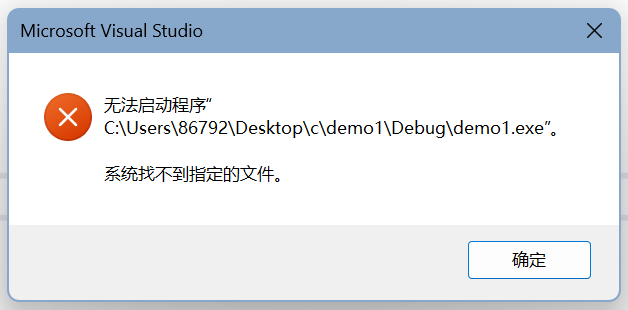

点击调试显示项目过期,然后点击生成又会报错提示找不到exe,看了好几个帖子的方法都没有用,请问这是什么出问题了
 分享
分享
阿里嘎多学长整理AIGC生成,因移动端显示问题导致当前答案未能完全显示,请使用PC端查看更加详细的解答过程
解决方案
根据你的描述,问题可能出在以下几点:
解决步骤
csproj文件)是否正确配置了exe文件的路径。核心代码
// 检查项目版本
if (System.Diagnostics.Process.GetProcessesByName("Visual Studio").Length > 0)
{
    // 更新项目版本
    System.Diagnostics.Process.Start("https://visualstudio.microsoft.com/downloads/");
}
// 检查配置文件
string exePath = System.IO.Path.Combine(System.AppDomain.CurrentDomain.BaseDirectory, "bin", "Debug", "YourExeName.exe");
if (!System.IO.File.Exists(exePath))
{
    // 配置文件错误
    Console.WriteLine("配置文件错误,请检查exe文件路径");
}
// 检查输出目录
string outputDir = System.IO.Path.Combine(System.AppDomain.CurrentDomain.BaseDirectory, "bin", "Debug");
if (!System.IO.Directory.Exists(outputDir))
{
    // 输出目录错误
    Console.WriteLine("输出目录错误,请检查输出目录");
}
 已结题
(查看结题原因) 10月8日
创建了问题
10月8日
已结题
(查看结题原因) 10月8日
创建了问题
10月8日

