虚拟机配置SNAT,在外网上配置供测试的Web,但是httpd一直启动失败
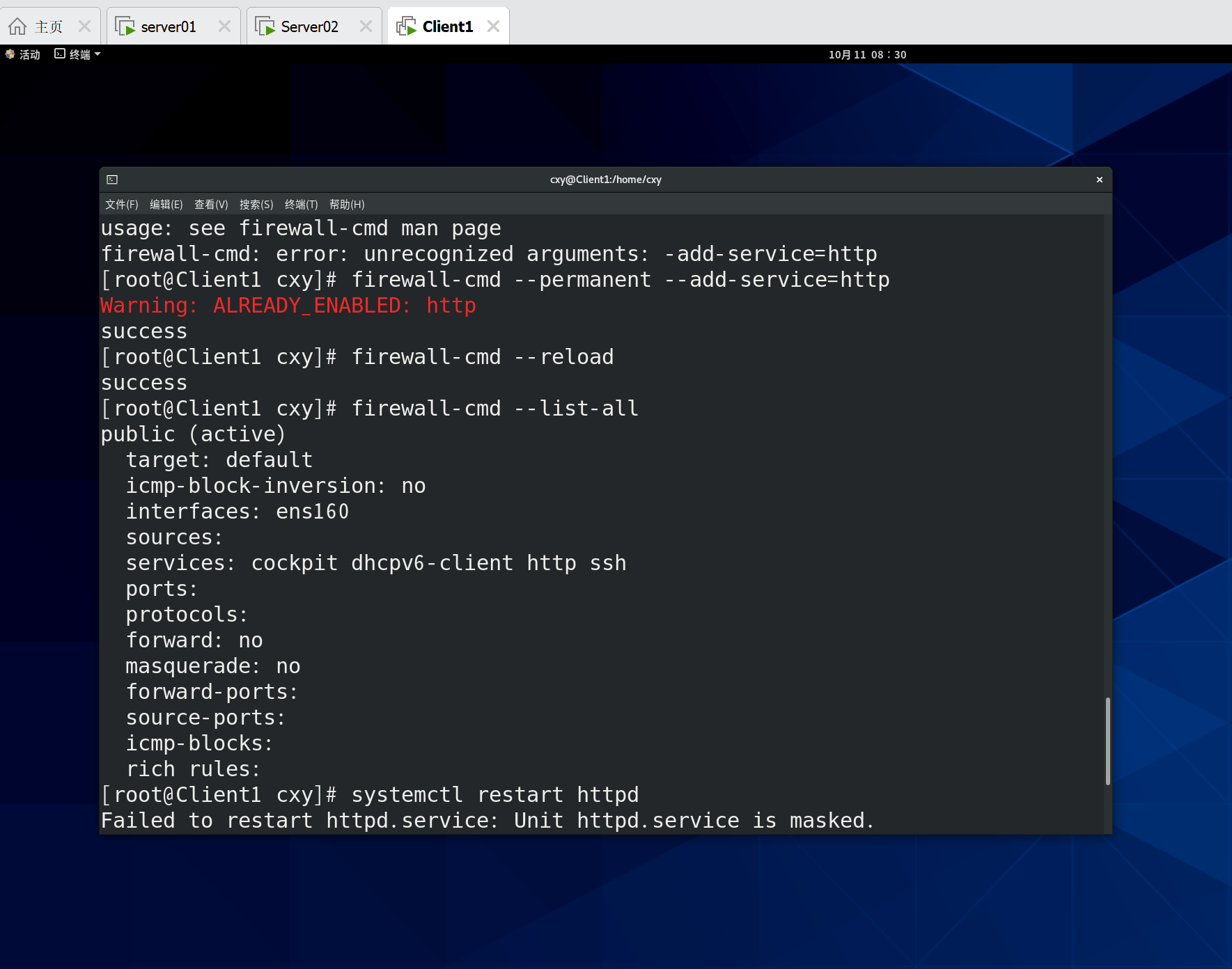

虚拟机配置SNAT,在外网上配置供测试的Web,但是httpd一直启动失败
 分享
分享
晚上好🌙🌙🌙
本答案参考通义千问
虚拟机启动不了 httpd(Apache HTTP Server)的问题,可能涉及多个方面。以下是一个详细排查与解决方案,重点部分已用加粗标注,并以有序列表形式列出。
你提到的“虚拟机配置SNAT,在外网上配置供测试的Web, 但是 httpd 一直启动失败”,这说明:
httpd),但无法正常启动;首先确认服务是否真的无法启动,以及是否有报错信息。
systemctl status httpd
如果提示 failed,请查看日志:
journalctl -u httpd --since "1 hour ago"
或者查看 /var/log/httpd/error_log 文件内容:
tail -n 50 /var/log/httpd/error_log
重点:查看具体的错误信息是解决问题的关键。例如:“Address already in use”、“Permission denied”等。
Apache 默认使用 80 端口,如果该端口被其他程序占用,会导致 httpd 启动失败。
netstat -tuln | grep 80
或者使用 lsof:
lsof -i :80
如果发现有进程占用了 80 端口,可以尝试终止它:
kill -9 <PID>
Apache 的配置文件通常位于 /etc/httpd/conf/httpd.conf 或 /etc/apache2/apache2.conf(根据发行版不同)。
运行以下命令检查配置文件语法是否正确:
apachectl configtest
或者:
httpd -t
如果有错误提示,请根据提示修改配置文件。
确保 Apache 配置文件中监听的地址和端口是正确的。
在 httpd.conf 中查找类似如下内容:
Listen 80
如果使用了虚拟主机(VirtualHost),确保对应的 <VirtualHost> 块也正确设置:
<VirtualHost *:80>
    ServerName example.com
    DocumentRoot /var/www/html
</VirtualHost>
注意: 如果使用的是
*:80,表示监听所有 IPv4 地址;如果是127.0.0.1:80,则只能本地访问。
某些系统默认启用了 SELinux 或 AppArmor,可能会阻止 Apache 访问文件或网络。
sestatus
如果启用,可以临时关闭:
setenforce 0
如果问题解决,说明 SELinux 是原因。建议修改策略而不是永久关闭。
aa-status
如果开启,可以尝试禁用:
sudo systemctl stop apparmor
如果你的虚拟机在 NAT 模式下,外部访问需要通过宿主机转发端口(如 8080 -> 80)。
iptables -L -n -v
或者:
firewall-cmd --list-all
确保 80 端口没有被阻止。
sudo firewall-cmd --permanent --add-port=80/tcp
sudo firewall-cmd --reload
Apache 通常以 apache 或 www-data 用户运行,确保其对网站目录有读取权限。
ls -ld /var/www/html
如果权限不足,可以修改权限:
chown -R apache:apache /var/www/html
chmod -R 755 /var/www/html
如果你的 Apache 配置文件中监听地址为 127.0.0.1,而你希望通过外网访问,可以将其改为 0.0.0.0:
Listen 0.0.0.0:80
同时确保 DocumentRoot 正确指向你的网页目录。
apachectl configtest。# 修改监听地址为 0.0.0.0,允许外部访问
Listen 0.0.0.0:80
# 设置网站根目录
DocumentRoot "/var/www/html"
# 虚拟主机配置
<VirtualHost *:80>
ServerAdmin admin@example.com
DocumentRoot /var/www/html
ServerName example.com
ErrorLog /var/log/httpd/example.com-error.log
CustomLog /var/log/httpd/example.com-access.log combined
</VirtualHost>
如果你能提供具体的错误日志,我可以进一步帮助你定位问题。希望以上内容对你有所帮助!
分享 创建了问题
10月11日
创建了问题
10月11日

