
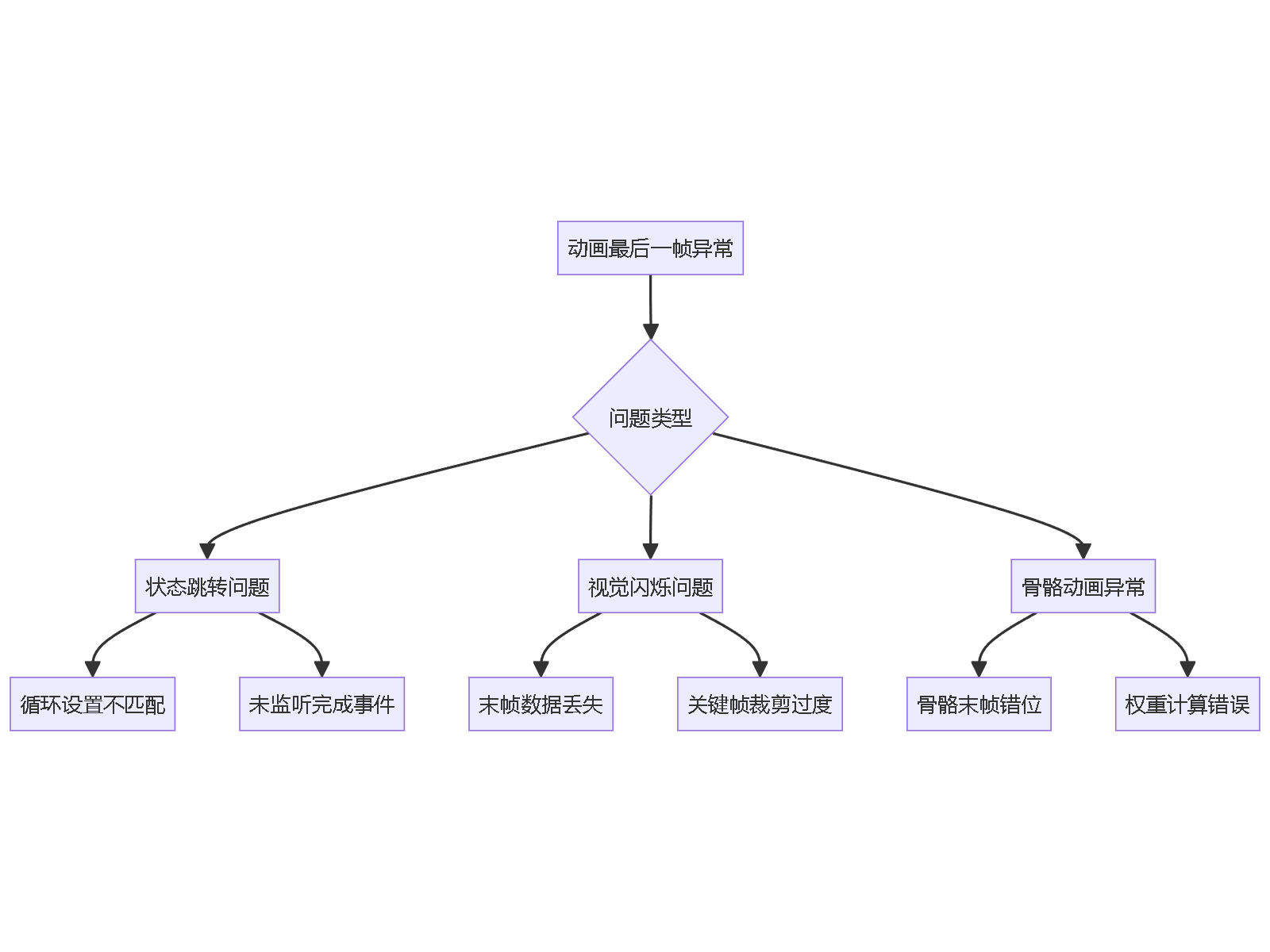
在使用Cocos Creator开发2D动画时,常有开发者反馈“动画最后一帧显示异常”问题:当Animation播放结束后,节点突然跳回初始状态或出现视觉闪烁。此现象多因动画剪辑(AnimationClip)的循环设置与播放逻辑不匹配所致,尤其在非循环播放且未正确监听“finished”事件时更为明显。此外,骨骼动画中若末帧关键帧数据丢失或裁剪过度,也会导致渲染异常。需检查动画编辑器中的末帧完整性,并确保代码中合理处理播放完成后的状态锁定。


1条回答 默认 最新

 关注
关注让【宝码香车】来帮你解答,本回答参考DeepSeek编写,并整理提供。
如果还有疑问可以“评论”。如果答案让您满意,请“采纳”,非常感谢!
Cocos Creator动画最后一帧显示异常解决方案
这个问题的根本原因是动画播放完成后的状态管理不当,常见于非循环动画播放场景。以下是完整的排查和解决方案:
问题原因分析
解决方案
1. 检查动画剪辑设置
在Cocos Creator动画编辑器中检查:
// 检查动画剪辑属性
const animationClip = this.getComponent(Animation).defaultClip;
console.log("循环模式:", animationClip.wrapMode);
console.log("动画时长:", animationClip.duration);
console.log("帧率:", animationClip.sample);
2. 正确的动画播放代码
import { _decorator, Component, Animation } from 'cc';
const { ccclass, property } = _decorator;


@ccclass('AnimationController')
export class AnimationController extends Component {

    @property(Animation)
    private anim: Animation = null!;


    onLoad() {
        // 方法1:监听动画完成事件
        this.anim.on(Animation.EventType.FINISHED, this.onAnimationFinished, this);

        // 方法2:使用Promise方式
        this.playAnimationWithPromise();
    }


    // 方法1:事件监听方式
    playAnimation() {
        this.anim.play('your-animation-clip');
    }


    onAnimationFinished(type: Animation.EventType, state: Animation.State) {
        if (type === Animation.EventType.FINISHED) {
            // 锁定在最后一帧
            this.anim.stop();
            // 可选:设置到最后一帧时间
            const clip = this.anim.getState('your-animation-clip');
            clip.setTime(clip.duration);
        }
    }


    // 方法2:Promise方式(推荐)
    async playAnimationWithPromise() {
        return new Promise<void>((resolve) => {
            const onFinished = () => {
                this.anim.off(Animation.EventType.FINISHED, onFinished);
                // 确保停留在最后一帧
                this.ensureLastFrame();
                resolve();
            };

            this.anim.on(Animation.EventType.FINISHED, onFinished);
            this.anim.play('your-animation-clip');
        });
    }


    // 方法3:手动控制最后一帧
    ensureLastFrame() {
        const state = this.anim.getState('your-animation-clip');
        if (state) {
            // 设置到精确的最后一帧
            state.setTime(state.duration);
            this.anim.stop();
        }
    }


    // 清理监听
    onDestroy() {
        this.anim.off(Animation.EventType.FINISHED, this.onAnimationFinished, this);
    }
}
3. 骨骼动画特殊处理
对于骨骼动画,需要额外检查:
@ccclass('SkeletonAnimationFix')
export class SkeletonAnimationFix extends Component {

    @property(sp.Skeleton)
    private skeleton: sp.Skeleton = null!;


    fixSkeletonAnimation() {
        // 检查骨骼动画设置
        const animation = this.skeleton.getCurrentAnimation();
        if (animation) {
            // 确保循环模式正确
            this.skeleton.setAnimation(0, animation, false);

            // 监听完成事件
            this.skeleton.setCompleteListener(() => {
                // 停留在最后一帧
                this.skeleton.setTimeScale(0);
            });
        }
    }
}
4. 动画编辑器检查清单
// 在控制台运行检查动画完整性
function checkAnimationIntegrity(animation: Animation) {
    const states = animation.getStateList();

    states.forEach(state => {
        const clip = state.clip;
        console.log(`动画剪辑: ${clip.name}`);
        console.log(`- 时长: ${clip.duration}`);
        console.log(`- 循环模式: ${clip.wrapMode}`);
        console.log(`- 曲线数量: ${clip.curves.length}`);

        // 检查每条曲线的关键帧
        clip.curves.forEach(curve => {
            const keyframes = curve.keyframes;
            console.log(`  - 曲线路径: ${curve.path}, 关键帧数: ${keyframes.length}`);

            if (keyframes.length > 0) {
                const lastKeyframe = keyframes[keyframes.length - 1];
                console.log(`    - 最后关键帧时间: ${lastKeyframe.time}`);
            }
        });
    });
}
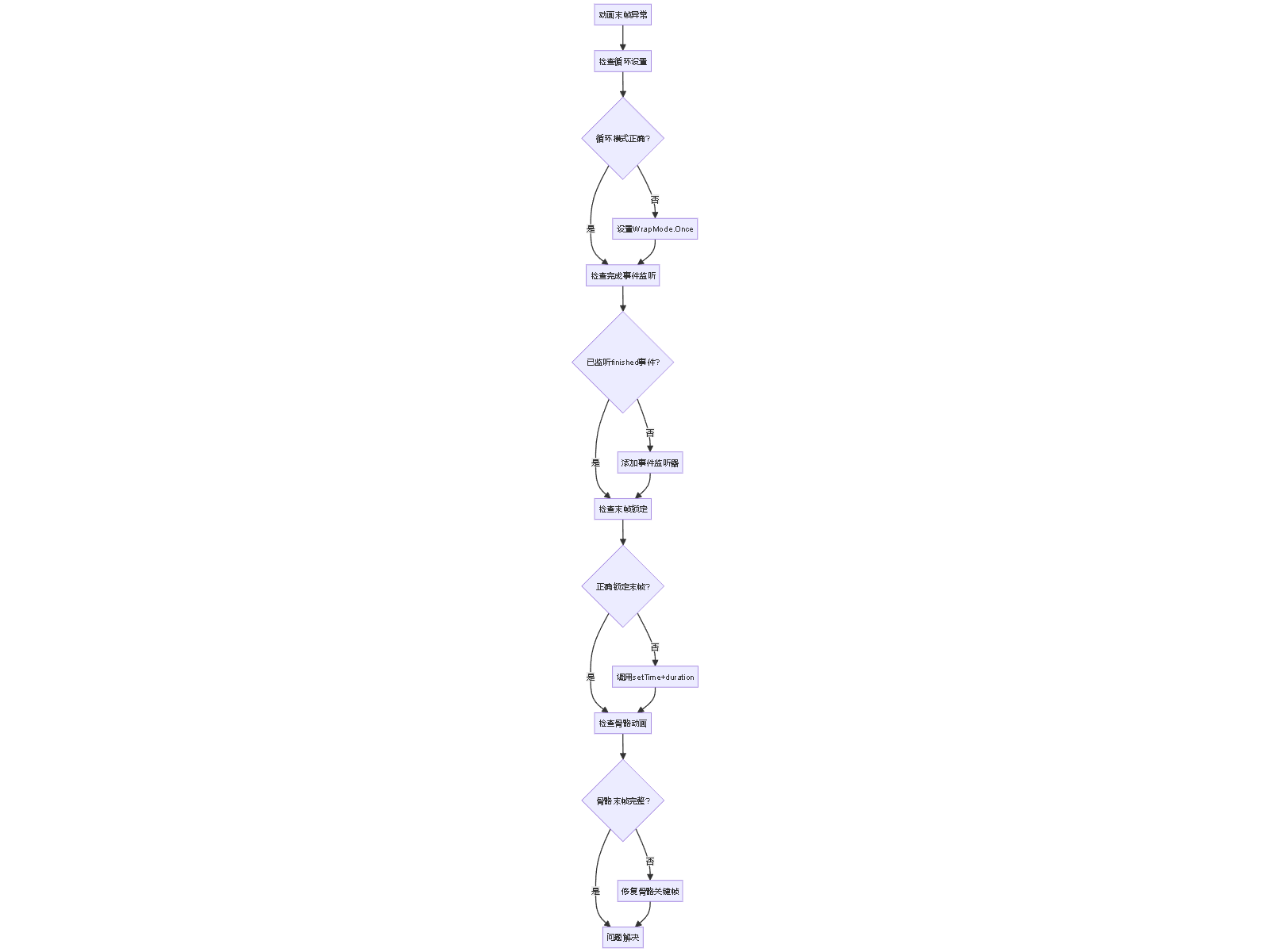
5. 完整的故障排查流程
预防措施
- 动画制作规范:
- 确保动画剪辑首尾帧一致
- 避免过度裁剪关键帧
- 设置合适的循环模式
- 代码最佳实践:
- 始终监听
finished事件 - 在完成回调中明确状态管理
- 使用TypeScript获得更好的类型安全
- 始终监听
- 测试验证:
- 在不同设备上测试动画表现
- 验证内存泄漏情况
- 检查性能影响
通过以上方法,可以彻底解决Cocos Creator动画最后一帧显示异常的问题。
解决 无用评论 打赏举报 分享
分享- 动画制作规范:
- 2023-10-07 18:44Cocos Creator 3.8.0 是一个强大的跨平台游戏开发框架,它的最新版本引入了对Live2D动画的支持,让开发者能够轻松地在游戏或应用程序中集成生动、逼真的2D角色动画。Live2D是一种实时二维动画技术,通过使用物理计算...
- 2025-09-05 15:46Cocos Creator作为一款流行的游戏开发框架,提供了强大的动画控制功能,其中sp.Skeleton组件允许开发者在编辑器内预览骨骼动画,极大地方便了动画的调试和优化过程。 在Cocos Creator 2.4.11版本中,sp.Skeleton的...
- 2026-01-02 19:31CocosCreator是一个基于Cocos2d-x引擎开发的游戏开发框架,它采用JavaScript作为编程语言,提供了强大的游戏开发工具和模块化的开发环境。CocosCreator支持跨平台的游戏开发,使开发者能够使用一套代码开发出在多种...
- 2022-05-11 12:28《cocos creator 企鹅跳一跳源码》是一款基于Cocos Creator开发的休闲小游戏,其核心在于通过编程实现企鹅角色的跳跃动作,玩家通过触屏操作控制企鹅在平台间跃动,以达到尽可能远的距离。这款游戏的源码为开发者...
- 2025-08-10 16:14雷鸣泽基的博客 CocosCreator是一款功能强大的游戏开发引擎,它支持2D和3D游戏的开发。随着版本的不断更新,其提供了更加丰富的功能和更优化的性能。CocosCreator以其高度的灵活性和强大的渲染能力,在游戏开发社区中享有盛誉。通过...
- 2024-05-18 11:00CocosCreator支持JavaScript和TypeScript作为主要的编程语言,开发者可以通过编写脚本来控制游戏逻辑。它的脚本系统与组件系统紧密结合,每个节点(Node)都可以添加多个组件,每个组件有自己的属性和方法,这样可以...
- 2022-04-18 15:59在Cocos Creator 3.4.2中,实现滚动数字效果是通过组合使用基本组件、动画和编程逻辑来完成的。这个过程涉及到多个关键知识点,包括但不限于以下几点: 1. **Cocos Creator 3.4.2框架**: Cocos Creator是一个强大...
- 2021-06-11 09:50CocosCreator的动画系统支持帧动画和基于时间的动画,可以轻松创建平滑的移动和旋转效果。 5. 用户界面(UI)设计:除了游戏核心机制外,还需要考虑分数显示、排行榜、游戏提示等UI元素的实现。CocosCreator提供了...
- 2021-11-02 17:11本知识点将深入探讨如何利用Cocos Creator的特性,结合TypeScript编程语言来实现这样的效果。 首先,我们需要理解Cocos Creator的基本架构。Cocos Creator是一个基于HTML5的2D游戏引擎,它提供了丰富的图形渲染、...
- 2021-05-17 18:53【cocos-creator-:左右跳一跳游戏】是一款基于CocosCreator开发的简单休闲游戏,旨在帮助初学者了解和掌握CocosCreator的基本操作和JavaScript编程。CocosCreator是一款强大的2D游戏开发工具,它提供了可视化编辑器...
- 没有解决我的问题, 去提问


问题事件
 创建了问题
10月15日
创建了问题
10月15日