
使用Bilidown工具批量下载B站视频时,频繁请求易触发平台反爬机制,导致账号被限流或封禁。常见问题是:如何在高效下载的同时规避账号风险?需探讨合理设置请求间隔、IP轮换、Cookie管理及模拟真实用户行为等策略,平衡下载效率与账号安全。


1条回答 默认 最新

 关注
关注让【宝码香车】来帮你解答,本回答参考DeepSeek编写,并整理提供。
如果还有疑问可以“评论”。如果答案让您满意,请“采纳”,非常感谢!
针对Bilidown批量下载时避免账号被封禁的问题,以下是详细的解决方案:
请求频率控制策略
1. 合理设置请求间隔
import time
import random


class SafeDownloader:
    def __init__(self):
        self.base_delay = 3  # 基础延迟秒数
        self.random_range = 2  # 随机延迟范围

    def safe_delay(self):
        """安全延迟函数"""
        delay = self.base_delay + random.uniform(0, self.random_range)
        time.sleep(delay)

    def batch_download(self, video_list):
        for video in video_list:
            # 下载操作
            self.download_video(video)
            # 添加安全延迟
            self.safe_delay()
2. IP轮换机制
import requests
from itertools import cycle


class IPRotator:
    def __init__(self, proxy_list):
        self.proxies = cycle(proxy_list)

    def get_next_proxy(self):
        return next(self.proxies)

    def download_with_proxy_rotation(self, urls):
        for url in urls:
            proxy = self.get_next_proxy()
            try:
                response = requests.get(url, proxies={"http": proxy, "https": proxy})
                # 处理响应
            except Exception as e:
                print(f"代理 {proxy} 失败: {e}")
完整的防护策略实现
import time
import random
import requests
from fake_useragent import UserAgent


class BiliSafeDownloader:
    def __init__(self, cookies, proxies=None):
        self.cookies = cookies
        self.proxies = proxies or []
        self.ua = UserAgent()
        self.request_count = 0
        self.session = requests.Session()

    def get_headers(self):
        """生成随机请求头"""
        return {
            'User-Agent': self.ua.random,
            'Referer': 'https://www.bilibili.com/',
            'Accept': 'text/html,application/xhtml+xml,application/xml;q=0.9,*/*;q=0.8',
            'Accept-Language': 'zh-CN,zh;q=0.9,en;q=0.8',
            'Connection': 'keep-alive'
        }

    def intelligent_delay(self):
        """智能延迟策略"""
        base_delay = 5  # 基础延迟
        if self.request_count > 50:
            base_delay = 10  # 高频请求后增加延迟
        elif self.request_count > 100:
            base_delay = 15

        delay = base_delay + random.uniform(0, 3)
        time.sleep(delay)

    def safe_request(self, url, max_retries=3):
        """安全请求函数"""
        for attempt in range(max_retries):
            try:
                headers = self.get_headers()

                # 轮换代理
                if self.proxies:
                    proxy = random.choice(self.proxies)
                    proxies = {'http': proxy, 'https': proxy}
                else:
                    proxies = None

                response = self.session.get(
                    url,
                    headers=headers,
                    cookies=self.cookies,
                    proxies=proxies,
                    timeout=30
                )

                self.request_count += 1
                self.intelligent_delay()

                if response.status_code == 200:
                    return response
                elif response.status_code == 412:  # 触发反爬
                    print("触发反爬机制,延长等待时间")
                    time.sleep(60)
                    continue

            except Exception as e:
                print(f"请求失败 (尝试 {attempt + 1}/{max_retries}): {e}")
                time.sleep(10)

        return None
配置管理
# config.yaml
download_config:
  base_delay: 5
  random_delay_range: 3
  batch_size: 10
  daily_limit: 100
  retry_times: 3

proxy_settings:
  enabled: true
  update_interval: 3600  # 代理更新间隔(秒)

user_behavior:
  simulate_scroll: true
  random_breaks: true
  break_interval: 30
风险规避流程
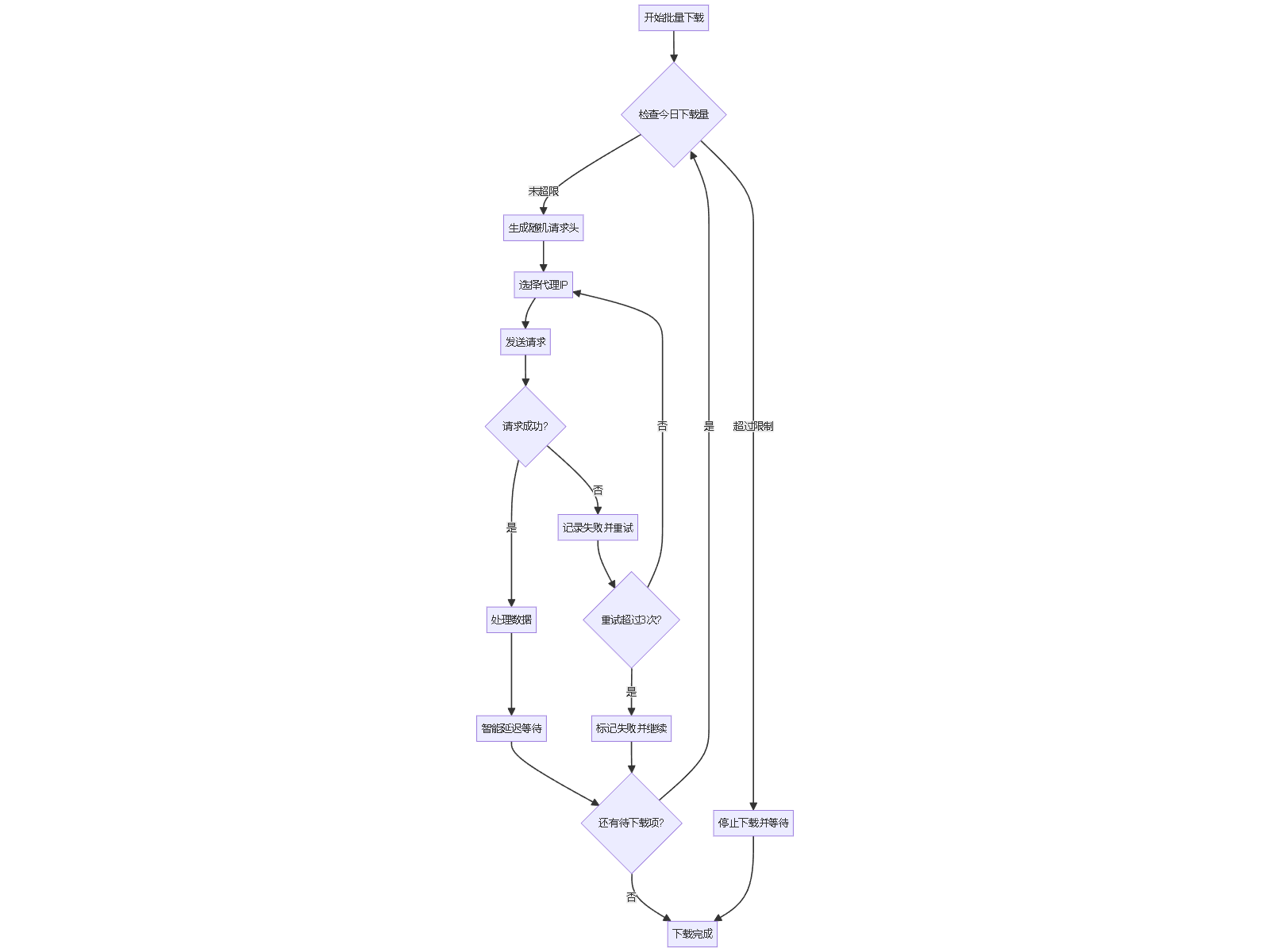
最佳实践建议
1. Cookie管理
import json
import os


class CookieManager:
    def __init__(self, cookie_file='cookies.json'):
        self.cookie_file = cookie_file

    def save_cookies(self, cookies):
        """保存Cookie到文件"""
        with open(self.cookie_file, 'w', encoding='utf-8') as f:
            json.dump(cookies, f, ensure_ascii=False, indent=2)

    def load_cookies(self):
        """从文件加载Cookie"""
        if os.path.exists(self.cookie_file):
            with open(self.cookie_file, 'r', encoding='utf-8') as f:
                return json.load(f)
        return None

    def rotate_cookies(self, cookie_list):
        """轮换使用多个Cookie"""
        return random.choice(cookie_list)
2. 监控与报警
class Monitor:
    def __init__(self):
        self.error_count = 0
        self.last_alert_time = 0

    def check_risk(self, response):
        """检查响应中的风险信号"""
        if response.status_code in [412, 403]:
            self.error_count += 1
            if self.error_count > 5:
                self.send_alert("检测到频繁封禁风险")
                return False
        return True

    def send_alert(self, message):
        """发送风险警报"""
        current_time = time.time()
        if current_time - self.last_alert_time > 3600:  # 1小时内不重复报警
            print(f"警报: {message}")
            self.last_alert_time = current_time
关键注意事项
- 下载频率控制:单账号每日下载量建议不超过50个视频
- 时间分布:避免在短时间内集中下载,分散到不同时间段
- 行为模拟:添加随机滚动、页面停留等模拟用户行为
- 异常处理:遇到412状态码立即停止,等待1小时以上再继续
- 多账号轮换:使用多个B站账号轮流下载,分散风险
通过以上策略的组合使用,可以在保证下载效率的同时,最大程度降低账号被封禁的风险。
解决 无用评论 打赏举报 分享
分享
- 2025-12-17 14:17金瑶苓Britney的博客 还在为无法保存B站精彩内容而困扰?...bilidown采用扫码登录机制,既保障账号安全,又简化操作流程。软件主界面设计直观,功能区域划分清晰,让用户能够快速上手。 [
问题事件
 创建了问题
10月15日
创建了问题
10月15日