Iam_楠 2025-10-20 10:31 采纳率: 69.2%
浏览 6

Vue2、Element-ui启用CSP,移除unsafe-inline报错

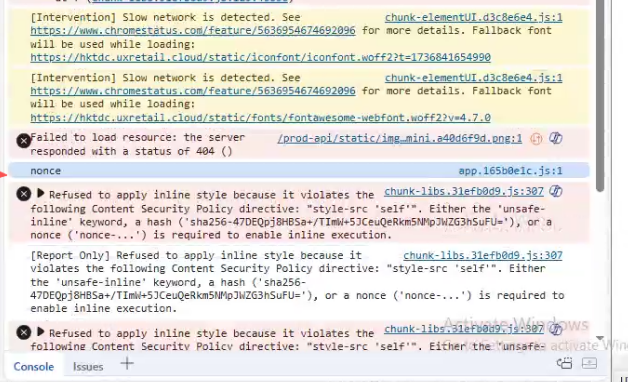
项目使用 Element-UI,Nginx开启 CSP 移除 “unsafe-inline”,会报错
img

Refused to apply inline style because it violates the following Content Security Policy directive: "style-src 'self'". Either the'unsafe-inline'keyword,a hash('sha256-47DEQpj8HBSa+/TImW+5JCeuQeRkm5NMpJWZG3hSuFU='),or a nonce ('nonce-...') is required to enable inline execution.

是不是 Element-UI 无法启用 CSP 策略,还是有什么打补丁的方法?

  • 写回答

2条回答 默认 最新

  • 紫雾凌寒 新星创作者: 人工智能技术领域 2025-10-20 11:05
    关注

    让 “紫雾凌寒” 来帮你回答,本回答结合 DeepSeek

    如果还有问题,请评论或点击头像私信,如果有帮助到您, 请关注、采纳、点赞

    1. 关键点分析:
      - 项目使用Element - UI,在Nginx启用CSP(Content Security Policy)移除“unsafe - inline”后出现报错。这是因为Element - UI的样式部分是通过内联样式方式存在的,移除“unsafe - inline”后,浏览器根据CSP策略拒绝应用这些内联样式。
    2. 解决方案:
      - 方案一:将Element - UI的样式提取到单独的CSS文件

      • 首先,在项目中找到引入Element - UI的地方,例如在main.js中:
        javascript import ElementUI from 'element-ui'; import 'element-ui/lib/theme - chameleon/index.css';
      • 然后,将element - ui/lib/theme - chameleon/index.css中的内容提取到一个新的CSS文件中,比如element - ui.css。在main.js中修改引入为:
        javascript import ElementUI from 'element-ui'; import './element - ui.css';
      • 这样做的优点是完全符合CSP策略,因为样式不再以内联形式存在。缺点是可能会增加CSS文件的体积,如果项目中多个地方使用Element - UI,可能需要多次提取。
      • 方案二:使用nonce
      • 在Nginx配置中设置nonce值。例如:
        nginx add_header Content - Security - Policy "default - src'self'; script - src'self' 'nonce - YOUR_NONCE_VALUE'; style - src'self' 'nonce - YOUR_NONCE_VALUE'; object - src 'none'; img - src'self' data:; media - src'self'; frame - src'self'";
      • 然后在Vue项目中,获取这个nonce值并添加到相关标签上。在main.js中可以这样做:
        ```javascript
        import ElementUI from ‘element-ui’;
        import ‘element-ui/lib/theme - chameleon/index.css’;
        import { getNonce } from ‘./utils’;// 假设utils.js中有获取nonce的方法

      const nonce = getNonce();
      document.head.setAttribute(‘nonce’, nonce);

      Vue.use(ElementUI);
      `` - 优点是相对简单,不需要修改Element - UI的样式结构。缺点是需要额外的代码来管理nonce值,并且如果nonce值泄露可能会有安全风险。 3. 总结: - 解决Vue2 + Element - UI在Nginx启用CSP移除“unsafe - inline”报错的问题,可以通过提取Element - UI样式到单独CSS文件或使用nonce值这两种方式。提取样式文件的方式更彻底符合CSP策略,而使用nonce值相对简单但需要注意管理nonce`的安全性。根据项目的具体情况和需求选择合适的解决方案。

    希望以上解答对您有所帮助。如果您有任何疑问,欢迎在评论区提出。

    评论

报告相同问题?

问题事件

  • 创建了问题 10月20日