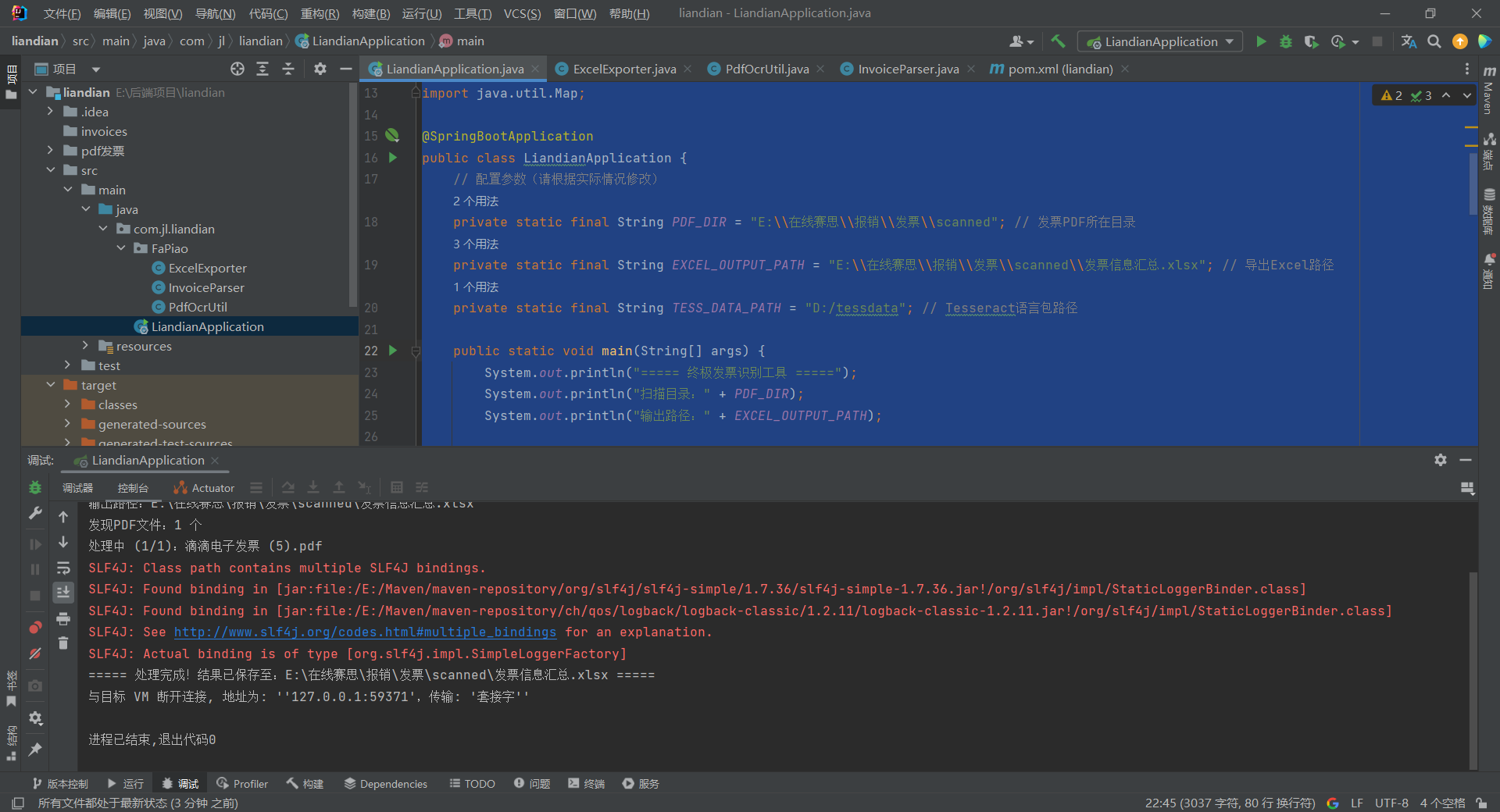
今天写个代码,用java扫描发票,抓取数据,保存到表格里,
问题:
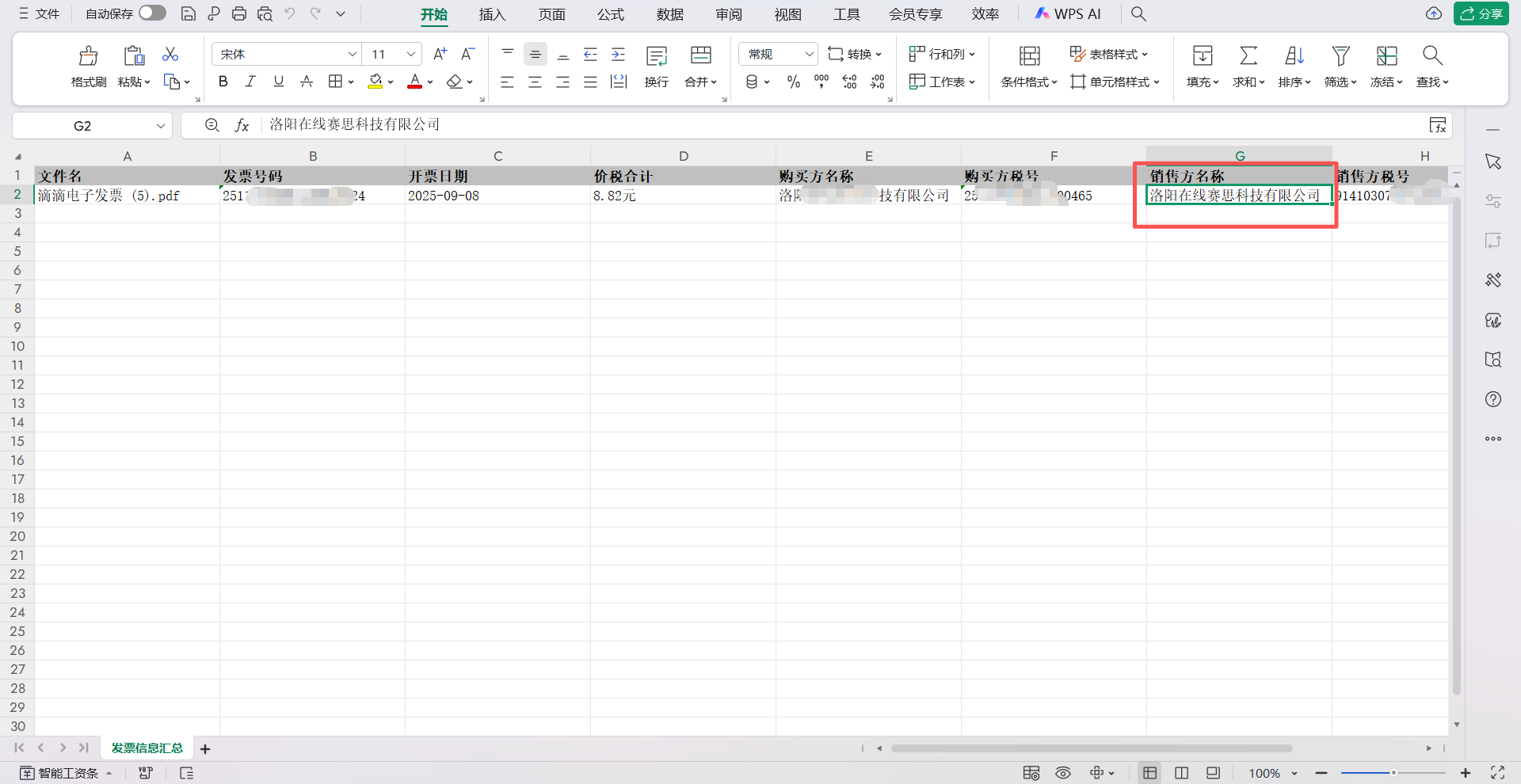
1:为什么销售方的名称抓取的也是,购买方的名称效果图如下:
以下是核心代码:
ExcelExporter
package com.jl.liandian.FaPiao;

import org.apache.poi.ss.usermodel.*;
import org.apache.poi.xssf.usermodel.XSSFWorkbook;

import java.io.File;
import java.io.FileOutputStream;
import java.io.IOException;
import java.util.List;
import java.util.Map;

/**
 * @Author Jin
 * @Description
 * @Date 2025/10/23 8:05
 **/
public class ExcelExporter {

    public static void exportToExcel(List<Map<String, String>> invoiceList, String excelPath) throws IOException {
        File excelFile = new File(excelPath);
        if (!excelFile.getParentFile().exists()) {
            excelFile.getParentFile().mkdirs();
        }

        try (Workbook workbook = new XSSFWorkbook()) {
            Sheet sheet = workbook.createSheet("发票信息汇总");
            sheet.setDefaultColumnWidth(25);

            // 表头
            String[] headers = {
                    "文件名", "发票号码", "开票日期", "价税合计",
                    "购买方名称", "购买方税号", "销售方名称", "销售方税号"
            };
            Row headerRow = sheet.createRow(0);
            CellStyle headerStyle = createHeaderStyle(workbook);
            for (int i = 0; i < headers.length; i++) {
                Cell cell = headerRow.createCell(i);
                cell.setCellValue(headers[i]);
                cell.setCellStyle(headerStyle);
            }

            // 数据行
            CellStyle dataStyle = workbook.createCellStyle();
            dataStyle.setWrapText(true);
            for (int i = 0; i < invoiceList.size(); i++) {
                Map<String, String> invoice = invoiceList.get(i);
                Row row = sheet.createRow(i + 1);
                row.createCell(0).setCellValue(invoice.get("文件名"));
                row.createCell(1).setCellValue(invoice.get("发票号码"));
                row.createCell(2).setCellValue(invoice.get("开票日期"));
                row.createCell(3).setCellValue(invoice.get("价税合计"));
                row.createCell(4).setCellValue(invoice.get("购买方名称"));
                row.createCell(5).setCellValue(invoice.get("购买方税号"));
                row.createCell(6).setCellValue(invoice.get("销售方名称"));
                row.createCell(7).setCellValue(invoice.get("销售方税号"));
            }

            // 写入文件
            try (FileOutputStream fos = new FileOutputStream(excelPath)) {
                workbook.write(fos);
            }
        }
    }

    private static CellStyle createHeaderStyle(Workbook workbook) {
        CellStyle style = workbook.createCellStyle();
        Font font = workbook.createFont();
        font.setBold(true);
        style.setFont(font);
        style.setFillForegroundColor(IndexedColors.GREY_25_PERCENT.getIndex());
        style.setFillPattern(FillPatternType.SOLID_FOREGROUND);
        return style;
    }
}
InvoiceParser
package com.jl.liandian.FaPiao;

import java.util.*;
import java.util.regex.Matcher;
import java.util.regex.Pattern;

/**
 * 发票常用字段
 * @Author Jin
 * @Description
 * @Date 2025/10/23 8:04
 **/
public class InvoiceParser {

    public static Map<String, String> parseInvoice(String text, String fileName) {
        Map<String, String> invoiceInfo = new HashMap<>();
        invoiceInfo.put("文件名", fileName);
        String[] fields = {"发票号码", "开票日期", "价税合计", "购买方名称", "购买方税号", "销售方名称", "销售方税号"};
        for (String field : fields) {
            invoiceInfo.put(field, "未识别");
        }

        // 1. 发票号码(强制匹配8-20位数字)
        Matcher invNoMatcher = Pattern.compile("(\\d{8,20})", Pattern.CASE_INSENSITIVE).matcher(text);
        if (invNoMatcher.find()) {
            invoiceInfo.put("发票号码", invNoMatcher.group(1));
        }

        // 2. 开票日期(强制匹配日期格式)
        Matcher dateMatcher = Pattern.compile("(\\d{4}[-/年]\\d{1,2}[-/月]\\d{1,2})", Pattern.CASE_INSENSITIVE).matcher(text);
        if (dateMatcher.find()) {
            String date = dateMatcher.group(1)
                    .replaceAll("[年月]", "-")
                    .replace("/", "-")
                    .trim();
            invoiceInfo.put("开票日期", date);
        }

        // 3. 价税合计(强制匹配金额格式)
        Matcher amountMatcher = Pattern.compile("(\\d+\\.\\d{2})", Pattern.CASE_INSENSITIVE).matcher(text);
        if (amountMatcher.find()) {
            invoiceInfo.put("价税合计", amountMatcher.group(1) + "元");
        }

        // 4. 购买方名称(强制匹配中文企业名)
        Matcher buyerNameMatcher = Pattern.compile("([\\u4e00-\\u9fa5]+[有限公司|公司|企业|个人]+)", Pattern.CASE_INSENSITIVE).matcher(text);
        if (buyerNameMatcher.find()) {
            invoiceInfo.put("购买方名称", buyerNameMatcher.group(1));
        }

        // 5. 销售方名称(强化专属关键词 + 严格排除购买方)
        List<String> sellerExclusiveKeywords = Arrays.asList(
                "销售方", "卖方", "商家", "销方", "收款方", "提供方",
                "出票方", "航空公司", "旅行社" // 新增行业专属关键词
        );
        for (String keyword : sellerExclusiveKeywords) {
            Matcher sellerNameMatcher = Pattern.compile(
                    keyword + "[::]?\\s*([^\\d\\n]+?)(?=\\s*税号|\\s*识别号|\\s*$)",
                    Pattern.CASE_INSENSITIVE | Pattern.DOTALL
            ).matcher(text);
            if (sellerNameMatcher.find()) {
                String sellerName = cleanText(sellerNameMatcher.group(1));
                // 严格排除购买方名称(包含、完全相同均排除)
                if (!sellerName.contains(invoiceInfo.get("购买方名称")) &&
                        !invoiceInfo.get("购买方名称").contains(sellerName)) {
                    invoiceInfo.put("销售方名称", sellerName);
                    break;
                }
            }
        }
        // 补充:若仍未识别,强制匹配与购买方不同的企业名
        if ("未识别".equals(invoiceInfo.get("销售方名称")) && !"未识别".equals(invoiceInfo.get("购买方名称"))) {
            Matcher fallbackSeller = Pattern.compile(
                    "([\\u4e00-\\u9fa5]+[有限公司|公司|企业|商家|航空|旅行社]+)(?!" + invoiceInfo.get("购买方名称") + ")",
                    Pattern.CASE_INSENSITIVE
            ).matcher(text);
            if (fallbackSeller.find()) {
                invoiceInfo.put("销售方名称", fallbackSeller.group(1));
            }
        }

        // 6. 购买方税号、销售方税号(强制匹配18位税号)
        List<String> taxNos = new ArrayList<>();
        Matcher taxMatcher = Pattern.compile("([\\dA-Z]{18})", Pattern.CASE_INSENSITIVE).matcher(text);
        while (taxMatcher.find()) {
            taxNos.add(taxMatcher.group(1));
        }
        if (taxNos.size() >= 1) invoiceInfo.put("购买方税号", taxNos.get(0));
        if (taxNos.size() >= 2) invoiceInfo.put("销售方税号", taxNos.get(1));

        return invoiceInfo;
    }

    private static String cleanText(String text) {
        return text.replaceAll("[^\\u4e00-\\u9fa5a-zA-Z0-9]", "").trim();
    }
}
PdfOcrUtil
package com.jl.liandian.FaPiao;

import net.sourceforge.tess4j.ITesseract;
import net.sourceforge.tess4j.Tesseract;
import org.apache.pdfbox.pdmodel.PDDocument;
import org.apache.pdfbox.rendering.PDFRenderer;
import org.apache.pdfbox.text.PDFTextStripper;

import java.awt.*;
import java.awt.image.BufferedImage;
import java.io.File;
import java.io.IOException;

/**
 * @Author Jin
 * @Description
 * @Date 2025/10/23 8:08
 **/
public class PdfOcrUtil {

    /**
     * 提取可复制PDF文本
     */
    public static String extractTextFromEditablePdf(File pdfFile) throws IOException {
        try (PDDocument document = PDDocument.load(pdfFile)) {
            PDFTextStripper stripper = new PDFTextStripper();
            stripper.setSortByPosition(true);
            return stripper.getText(document).replaceAll("\\s+", " ").trim();
        }
    }

    /**
     * 扫描件PDF识别(极端增强预处理)
     */
    public static String extractTextFromScannedPdf(File pdfFile, String tessDataPath) throws Exception {
        try (PDDocument document = PDDocument.load(pdfFile)) {
            PDFRenderer renderer = new PDFRenderer(document);
            StringBuilder text = new StringBuilder();
            ITesseract tesseract = new Tesseract();
            tesseract.setDatapath(tessDataPath);
            tesseract.setLanguage("chi_sim+eng");
            tesseract.setOcrEngineMode(1);

            for (int i = 0; i < document.getNumberOfPages(); i++) {
                // 400DPI高清渲染
                BufferedImage image = renderer.renderImageWithDPI(i, 400);
                // 极端增强预处理(对比度+二值化)
                BufferedImage processedImage = preprocessImage(image);
                text.append(tesseract.doOCR(processedImage)).append(" ");
            }
            return text.toString().replaceAll("\\s+", " ").trim();
        }
    }

    /**
     * 极端增强图片预处理(解决极低清晰度问题)
     */
    private static BufferedImage preprocessImage(BufferedImage image) {
        // 转为灰度图
        BufferedImage grayImage = new BufferedImage(
                image.getWidth(), image.getHeight(), BufferedImage.TYPE_BYTE_GRAY
        );
        Graphics g = grayImage.getGraphics();
        g.drawImage(image, 0, 0, null);
        g.dispose();

        // 超增强对比度(暗部更暗,亮部更亮)
        int contrast = 60;
        BufferedImage contrastImage = new BufferedImage(
                grayImage.getWidth(), grayImage.getHeight(), BufferedImage.TYPE_BYTE_GRAY
        );
        for (int y = 0; y < grayImage.getHeight(); y++) {
            for (int x = 0; x < grayImage.getWidth(); x++) {
                int pixel = grayImage.getRGB(x, y) & 0xFF;
                int newPixel = pixel + contrast;
                newPixel = Math.min(255, Math.max(0, newPixel));
                contrastImage.setRGB(x, y, (newPixel << 16) | (newPixel << 8) | newPixel);
            }
        }

        // 低阈值二值化(确保文字不被过滤)
        BufferedImage binaryImage = new BufferedImage(
                contrastImage.getWidth(), contrastImage.getHeight(), BufferedImage.TYPE_BYTE_BINARY
        );
        for (int y = 0; y < contrastImage.getHeight(); y++) {
            for (int x = 0; x < contrastImage.getWidth(); x++) {
                int pixel = contrastImage.getRGB(x, y) & 0xFF;
                binaryImage.setRGB(x, y, pixel > 80 ? 0xFFFFFF : 0x000000); // 阈值降至80
            }
        }
        return binaryImage;
    }

    /**
     * 判断是否为扫描件
     */
    public static boolean isScannedPdf(File pdfFile) {
        try {
            String text = extractTextFromEditablePdf(pdfFile);
            return text.length() < 100;
        } catch (Exception e) {
            return true;
        }
    }
}
LiandianApplication
package com.jl.liandian;

import com.jl.liandian.FaPiao.ExcelExporter;
import com.jl.liandian.FaPiao.InvoiceParser;
import com.jl.liandian.FaPiao.PdfOcrUtil;
import org.springframework.boot.SpringApplication;
import org.springframework.boot.autoconfigure.SpringBootApplication;

import java.io.File;
import java.util.ArrayList;
import java.util.HashMap;
import java.util.List;
import java.util.Map;

@SpringBootApplication
public class LiandianApplication {
    // 配置参数(请根据实际情况修改)
    private static final String PDF_DIR = "E:\\在线赛思\\报销\\发票\\scanned"; // 发票PDF所在目录
    private static final String EXCEL_OUTPUT_PATH = "E:\\在线赛思\\报销\\发票\\scanned\\发票信息汇总.xlsx"; // 导出Excel路径
    private static final String TESS_DATA_PATH = "D:/tessdata"; // Tesseract语言包路径

    public static void main(String[] args) {
        System.out.println("===== 终极发票识别工具 =====");
        System.out.println("扫描目录:" + PDF_DIR);
        System.out.println("输出路径:" + EXCEL_OUTPUT_PATH);

        try {
            // 收集所有PDF发票
            List<File> pdfFiles = new ArrayList<>();
            traversePdfFiles(new File(PDF_DIR), pdfFiles);
            System.out.println("发现PDF文件:" + pdfFiles.size() + " 个");
            if (pdfFiles.isEmpty()) {
                System.out.println("未找到PDF文件,程序退出");
                return;
            }

            // 批量识别
            List<Map<String, String>> invoiceList = new ArrayList<>();
            for (int i = 0; i < pdfFiles.size(); i++) {
                File pdfFile = pdfFiles.get(i);
                System.out.printf("处理中 (%d/%d):%s%n", i + 1, pdfFiles.size(), pdfFile.getName());

                try {
                    // 提取文本
                    String pdfText = PdfOcrUtil.isScannedPdf(pdfFile)
                            ? PdfOcrUtil.extractTextFromScannedPdf(pdfFile, TESS_DATA_PATH)
                            : PdfOcrUtil.extractTextFromEditablePdf(pdfFile);

                    // 解析发票
                    Map<String, String> info = InvoiceParser.parseInvoice(pdfText, pdfFile.getName());
                    invoiceList.add(info);
                } catch (Exception e) {
                    System.err.println("处理失败 " + pdfFile.getName() + ":" + e.getMessage());
                }
            }

            // 导出到Excel
            ExcelExporter.exportToExcel(invoiceList, EXCEL_OUTPUT_PATH);
            System.out.println("===== 处理完成!结果已保存至:" + EXCEL_OUTPUT_PATH + " =====");

        } catch (Exception e) {
            System.err.println("程序异常:" + e.getMessage());
            e.printStackTrace();
        }
    }

    // 递归遍历所有PDF
    private static void traversePdfFiles(File dir, List<File> pdfFiles) {
        if (dir == null || !dir.isDirectory()) return;
        File[] files = dir.listFiles();
        if (files == null) return;
        for (File file : files) {
            if (file.isDirectory()) {
                traversePdfFiles(file, pdfFiles);
            } else if (file.getName().toLowerCase().endsWith(".pdf")) {
                pdfFiles.add(file);
            }
        }
    }
}
这是控制台运行后的截图: