
在构建“大爱仙尊霸气语录”这类高并发、高频检索的文本库时,常面临如何在海量非结构化语录数据中实现毫秒级精准检索的技术挑战。尤其是在支持模糊匹配、关键词高亮、语义相似度搜索等场景下,传统关系型数据库查询效率低下,易造成响应延迟。如何合理设计索引结构(如倒排索引)、选择合适的存储引擎(如Elasticsearch或向量数据库),并在数据分片与缓存策略间取得平衡,成为保障高效存储与低延迟检索的核心难题。


2条回答 默认 最新

 关注
关注让【宝码香车】来帮你解答,本回答参考DeepSeek编写,并整理提供。
如果还有疑问可以“评论”。如果答案让您满意,请“采纳”,非常感谢!
针对"大爱仙尊霸气语录"这类高并发、高频检索的文本库需求,我推荐使用Elasticsearch + Redis的组合方案,下面详细介绍完整的技术架构和实现方案。
技术架构设计
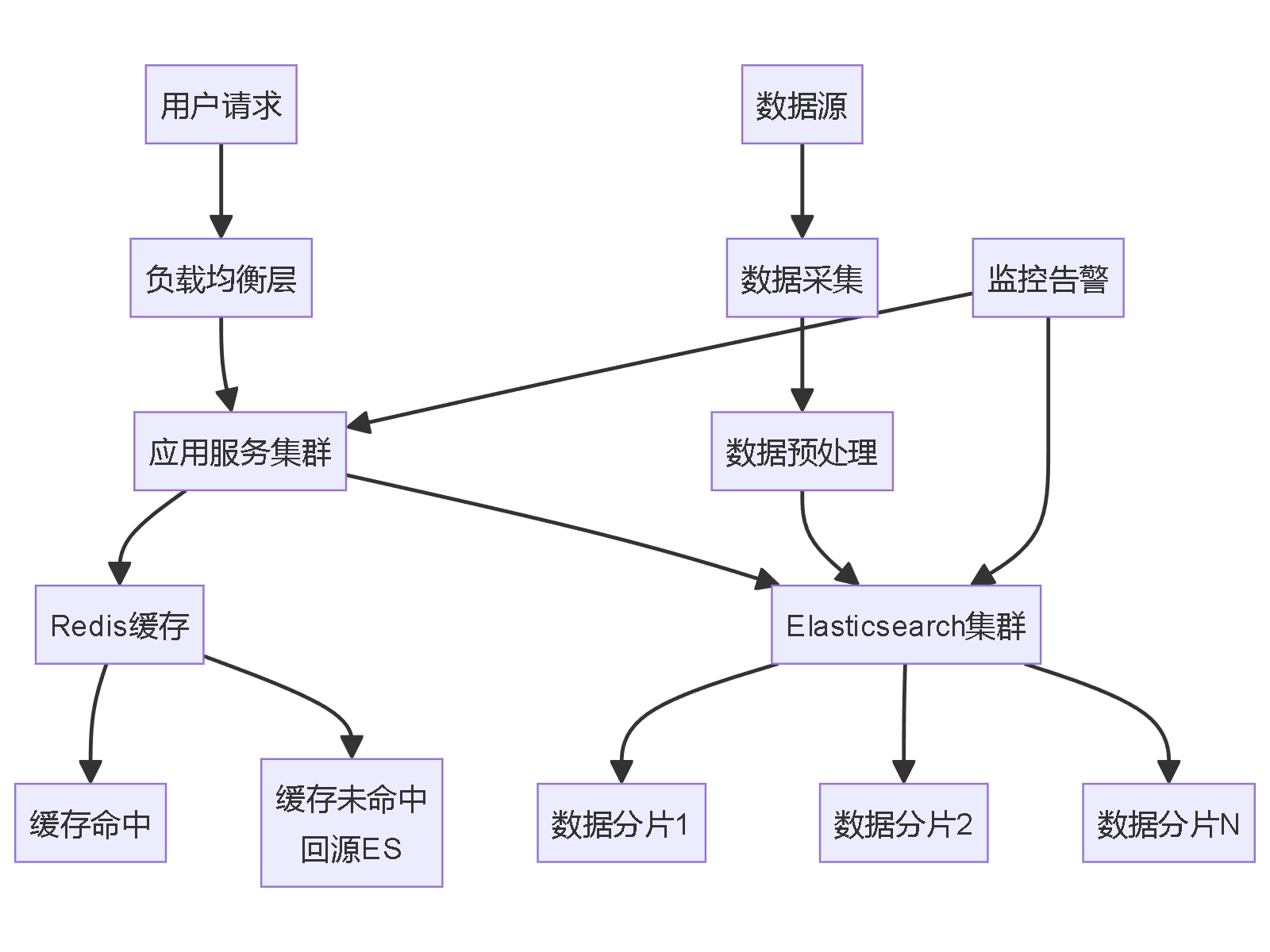
1. Elasticsearch索引设计
// 创建语录索引映射
PUT /quotes_index
{
  "settings": {
    "number_of_shards": 3,
    "number_of_replicas": 2,
    "analysis": {
      "analyzer": {
        "chinese_analyzer": {
          "tokenizer": "ik_max_word",
          "filter": ["lowercase"]
        }
      }
    }
  },
  "mappings": {
    "properties": {
      "id": {
        "type": "keyword"
      },
      "content": {
        "type": "text",
        "analyzer": "chinese_analyzer",
        "fields": {
          "keyword": {
            "type": "keyword"
          }
        }
      },
      "character": {
        "type": "keyword"
      },
      "scene": {
        "type": "keyword"
      },
      "popularity": {
        "type": "integer"
      },
      "tags": {
        "type": "keyword"
      },
      "vector_embedding": {
        "type": "dense_vector",
        "dims": 768
      },
      "created_time": {
        "type": "date"
      },
      "updated_time": {
        "type": "date"
      }
    }
  }
}
2. 核心Java实现代码
@Service
public class QuoteSearchService {

    @Autowired
    private ElasticsearchRestTemplate elasticsearchTemplate;

    @Autowired
    private RedisTemplate<String, Object> redisTemplate;

    private static final String CACHE_PREFIX = "quote:";
    private static final long CACHE_EXPIRE = 3600; // 1小时

    /**
     * 关键词搜索 + 高亮显示
     */
    public SearchResult<Quote> searchByKeyword(String keyword, int page, int size) {
        String cacheKey = CACHE_PREFIX + "search:" + keyword + ":" + page + ":" + size;

        // 尝试从缓存获取
        SearchResult<Quote> cachedResult = (SearchResult<Quote>)
            redisTemplate.opsForValue().get(cacheKey);
        if (cachedResult != null) {
            return cachedResult;
        }

        // 构建搜索请求
        NativeSearchQueryBuilder queryBuilder = new NativeSearchQueryBuilder();

        // 多字段搜索
        Query multiMatchQuery = QueryBuilders.multiMatchQuery(keyword,
            "content", "tags", "character", "scene");

        // 高亮配置
        HighlightBuilder highlightBuilder = new HighlightBuilder()
            .field("content")
            .preTags("<em class='highlight'>")
            .postTags("</em>")
            .fragmentSize(100);

        // 构建完整查询
        NativeSearchQuery searchQuery = queryBuilder
            .withQuery(multiMatchQuery)
            .withHighlightBuilder(highlightBuilder)
            .withPageable(PageRequest.of(page, size))
            .build();

        // 执行搜索
        SearchHits<Quote> searchHits = elasticsearchTemplate.search(
            searchQuery, Quote.class);

        // 处理高亮结果
        List<Quote> quotes = processHighlightResults(searchHits);

        SearchResult<Quote> result = new SearchResult<>(
            quotes,
            searchHits.getTotalHits(),
            page,
            size
        );

        // 写入缓存
        redisTemplate.opsForValue().set(cacheKey, result,
            Duration.ofSeconds(CACHE_EXPIRE));

        return result;
    }

    /**
     * 模糊匹配搜索
     */
    public List<Quote> fuzzySearch(String content, int fuzziness) {
        BoolQueryBuilder boolQuery = QueryBuilders.boolQuery();

        // 模糊查询
        FuzzyQueryBuilder fuzzyQuery = QueryBuilders.fuzzyQuery("content", content)
            .fuzziness(Fuzziness.fromEdits(fuzziness));

        boolQuery.should(fuzzyQuery);

        NativeSearchQuery searchQuery = new NativeSearchQueryBuilder()
            .withQuery(boolQuery)
            .withPageable(PageRequest.of(0, 50))
            .build();

        return elasticsearchTemplate.search(searchQuery, Quote.class)
            .stream()
            .map(SearchHit::getContent)
            .collect(Collectors.toList());
    }

    /**
     * 语义相似度搜索(需要向量化模型)
     */
    public List<Quote> semanticSearch(String query, int topK) {
        // 获取查询文本的向量表示
        float[] queryVector = getTextEmbedding(query);

        // 向量相似度搜索
        ScriptScoreQueryBuilder scriptQuery = QueryBuilders.scriptScoreQuery(
            QueryBuilders.matchAllQuery(),
            new Script(ScriptType.INLINE, "painless",
                "cosineSimilarity(params.query_vector, 'vector_embedding') + 1.0",
                Collections.singletonMap("query_vector", queryVector))
        );

        NativeSearchQuery searchQuery = new NativeSearchQueryBuilder()
            .withQuery(scriptQuery)
            .withPageable(PageRequest.of(0, topK))
            .build();

        return elasticsearchTemplate.search(searchQuery, Quote.class)
            .stream()
            .map(SearchHit::getContent)
            .collect(Collectors.toList());
    }

    private List<Quote> processHighlightResults(SearchHits<Quote> searchHits) {
        return searchHits.stream()
            .map(hit -> {
                Quote quote = hit.getContent();
                // 处理高亮内容
                if (hit.getHighlightFields().containsKey("content")) {
                    List<String> highlights = hit.getHighlightFields()
                        .get("content");
                    if (!highlights.isEmpty()) {
                        quote.setHighlightContent(highlights.get(0));
                    }
                }
                return quote;
            })
            .collect(Collectors.toList());
    }

    private float[] getTextEmbedding(String text) {
        // 调用文本向量化服务(如BERT、Sentence-BERT等)
        // 这里需要集成相应的NLP模型
        return embeddingService.getEmbedding(text);
    }
}
3. 数据模型定义
@Data
@Document(indexName = "quotes_index")
public class Quote {
    @Id
    private String id;

    @Field(type = FieldType.Text, analyzer = "chinese_analyzer")
    private String content;

    @Field(type = FieldType.Keyword)
    private String character;

    @Field(type = FieldType.Keyword)
    private String scene;

    @Field(type = FieldType.Integer)
    private Integer popularity;

    @Field(type = FieldType.Keyword)
    private List<String> tags;

    @Field(type = FieldType.Dense_Vector, dims = 768)
    private float[] vectorEmbedding;

    @Field(type = FieldType.Date)
    private Date createdTime;

    @Field(type = FieldType.Date)
    private Date updatedTime;

    // 高亮内容(不存储)
    @Transient
    private String highlightContent;
}


@Data
public class SearchResult<T> {
    private List<T> data;
    private long total;
    private int page;
    private int size;
    private long totalPages;

    public SearchResult(List<T> data, long total, int page, int size) {
        this.data = data;
        this.total = total;
        this.page = page;
        this.size = size;
        this.totalPages = (total + size - 1) / size;
    }
}
4. 缓存策略实现
@Component
public class QuoteCacheService {

    @Autowired
    private RedisTemplate<String, Object> redisTemplate;

    private static final String HOT_QUOTES_KEY = "hot_quotes";
    private static final String QUOTE_DETAIL_KEY = "quote_detail:";

    /**
     * 缓存热门语录
     */
    public void cacheHotQuotes(List<Quote> quotes) {
        // 使用ZSET存储热门语录,按热度排序
        redisTemplate.opsForZSet().removeRange(HOT_QUOTES_KEY, 0, -1);

        quotes.forEach(quote -> {
            redisTemplate.opsForZSet().add(
                HOT_QUOTES_KEY,
                quote,
                quote.getPopularity().doubleValue()
            );
        });

        // 设置过期时间
        redisTemplate.expire(HOT_QUOTES_KEY, Duration.ofHours(6));
    }

    /**
     * 获取缓存的热门语录
     */
    public List<Quote> getHotQuotes(int count) {
        Set<Object> cachedQuotes = redisTemplate.opsForZSet()
            .reverseRange(HOT_QUOTES_KEY, 0, count - 1);

        if (cachedQuotes != null) {
            return cachedQuotes.stream()
                .map(obj -> (Quote) obj)
                .collect(Collectors.toList());
        }
        return Collections.emptyList();
    }

    /**
     * 语录详情缓存
     */
    public void cacheQuoteDetail(Quote quote) {
        String key = QUOTE_DETAIL_KEY + quote.getId();
        redisTemplate.opsForValue().set(key, quote, Duration.ofHours(2));
    }

    public Quote getQuoteDetail(String quoteId) {
        String key = QUOTE_DETAIL_KEY + quoteId;
        return (Quote) redisTemplate.opsForValue().get(key);
    }
}
5. 性能优化配置
# application.yml 配置
spring:
  elasticsearch:
    uris: http://localhost:9200
    connection-timeout: 3s
    socket-timeout: 30s

  redis:
    host: localhost
    port: 6379
    timeout: 2000ms
    lettuce:
      pool:
        max-active: 20
        max-idle: 10
        min-idle: 5


# Elasticsearch 集群配置
elasticsearch:
  cluster:
    nodes:
      - node1:9200
      - node2:9200
      - node3:9200
    index:
      quotes_index:
        shards: 3
        replicas: 2
6. 监控和告警
@Component
public class SearchMonitor {

    private final MeterRegistry meterRegistry;
    private final Counter searchRequests;
    private final Timer searchLatency;

    public SearchMonitor(MeterRegistry meterRegistry) {
        this.meterRegistry = meterRegistry;
        this.searchRequests = Counter.builder("search.requests")
            .description("搜索请求数量")
            .register(meterRegistry);
        this.searchLatency = Timer.builder("search.latency")
            .description("搜索延迟")
            .register(meterRegistry);
    }

    public <T> T monitorSearch(Supplier<T> searchOperation, String queryType) {
        searchRequests.increment();

        return searchLatency.record(() -> {
            try {
                return searchOperation.get();
            } catch (Exception e) {
                // 记录错误指标
                meterRegistry.counter("search.errors", "type", queryType).increment();
                throw e;
            }
        });
    }
}
技术优势总结
- 高性能检索:Elasticsearch倒排索引实现毫秒级搜索
- 智能缓存:Redis多级缓存减少ES压力
- 语义搜索:向量化技术支持语义相似度匹配
- 高可用:集群部署和分片策略保障服务稳定性
- 扩展性强:支持水平扩展应对高并发场景
这套方案能够有效解决"大爱仙尊霸气语录"这类文本库的高并发检索需求,实现毫秒级响应和精准匹配。
本回答被题主选为最佳回答 , 对您是否有帮助呢?解决 无用评论 打赏举报 分享
分享
- 2024-12-18 16:04知己8080的博客 【代码】大爱仙尊(名诗篇)
- 2024-07-27 12:56MemroyErHero的博客 人千方百计学习,来认知世界.知晓规则.就是要利用规则.若是被规则牵绊.反而因为自身所学而束手束脚,这才是真正的悲剧.
- 2023-10-18 08:32Java是当前最流行的编程语言之一,它是一种面向对象的程序设计语言,可以用于开发各种类型的应用程序。为了帮助初学者更好地学习Java编程语言,以下总结了一些常用的Java学习资料。 Java官方文档 Java官方网站提供...
- 2024-09-25 19:53DS_Store文件是macOS系统上用于存储文件夹属性的隐藏文件,它们对于保持项目文件结构的有序性非常重要。而JPG图片则可能用于展示公司的标志、产品图片或其他宣传素材,这些图片可以增强品牌认同感和专业感。 6个JAR...
- 2021-04-07 00:14hello-java-maker的博客 1、C++ 蝉联鹅厂最受欢迎的编程语言 2020 年,鹅厂非常突出的编程语言是这 3 个:C++、Go 和 TypeScript。 作为一个游戏大厂,C++ 蝉联“鹅厂最受欢迎语言”一点也不意外。 特别值得一提的是 Go 语言,它在 2019 年...
- 2021-08-19 10:182. 家国大爱:何石的作品展现了对祖国和家乡的热爱,他的笔触既描绘了湖南、广西、深圳等地的风土人情,也记录了境内外的“奇闻”,传达出对国家和人民的深情厚意。这种大爱情怀体现在对个体命运的关注以及对社会...
- 2021-05-28 00:13hello-java-maker的博客 16 个写代码的好习惯 为什么不推荐使用BeanUtils属性转换工具 盘点阿里巴巴 34 个牛逼 GitHub 项目 常见代码重构技巧(非常实用) 有位新接触编程的新手在知乎上提问[1]: 想知道那些编程大佬是不是代码都能记住,...
- 2020-07-09 03:37当前一些高校对在大学生中开展大爱精神教育的重要性和必要性认识不足,缺乏可行的措施。本文分析了当前大学生思想政治教育中大爱精神教育的现状,并结合实际,提出了在高校开展大爱精神教育的相应对策。
- 2020-07-09 07:00作为一种道德精神,大爱精神广泛地存在于人类社会。...特别是在以儒家、墨家、道家和法家为代表的古代诸子百家的思想中,无不闪烁着大爱精神元素的光芒,它们共同构成了大爱精神产生与发展的思想渊源。
- 2020-10-22 12:41《大爱卖家工具v1.8:提升电商运营效率的利器》 在电子商务领域,卖家工具扮演着至关重要的角色,它们能帮助商家高效地管理店铺,优化运营流程,节省时间,提升业绩。其中,“大爱卖家工具v1.8”正是这样一款专为...
- 2021-12-22 16:17qq_51082517的博客 圣诞来袭,小伙伴们应该会看到好多地方都说一行代码可以让大家画出精美的圣诞树,大家想想这个有...IDEA,全称 IntelliJ IDEA ,是 Java 语言的集成开发环境, IDEA 在业界被公认为是最好的 java 开发工具之一,尤其
- 2023-10-24 14:46电工电子产品环境条件与环境试验标准
- 2020-07-09 02:27科学地反思与审视大爱和谐婚姻家庭文化建设,正确评价其建设成就与经验,分析现阶段存在的问题,进一步明确大爱和谐婚姻家庭文化的内在规律与发展方向,对培育和繁荣具有大爱价值理念的和谐婚姻家庭文化,进而推进社会...
- 2024-11-25 14:37最后,模板还可能包含了多语言支持,考虑到公益的无国界特性,支持多语言可以让不同语言背景的用户都能方便地使用和了解公益信息,从而扩大公益活动的影响力。 这款“大爱公益宣传”的微信小程序模板,通过提供一...
- 2024-11-19 18:39徐徐柒柒的博客 改进:使用双数组Trie树 -DAT算法,优点:词语越多,内存压缩越高效,在大量词语下,内存使用仅是普通算法的1/10,甚至更低 方案三 - 双数组Trie树 在聊双数组Trie树之前,需要了解双数组Trie树与普通Trie树的区别...
- 2021-03-01 21:18火了一年的扁平化,同学们都了解清楚了吗?今天@网秦UEC的同学从国外译过来一篇好文,从扁平...大家怎么就突然从大爱材质、斜面和投射阴影突然转向热衷扁平化颜色和简约字体了?这一转变受到了很多因素的推波助澜,下面
- 2021-11-24 22:46"大爱无言、大爱无悔"这一标题,虽然看起来与IT无关,但它所代表的深刻情感与无私奉献的精神,实际上与IT行业的需求不谋而合。 在IT行业,我们常常面临各种挑战和难题,有时候,即使全力以赴也可能难以看到立竿见影...
- 2021-05-18 00:13hello-java-maker的博客 2.3.1 分词后检索 ES 的索引存储的就是分词排序后的结果。比如图中的 Ada,在 MySQL 中 %da% 就扫全表了,但对 ES 来说可以快速定位 2.3.2 精确检索 该情况其实相差是不大的,因为 Term Index 的优势没了,却还要借...
- 没有解决我的问题, 去提问


问题事件
 已采纳回答
11月6日
已采纳回答
11月6日-
创建了问题
11月5日