在使用Java结合OpenCV为图像添加中文文字时,常出现中文乱码或方框替代文字的问题。这是因为OpenCV的`putText()`函数依赖于底层FreeType库渲染文本,而默认情况下不支持中文字符集,且系统缺少合适的中文字体文件。即使传入UTF-8编码的中文字符串,也无法正确显示。该问题多发于跨平台环境(如Windows、Linux、macOS)部署时,字体路径配置不当或未启用FreeType2模块加剧了此问题。如何在Java OpenCV应用中正确集成中文字体并实现清晰中文渲染,成为开发者亟需解决的关键技术难点。


2条回答 默认 最新

 关注
关注让【宝码香车】来帮你解答,本回答参考DeepSeek编写,并整理提供。
如果还有疑问可以“评论”。如果答案让您满意,请“采纳”,非常感谢!
Java OpenCV 中文文字乱码解决方案
这是一个常见的问题,主要原因是OpenCV的
putText()函数默认不支持中文字体渲染。以下是完整的解决方案:问题分析
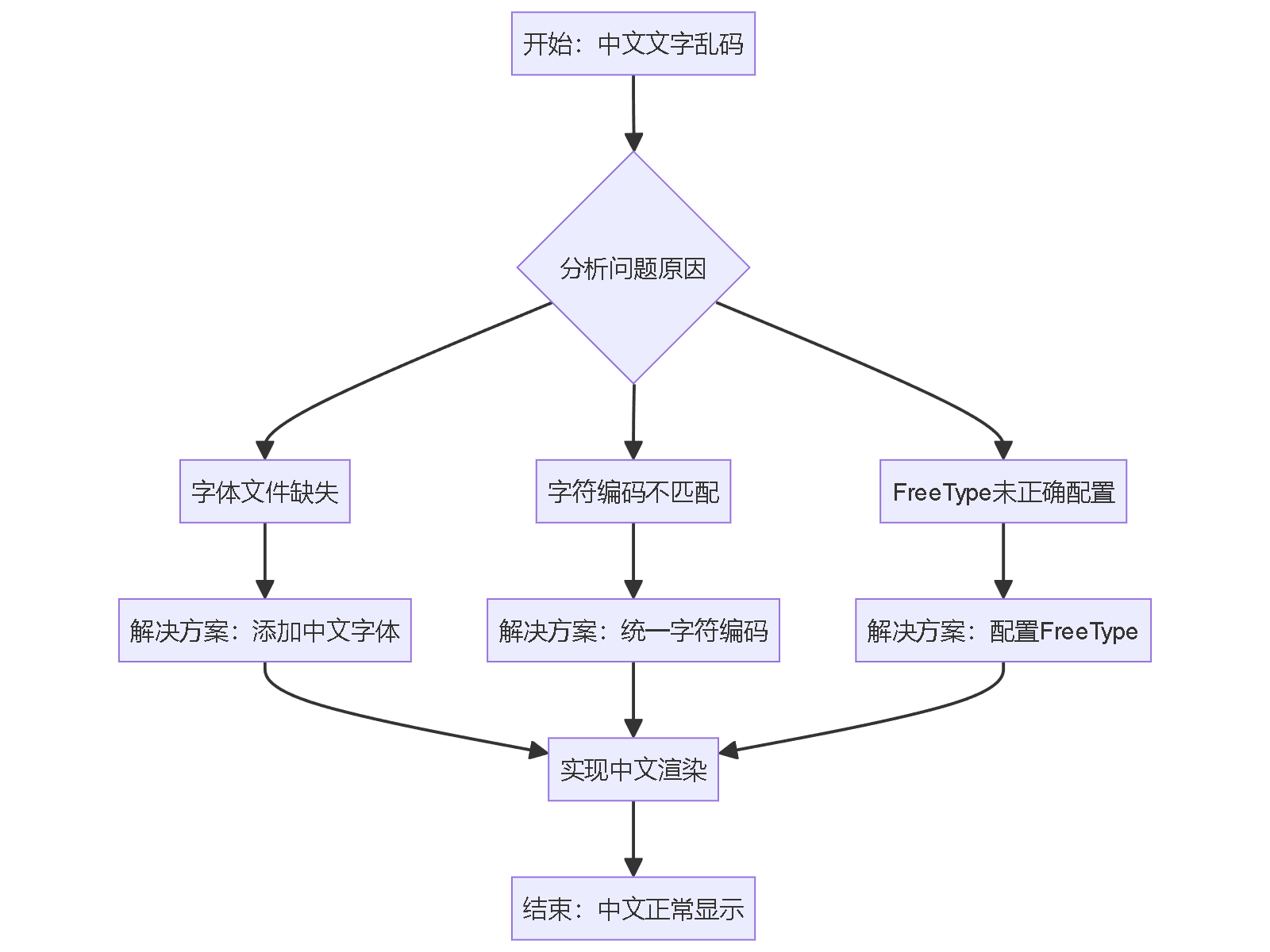
解决方案
1. 添加FreeType2依赖
首先确保OpenCV包含FreeType2模块:
<!-- Maven依赖 -->
<dependency>
    <groupId>org.openpnp</groupId>
    <artifactId>opencv</artifactId>
    <version>4.5.5-1</version>
</dependency>
2. 核心解决方案代码
import org.opencv.core.*;
import org.opencv.freetype.FreeType2;
import org.opencv.imgcodecs.Imgcodecs;
import org.opencv.imgproc.Imgproc;


import java.io.File;
import java.nio.file.Paths;


public class ChineseTextRenderer {

    static {
        // 加载OpenCV本地库
        nu.pattern.OpenCV.loadLocally();
        // 或者使用 System.loadLibrary(Core.NATIVE_LIBRARY_NAME);
    }

    /**
     * 使用FreeType2渲染中文文字
     */
    public static void putChineseText(Mat image, String text, Point position,
                                     Scalar color, int fontSize, String fontPath) {
        try {
            // 创建FreeType2实例
            FreeType2 ft2 = FreeType2.create();

            // 加载中文字体文件
            ft2.loadFontData(fontPath, 0);

            // 设置字体大小
            ft2.setSplitNumber(0);

            // 渲染中文文字
            ft2.putText(image, text, position, fontSize, color, -1, Imgproc.LINE_AA, false);

        } catch (Exception e) {
            System.err.println("中文文字渲染失败: " + e.getMessage());
            e.printStackTrace();
        }
    }

    /**
     * 自动查找系统中文字体
     */
    public static String findChineseFont() {
        // Windows系统字体路径
        String[] windowsFonts = {
            "C:/Windows/Fonts/simsun.ttc",      // 宋体
            "C:/Windows/Fonts/simhei.ttf",      // 黑体
            "C:/Windows/Fonts/msyh.ttc",        // 微软雅黑
            "C:/Windows/Fonts/simkai.ttf"       // 楷体
        };

        // Linux系统字体路径
        String[] linuxFonts = {
            "/usr/share/fonts/truetype/droid/DroidSansFallbackFull.ttf",
            "/usr/share/fonts/truetype/wqy/wqy-microhei.ttc",
            "/usr/share/fonts/truetype/arphic/ukai.ttc",
            "/usr/share/fonts/truetype/noto/NotoSansCJK-Regular.ttc"
        };

        // macOS系统字体路径
        String[] macFonts = {
            "/System/Library/Fonts/PingFang.ttc",
            "/System/Library/Fonts/STHeiti Light.ttc",
            "/System/Library/Fonts/STHeiti Medium.ttc",
            "/Library/Fonts/Arial Unicode.ttf"
        };

        // 根据操作系统检查字体文件
        String os = System.getProperty("os.name").toLowerCase();
        String[] fontPaths;

        if (os.contains("win")) {
            fontPaths = windowsFonts;
        } else if (os.contains("nix") || os.contains("nux")) {
            fontPaths = linuxFonts;
        } else if (os.contains("mac")) {
            fontPaths = macFonts;
        } else {
            fontPaths = new String[0];
        }

        // 查找存在的字体文件
        for (String fontPath : fontPaths) {
            if (new File(fontPath).exists()) {
                return fontPath;
            }
        }

        // 如果系统字体不存在,使用项目内的字体文件
        return "fonts/simsun.ttc"; // 需要将字体文件放在项目fonts目录下
    }

    public static void main(String[] args) {
        // 示例:在图像上添加中文文字
        Mat image = new Mat(400, 600, CvType.CV_8UC3, new Scalar(255, 255, 255));

        // 查找并设置中文字体
        String fontPath = findChineseFont();
        System.out.println("使用字体: " + fontPath);

        // 添加中文文字
        putChineseText(image, "你好,OpenCV!", new Point(50, 100),
                      new Scalar(0, 0, 0), 30, fontPath);

        putChineseText(image, "中文渲染测试", new Point(50, 150),
                      new Scalar(255, 0, 0), 24, fontPath);

        putChineseText(image, "Java + OpenCV 中文解决方案", new Point(50, 200),
                      new Scalar(0, 0, 255), 20, fontPath);

        // 保存图像
        Imgcodecs.imwrite("output_with_chinese.jpg", image);
        System.out.println("图像已保存为 output_with_chinese.jpg");
    }
}
3. 增强版本 - 支持字体缓存和多行文本
import org.opencv.core.*;
import org.opencv.freetype.FreeType2;
import org.opencv.imgcodecs.Imgcodecs;
import org.opencv.imgproc.Imgproc;


import java.io.File;
import java.util.HashMap;
import java.util.Map;


public class AdvancedChineseTextRenderer {
    private static Map<String, FreeType2> fontCache = new HashMap<>();

    static {
        nu.pattern.OpenCV.loadLocally();
    }

    /**
     * 获取字体实例(带缓存)
     */
    private static FreeType2 getFont(String fontPath, int fontSize) {
        String cacheKey = fontPath + "_" + fontSize;

        if (!fontCache.containsKey(cacheKey)) {
            try {
                FreeType2 ft2 = FreeType2.create();
                ft2.loadFontData(fontPath, 0);
                ft2.setSplitNumber(0);
                fontCache.put(cacheKey, ft2);
            } catch (Exception e) {
                System.err.println("字体加载失败: " + e.getMessage());
                return null;
            }
        }

        return fontCache.get(cacheKey);
    }

    /**
     * 渲染多行中文文本
     */
    public static void putMultilineChineseText(Mat image, String text, Point startPosition,
                                              Scalar color, int fontSize, String fontPath,
                                              int lineHeight) {
        FreeType2 font = getFont(fontPath, fontSize);
        if (font == null) return;

        String[] lines = text.split("\n");
        Point currentPosition = startPosition.clone();

        for (String line : lines) {
            font.putText(image, line, currentPosition, fontSize, color, -1, Imgproc.LINE_AA, false);
            currentPosition.y += lineHeight;
        }
    }

    /**
     * 带背景的中文文字
     */
    public static void putChineseTextWithBackground(Mat image, String text, Point position,
                                                   Scalar textColor, Scalar bgColor,
                                                   int fontSize, String fontPath) {
        FreeType2 font = getFont(fontPath, fontSize);
        if (font == null) return;

        // 计算文本尺寸
        int[] baseline = {0};
        Size textSize = font.getTextSize(text, fontSize, -1, baseline);

        // 绘制背景矩形
        Point bgStart = new Point(position.x - 5, position.y - textSize.height + 5);
        Point bgEnd = new Point(position.x + textSize.width + 5, position.y + 5);
        Imgproc.rectangle(image, bgStart, bgEnd, bgColor, -1);

        // 绘制文字
        font.putText(image, text, position, fontSize, textColor, -1, Imgproc.LINE_AA, false);
    }
}
4. 测试示例
public class TestChineseRendering {
    static {
        nu.pattern.OpenCV.loadLocally();
    }

    public static void main(String[] args) {
        // 创建测试图像
        Mat image = new Mat(500, 800, CvType.CV_8UC3, new Scalar(240, 240, 240));

        String fontPath = ChineseTextRenderer.findChineseFont();

        // 测试单行文字
        ChineseTextRenderer.putChineseText(image, "单行中文测试",
            new Point(50, 50), new Scalar(0, 0, 0), 30, fontPath);

        // 测试多行文字
        AdvancedChineseTextRenderer.putMultilineChineseText(image,
            "第一行中文\n第二行内容\n第三行测试",
            new Point(50, 100), new Scalar(255, 0, 0), 24, fontPath, 35);

        // 测试带背景的文字
        AdvancedChineseTextRenderer.putChineseTextWithBackground(image,
            "带背景的中文", new Point(50, 220),
            new Scalar(255, 255, 255), new Scalar(0, 100, 200),
            28, fontPath);

        // 保存结果
        Imgcodecs.imwrite("chinese_rendering_test.jpg", image);
        System.out.println("测试完成,图像已保存");
    }
}
关键要点
- 字体文件必须存在:确保指定的中文字体文件路径正确
- OpenCV版本:需要包含
opencv_contrib模块的版本 - 字符编码:Java字符串使用UTF-8编码
- 跨平台兼容:使用
findChineseFont()方法自动适配不同操作系统
字体文件获取
如果系统中没有合适的中文字体,可以从以下途径获取:
- 下载思源黑体、文泉驿等开源字体
- 将字体文件放在项目
resources/fonts/目录下 - 在代码中指定相对路径加载字体
这个解决方案应该能够彻底解决Java OpenCV中的中文文字乱码问题。
本回答被题主选为最佳回答 , 对您是否有帮助呢?解决 无用评论 打赏举报 分享
分享
- 2025-10-30 11:49CompiWander的博客 解决OpenCV无法读取中文路径图片的难题,本文深入解析编码原理并提供有效方法。涵盖Python环境下OpenCV读取中文路径图片方法,适用于Windows系统图像处理场景,避免文件路径报错。原理清晰、操作简单,值得收藏。
- 2025-10-30 12:05ByteVein的博客 解决OpenCV读取中文路径图片失败问题,本文详解OpenCV读取中文路径图片方法,涵盖Python环境下的编码转换与imread兼容性处理技巧,适用于Windows及跨平台开发场景,有效避免文件路径报错,提升项目稳定性,值得收藏...
- 2020-12-10 08:28weixin_39588419的博客 python 解决cv2绘制中文乱码问题因为使用cv2.putText() 只能显示英文字符,中文会出现乱码问题,因此使用PIL在图片上绘制添加中文,可以指定字体文件。大体思路:OpenCV图片格式转换成PIL的图片格式;使用PIL绘制...
- 2022-11-06 00:05hands_up_down的博客 如果文件中加入中文这种一个字符占四个字节的数据,出现乱码就在情理之中了 对于纯文本文件(.txt .java .c .cpp),使用字符流处理 对于非纯文本文件(.jpg .mp3 .mp4 .avi .doc),使用字节流处理 核心步骤和字符...
- 2025-01-20 15:00逆境清醒的博客 OpenCV简介、OpenCV安装
- 2022-07-19 07:18zls365365的博客 OpenCvSharp是OpenCv的包装器,相当于底层是OpenCv只是用.Net的方式调用底层的接口的实现,所以,从OpenCv的知识架构来讲,源码是一样一样的。就是换个语言写而已。1. OpenCvSharp 尽可能地以原生 OpenCV C/C++ API ...
- 2025-05-09 00:00墨瑾轩的博客 关注墨瑾轩,带你探索编程的奥秘!超萌技术攻略,轻松晋级编程高手技术宝库已备好,就等你来挖掘订阅墨瑾轩,智趣学习不孤单即刻启航,编程之旅更有趣。
- 2022-06-30 05:34逆境清醒的博客 2026年2月多家权威机构的编程语言流行度指数排行榜和资历薪酬状况,2月标题:领域特定语言挑战Python的领先地位。PYPL 编程语言流行指数(2026年2月)(1)PYPL Index(2)10 TOP IDE(3)10 TOP ODE(4)10 TOP DB。...
- 2023-01-02 22:09蒙娜丽宁的博客 本系列文章会深入讲解OpenCV 4(Python版)的核心技术,并提供了大量的实战案例。这是本系列文章的第一篇,主要讲解OpenCV处理图像的基本方法,主要包括读取图像、显示图像、保存图像和获取图像的属性。
- 2024-11-10 10:24Doraemon^~^的博客 发展历程 之前国内(软件为主)使用最多的编程语言是 java(C++难学,主要应用于开发硬件)。近年来由于 AI 的出现,python 逐渐火起来(之前火不起来,是因为它是脚本,脚本优点是开发速度快、缺点是承受力有限,...
- 没有解决我的问题, 去提问

问题事件
已采纳回答 11月7日
创建了问题 11月6日