
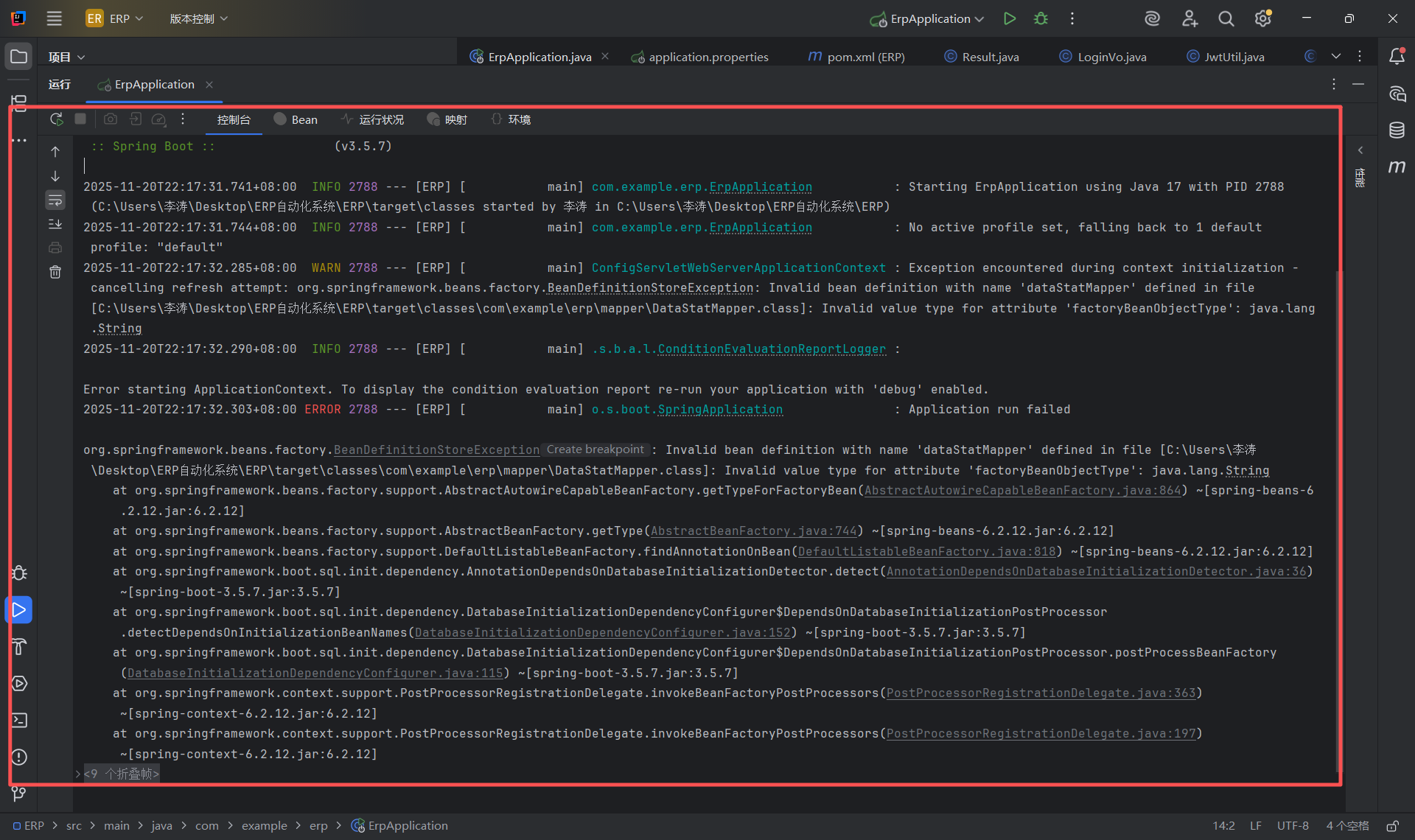
springboot启动失败一直提示这里有问题Invalid value type for attribute 'factoryBeanObjectType': java.lang.String但是修改后还是这个问题请问怎么修改
package com.example.erp.config;
 // 注意补充包路径

import org.springframework.context.annotation.Configuration;
import org.springframework.web.servlet.config.annotation.CorsRegistry;
import org.springframework.web.servlet.config.annotation.WebMvcConfigurer;

@Configuration
public class CorsConfig implements WebMvcConfigurer {
    @Override
    public void addCorsMappings(CorsRegistry registry) {
        registry.addMapping("/**") // 对所有接口生效
                .allowedOrigins("*") // 允许所有来源(开发环境使用,生产环境建议指定具体域名)
                .allowedMethods("GET", "POST", "DELETE", "OPTIONS") // 允许的HTTP方法
                .allowedHeaders("*") // 允许所有请求头
                .maxAge(3600); // 预检请求的缓存时间(1小时)
    }
}


package com.example.erp.config;

import org.springframework.context.annotation.Bean;
import org.springframework.context.annotation.Configuration;
import org.springframework.security.authentication.AuthenticationManager;
import org.springframework.security.config.annotation.authentication.configuration.AuthenticationConfiguration;
import org.springframework.security.config.annotation.web.builders.HttpSecurity;
import org.springframework.security.config.annotation.web.configuration.EnableWebSecurity;
import org.springframework.security.config.http.SessionCreationPolicy;
import org.springframework.security.crypto.bcrypt.BCryptPasswordEncoder;
import org.springframework.security.crypto.password.PasswordEncoder;
import org.springframework.security.web.SecurityFilterChain;

@Configuration
@EnableWebSecurity // 启用Spring Security
public class SecurityConfig {

    // 密码加密器(使用BCrypt算法)
    @Bean
    public PasswordEncoder passwordEncoder() {
        return new BCryptPasswordEncoder();
    }

    // 暴露出自定义的AuthenticationManager(用于登录认证)
    @Bean
    public AuthenticationManager authenticationManager(AuthenticationConfiguration config) throws Exception {
        return config.getAuthenticationManager();
    }

    // 配置安全过滤链(核心配置)
    @Bean
    public SecurityFilterChain securityFilterChain(HttpSecurity http) throws Exception {
        http
                .csrf(csrf -> csrf.disable()) // 禁用CSRF(前后端分离场景常用)
                .sessionManagement(session ->
                        session.sessionCreationPolicy(SessionCreationPolicy.STATELESS) // 无状态会话(JWT场景必须)
                )
                .authorizeHttpRequests(auth -> auth
                        // 允许静态资源匿名访问(HTML、图片等)
                        .requestMatchers("/*.html", "/img/**").permitAll()
                        // 允许登录/注册接口匿名访问
                        .requestMatchers("/api/auth/login", "/api/auth/register").permitAll()
                        // 其他所有请求必须认证(登录后才能访问)
                        .anyRequest().authenticated()
                );

        return http.build();
    }
}


package com.example.erp.Controller;

import com.example.erp.Dto.RegisterDTO;
import com.example.erp.Dto.LoginDTO;
import com.example.erp.Service.AuthService;
import com.example.erp.Vo.Result;
import com.example.erp.Vo.LoginVo;
import jakarta.validation.Valid;
import org.springframework.beans.factory.annotation.Autowired;
import org.springframework.web.bind.annotation.*;

@RestController
@RequestMapping("/api/auth")
@CrossOrigin(origins = "*") // 解决跨域(可选,若前端仍有跨域问题添加)
public class AuthController {

    @Autowired
    private AuthService authService;

    // 注册接口:添加 @Valid 触发参数验证
    @PostMapping("/register")
    public Result<?> register(@Valid @RequestBody RegisterDTO registerDTO) {
        boolean success = authService.register(registerDTO);
        if (success) {
            // 调用 Result.success(数据, 消息) - 匹配第一步实现的方法
            return Result.success(null, "注册成功");
        } else {
            return Result.error("用户名已存在");
        }
    }

    // 登录接口示例(补充完整,避免报错)
    @PostMapping("/login")
    public Result<?> login(@RequestBody LoginDTO loginDTO) {
        try {
            LoginVo loginVo = authService.login(loginDTO);
            return Result.success(loginVo, "登录成功");
        } catch (Exception e) {
            return Result.error("用户名或密码错误");
        }
    }
}

package com.example.erp.Controller;

import com.example.erp.Entity.Employee;
import com.example.erp.Service.EmployeeService;
import org.springframework.beans.factory.annotation.Autowired;
import org.springframework.web.bind.annotation.*;
import java.util.List;

/**
 * 员工管理接口 - 前端员工管理页面通过这些接口与后端交互
 * @CrossOrigin:解决跨域问题(前端和后端端口不同时需要)
 */
@RestController
@RequestMapping("/api/employees")  // 接口统一前缀
@CrossOrigin(origins = "*")  // 开发环境允许所有跨域(生产环境可指定前端域名)
public class EmployeeController {

    @Autowired
    private EmployeeService employeeService;

    // 1. GET 请求:查询所有员工 → 前端页面加载时调用
    @GetMapping
    public List<Employee> getAllEmployees() {
        return employeeService.getAllEmployees();
    }

    // 2. GET 请求:搜索员工 → 前端搜索框输入后调用(参数:name)
    @GetMapping("/search")
    public List<Employee> searchEmployees(@RequestParam String name) {
        return employeeService.searchEmployees(name);
    }

    // 3. POST 请求:添加员工 → 前端点击"添加"按钮提交表单时调用
    @PostMapping
    public boolean addEmployee(@RequestBody Employee employee) {
        return employeeService.addEmployee(employee);
    }

    // 4. DELETE 请求:删除员工 → 前端点击"删除"按钮时调用(路径参数:empId)
    @DeleteMapping("/{empId}")
    public boolean deleteEmployee(@PathVariable String empId) {
        return employeeService.deleteEmployee(empId);
    }

    // 5. GET 请求:根据ID查询员工 → 前端点击"编辑"按钮时调用(回显数据)
    @GetMapping("/{empId}")
    public Employee getEmployeeByEmpId(@PathVariable String empId) {
        return employeeService.getEmployeeByEmpId(empId);
    }

    // 6. PUT 请求:更新员工 → 前端编辑完成提交时调用
    @PutMapping
    public boolean updateEmployee(@RequestBody Employee employee) {
        return employeeService.updateEmployee(employee);
    }
}


package com.example.erp.Controller;

import com.example.erp.Entity.DataStat;
import com.example.erp.Service.HomeDataService;
import org.springframework.beans.factory.annotation.Autowired;
import org.springframework.web.bind.annotation.CrossOrigin;
import org.springframework.web.bind.annotation.GetMapping;
import org.springframework.web.bind.annotation.RequestMapping;
import org.springframework.web.bind.annotation.RestController;
import java.util.List;

@RestController
@RequestMapping("/api/home")
@CrossOrigin(origins = "*")
public class HomeDataController {

    @Autowired
    private HomeDataService homeDataService;

    // 1. 获取首页数据统计(4个颜色块)
    @GetMapping("/stat")
    public DataStat getHomeDataStat() {
        return homeDataService.getHomeDataStat();
    }

    // 2. 获取首页最新通知
//    @GetMapping("/news")
//    public List<CompanyNews> getLatestCompanyNews() {
//        return homeDataService.getLatestCompanyNews();
//    }
}


package com.example.erp.Controller;

import com.example.erp.Entity.Stock;
import com.example.erp.Service.StockService;
import org.springframework.beans.factory.annotation.Autowired;
import org.springframework.web.bind.annotation.*;
import java.util.List;

@RestController
@RequestMapping("/api/stock-ins")
@CrossOrigin(origins = "*")
public class StockInController {

    @Autowired
    private StockService stockService;

    // 1. 查询所有入库记录
    @GetMapping
    public List<Stock> getAllStockIns() {
        return stockService.getAllStockIns();
    }

    // 2. 搜索入库记录
    @GetMapping("/search")
    public List<Stock> searchStockIns(@RequestParam String materialName) {
        return stockService.searchStockIns(materialName);
    }

    // 3. 添加入库记录
    @PostMapping
    public boolean addStockIn(@RequestBody Stock stock) {
        return stockService.addStockIn(stock);
    }

    // 4. 删除入库记录
    @DeleteMapping("/{orderId}")
    public boolean deleteStockIn(@PathVariable String orderId) {
        return stockService.deleteStockIn(orderId);
    }

    // 5. 根据订单号查询入库记录
    @GetMapping("/{orderId}")
    public Stock getStockInByOrderId(@PathVariable String orderId) {
        return stockService.getStockInByOrderId(orderId);
    }

    // 6. 更新入库记录
    @PutMapping
    public boolean updateStockIn(@RequestBody Stock stockIn) {
        return stockService.updateStockIn(stockIn);
    }
}

package com.example.erp.Dto;

import lombok.Data;

/**
 * 登录请求参数封装(前端传递的用户名密码)
 */
@Data
public class LoginDTO {
    private String username; // 登录用户名
    private String password; // 登录密码(明文)
}
package com.example.erp.Dto;

import lombok.Data;
import jakarta.validation.constraints.Email;
import jakarta.validation.constraints.NotBlank;
import jakarta.validation.constraints.Pattern;
import jakarta.validation.constraints.Size; // 注意:Spring Boot 3.x 用 jakarta 包

/**
 * 注册请求参数DTO(补充 realName 字段)
 */
@Data
public class RegisterDTO {
    @NotBlank(message = "用户名不能为空")
    @Size(min = 3, max = 20, message = "用户名长度必须在3-20位之间")
    private String username;

    @NotBlank(message = "密码不能为空")
    @Size(min = 6, max = 20, message = "密码长度必须在6-20位之间")
    private String password;

    @NotBlank(message = "确认密码不能为空")
    private String confirmPassword;

    @NotBlank(message = "真实姓名不能为空")
    @Size(min = 2, max = 10, message = "真实姓名长度必须在2-10位之间")
    private String realName;

    @NotBlank(message = "手机号不能为空")
    @Pattern(regexp = "^1[3-9]\\d{9}$", message = "手机号格式不正确")
    private String phone;

    @NotBlank(message = "邮箱不能为空")
    @Email(message = "邮箱格式不正确")
    private String email;
}

package com.example.erp.Entity;

import lombok.Data;

@Data
public class DataStat {
    private Double sales7days; // 7天销售额
    private Double salesMonth; // 月度销售额
    private Integer productCount; // 产品总数
    private Integer stockWarning; // 库存预警数
}

package com.example.erp.Entity;

import java.time.LocalDate;

public class Employee {
    private String empId;      // 员工ID
    private String name;       // 姓名
    private Integer age;       // 年龄
    private String position;   // 职位
    private LocalDate hireDate;// 入职时间
    private String status;     // 是否在职(是/否)

    // getter和setter
    public String getEmpId() { return empId; }
    public void setEmpId(String empId) { this.empId = empId; }
    public String getName() { return name; }
    public void setName(String name) { this.name = name; }
    public Integer getAge() { return age; }
    public void setAge(Integer age) { this.age = age; }
    public String getPosition() { return position; }
    public void setPosition(String position) { this.position = position; }
    public LocalDate getHireDate() { return hireDate; }
    public void setHireDate(LocalDate hireDate) { this.hireDate = hireDate; }
    public String getStatus() { return status; }
    public void setStatus(String status) { this.status = status; }
}
package com.example.erp.Entity;

import java.time.LocalDate;

public class Stock {
    private String orderId;    // 订单编号
    private String materialName;// 物料名
    private LocalDate time;    // 时间
    private String manager;    // 负责人
    private Integer quantity;  // 数量

    // getter和setter
    public String getOrderId() { return orderId; }
    public void setOrderId(String orderId) { this.orderId = orderId; }
    public String getMaterialName() { return materialName; }
    public void setMaterialName(String materialName) { this.materialName = materialName; }
    public LocalDate getTime() { return time; }
    public void setTime(LocalDate time) { this.time = time; }
    public String getManager() { return manager; }
    public void setManager(String manager) { this.manager = manager; }
    public Integer getQuantity() { return quantity; }
    public void setQuantity(Integer quantity) { this.quantity = quantity; }
}
package com.example.erp.Entity;

import com.baomidou.mybatisplus.annotation.IdType;
import com.baomidou.mybatisplus.annotation.TableId;
import com.baomidou.mybatisplus.annotation.TableName;
import lombok.Data;
import java.time.LocalDateTime;

/**
 * 用户实体(确保包含 realName 字段,@Data 会自动生成 getRealName())
 */
@Data
@TableName("sys_user") // 数据库表需有 real_name 字段
public class SysUser {
    @TableId(type = IdType.AUTO)
    private Long id;

    private String username; // 用户名(唯一)
    private String password; // 加密后的密码
    private String realName; // 必须包含该字段!@Data 会自动生成 getRealName()/setRealName()
    private String phone;    // 手机号
    private String email;    // 邮箱
    private String role;     // 角色(默认USER)
    private Integer status;  // 状态(1-正常,0-禁用)
    private LocalDateTime createTime; // 创建时间
    private LocalDateTime updateTime; // 更新时间
}

package com.example.erp.mapper;

import com.example.erp.Entity.DataStat;
import org.apache.ibatis.annotations.Select;

// 关键:删除 @Mapper 注解的所有参数!或直接不写 @Mapper(启动类有 @MapperScan)
public interface DataStatMapper {

    // 统计首页数据的 SQL(根据你的实际表名调整,比如订单表、产品表)
    @Select("""
        SELECT
            -- 7天销售额(假设订单表是 order_info,金额字段是 amount)
            IFNULL(SUM(CASE WHEN create_time >= DATE_SUB(NOW(), INTERVAL 7 DAY) THEN amount ELSE 0 END), 0) AS sales7days,
            -- 月度销售额
            IFNULL(SUM(CASE WHEN DATE_FORMAT(create_time, '%Y-%m') = DATE_FORMAT(NOW(), '%Y-%m') THEN amount ELSE 0 END), 0) AS salesMonth,
            -- 产品总数(假设产品表是 product)
            IFNULL((SELECT COUNT(*) FROM product), 0) AS productCount,
            -- 库存预警(假设库存表是 stock,低于 10 为预警)
            IFNULL((SELECT COUNT(*) FROM stock WHERE quantity < 10), 0) AS stockWarning
        FROM order_info  -- 若没有订单表,可改为任意存在的表(如 sys_user)
        """)
    DataStat selectHomeData();
}


