新建的windowsform(.net),打开就是这样,查看desinger.cs的文件就是只加载了一部分,修复了,重新装组件也试过了还是这样,该怎么解决呀
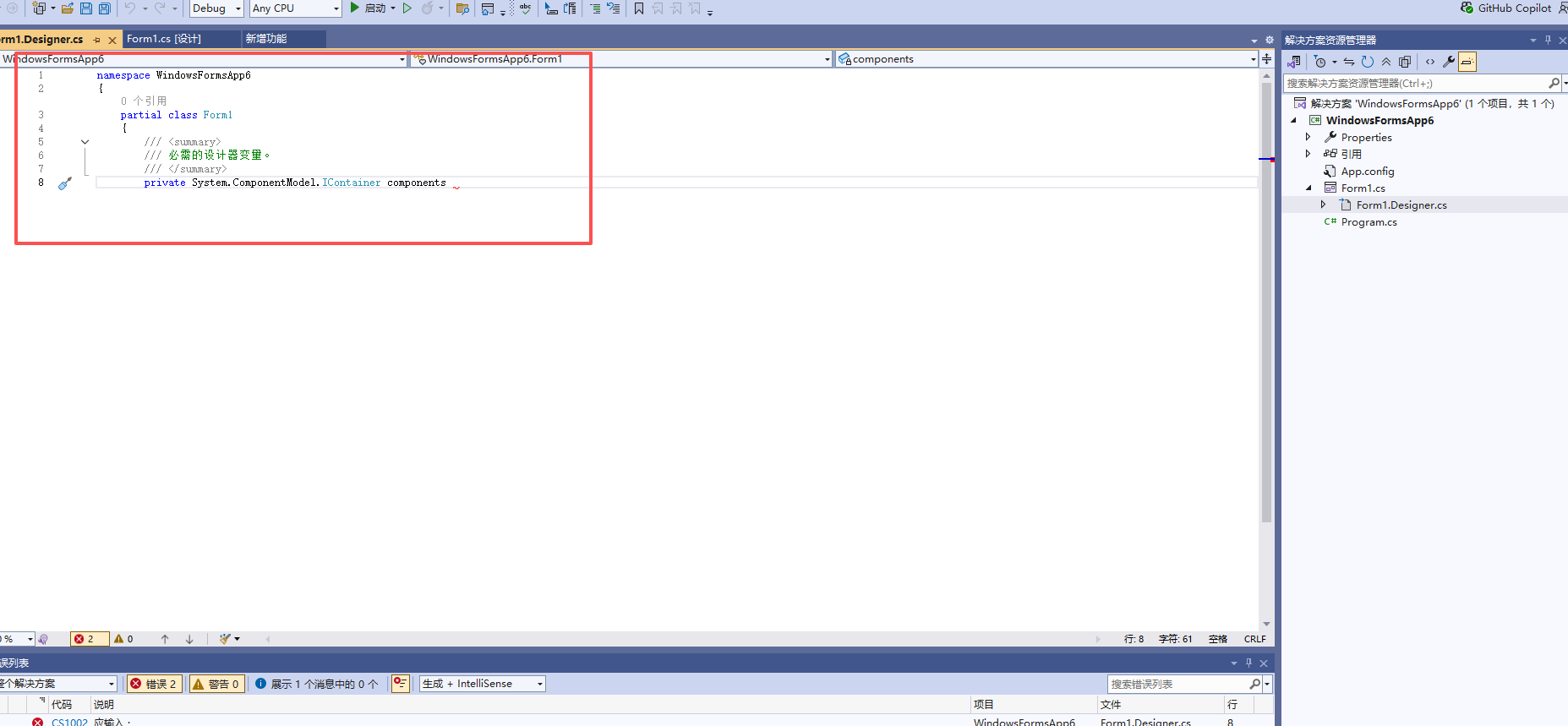

新建的windowsform(.net),打开就是这样,查看desinger.cs的文件就是只加载了一部分,修复了,重新装组件也试过了还是这样,该怎么解决呀
 分享
分享
下午好🌅🌅🌅
本答案参考通义千问
你遇到的问题是 Windows Forms 项目中 Designer.cs 文件加载不完整或缺失,这通常会导致设计器无法正常显示控件布局,并可能引发编译错误。以下是详细的解决方案和排查步骤:
.csproj)配置异常注意: 这会强制重新生成所有
.designer.cs文件。
%LocalAppData%\Microsoft\VisualStudio\%LocalAppData%\Microsoft\VSCommon\%AppData%\Microsoft\VisualStudio\提示: 可以使用
%LocalAppData%和%AppData%快捷方式快速定位路径。
.csproj 文件是否损坏<ItemGroup> 中的 <Compile> 或 <None> 配置。.csproj 文件,或者从备份中恢复。示例代码片段(应包含 Designer.cs 文件):
<Compile Include="Form1.Designer.cs">
  <DependentUpon>Form1.cs</DependentUpon>
  <AutoGen>True</AutoGen>
  <DesignTime>True</DesignTime>
  <SubType>Designer</SubType>
</Compile>
如果 Designer.cs 文件内容丢失,可以尝试:
regedit)HKEY_CURRENT_USER\Software\Microsoft\VisualStudio\17.0_xxxx\ComponentModelCache
ComponentModelCache 文件夹注意: 请谨慎操作注册表,建议先备份。
.designer.cs 文件.designer.cs 文件内容是否完整,例如:this.button1 = new System.Windows.Forms.Button();
this.SuspendLayout();
//
// button1
//
this.button1.Location = new System.Drawing.Point(100, 100);
this.button1.Name = "button1";
this.button1.Size = new System.Drawing.Size(75, 23);
this.button1.TabIndex = 0;
this.button1.Text = "按钮";
this.button1.UseVisualStyleBackColor = true;
//
// Form1
//
this.AutoScaleDimensions = new System.Drawing.SizeF(6F, 13F);
this.AutoScaleMode = System.Windows.Forms.AutoScaleMode.Font;
this.ClientSize = new System.Drawing.Size(284, 261);
this.Controls.Add(this.button1);
this.Name = "Form1";
this.Text = "Form1";
this.ResumeLayout(false);
如果你仍然无法解决,请提供以下信息:
.csproj 文件中的关键部分(如 <Project Sdk="...">)我可以进一步帮你分析!
分享 创建了问题
11月21日
创建了问题
11月21日

