上午好☀️☀️☀️️
本答案参考通义千问
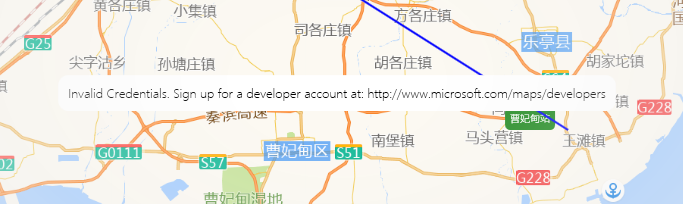
你遇到的问题是 WPF 项目中使用 Microsoft.Maps.MapControl.WPF 控件时出现 Invalid Credentials 错误,提示你需要注册一个开发者账号并获取有效的凭证。
根据你的描述,你已经在 Azure Maps 中注册了订阅,并复制了“主密钥”作为 CredentialsProvider 的值。但依然报错,这可能是因为以下原因:
✅ 问题原因分析
-
Azure Maps 与 Microsoft Maps SDK 的区别
Microsoft.Maps.MapControl.WPF 是旧版的 Microsoft Bing Maps 控件(已不再维护)。- Azure Maps 是微软新推出的地图服务,其 API 和认证方式不同。
- 你使用的
CredentialsProvider 是 Azure Maps 的 主密钥,但该控件仍要求的是 Bing Maps 的访问密钥(即 "key")。
-
错误的 API 类型
Microsoft.Maps.MapControl.WPF 使用的是 Bing Maps REST API,需要的是 Bing Maps Key。- Azure Maps 使用的是 Azure Maps REST API,需要的是 Azure Subscription Key 或 Access Token。
-
控件版本过旧
- 如果你使用的是较旧版本的
Microsoft.Maps.MapControl.WPF,它可能不支持 Azure Maps 的认证方式。
✅ 解决方案
1. 确认使用正确的地图控件
-
如果你希望使用 Azure Maps,应使用 Azure Maps WPF 控件,而不是 Microsoft.Maps.MapControl.WPF。
-
可以从 Azure Maps GitHub 获取官方控件。
-
如果你坚持使用 Microsoft.Maps.MapControl.WPF,请确保使用的是 Bing Maps Key,而非 Azure Maps 的主密钥。
2. 获取正确的 CredentialsProvider 值
✅ 正确做法(Bing Maps Key):
- 访问 Bing Maps Portal
- 登录后,进入 Account Keys 页面。
- 复制 Bing Maps Key(不是 Azure 的主密钥)。
- 替换你代码中的
CredentialsProvider 值。
<m:Map ZoomLevel="9.6" Center="39.35201,118.53246"
      CredentialsProvider="YOUR_BING_MAPS_KEY">
    <m:Map.OpacityMask>
        <RadialGradientBrush RadiusX="0.45" RadiusY="0.55" Center="0.5,0.4">
            <GradientStop Color="White" Offset="0.1"/>
            <GradientStop Color="Transparent" Offset="1"/>
        </RadialGradientBrush>
    </m:Map.OpacityMask>
    <!--从高德接口获取地点信息-->
    <b:AMapTitleLayer/>
</m:Map>
3. 如果必须使用 Azure Maps
如果你确实需要使用 Azure Maps,建议改用官方提供的 Azure Maps WPF 控件,示例如下:
✅ 安装 NuGet 包:
Install-Package Microsoft.Azure.Maps.MapControl.Wpf
✅ 示例 XAML:
<Window x:Class="WpfApp.MainWindow"
        xmlns="http://schemas.microsoft.com/winfx/2006/xaml/presentation"
        xmlns:x="http://schemas.microsoft.com/winfx/2006/xaml"
        xmlns:maps="clr-namespace:Microsoft.Azure.Maps.MapControl.Wpf;assembly=Microsoft.Azure.Maps.MapControl.Wpf"
        Title="MainWindow" Height="450" Width="800">
    <Grid>
        <maps:MapControl
            Id="mapControl"
            AuthenticationToken="YOUR_AZURE_MAPS_ACCESS_TOKEN"
            Center="13.4125,52.5200"
            Zoom="5"
            />
    </Grid>
</Window>
⚠️ 注意:Azure Maps 需要使用 Access Token 或 Subscription Key,可以通过 Azure Portal 获取。
4. 检查网络连接和防火墙设置
- 确保你的开发环境可以访问微软的地图服务(如
dev.virtualearth.net)。 - 如果使用代理,请在代码中配置代理设置。
✅ 总结
| 问题 | 解决方案 |
|------|----------|
| 使用了 Azure Maps 的主密钥 | 更换为 Bing Maps Key(适用于 Microsoft.Maps.MapControl.WPF) |
| 想使用 Azure Maps | 改用 Azure Maps WPF 控件,并使用 Access Token |
| 控件版本过旧 | 更新到最新版本或使用官方 Azure Maps 控件 |
如果你能提供你当前使用的 Microsoft.Maps.MapControl.WPF 版本号,我可以进一步帮你确认兼容性问题。