
在vue项目(端口号localhost:8081)中使用iframe嵌入目标页面(端口号localhost:5177),启动目标页面项目后,再启动使用iframe的项目,发现iframe里的页面内容与目标页面内容不同,如下图所示:
这是目标页面,注意看“体积”,和当前数量的值:
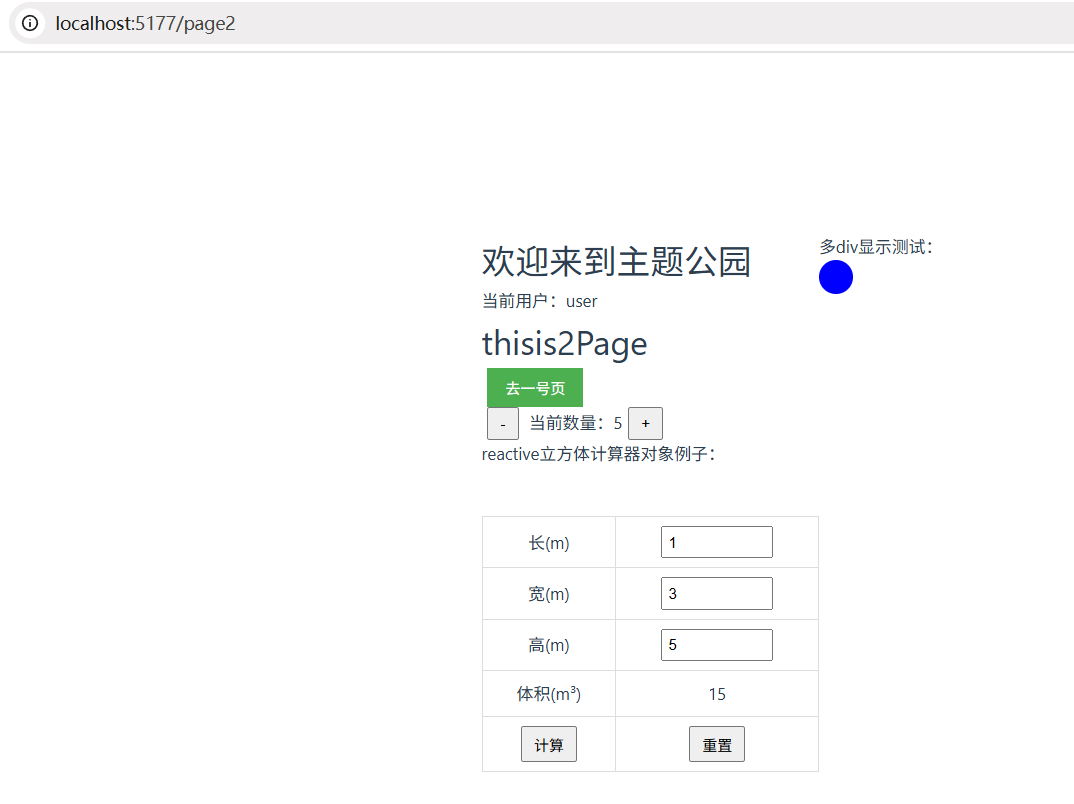
这是使用了iframe的页面内容:

这是目标页面代码:
<template>
<!-- By master update -->
<!-- 组员新建分支后,就可以自由发挥开发了,写完后需要往远程仓库的自己的分支上push,怎么操作?-->
<!--  By m1 update-->
  <h1>thisis2Page</h1>
  <button @click="toPageFirist" class="toFirst">去一号页</button>
  <br>
  <p>
    <button @click="diff">-</button> 当前数量:{{ count }}<button @click="add">+</button>
  </p>
  <!-- 添加显示接收到的消息区域 -->
  <p>reactive立方体计算器对象例子:</p><br/>
  <table>
    <tr>
      <td>长(m)</td>
      <td><input type="number" v-model.number="cube.length"/></td>
    </tr>
    <tr>
      <td>宽(m)</td>
      <td><input type="number" v-model.number="cube.width"/></td>
    </tr>
    <tr>
      <td>高(m)</td>
      <td><input type="number" v-model.number="cube.height"/></td>
    </tr>
    <tr>
      <td>体积(m³)</td>
      <td>{{ cube.volume }}</td>
    </tr>
    <tr>
      <td>
        <button @click="jisuan">计算</button>
      </td>
      <td>
        <button @click="reset">重置</button>
      </td>
    </tr>
  </table>
</template>

<script setup>
// 从vue-router中导入useRouter函数,用于获取路由实例
import { useRouter } from 'vue-router'
// 导入必要的Vue响应式API
import { ref, reactive, onMounted, onUnmounted } from 'vue'

const count = ref(0)
// 添加接收消息的响应式变量
const receivedMessage = ref('')

// 修复体积属性名拼写错误:将voulme改为volume
const cube = reactive({
  length: 0,
  width: 0,
  height: 0,
  volume: 0, // 修复拼写错误
})

function add() {
  count.value++
}

function diff() {
  count.value--
}

function jisuan() {
  // 确保计算结果正确赋值给正确的属性名
  cube.volume = cube.length * cube.width * cube.height
  console.log('计算体积:', cube.volume)
}

function reset() {
  cube.length = 0
  cube.width = 0
  cube.height = 0
  cube.volume = 0
}
const router = useRouter()
function toPageFirist() {
  router.push('/page1')
}
</script>

<style scoped>
.toFirst {
  padding: 8px 16px;
  background-color: #4CAF50;
  color: white;
  border: none;
  cursor: pointer;
}

.toFirst:hover {
  background-color: #45a049;
}

input[type="number"] {
  width: 100px;
  padding: 5px;
}

table {
  border-collapse: collapse;
  width: 300px;
  margin: 20px auto;
}

table td {
  border: 1px solid #ddd;
  padding: 8px;
  text-align: center;
}

button {
  padding: 5px 10px;
  margin: 0 5px;
}
</style>
这是使用iframe的页面的代码:
<template>
  <div id="app">
    <div>
      <el-button @click="toPage2">传送</el-button>
    </div>
    <div id="viewArea" v-if="showIframe">
      <iframe
          src="http://localhost:5177/page2"
          width="100%"
          height="100%"
          frameborder="0"
      >
      </iframe>
    </div>
  </div>
</template>

<script>
import HelloWorld from './components/HelloWorld.vue'

export default {
  name: 'app',
  components: {
    HelloWorld
  },
  data(){
    return{
      showIframe:false,
    }
  },
  methods:{
    toPage2(){
      this.showIframe = true;
      console.log('打开了传送按钮,iframe显示了');
    },
  }
}
</script>

<style>
#app {
  font-family: 'Avenir', Helvetica, Arial, sans-serif;
  -webkit-font-smoothing: antialiased;
  -moz-osx-font-smoothing: grayscale;
  text-align: center;
  color: #2c3e50;
  margin-top: 60px;
}
#viewArea{
  width: 100%;
  height:80%;
  position: fixed;
  background-color: blue;
}
iframe{
  width: 100%;
  height: 100%;
}
</style>
我想实现:保证iframe内页面内容与目标页面内容同步。(比如在iframe里修改“当前数量”的值,对应的目标页面也要变)


