在WSL(Windows serviced Linux)框架下想要编译PX4-Autopilot代码,在运行安装脚本
bash ./Tools/setup/ubuntu.sh
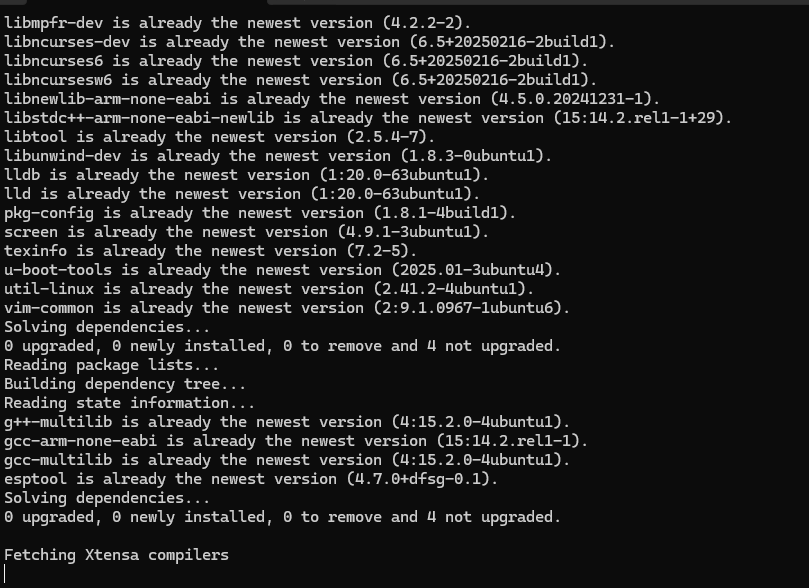
这一步时,程序卡在 Fetching Xtensa compilers这里,上网查了一下,有推荐用代理服务器端口 http://127.0.0.7480,结果国内的代理端口根本连接不上,取消代理后运行时又会遇到这个问题,这里是怎么解决的?

在WSL(Windows serviced Linux)框架下想要编译PX4-Autopilot代码,在运行安装脚本
bash ./Tools/setup/ubuntu.sh
这一步时,程序卡在 Fetching Xtensa compilers这里,上网查了一下,有推荐用代理服务器端口 http://127.0.0.7480,结果国内的代理端口根本连接不上,取消代理后运行时又会遇到这个问题,这里是怎么解决的?
 分享
分享
阿里嘎多学长整理AIGC生成,因移动端显示问题导致当前答案未能完全显示,请使用PC端查看更加详细的解答过程
问题分析
你是在WSL环境下尝试编译PX4-Autopilot代码,运行安装脚本bash ./Tools/setup/ubuntu.sh时卡在Fetch步骤。
解决方案
Fetch步骤可能会卡住。git、curl等。可以使用sudo apt-get update && sudo apt-get install -y git curl命令安装。git pull命令更新代码。--no-sandbox参数: 在bash ./Tools/setup/ubuntu.sh命令前加上--no-sandbox参数,例如bash --no-sandbox ./Tools/setup/ubuntu.sh。核心代码
# 检查依赖包
sudo apt-get update && sudo apt-get install -y git curl

# 检查PX4-Autopilot代码
git pull

# 尝试使用--no-sandbox参数
bash --no-sandbox ./Tools/setup/ubuntu.sh
如果以上解决方案仍然无法解决问题,请提供更多详细信息和日志输出,以便更好地帮助你解决问题。
分享 创建了问题
12月5日
创建了问题
12月5日

