中午好🌞🌞🌞
本答案参考通义千问
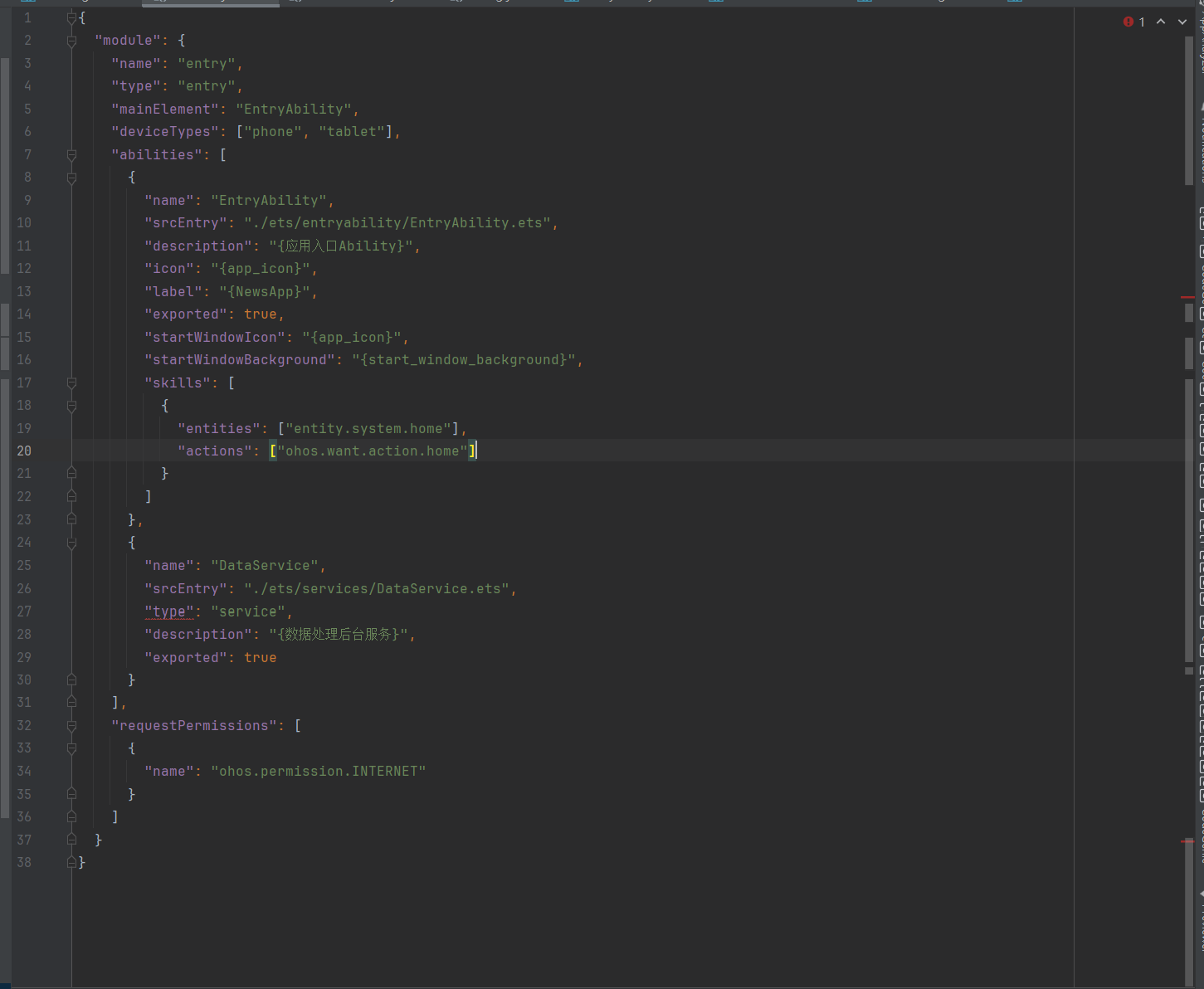
在 DevEco Studio 中使用 module.json5 文件时,如果你将 "type": "service" 作为模块类型,却出现以下错误:
Value should be one of: ...
这说明你配置的 "type": "service" 不符合 module.json5 的合法字段定义。DevEco Studio 对于 module.json5 的字段有严格的限制,"type" 字段只能是特定的值,例如 "entry"、"component"、"service" 是不被允许的,除非你在特定的上下文中使用。
✅ 问题分析
你可能误将模块类型设置为 "service",但根据 DevEco Studio 的文档和实际开发经验,module.json5 中的 type 字段不支持 "service",它通常用于 Service 模块的配置文件(如 service.json5),而不是 module.json5。
🔍 正确的 module.json5 配置
在 module.json5 中,type 字段的合法值包括但不限于:
"entry":表示主模块(入口模块)"component":表示组件模块(可被其他模块引用)
🛠️ 解决方案
1. 检查模块类型是否正确
确保你的 module.json5 文件中的 type 字段是合法的,比如:
{
  "module": {
    "name": "myModule",
    "type": "entry",  // 或 "component"
    "description": "My module description",
    "version": {
      "code": 1,
      "name": "1.0"
    },
    "deviceTypes": ["phone"]
  }
}
注意:不要使用 "type": "service" 在 module.json5 中!
2. 如果需要创建 Service 模块
- Service 模块应该使用
service.json5 文件,而不是 module.json5。 service.json5 的配置中可以使用 "type": "service"。
示例:service.json5 配置
{
  "service": {
    "name": "myService",
    "type": "service",
    "description": "My background service",
    "version": {
      "code": 1,
      "name": "1.0"
    },
    "deviceTypes": ["phone"],
    "srcEntry": "service.js"
  }
}
3. 确认项目结构是否合理
确保你的项目目录结构如下:
your-project/
├── entry/           # 主模块(entry 类型)
│   └── module.json5
├── service/         # Service 模块(service 类型)
│   └── service.json5
└── package.json
4. 清理并重新构建项目
有时候缓存会导致配置错误,执行以下命令清理并重新构建:
npm run clean
npm run build
或者在 DevEco Studio 中选择 Build > Clean Project 和 Build > Rebuild Project。
5. 检查 DevEco Studio 版本
确保你使用的 DevEco Studio 是最新版本,某些旧版本可能对配置支持不完善。
🧾 总结
| 问题 | 原因 | 解决方法 |
|------|------|----------|
| module.json5 中使用 "type": "service" 报错 | module.json5 不支持 "service" 类型 | 使用 service.json5 文件,并在其中配置 "type": "service" |
| 配置错误导致编译失败 | type 字段不在允许列表中 | 检查 module.json5 的 type 是否为 "entry" 或 "component" |
✅ 修改后的 module.json5 示例
{
  "module": {
    "name": "mainModule",
    "type": "entry",  // 正确的类型
    "description": "Main application module",
    "version": {
      "code": 1,
      "name": "1.0"
    },
    "deviceTypes": ["phone"],
    "srcEntrance": "index.js"
  }
}
如果你还有其他配置问题或需要进一步帮助,请提供完整的 module.json5 或 service.json5 内容,我可以帮你逐项排查。