
今天写了份代码,通过使用斑马手持机(TC26)蓝牙的方式连接打印(TSC-30B)出现的问题如下:
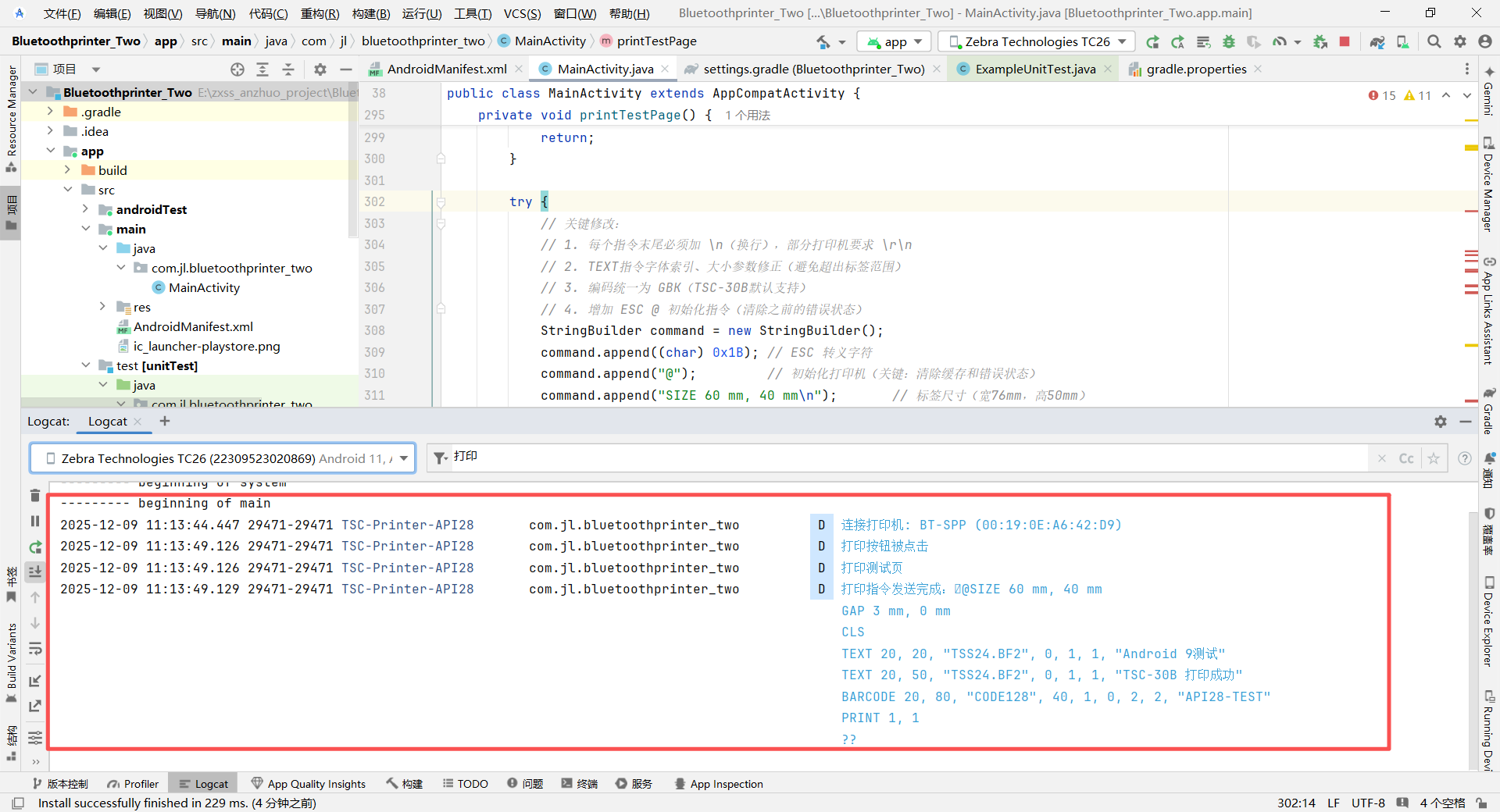
通过手持机的前段界面,点击打印,打印机正常出纸,但是纸上没有测试内容,但是控制台提示ok,以下截图

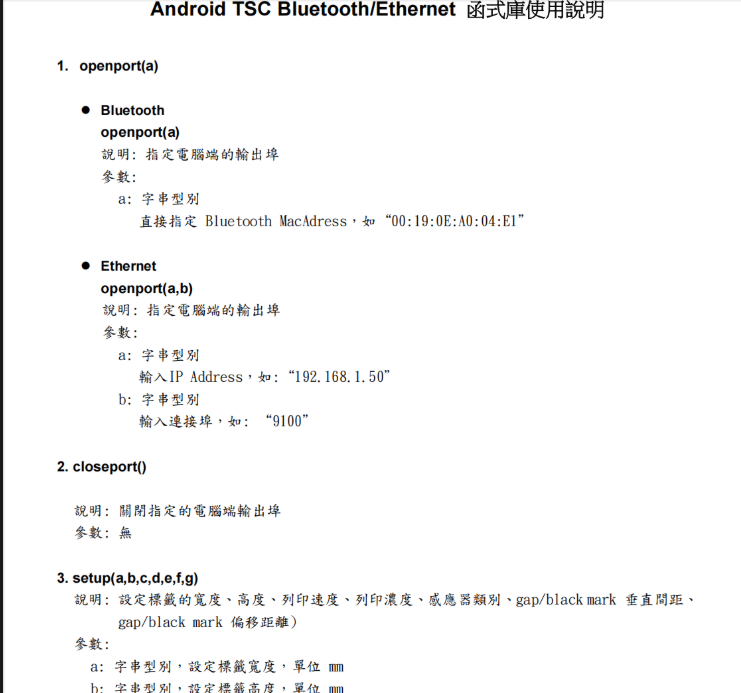
这个是厂家给的打印机指令:

以下是核心代码:
MainActivity
package com.jl.bluetoothprinter_two;

import android.Manifest;
import android.app.AlertDialog;
import android.bluetooth.BluetoothAdapter;
import android.bluetooth.BluetoothDevice;
import android.bluetooth.BluetoothSocket;
import android.content.BroadcastReceiver;
import android.content.Context;
import android.content.Intent;
import android.content.IntentFilter;
import android.content.pm.PackageManager;
import android.net.Uri;
import android.os.Bundle;
import android.os.Handler;
import android.os.Looper;
import android.provider.Settings;
import android.util.Log;
import android.view.View;
import android.widget.ArrayAdapter;
import android.widget.Button;
import android.widget.ListView;
import android.widget.TextView;
import android.widget.Toast;

import androidx.annotation.NonNull;
import androidx.appcompat.app.AppCompatActivity;
import androidx.core.app.ActivityCompat;
import androidx.core.content.ContextCompat;

import java.io.IOException;
import java.io.OutputStream;
import java.util.ArrayList;
import java.util.Set;
import java.util.UUID;

// 主活动:适配Android 9(API 28)的TSC-30B蓝牙打印机连接
public class MainActivity extends AppCompatActivity {

    // 日志标签(过滤日志用)
    private static final String TAG = "TSC-Printer-API28";
    // 权限请求码(Android 9只需位置和蓝牙权限)
    private static final int REQUEST_PERMISSIONS = 100;
    // 蓝牙启用请求码
    private static final int REQUEST_ENABLE_BT = 101;
    // TSC打印机通用UUID(固定值)
    private static final UUID PRINTER_UUID = UUID.fromString("00001101-0000-1000-8000-00805F9B34FB");

    // 蓝牙核心组件
    private BluetoothAdapter bluetoothAdapter; // 蓝牙适配器
    private BluetoothSocket bluetoothSocket;   // 蓝牙连接Socket
    private OutputStream outputStream;         // 打印输出流

    // UI组件
    private TextView connectionStatus; // 连接状态显示
    private ListView deviceListView;   // 设备列表
    private Button searchBtn;          // 搜索按钮
    private Button printBtn;           // 打印按钮

    // 设备数据列表
    private ArrayList<String> deviceList = new ArrayList<>(); // 设备名称+地址
    private ArrayList<String> deviceAddresses = new ArrayList<>(); // 设备地址
    private ArrayAdapter<String> deviceAdapter; // 列表适配器

    @Override
    protected void onCreate(Bundle savedInstanceState) {
        super.onCreate(savedInstanceState);
        Log.d(TAG, "=== 应用启动(Android 9适配) ===");
        setContentView(R.layout.activity_main);

        // 初始化UI
        initViews();
        // 初始化蓝牙适配器
        initBluetoothAdapter();
        // 注册蓝牙广播接收器
        registerBluetoothReceiver();
    }

    // 初始化UI组件
    private void initViews() {
        Log.d(TAG, "初始化UI组件");
        connectionStatus = findViewById(R.id.connection_status);
        deviceListView = findViewById(R.id.device_list);
        searchBtn = findViewById(R.id.search_button);
        printBtn = findViewById(R.id.print_button);

        // 初始化列表适配器
        deviceAdapter = new ArrayAdapter<>(this, android.R.layout.simple_list_item_1, deviceList);
        deviceListView.setAdapter(deviceAdapter);

        // 搜索按钮点击事件
        searchBtn.setOnClickListener(v -> {
            Log.d(TAG, "搜索按钮被点击");
            clearDeviceList(); // 清空旧列表
            checkPermissionsAndSearch(); // 检查权限后搜索
        });

        // 设备列表点击事件(连接设备)
        deviceListView.setOnItemClickListener((parent, view, position, id) -> {
            String address = deviceAddresses.get(position);
            String name = deviceList.get(position).split("\n")[0];
            Log.d(TAG, "选中设备: " + name + ",地址: " + address);
            connectToPrinter(address, name);
        });

        // 打印按钮点击事件
        printBtn.setOnClickListener(v -> {
            Log.d(TAG, "打印按钮被点击");
            if (isConnected()) {
                printTestPage();
            } else {
                showToast("请先连接打印机");
                Log.w(TAG, "打印失败:未连接设备");
            }
        });
    }

    // 初始化蓝牙适配器
    private void initBluetoothAdapter() {
        Log.d(TAG, "初始化蓝牙适配器");
        bluetoothAdapter = BluetoothAdapter.getDefaultAdapter();

        // 检查设备是否支持蓝牙
        if (bluetoothAdapter == null) {
            Log.e(TAG, "设备不支持蓝牙");
            showToast("设备不支持蓝牙");
            finish(); // 退出应用
        } else {
            Log.d(TAG, "蓝牙适配器初始化成功");
        }
    }

    // 注册蓝牙广播接收器(发现设备和搜索完成)
    private void registerBluetoothReceiver() {
        Log.d(TAG, "注册蓝牙广播接收器");
        IntentFilter filter = new IntentFilter(BluetoothDevice.ACTION_FOUND);
        registerReceiver(bluetoothReceiver, filter);

        filter = new IntentFilter(BluetoothAdapter.ACTION_DISCOVERY_FINISHED);
        registerReceiver(bluetoothReceiver, filter);
    }

    // 蓝牙广播接收器
    private final BroadcastReceiver bluetoothReceiver = new BroadcastReceiver() {
        @Override
        public void onReceive(Context context, Intent intent) {
            String action = intent.getAction();

            // 发现新设备
            if (BluetoothDevice.ACTION_FOUND.equals(action)) {
                BluetoothDevice device = intent.getParcelableExtra(BluetoothDevice.EXTRA_DEVICE);
                if (device != null) {
                    String name = device.getName() != null ? device.getName() : "未知设备";
                    String address = device.getAddress();

                    // 避免重复添加
                    if (!deviceAddresses.contains(address)) {
                        deviceList.add(name + "\n" + address);
                        deviceAddresses.add(address);
                        deviceAdapter.notifyDataSetChanged();
                        Log.d(TAG, "发现设备: " + name + " (" + address + ")");
                    }
                }
            }
            // 搜索完成
            else if (BluetoothAdapter.ACTION_DISCOVERY_FINISHED.equals(action)) {
                Log.d(TAG, "搜索完成,共发现" + deviceList.size() + "个设备");
                if (deviceList.isEmpty()) {
                    showToast("未发现蓝牙设备");
                } else {
                    showToast("找到" + deviceList.size() + "个设备");
                }
            }
        }
    };

    // 检查权限并开始搜索(Android 9需要的权限更少)
    private void checkPermissionsAndSearch() {
        Log.d(TAG, "检查Android 9所需权限");
        // Android 9只需这两个权限
        String[] requiredPermissions = {
                Manifest.permission.ACCESS_FINE_LOCATION, // 位置权限(蓝牙扫描需要)
                Manifest.permission.BLUETOOTH_ADMIN       // 蓝牙管理权限
        };

        // 收集未授予的权限
        ArrayList<String> needPermissions = new ArrayList<>();
        for (String perm : requiredPermissions) {
            if (ContextCompat.checkSelfPermission(this, perm) != PackageManager.PERMISSION_GRANTED) {
                needPermissions.add(perm);
                Log.d(TAG, "缺少权限: " + perm);
            }
        }

        if (needPermissions.isEmpty()) {
            // 权限齐全,开始搜索
            startBluetoothSearch();
        } else {
            // 请求权限
            ActivityCompat.requestPermissions(this,
                    needPermissions.toArray(new String[0]),
                    REQUEST_PERMISSIONS);
        }
    }

    // 开始搜索蓝牙设备
    private void startBluetoothSearch() {
        Log.d(TAG, "开始搜索蓝牙设备");
        // 检查蓝牙是否开启
        if (!bluetoothAdapter.isEnabled()) {
            Log.d(TAG, "蓝牙未开启,请求开启");
            Intent enableBtIntent = new Intent(BluetoothAdapter.ACTION_REQUEST_ENABLE);
            startActivityForResult(enableBtIntent, REQUEST_ENABLE_BT);
            return;
        }

        // 停止正在进行的搜索
        if (bluetoothAdapter.isDiscovering()) {
            bluetoothAdapter.cancelDiscovery();
            Log.d(TAG, "取消正在进行的搜索");
        }

        // 加载已配对设备
        loadPairedDevices();

        // 开始搜索新设备(Android 9不需要特殊权限)
        boolean isSearching = bluetoothAdapter.startDiscovery();
        if (isSearching) {
            showToast("正在搜索设备...");
            Log.d(TAG, "搜索启动成功");
        } else {
            showToast("搜索失败,请重试");
            Log.e(TAG, "搜索启动失败");
        }
    }

    // 加载已配对设备
    private void loadPairedDevices() {
        Log.d(TAG, "加载已配对设备");
        Set<BluetoothDevice> pairedDevices = bluetoothAdapter.getBondedDevices();
        if (pairedDevices.size() > 0) {
            for (BluetoothDevice device : pairedDevices) {
                String name = device.getName() != null ? device.getName() : "未知设备";
                String address = device.getAddress();
                deviceList.add(name + "\n" + address + " (已配对)");
                deviceAddresses.add(address);
                Log.d(TAG, "已配对设备: " + name + " (" + address + ")");
            }
            deviceAdapter.notifyDataSetChanged();
        } else {
            Log.d(TAG, "无已配对设备");
        }
    }

    // 连接到打印机
    private void connectToPrinter(String address, String name) {
        Log.d(TAG, "连接打印机: " + name + " (" + address + ")");
        if (isConnected()) {
            showToast("已连接其他设备");
            return;
        }

        // 取消搜索以提高连接速度
        if (bluetoothAdapter.isDiscovering()) {
            bluetoothAdapter.cancelDiscovery();
        }

        // 后台线程连接(避免UI卡顿)
        new Thread(() -> {
            BluetoothDevice device = bluetoothAdapter.getRemoteDevice(address);
            try {
                // Android 9不需要BLUETOOTH_CONNECT权限,直接创建Socket
                bluetoothSocket = device.createRfcommSocketToServiceRecord(PRINTER_UUID);
                Log.d(TAG, "正在连接...");
                bluetoothSocket.connect();
                outputStream = bluetoothSocket.getOutputStream();

                // 连接成功,更新UI
                Log.d(TAG, "连接成功");
                updateStatus("连接成功: " + name, true);
                showToast("连接成功");

            } catch (IOException e) {
                // 连接失败处理
                Log.e(TAG, "连接失败: " + e.getMessage(), e);
                closeConnection();
                updateStatus("连接失败: " + e.getMessage(), false);
                showToast("连接失败,请重试");
            }
        }).start();
    }

    // 打印测试页(TSC指令)
    // 打印测试页(修复后的TSC指令)
    private void printTestPage() {
        Log.d(TAG, "打印测试页");
        if (outputStream == null) {
            Log.e(TAG, "输出流为空");
            return;
        }

        try {
            // 关键修改:
            // 1. 每个指令末尾必须加 \n(换行),部分打印机要求 \r\n
            // 2. TEXT指令字体索引、大小参数修正(避免超出标签范围)
            // 3. 编码统一为 GBK(TSC-30B默认支持)
            // 4. 增加 ESC @ 初始化指令(清除之前的错误状态)
            StringBuilder command = new StringBuilder();
            command.append((char) 0x1B); // ESC 转义字符
            command.append("@");         // 初始化打印机(关键:清除缓存和错误状态)
            command.append("SIZE 60 mm, 40 mm\n");       // 标签尺寸(宽76mm,高50mm)
            command.append("GAP 3 mm, 0 mm\n");          // 标签间隙(3mm,无偏移)
            command.append("CLS\n");                     // 清空打印缓冲区
            command.append("TEXT 20, 20, \"TSS24.BF2\", 0, 1, 1, \"Android 9测试\"\n"); // 字体文件改为TSC默认字体
            command.append("TEXT 20, 50, \"TSS24.BF2\", 0, 1, 1, \"TSC-30B 打印成功\"\n");
            command.append("BARCODE 20, 80, \"CODE128\", 40, 1, 0, 2, 2, \"API28-TEST\"\n"); // 条形码内容长度调整
            command.append("PRINT 1, 1\n");              // 打印1份(参数:份数,打印次数)
            command.append((char) 0x00);                 // 指令结束符(部分打印机需要)

            // 发送指令(强制GBK编码,支持中文)
            outputStream.write(command.toString().getBytes("GBK"));
            outputStream.flush(); // 确保指令全部发送
            Log.d(TAG, "打印指令发送完成:" + command.toString());
            showToast("打印成功");
        } catch (IOException e) {
            Log.e(TAG, "打印失败: " + e.getMessage(), e);
            showToast("打印失败");
        }
    }

    // 关闭连接
    private void closeConnection() {
        Log.d(TAG, "关闭蓝牙连接");
        try {
            if (outputStream != null) outputStream.close();
            if (bluetoothSocket != null) bluetoothSocket.close();
        } catch (IOException e) {
            Log.e(TAG, "关闭连接失败: " + e.getMessage(), e);
        }
    }

    // 检查是否已连接
    private boolean isConnected() {
        return bluetoothSocket != null && bluetoothSocket.isConnected();
    }

    // 更新连接状态(UI线程)
    private void updateStatus(String text, boolean isSuccess) {
        new Handler(Looper.getMainLooper()).post(() -> {
            connectionStatus.setText(text);
            connectionStatus.setTextColor(isSuccess ?
                    getResources().getColor(android.R.color.holo_green_dark) :
                    getResources().getColor(android.R.color.holo_red_dark));
        });
    }

    // 显示Toast(UI线程)
    private void showToast(String msg) {
        new Handler(Looper.getMainLooper()).post(() ->
                Toast.makeText(this, msg, Toast.LENGTH_SHORT).show());
    }

    // 清空设备列表
    private void clearDeviceList() {
        deviceList.clear();
        deviceAddresses.clear();
        deviceAdapter.notifyDataSetChanged();
    }

    // 处理权限请求结果(Android 9逻辑)
    @Override
    public void onRequestPermissionsResult(int requestCode, @NonNull String[] permissions, @NonNull int[] grantResults) {
        super.onRequestPermissionsResult(requestCode, permissions, grantResults);
        Log.d(TAG, "权限请求结果,请求码: " + requestCode);

        if (requestCode == REQUEST_PERMISSIONS) {
            boolean allGranted = true;
            for (int result : grantResults) {
                if (result != PackageManager.PERMISSION_GRANTED) {
                    allGranted = false;
                    break;
                }
            }

            if (allGranted) {
                Log.d(TAG, "权限已授予,开始搜索");
                startBluetoothSearch();
            } else {
                Log.w(TAG, "权限被拒绝");
                // 引导用户手动开启权限
                new AlertDialog.Builder(this)
                        .setTitle("权限不足")
                        .setMessage("需要位置和蓝牙权限才能使用,请在设置中开启")
                        .setPositiveButton("去设置", (dialog, which) -> {
                            Intent intent = new Intent(Settings.ACTION_APPLICATION_DETAILS_SETTINGS);
                            intent.setData(Uri.fromParts("package", getPackageName(), null));
                            startActivity(intent);
                        })
                        .show();
            }
        }
    }

    // 处理蓝牙开启结果
    @Override
    protected void onActivityResult(int requestCode, int resultCode, Intent data) {
        super.onActivityResult(requestCode, resultCode, data);
        Log.d(TAG, "onActivityResult: 请求码=" + requestCode + ", 结果码=" + resultCode);

        if (requestCode == REQUEST_ENABLE_BT) {
            if (resultCode == RESULT_OK) {
                Log.d(TAG, "蓝牙已开启,开始搜索");
                startBluetoothSearch();
            } else {
                Log.w(TAG, "用户拒绝开启蓝牙");
                showToast("请开启蓝牙");
            }
        }
    }

    // 生命周期:销毁时清理
    @Override
    protected void onDestroy() {
        super.onDestroy();
        Log.d(TAG, "应用销毁,清理资源");
        unregisterReceiver(bluetoothReceiver); // 注销接收器
        closeConnection(); // 关闭连接
    }

    // 暂停时停止搜索
    @Override
    protected void onPause() {
        super.onPause();
        if (bluetoothAdapter != null && bluetoothAdapter.isDiscovering()) {
            bluetoothAdapter.cancelDiscovery();
            Log.d(TAG, "暂停,停止搜索");
        }
    }
}
AndroidManifest.xml
<?xml version="1.0" encoding="utf-8"?>
<manifest xmlns:android="http://schemas.android.com/apk/res/android"
    xmlns:tools="http://schemas.android.com/tools">

    <!-- 蓝牙基础权限 -->
    <uses-permission android:name="android.permission.BLUETOOTH" />
    <uses-permission android:name="android.permission.BLUETOOTH_ADMIN" />
    <!-- Android 12+ 蓝牙权限 -->
    <uses-permission android:name="android.permission.BLUETOOTH_CONNECT" />
    <uses-permission android:name="android.permission.BLUETOOTH_SCAN" />
    <!-- 位置权限(低版本蓝牙扫描需要) -->
    <uses-permission android:name="android.permission.ACCESS_FINE_LOCATION" />
    <uses-permission android:name="android.permission.ACCESS_COARSE_LOCATION" />
    <!-- 后台定位(可选,用于持续扫描) -->
    <uses-permission android:name="android.permission.ACCESS_BACKGROUND_LOCATION" />

    <uses-feature
        android:name="android.hardware.bluetooth"
        android:required="true" />

    <application
        android:allowBackup="true"
        android:dataExtractionRules="@xml/data_extraction_rules"
        android:fullBackupContent="@xml/backup_rules"
        android:icon="@mipmap/ic_launcher"
        android:label="@string/app_name"
        android:roundIcon="@mipmap/ic_launcher_round"
        android:supportsRtl="true"
        android:theme="@style/Theme.Bluetoothprinter_Two"
        tools:targetApi="31">
        <activity
            android:name=".MainActivity"
            android:exported="true">
            <intent-filter>
                <action android:name="android.intent.action.MAIN" />

                <category android:name="android.intent.category.LAUNCHER" />
            </intent-filter>
        </activity>
    </application>

</manifest>
activity_main.xml
<?xml version="1.0" encoding="utf-8"?>
<LinearLayout xmlns:android="http://schemas.android.com/apk/res/android"
    android:layout_width="match_parent"
    android:layout_height="match_parent"
    android:orientation="vertical"
    android:padding="16dp">

    <!-- 连接状态显示 -->
    <TextView
        android:id="@+id/connection_status"
        android:layout_width="match_parent"
        android:layout_height="wrap_content"
        android:background="@drawable/status_bg"
        android:padding="12dp"
        android:text="未连接设备"
        android:textSize="16sp"
        android:textStyle="bold" />

    <!-- 蓝牙设备列表 -->
    <ListView
        android:id="@+id/device_list"
        android:layout_width="match_parent"
        android:layout_height="0dp"
        android:layout_marginVertical="16dp"
        android:layout_weight="1"
        android:divider="@android:color/darker_gray"
        android:dividerHeight="1dp" />

    <!-- 操作按钮 -->
    <LinearLayout
        android:layout_width="match_parent"
        android:layout_height="wrap_content"
        android:orientation="horizontal"
        android:spacing="16dp">

        <Button
            android:id="@+id/search_button"
            android:layout_width="0dp"
            android:layout_height="wrap_content"
            android:layout_weight="1"
            android:text="搜索蓝牙设备"
            android:textSize="16sp" />

        <Button
            android:id="@+id/print_button"
            android:layout_width="0dp"
            android:layout_height="wrap_content"
            android:layout_weight="1"
            android:text="打印测试页"
            android:textSize="16sp" />
    </LinearLayout>

</LinearLayout>


