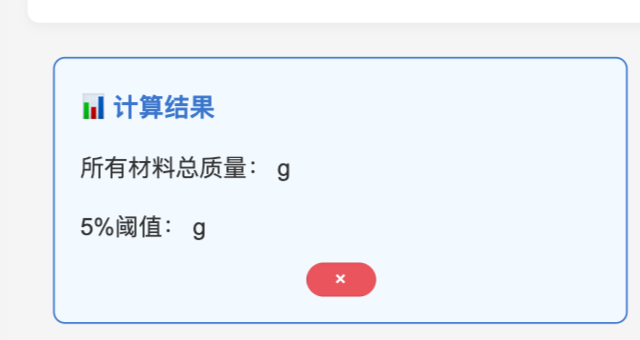
微信小程序:为什么这个数据显示不出来?以下是我的wxml和js代码
请问一下大家
<view class="container">
<view class="title">燃烧计算器</view>
<view class="input-group">
<text class="group-title">全局基础参数</text>
<view class="input-item">
<text class="label">取样总长度(米):</text>
<input
type="digit"
placeholder="例:0.318"
bindinput="inputTotalLength"
value="{{totalLength}}"
class="input-box"
/>
</view>
<view class="input-item">
<text class="label">酒精温度(℃):</text>
<input
type="digit"
placeholder="例:25"
bindinput="inputAlcoholTemp"
value="{{alcoholTemp}}"
class="input-box"
/>
</view>
<button bindtap="getAlcoholDensity" class="calc-btn">确认酒精密度</button>
</view>


<view class="result-group" wx:if="{{alcoholDensity}}">
<text class="group-title">酒精密度结果</text>
<view class="result-item">
<text class="result-label">酒精密度({{alcoholTemp}}℃):</text>
<text class="result-value">{{alcoholDensity}} g/mL</text>
</view>
</view>


<view class="input-group" wx:if="{{alcoholDensity}}">
<text class="group-title">🧾 非金属材料名称和质量(先填完所有材料)</text>

<view class="material-list">
<view class="material-item" wx:for="{{materialList}}" wx:key="index">
<view class="material-header">
<text class="material-title">{{item.name ? item.name : '材料' + (index+1)}}</text>
</view>
<view class="input-row">
<text class="label">自定义名称:</text>
<input
placeholder="可填数字/字母/文字,为空默认材料{{index+1}}"
bindinput="inputMaterialName"
data-index="{{index}}"
value="{{item.name}}"
class="input-box name-input"
/>
</view>
<view class="input-row">
<text class="label">材料质量(g):</text>
<input
type="digit"
placeholder="例:62.6952"
bindinput="inputMaterialWeight"
data-index="{{index}}"
value="{{item.weight}}"
class="input-box weight-input"
/>
</view>

<button bindtap="deleteMaterial" data-index="{{index}}" class="delete-btn">× 删除</button>

<button bindtap="addMaterial" class="add-btn inline-add-btn">+ 新增材料</button>
</view>

<button bindtap="addMaterial" class="add-btn" wx:if="{{materialList.length === 0}}">+ 新增材料</button>
</view>

<button bindtap="calcTotalWeightAndThreshold" class="calc-btn" wx:if="{{materialList.length > 0}}">计算总质量和5%阈值</button>
</view>


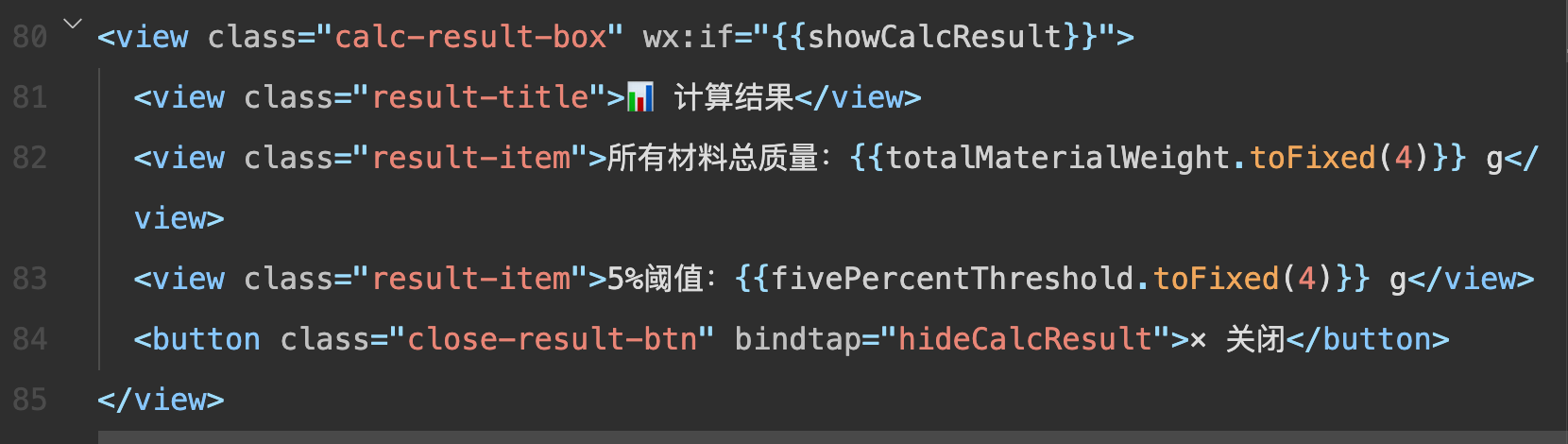
<view class="calc-result-box" wx:if="{{showCalcResult}}">
  <view class="result-title">计算结果</view>

  <view class="result-item">所有材料总质量:{{totalMaterialWeight.toFixed(4)}} g</view>

  <view class="result-item">5%阈值:{{fivePercentThreshold.toFixed(4)}} g</view>
  <button class="close-result-btn" bindtap="hideCalcResult">× 关闭</button>
</view>


<view class="input-group" wx:if="{{fivePercentThreshold > 0}}">
<text class="group-title">⚖️ 补充材料干/湿重和计算密度</text>
<view class="material-list">
<view class="material-item" wx:for="{{materialList}}" wx:key="index">
<view class="material-header">
<text class="material-title">{{item.name ? item.name : '材料' + (index+1)}}</text>
<text class="weight-tip">(质量:{{item.weight}}g {{item.weight < fivePercentThreshold ? '<5%' : '≥5%'}})</text>
</view>

<view wx:if="{{item.weight < fivePercentThreshold}}">
<view class="density-auto-tip">
<text class="tip-text">该材料质量小于5%,密度自动赋值为:</text>
<text class="density-value">1.00 kg/dm³</text>
</view>

<input type="hidden" value="1.00" bindinput="setAutoDensity" data-index="{{index}}"/>
</view>

<view wx:else>
<view class="input-row">
<text class="label">未浸酒精重量(g):</text>
<input
type="digit"
placeholder="例:2.3655"
bindinput="inputMaterialWeightDry"
data-index="{{index}}"
value="{{item.weightDry}}"
class="input-box weight-input"
/>
</view>
<view class="input-row">
<text class="label">浸酒精重量(g):</text>
<input
type="digit"
placeholder="例:1.1574"
bindinput="inputMaterialWeightWet"
data-index="{{index}}"
value="{{item.weightWet}}"
class="input-box weight-input"
/>
</view>
<button bindtap="calcSingleMaterialDensity" data-index="{{index}}" class="single-calc-btn">计算该材料密度</button>
</view>

<view class="single-result" wx:if="{{item.density}}">
<text class="result-label">最终密度:</text>
<text class="result-value">{{item.density}} kg/dm³</text>
<text class="density-note" wx:if="{{item.isLess5Percent}}">(小于5%自动赋值1)</text>
</view>
</view>
</view>

<button bindtap="calcVolumeAndCount" class="calc-btn">计算总容积和成束根数</button>
</view>


<view class="result-group" wx:if="{{totalVolume}}">
<text class="group-title">最终计算结果</text>

<view class="material-result" wx:for="{{materialList}}" wx:key="index">
<text class="result-label">{{item.name ? item.name : '材料' + (index+1)}} 体积:</text>
<text class="result-value">{{item.volume}} dm³</text>
</view>
<view class="result-item">
<text class="result-label">总非金属体积:</text>
<text class="result-value">{{totalVolume}} dm³</text>
</view>
<view class="result-item">
<text class="result-label">成束A类根数:</text>
<text class="result-value">{{countA}}</text>
</view>
<view class="result-item">
<text class="result-label">成束B类根数:</text>
<text class="result-value">{{countB}}</text>
</view>
<view class="result-item">
<text class="result-label">成束C类根数:</text>
<text class="result-value">{{countC}}</text>
</view>
</view>
Page({
  data: {
  // 全局基础参数
    showCalcResult: false, // 计算结果提示区开关
    totalLength: '',
    alcoholTemp: '',
    alcoholDensity: '',
    materialList: [],
    totalMaterialWeight: 0,
    fivePercentThreshold: 0,
    showCalcResult: false,

  // 材料相关
  materialList: [], // 材料列表:{name, weight, weightDry, weightWet, density, volume, isLess5Percent}
  totalMaterialWeight: 0, // 所有材料总质量(g)
  fivePercentThreshold: 0, // 总质量的5%阈值(g)

  // 最终计算结果
  totalVolume: '', // 总非金属体积
  countA: '', // A类根数
  countB: '', // B类根数
  countC: '' // C类根数
  },

  // 全局基础参数输入
  inputTotalLength(e) {
  this.setData({ totalLength: e.detail.value });
  },
  inputAlcoholTemp(e) {
  this.setData({ alcoholTemp: e.detail.value });
  },

  // 获取精准酒精密度
  getAlcoholDensity() {
  const { totalLength, alcoholTemp } = this.data;
  // 校验输入
  if (!totalLength || !alcoholTemp) {
  wx.showToast({ title: '请填写取样总长度和酒精温度', icon: 'none' });
  return;
  }

  // 乙醇密度表
  const alcoholDensityTable = {
  10: [0.79784, 0.79775, 0.79767, 0.79758, 0.79750, 0.79741, 0.79733, 0.79725, 0.79716, 0.79708],
  11: [0.79699, 0.79691, 0.79682, 0.79674, 0.79665, 0.79657, 0.79648, 0.79640, 0.79631, 0.79623],
  12: [0.79614, 0.79606, 0.79598, 0.79589, 0.79581, 0.79572, 0.79564, 0.79555, 0.79547, 0.79538],
  13: [0.79530, 0.79521, 0.79513, 0.79504, 0.79496, 0.79487, 0.79479, 0.79470, 0.79462, 0.79453],
  14: [0.79445, 0.79436, 0.79428, 0.79419, 0.79411, 0.79402, 0.79394, 0.79385, 0.79377, 0.79368],
  15: [0.79360, 0.79352, 0.79343, 0.79335, 0.79326, 0.79318, 0.79309, 0.79301, 0.79292, 0.79284],
  16: [0.79275, 0.79267, 0.79258, 0.79250, 0.79241, 0.79232, 0.79224, 0.79215, 0.79207, 0.79198],
  17: [0.79190, 0.79181, 0.79173, 0.79164, 0.79156, 0.79147, 0.79139, 0.79130, 0.79122, 0.79113],
  18: [0.79105, 0.79096, 0.79088, 0.79079, 0.79071, 0.79062, 0.79054, 0.79045, 0.79037, 0.79028],
  19: [0.79020, 0.79011, 0.79002, 0.78994, 0.78985, 0.78977, 0.78968, 0.78960, 0.78951, 0.78943],
  20: [0.78934, 0.78926, 0.78917, 0.78909, 0.78900, 0.78882, 0.78883, 0.78874, 0.78866, 0.78857],
  21: [0.78849, 0.78840, 0.78832, 0.78823, 0.78815, 0.78806, 0.78797, 0.78789, 0.78780, 0.78772],
  22: [0.78763, 0.78755, 0.78746, 0.78738, 0.78729, 0.78720, 0.78712, 0.78703, 0.78695, 0.78686],
  23: [0.78678, 0.78669, 0.78660, 0.78652, 0.78643, 0.78635, 0.78626, 0.78618, 0.78609, 0.78600],
  24: [0.78592, 0.78583, 0.78575, 0.78566, 0.78558, 0.78549, 0.78540, 0.78532, 0.78523, 0.78515],
  25: [0.78506, 0.78497, 0.78489, 0.78480, 0.78472, 0.78463, 0.78454, 0.78446, 0.78437, 0.78429],
  26: [0.78420, 0.78411, 0.78403, 0.78394, 0.78386, 0.78377, 0.78368, 0.78360, 0.78351, 0.78343],
  27: [0.78334, 0.78325, 0.78317, 0.78308, 0.78299, 0.78291, 0.78282, 0.78274, 0.78265, 0.78256],
  28: [0.78248, 0.78239, 0.78230, 0.78222, 0.78213, 0.78205, 0.78196, 0.78187, 0.78179, 0.78170],
  29: [0.78161, 0.78153, 0.78144, 0.78136, 0.78127, 0.78118, 0.78110, 0.78101, 0.78092, 0.78084],
  30: [0.78075, 0.78066, 0.78058, 0.78049, 0.78040, 0.78032, 0.78023, 0.78014, 0.78006, 0.77997]
  };

  // 解析温度
  const temp = Number(alcoholTemp);
  if (temp < 10 || temp > 30) {
  wx.showToast({ title: '仅支持10~30℃的乙醇密度查询', icon: 'none' });
  return;
  }
  const tempInt = Math.floor(temp); // 整数部分
  const tempDecimal = temp - tempInt; // 小数部分
  const colIndex = Math.round(tempDecimal * 10); // 小数×10取整 → 列索引(0~9)
  const validColIndex = colIndex > 9 ? 9 : (colIndex < 0 ? 0 : colIndex);

  // 获取精准密度
  const alcoholDensity = alcoholDensityTable[tempInt][validColIndex];
  if (alcoholDensity === undefined) {
  wx.showToast({ title: '该温度下无匹配密度值', icon: 'none' });
  return;
  }

  this.setData({
  alcoholDensity: alcoholDensity.toFixed(5) // 精准保留5位小数(如25℃→0.78506)
  });
  wx.showToast({ title: '酒精密度已确认', icon: 'success' });
  },

  // 批量添加材料
  // 新增材料项
  addMaterial() {
  const { materialList } = this.data;
  materialList.push({
  name: '', // 自定义名称(为空默认材料N)
  weight: '', // 材料质量(g)
  weightDry: '', // 未浸酒精重量(g)
  weightWet: '', // 浸酒精重量(g)
  density: '', // 最终密度
  volume: '', // 体积
  isLess5Percent: false
  });
  this.setData({ materialList });
  },


  inputMaterialName(e) {
  const { index } = e.currentTarget.dataset;
  const { materialList } = this.data;
  materialList[index].name = e.detail.value;
  this.setData({ materialList });
  },


  inputMaterialWeight(e) {
  const { index } = e.currentTarget.dataset;
  const { materialList } = this.data;
  materialList[index].weight = e.detail.value;
  this.setData({ materialList });
  },


  deleteMaterial(e) {
  const { index } = e.currentTarget.dataset;
  const { materialList } = this.data;
  materialList.splice(index, 1);
  this.setData({
  materialList,
  totalMaterialWeight: 0,
  fivePercentThreshold: 0
  });
  wx.showToast({ title: '材料已删除', icon: 'success' });
  },


  calcTotalWeightAndThreshold() {
  const { materialList } = this.data;

  const hasEmptyWeight = materialList.some(item => !item.weight);
  if (hasEmptyWeight) {
  wx.showToast({ title: '请填写所有材料的质量', icon: 'none' });
  return;
  }

  // 计算总质量
  let totalWeight = 0;
  materialList.forEach(item => {
  totalWeight += Number(item.weight) || 0;
  });

  const threshold = totalWeight * 0.05;


  const newMaterialList = materialList.map(item => {
    const weight = Number(item.weight);
    if (weight < threshold) {
      item.density = '1.00';
      item.isLess5Percent = true;
    } else {
      item.isLess5Percent = false;
    }
    return item;
  });


  this.setData({
    materialList: newMaterialList,
    totalMaterialWeight: totalWeight,
    fivePercentThreshold: threshold,
    showCalcResult: true
  });


  console.log('总质量:', totalWeight);
  console.log('5%阈值:', threshold);
},
// 隐藏计算结果提示区
    hideCalcResult() {
      this.setData({ showCalcResult: false });
    },


  // 输入未浸酒精重量
  inputMaterialWeightDry(e) {
  const { index } = e.currentTarget.dataset;
  const { materialList } = this.data;
  materialList[index].weightDry = e.detail.value;
  this.setData({ materialList });
  },

  // 输入浸酒精重量
  inputMaterialWeightWet(e) {
  const { index } = e.currentTarget.dataset;
  const { materialList } = this.data;
  materialList[index].weightWet = e.detail.value;
  this.setData({ materialList });
  },

  // <5%材料自动赋值密度1.00
  setAutoDensity(e) {
  const { index } = e.currentTarget.dataset;
  const { materialList } = this.data;
  materialList[index].density = '1.00';
  materialList[index].isLess5Percent = true;
  this.setData({ materialList });
  },

  // 计算单材料密度(≥5%材料)
  calcSingleMaterialDensity(e) {
  const { index } = e.currentTarget.dataset;
  const { materialList, alcoholDensity, fivePercentThreshold } = this.data;
  const material = materialList[index];

  // 校验输入
  if (!material.weightDry || !material.weightWet) {
  wx.showToast({ title: '请填写干/湿重', icon: 'none' });
  return;
  }
  if (!alcoholDensity) {
  wx.showToast({ title: '请先确认酒精密度', icon: 'none' });
  return;
  }

  const currentWeight = Number(material.weight);
  let density = '';
  let isLess5Percent = false;

  // 判断是否<5%阈值
  if (currentWeight < fivePercentThreshold) {
  density = '1.00';
  isLess5Percent = true;
  } else {
  // 正常计算密度
  const m = Number(material.weightDry);
  const mPrime = Number(material.weightWet);
  const diff = m - mPrime;
  if (diff === 0) {
  wx.showToast({ title: '浸酒精重量不能等于未浸重量', icon: 'none' });
  return;
  }
  const alcoholDensityNum = Number(alcoholDensity);
  density = ((m / diff) * (alcoholDensityNum - 0.0012)) + 0.0012;
  density = density.toFixed(2);
  }

  // 更新材料密度和标记
  materialList[index].density = density;
  materialList[index].isLess5Percent = isLess5Percent;
  this.setData({ materialList });

  // 提示
  const tip = isLess5Percent
  ? `${material.name ? material.name : '材料' + (index+1)} <5%,密度赋值1.00`
  : `${material.name ? material.name : '材料' + (index+1)} 密度计算完成`;
  wx.showToast({ title: tip, icon: 'success' });
  },

  // 计算总容积
  calcVolumeAndCount() {
  const { materialList, totalLength } = this.data;
  // 校验
  if (materialList.length === 0) {
  wx.showToast({ title: '请添加至少一种材料', icon: 'none' });
  return;
  }
  if (!totalLength) {
  wx.showToast({ title: '请填写取样总长度', icon: 'none' });
  return;
  }

  // 自动为<5%材料赋值密度1.00(防止漏赋值)
  const newMaterialList = materialList.map(item => {
  if (Number(item.weight) < this.data.fivePercentThreshold && !item.density) {
  item.density = '1.00';
  item.isLess5Percent = true;
  }
  return item;
  });

  // 校验所有材料是否有密度
  const hasEmptyDensity = newMaterialList.some(item => !item.density);
  if (hasEmptyDensity) {
  wx.showToast({ title: '请确保所有材料都有密度值', icon: 'none' });
  return;
  }

  // 计算每类材料体积+总体积
  let totalVolume = 0;
  const finalMaterialList = newMaterialList.map(item => {
  // 单位换算:g → kg
  const weightKg = Number(item.weight) / 1000;
  // 体积公式
  const volume = weightKg / (Number(item.density) * Number(totalLength));
  item.volume = volume.toFixed(4);
  totalVolume += volume;
  return item;
  });

  // 计算
  const countA = (7 / totalVolume).toFixed(2);
  const countB = (3.5 / totalVolume).toFixed(2);
  const countC = (1.5 / totalVolume).toFixed(2);

  this.setData({
  materialList: finalMaterialList,
  totalVolume: totalVolume.toFixed(4),
  countA,
  countB,
  countC
  });
  wx.showToast({ title: '计算完成', icon: 'success' });
  }
  });