
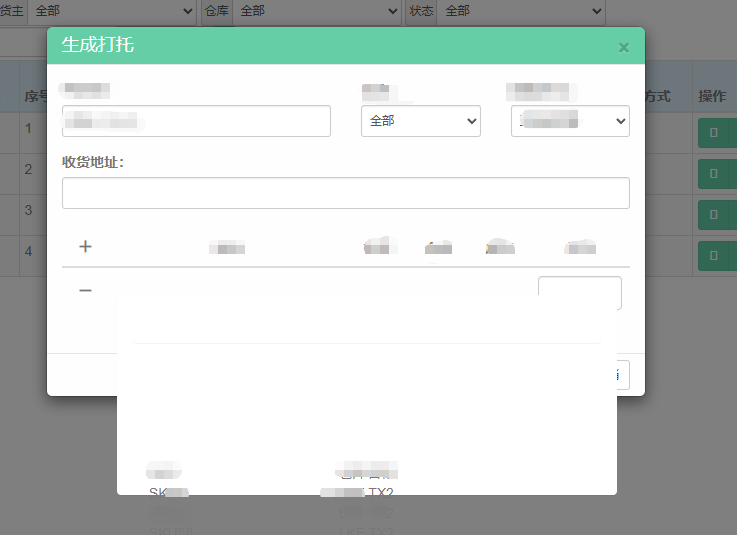
用的前端框架是bootstrap,在模态框里使用easyui的组合网格(combogrid),但是发现数据都展示在模态框外面,这个如何解
function ChargeTr(obj) {
    var str = "";
    str += '<tr class="info-val">';
    str += '<td style="text-align: center;"><span  class="glyphicon glyphicon-minus" style="font-size: 24px; cursor: pointer;" onclick="ChargeTrRemove(this)"></span></td>';
    str += '<td><input type="text" style="width: 200px" id="1" value="" /></td>';
    str += '<td style="word-break: break-all; word-wrap: break-all;"></td>';
    str += '<td></td>';
    str += '<td></td>';
    str += '<td style="width: 80px;"><input type="text" class="form-control" value="" /></td>';
    str += '</tr>';
    $("#newDetail").append(str);
    var trs = $("#newDetail").find("tr");
    var count = trs.length
    //trs.each(function (index, element) {
    //    $(this).find("td").eq(1).find("input").eq(0).attr("id", index + 1);
    //});

    $("#1").combogrid({
        loader: function (param, success, error) {
            $.ajax({
                url: 'GetSkuByOwnID.ashx',
                method: 'POST',
                dataType: 'json',
                data: param,
                success: function (result) {
                    success(result); // 数据需符合格式要求
                },
                error: function () {
                    error.apply(this, arguments);
                }
            });
        },
        panelWidth: 500,
        //datatype: 'local',
        delay: 600,
        mode: 'remote',
        idField: 'SKU',
        textField: 'SKU',
        //data:data,
        columns: [[
            //{ field: 'ContainerID', title: 'Code', width: 60 },
            //{ field: 'OwnID', title: '货主', width: 100 },
            //{ field: 'Weight', title: '单箱重量', width: 120 },
            { field: 'SKU', title: 'SKU', width: 100 },
            //{ field: 'ContainerNo', title: '柜号', width: 60 },
            //{ field: 'StoreID', title: '仓库代码', width: 100 },
            { field: 'StoreName', title: '仓库名称', width: 120 }
        //    { field: 'Volume', title: '单箱体积', width: 100 }
        ]],
        fitColumns: true
    });
}


